Search...Search plugins and themes...
⌘K
Sign in
  • Get started
  • Download
  • Pricing
  • Enterprise
  • Account
  • Obsidian
  • Overview
  • Sync
  • Publish
  • Canvas
  • Mobile
  • Web Clipper
  • CLI
  • Learn
  • Help
  • Developers
  • Changelog
  • About
  • Roadmap
  • Blog
  • Resources
  • System status
  • License overview
  • Terms of service
  • Privacy policy
  • Security
  • Community
  • Plugins
  • Themes
  • Discord
  • Forum / 中文论坛
  • Merch store
  • Brand guidelines
Follow us
DiscordTwitterBlueskyThreadsMastodonYouTubeGitHub
© 2026 Obsidian

Pagebound Notes

Patrick Evald JepsenPatrick Evald Jepsen29 downloads

Read PDF pages alongside editable, page-linked Markdown notes.

Add to Obsidian
Pagebound Notes screenshot
  • Overview
  • Scorecard
  • Updates7

Read a PDF alongside page-linked Markdown notes in Obsidian Live Preview.
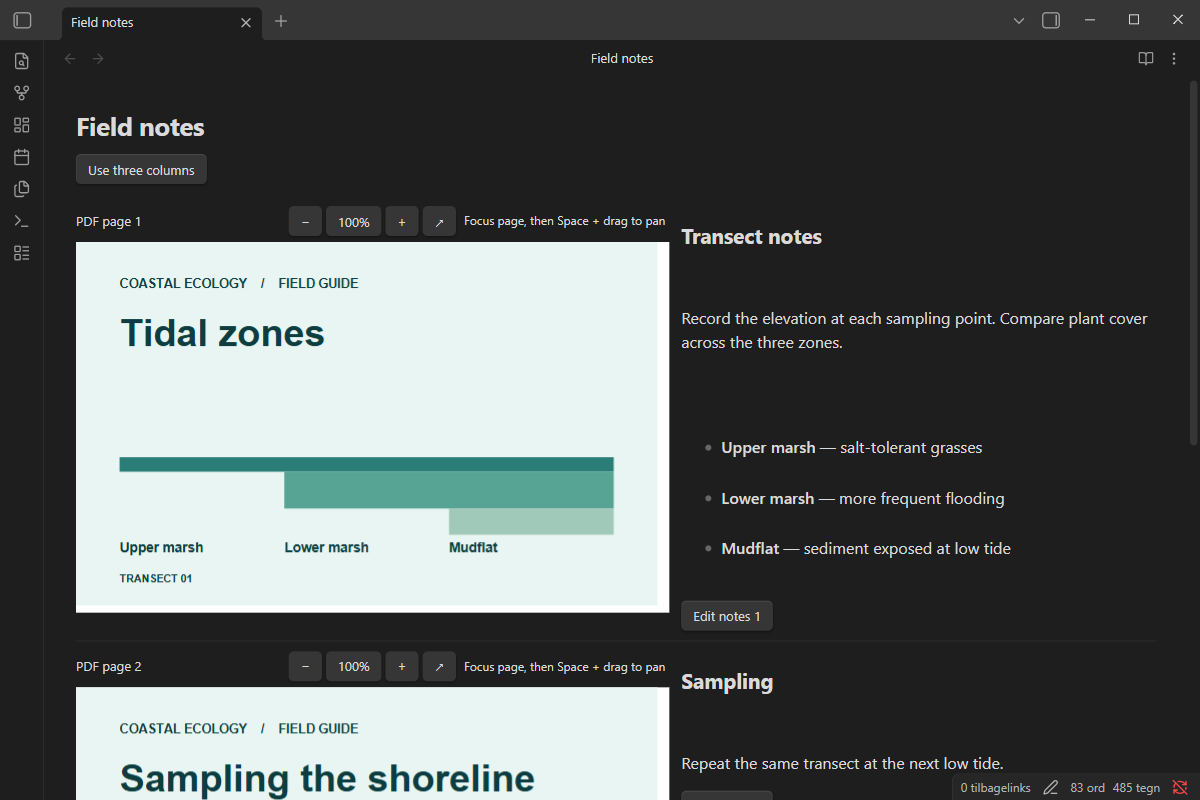
PDF slide with editable notes in Obsidian Live Preview

Reading View · Three-column layout

Install from GitHub

  1. Download main.js, manifest.json, and styles.css from the release.
  2. Put the three files in .obsidian/plugins/pagebound-notes/ in your vault. Substitute your vault's configuration folder if you changed it.
  3. Open Settings → Community plugins and enable Pagebound Notes.

Target: desktop Obsidian 1.12.7 or later. Use a separate vault to try a development build.

Use

In a Markdown note in Live Preview, run Insert PDF notes and select a PDF from the vault. Switch between two and three columns with the button above the PDF. Click a note or its Edit button to write Markdown. Changes use the note's undo history. Pinch on a touchpad over a PDF page to zoom around the pointer. Each page has its own zoom controls and a button to open the original PDF. To pan a zoomed page, scroll within it, drag with the middle mouse button, or focus the page and hold Space while dragging. Existing PDF text can be selected and copied. Scanned PDFs are displayed without OCR.

The source uses a vault wikilink, page headings and HTML comment markers. Keep the markers intact when editing in Source Mode. Page associations use the physical PDF page number. If you reorder the PDF, move the notes to match. Reading View shows the slides alongside their notes. The Markdown notes remain readable after disabling the plugin.

The PDF picker starts in the note's folder. Open a subfolder or choose Parent folder to browse elsewhere. The picker lists only folders and PDFs in the current folder and reads only PDFs selected for display. Pagebound Notes uses no accounts, network services or telemetry.

Develop

Use Node.js 24. Run npm ci, npm run check, npm test, and npm run build. Build output is in dist/.

The project is MIT-licensed. Bundled PDF.js code is available under Apache-2.0. The bundle preserves upstream license notices.

Export slides and notes

Use Obsidian’s built-in Export to PDF command. The export includes full slides and their corresponding notes.

HealthExcellent
ReviewPassed
About
Read PDFs alongside page-linked Markdown notes in Obsidian Live Preview. Edit per-page notes stored in your vault, switch between two- and three-column layouts, zoom and pan individual pages, and export slides with their notes to PDF.
PDFAnnotation
Details
Current version
1.0.6
Last updated
3 hours ago
Created
3 days ago
Updates
7 releases
Downloads
29
Compatible with
Obsidian 1.12.7+
Platforms
Desktop only
License
MIT
Report bugRequest featureReport plugin
Sponsor
Buy Me a Coffee
Author
Patrick Evald JepsenPatrick Evald Jepsenlukasarcher
GitHublukasarcher
  1. Community
  2. Plugins
  3. PDF
  4. Pagebound Notes

Related plugins

Handwritten Notes

Annotate PDFs and create handwritten notes inside your vault.

ZotFlow

Read, annotate and cite your Zotero library in Obsidian: two-way sync, built-in PDF/EPUB reader, templated literature notes and CSL citations. #Zotero #PDF #Annotation

Xournalpp

Integration with Xournal++ for handwritten notes and annotations.

Ink-Annotation

Markdown/PDF handwritten annotation with pen, highlighter, eraser, color, width, undo, redo, save, and exit tools, plus PDF text selection annotation (highlight, underline, strikethrough, and notes).

PDF Highlights

Extract highlights, underlines and annotations from your PDFs.

Extract PDF Annotations

Extract PDF annotations (notes and highlights) and sort them by topic.

Admonition

Admonition block-styled content.

Karpathy LLM Wiki

Karpathy's LLM Wiki implementation plugin for Obsidian - turns notes and PDFs into a linked, LLM-powered knowledge base with entity pages, concept pages, graph-powered Q&A, and local-first privacy.

Text Extractor

A (companion) plugin to facilitate the extraction of text from images (OCR) and PDFs.

HiNote

Add comments to highlighted notes, use AI for thinking, and flashcards for memory.