Orbital
 Marcus Breiden699 downloads
Explore note relations, fix dangling links in bulk, and track recent files — all in one sidebar pane.
- Overview
- Scorecard
- Updates7

Orbital
See what orbits your notes.
Orbital is an Obsidian plugin that brings everything connected to the note you're reading into a single sidebar pane. Instead of running three separate plugins for connections, broken links, and history, Orbital gives you one tabbed pane that answers three questions about the active note: what does it link to and from, which of its links are broken, and what was I just looking at?
It works on desktop and mobile, and reads Obsidian's own link graph — there's nothing to index or import.
What Orbital does
- Context — the first tab: the active note's backlinks with the surrounding text, so you can see at a glance where the note you're reading is referenced. Sort, search, dense/cards styling, and adjustable context amount. See the Usage guide.
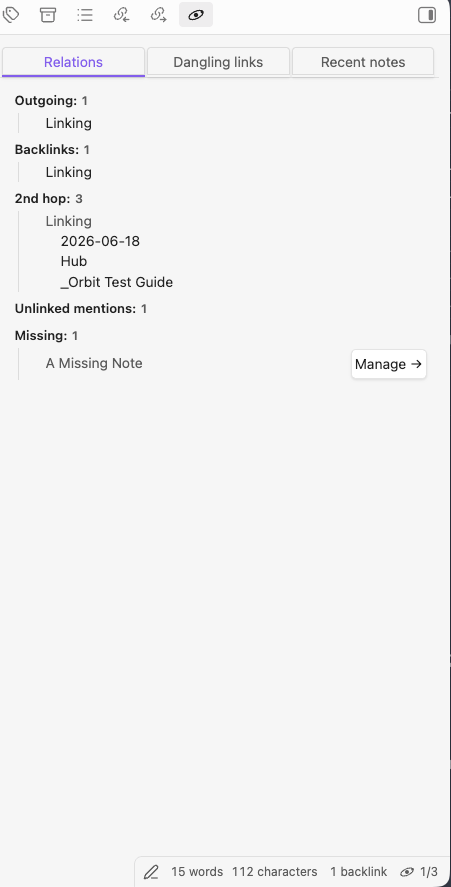
- Relations — outgoing links, backlinks, deduplicated 2nd-hop "related" notes, unlinked mentions you can convert to links inline, and the note's missing (unresolved) link targets.
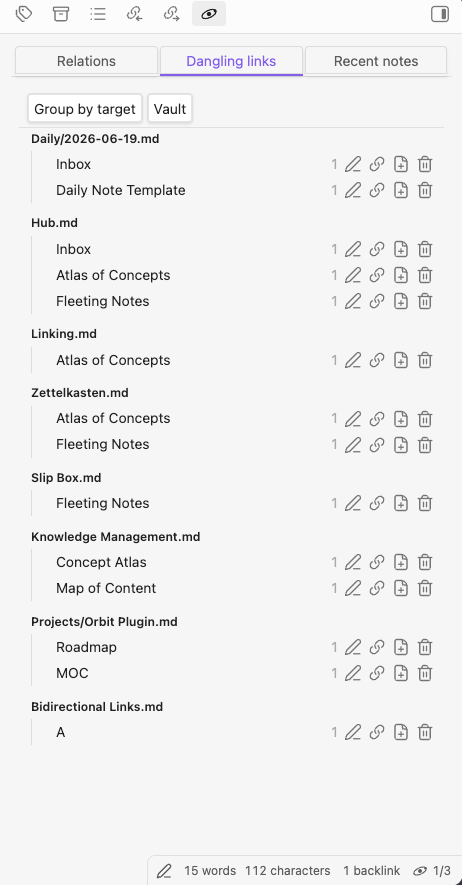
- Dangling links — every unresolved
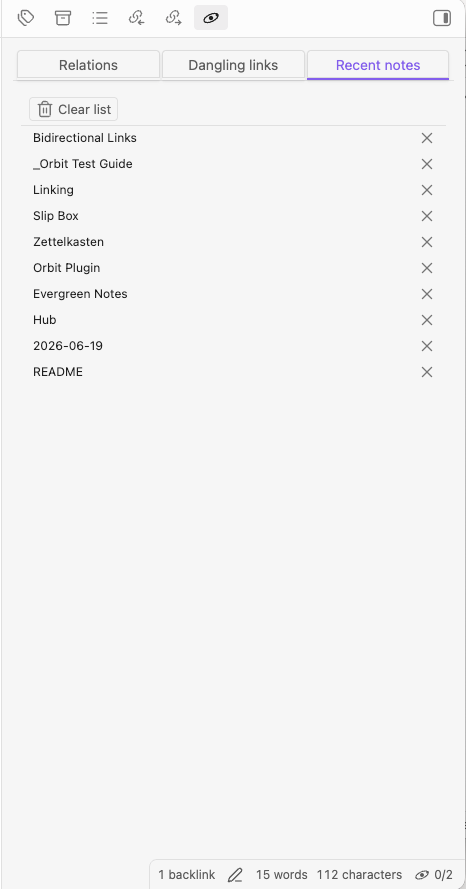
[[link]]across the vault (or just the current folder), grouped by target or by source, with bulk rename/merge, change to alias, create note, and delete — each preview-confirmed and never silent. Apart from create note, these only rewrite the link text in your notes (e.g. delete turns a dangling[[link]]back into plain text) — they never create, move, or remove a target file. - Recent files — a most-recent-first list of opened notes; drag a row into an editor to insert a
[[wikilink]], or click to open. - Status bar — an item showing backlink / 2nd-hop counts for the active note; click it to open the Orbital pane.
- In-note backlinks (
orbital-backlinks) — a fenced code block that renders the containing note's backlinks inline, in reading view and live preview. Filter sources by folder or tag, choose between a compact link list and a context view that shows the surrounding text, and let the block update automatically as the vault changes. See the Usage guide for syntax and all options. - Backlinks footer — optionally append that same context backlinks view at the end of every note automatically (reading view and live preview), with no code block to add. Off by default; enable it under Settings → Orbital → In-note backlinks. See the Usage guide.
See the Usage guide for screenshots and the full walkthrough.
Installation
Install Orbital from Obsidian's Settings → Community plugins → Browse, then enable it. For manual and beta (BRAT) installs, see the installation guide.
Migrating from another plugin
Orbital reads Obsidian's own link graph, so there's nothing to import — your notes and links already work. To switch over:
- Disable the community plugins Orbital replaces: obsidian-relation-pane, obsidian-dangling-links, and recent-files-obsidian.
- Optionally turn off Obsidian's core Backlinks and Outgoing links panes if you now use Orbital's Relations tab instead.
Prior art and attribution
Orbital consolidates what previously required three separate plugins. It draws inspiration from the following prior art:
- obsidian-relation-pane by mottox2 — relation/connection viewer (MIT)
- obsidian-dangling-links by graydon — dangling/broken-link viewer (MIT)
- recent-files-obsidian by tgrosinger — recent files list (GPL-3.0)
The MIT-licensed projects (obsidian-relation-pane, obsidian-dangling-links) informed the implementation; credit and thanks to their authors. recent-files-obsidian is GPL-3.0 licensed — its functionality was reimplemented from scratch using it as a pattern reference only; no GPL code was copied into this MIT-licensed plugin.
Development
Building Orbital, the test vault, and the hot-reload workflow are documented in docs/development.md.
Documentation
License
MIT - see LICENSE