Omnichannel Diary
 builtbyxm298 downloads
Save messages, web pages, and attachments from nine chat channels into your local vault.
- Overview
- Scorecard
- Updates21
English | 简体中文
Omnichannel Diary saves messages, web pages, and attachments from chat platforms into a local Obsidian Vault. It supports WeChat, Feishu/Lark, DingTalk, WeCom, QQ, Slack, Telegram, Discord, and WhatsApp.
Version 0.4.x is an independent implementation. It does not contain source code from another Obsidian diary plugin and it has no AI provider, prompt, model, semantic routing, telemetry, account service, or hosted relay.
What it saves
- Plain messages are appended to
Omnichannel Diary/Daily/YYYY-MM-DD.md. - HTTP(S) links can be converted to readable Markdown notes under
Omnichannel Diary/Clippings, then filed by type: Articles, Social, Community, Documents, and PDFs. Each type can be turned off or given its own subfolder in Capture rules. - Code-platform links have an independent rule: extract the page, file only a categorized bookmark under
Omnichannel Diary/Code Links/<Platform>, or do both. Bookmark-only mode never opens the target page. - The built-in registry covers GitHub, GitLab, Bitbucket, Azure DevOps, Codeberg, SourceHut, SourceForge, Launchpad, GNU Savannah, Hugging Face Hub, GitFlic, Google Git, Gitee, GitCode, JiHu GitLab, CODING, AtomGit, and GitLink. Custom self-hosted GitLab, Gitea, Forgejo, or internal hosts can be added in settings.
- X posts/articles and WeChat articles retain their dedicated extractors. Xiaohongshu/REDnote notes use the page's non-executable initial-state data to preserve the text and every full-size carousel image. Reddit posts include nested public comments when its public endpoint is available; an isolated signed-in browser session handles access challenges.
- Technical-community detail pages use an extensible registry rather than hard-coded routing. Hacker News, GitHub issues/pull requests, Stack Exchange, DEV/Forem, Discourse forums, and V2EX have structured post/comment adapters with browser fallback.
- Dynamic community pages cover Product Hunt, GitHub Discussions, Medium, Hashnode, Substack, Lobsters, Indie Hackers, Hugging Face, Kaggle, 掘金, CSDN, 博客园, SegmentFault, 开源中国, 知乎, 少数派, InfoQ, 腾讯云/阿里云开发者社区, 51CTO, Gitee, and GitCode. A generic forum detector also preserves visible comments from unlisted Discourse/Forem/Flarum/NodeBB-style pages.
- Public and private Feishu/Lark, Tencent Docs, WPS/KDocs, Google Docs/Sheets/Slides, and Microsoft 365/OneDrive pages can be rendered with an isolated local browser profile. Public Google documents first try the official export endpoint. The plugin never imports cookies from the user's normal browser profile.
- Direct online PDFs are extracted page by page and the original PDF is stored beside the clipping.
- Community receipts report the number of captured comments in the same bilingual reply format used by every chat channel.
- Chat attachments and web images are downloaded into
Omnichannel Diary/Attachments. - Every entry identifies the channel, conversation, message ID, and any download failure.
- If page extraction or an image download fails, the original URL remains in the daily note.
- WeChat and WhatsApp use the same deterministic receipt text. Receipts are retried and kept pending locally until the channel confirms that they were sent.
- WeChat messages are marked processed and its polling cursor is advanced only after the Vault write succeeds.
- WeChat replies include the complete iLink Bot envelope (
client_id, bot message type, finished state, and the inboundcontext_token) required for mobile delivery.
All folders and capture rules are configurable.
Optional remote search is off by default. When enabled, any connected channel can send search keyword or 查 关键词 — a space after the command is required, otherwise the message is saved as diary text. The plugin returns title, time, source, and path only. After confirm 1,3 or 确认 1,3, it packs those notes on this computer as Markdown, plain text, Word, or PDF and tries to send an openable file back through that channel. See Remote search and export.
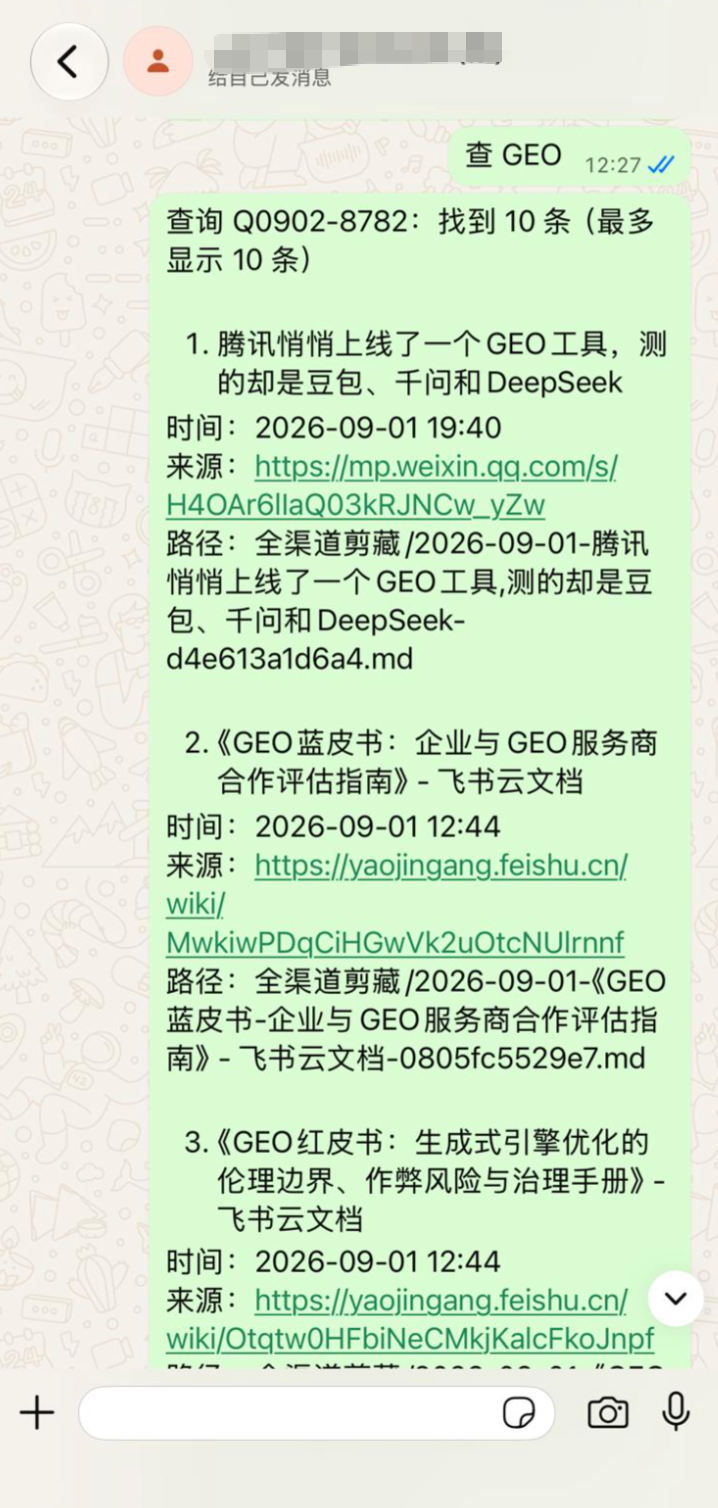
查 GEO — keep a space after 查. The bot replies immediately, then lists title, time, source, and path.
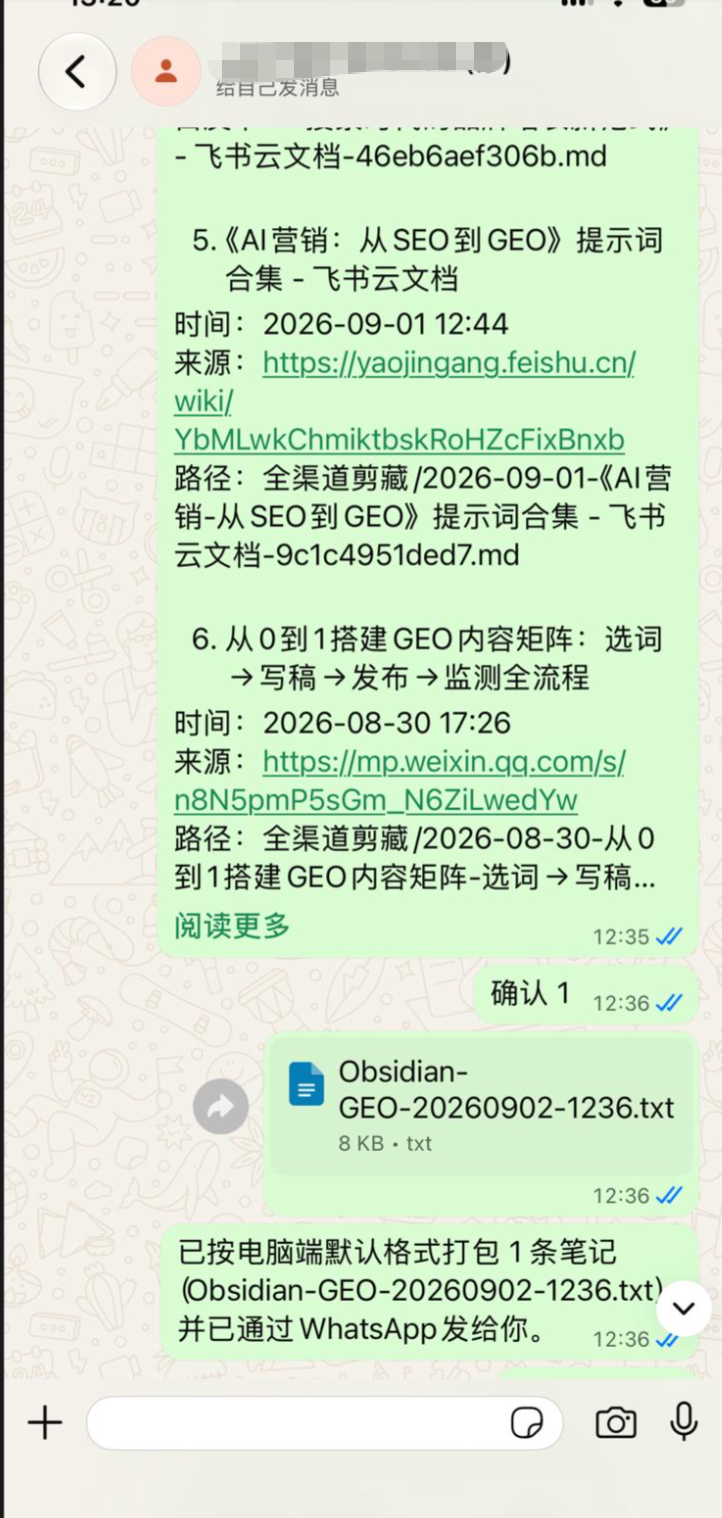
确认 1 packs the selected note on this computer and sends an openable attachment back on WhatsApp.
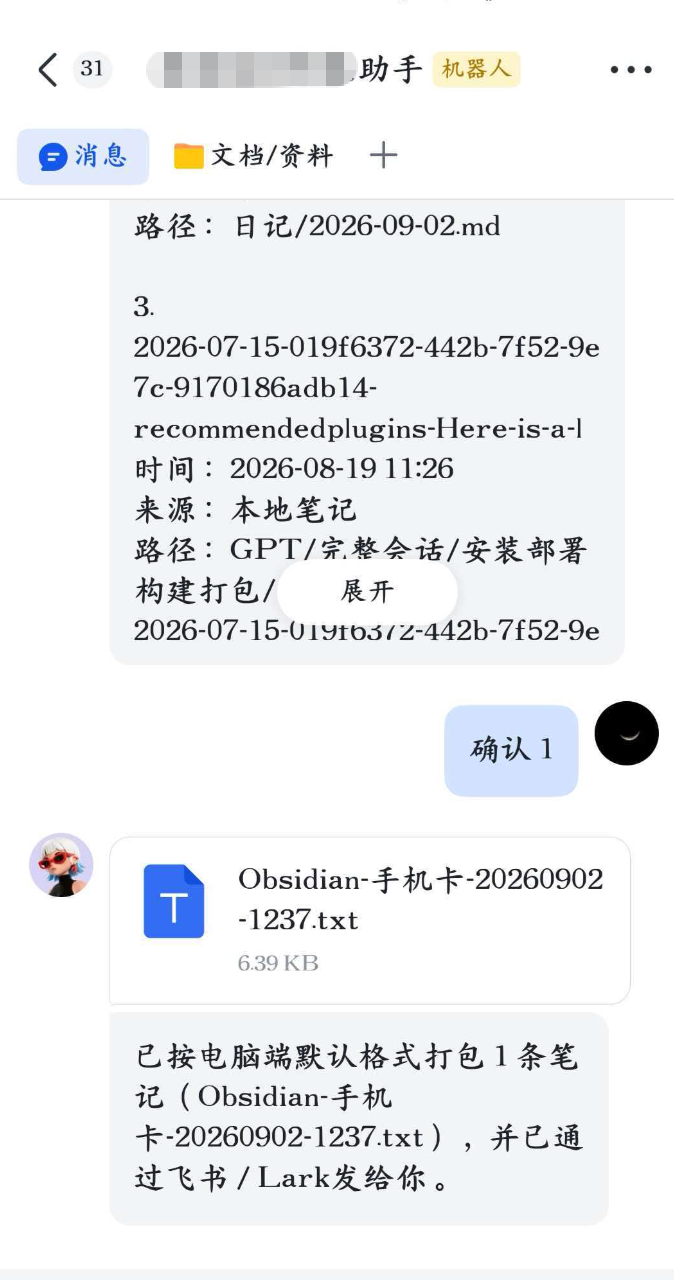
The same confirmation on Feishu/Lark also returns an openable file through that channel.
See Supported clipping sources for the extraction method and limitations of each source family.
Channel support
| Channel | Connection | Receive transport | Attachments |
|---|---|---|---|
| Official iLink/ClawBot QR authorization | HTTPS long polling | AES-decrypted image, file, video, and voice media | |
| Feishu / Lark | Official device registration or App ID/Secret | Official WebSocket SDK | Message resources downloaded through the official API |
| DingTalk | Client ID/Secret | Official Stream SDK | Text plus direct download resources supplied by the event |
| WeCom | Bot ID/Secret | Official bot WebSocket SDK | SDK download and AES decryption |
| App ID/Secret | Official QQ Bot Gateway SDK | Event attachment URLs | |
| Slack | Socket Mode app token and bot token | Socket Mode WebSocket | Authenticated private file URLs |
| Telegram | BotFather token | Bot API long polling | Photo, document, audio, voice, video, and animation |
| Discord | Bot token | Gateway v10 WebSocket | Message attachment URLs |
| Linked-device QR | Bundled Baileys Node transport | Image, document, audio, video, and sticker |
Platform access is subject to each platform's account eligibility and developer settings. Slack, Telegram, and Discord do not provide QR authorization for their official Bot APIs; their official developer tokens are required.
Install manually
Copy exactly these three release assets to:
<Vault>/.obsidian/plugins/omnichannel-diary/
Required assets:
main.js
manifest.json
styles.css
Then reload Obsidian, open Settings → Community plugins, and enable Omnichannel Diary.
WhatsApp requires an installed Node.js 20.18 or later runtime. Its transport remains bundled in main.js, but runs as an isolated Node process so protocol failures cannot crash the Obsidian renderer. The plugin never downloads a runtime or executes a shell command; it launches only an allowlisted node / node.exe path with fixed arguments.
Configure
Open Settings → Omnichannel Diary.
- In Channels, expand a card.
- Use QR authorization where the official platform supports it, or enter the official Bot credentials.
- Enable the channel and use Test reconnect.
- In Capture rules, choose folders, clipping types and subfolders, code-platform link handling, optional self-hosted code-platform domains, link clipping, dynamic-page rendering, image downloads, and file-size limits. To search notes from chat, enable Remote search and export on the same page. Channel SDKs are already bundled; do not install extra packages.
- For a private Feishu, Tencent Docs, WPS, Google, or Microsoft 365 link, open its isolated sign-in window in Capture rules → Private cloud-document sessions, complete sign-in, and close that window. Community sites that present a login or human check have separate opt-in verification windows.
The Storage & privacy page explains every local and network data boundary and can clear individual channel credentials.
Privacy and network behavior
- Message bodies, extracted pages, and successful downloads are written only to the current Vault.
- Channel credentials are stored in the plugin's
data.json. WhatsApp linked-device credentials and isolated document/community browser profiles are stored below.channel-data. These local values are not additionally encrypted. - Enabling a channel connects directly to that platform's official API and CDN domains.
- Web clipping connects to the submitted page, its image/resource hosts, public community APIs selected by the registry, and any selected cloud-document/community site.
- Code-platform bookmark-only mode parses the URL and writes a local categorized note without requesting that URL. Extract and combined modes use the normal clipping network path.
- Dynamic cloud documents and challenged community pages use an installed Chrome, Edge, Brave, or Chromium executable with a Vault-specific profile. No browser is downloaded or installed by the plugin.
- Direct filesystem access is limited to the plugin's
.channel-dataruntime state and checks for allowlisted Node/browser executable paths. External processes are started with fixed argument arrays and without a shell. - The isolated WhatsApp process runs the bundle that Obsidian already loaded; the plugin does not target, replace, unpack, or write its own release files. HTTP
gzipanddeflateresponses use explicit stream decoders and are never treated as plugin archives. - Localhost, link-local, private IP ranges, and redirects to those addresses are blocked.
- There is no telemetry, advertising, remote configuration, automatic publishing, self-update mechanism, or runtime package installation.
See Privacy and network access for the detailed list.
Build and test
Requirements: Node.js 20.18 or later.
npm install
npm run verify
The production build is generated from src/main.js. Verification checks the independent unit tests and confirms that the runtime needs only the official Obsidian release assets.
Release for the Obsidian community directory
- Keep
manifest.json,package.json, andversions.jsonon the same version. - Run
npm ci && npm run verify. - Create a GitHub release whose tag is the exact version, for example
1.0.0(novprefix). - Generate GitHub build-provenance attestations for
main.js,manifest.json, andstyles.css. - Attach
main.js,manifest.json, andstyles.cssto the release. - Submit the repository through Obsidian's community plugin submission page.
The repository must remain public and its source must correspond to the release bundle.
Independent implementation
The 0.4.x codebase was designed from product requirements and public platform/API documentation. Its source tree, tests, UI, build, documentation, and generated bundle were written independently. See Clean-room record.
License
Omnichannel Diary is licensed under AGPL-3.0-only. Bundled third-party components retain their own licenses; see NOTICE.md.