Vim Multibyte Char Search
 anselmwang4k downloads
Search multibyte characters by the first character of corresponding ASCII encoding of input method. For example, for Chinese, search by the first character of Pinyin.
- Overview
- Scorecard
- Updates4
This is an obsidian plugin. It supports search multibyte characters in VIM easily. VIM is best to operate under english input mode, to search for multibyte characters like Chinese, users have to switch back and forth between input modes.
To simplify the process, this plugin allows users to search multibyte character by the first characters of corresponding input method encoding of the multibyte characters.
For example, in the Chinese pinyin input method, the encoding of "用来" is "yong lai", we can search such chinese words by "yl".
Installation
The plugin requires VIM mode being turned on in Obsidian. Then you can install this plugin by searching "Vim Multibyte Char Search" in Obsidian "Community Plugin" tab.
Usage
- Run "Search Multibytes" command.
- If you want to search for "用来", type "yl" and press Enter.
- Press
nto trigger search
Advanced Usage
To achieve the best experience, we'd better install "obsidian-vimrc-support" plugin and add following lines to the .obsidian.vimrc.
unmap <Space>
exmap enrich_vim_search_pattern obcommand obsidian-vim-multibyte-char-search:enrich-current-vim-search-pattern
exmap search_multibytes obcommand obsidian-vim-multibyte-char-search:search-multibytes
nmap <Space>n :enrich_vim_search_pattern
nmap <Space>/ :search_multibytes
Then we can trigger "Search Multibytes" command by <Space>/.
Search single byte pattern first then switch to multibyte pattern
Another way to use the plugin is the search single byte pattern first and then switch to multibyte pattern. Such way may introduce some inconvenience. For example, if you want to search "吃了", the pattern is "cl" and will match with english word "class" first.
- Type "/yl" or "?yl"
- Press
<space> n n- The first part of the key sequence is
<space> n. According to our above configuration in.obsidian.vimrc, this key sequence will trigger command "Enrich Current VIM Search Pattern". The command retrieves current search pattern "yl", and tries to rewrite it according to all chinese phrases in current editor whose input method encoding starts from "yl". In this example, there are 2 chinese phrases "用来" and "原来", so the search pattern is rewritten to regular expression用来|原来. - Then the second
nagain to search using the new regular expression.
- The first part of the key sequence is
- Continue type "n" or "N" to jump to previous or next match, just as normal vim search.
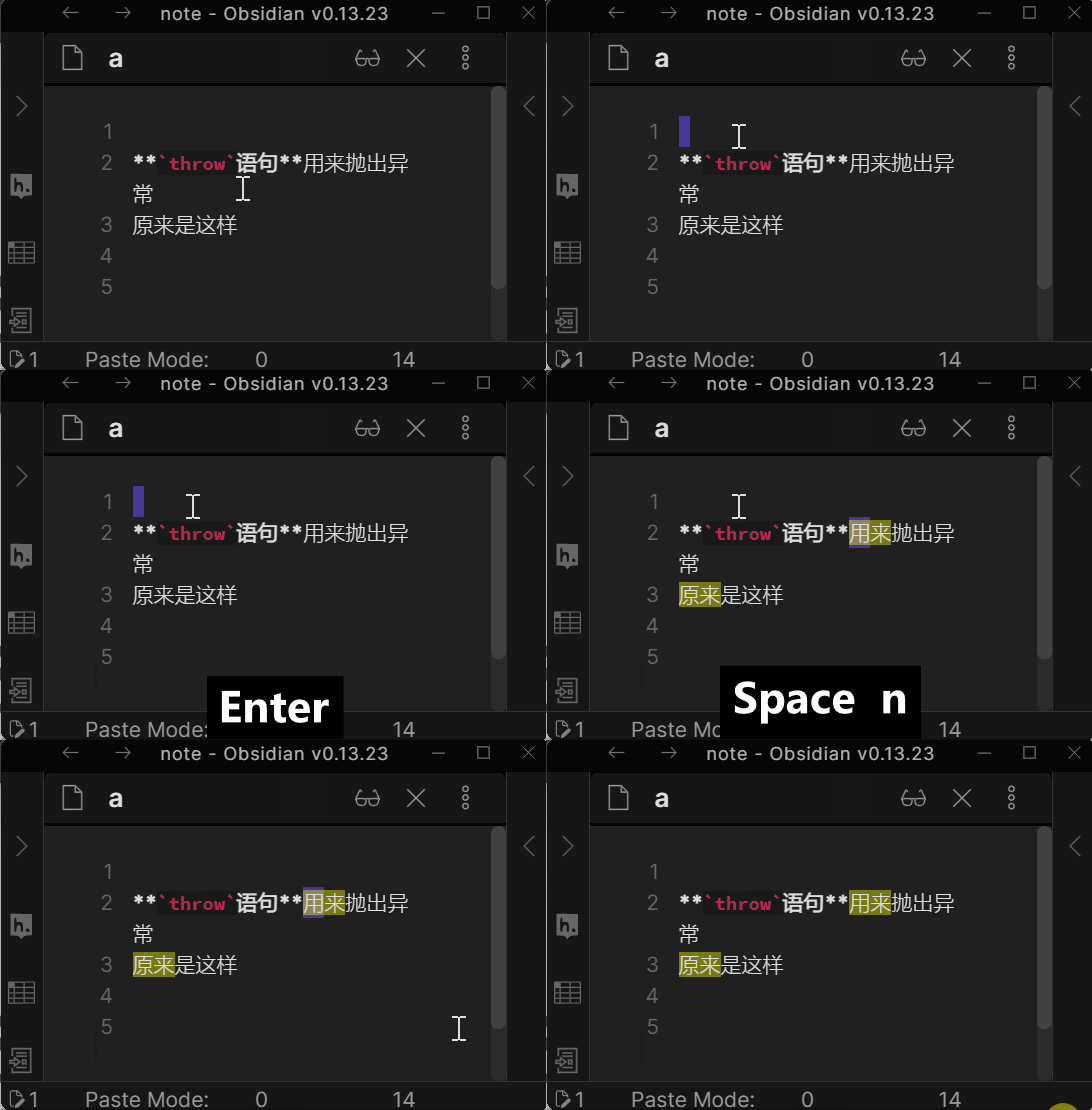 .
.
Onboard new language
The search capability is based on dictionary. "用来" is mapped to "yl" because following lines in pinyin_search.dict.txt.
用 y
来 l
The dictionary support multiple encoding for same character. For example, following lines mean "给" can start with either "g" or "j". so "给予" will match search pattern "gy" or "jy".
给 gj
予 y
To onboard any new language, just create a pinying_search.dict.txt for your language and replace the current one.
Acknowledgement
The plugin is an Obsidian ported version of GitHub - ppwwyyxx/vim-PinyinSearch: help vim search Chinese by Pinyin. ppwwyyxx generously allows me to use the same algorithm.
I learn how to work with CodeMirror editor from esm7's great plugin esm7/obsidian-vimrc-support: A plugin for the Obsidian.md note-taking software.