
- Overview
- Scorecard
- Updates3
Adds a command in Obsidian that tidies your footnotes so they're easy to follow:
- Consolidates all footnote definitions into one place, sorted by appearance
- Re-indexes numbered footnotes (e.g.,
[^1][^4][^2]becomes[^1][^2][^3])
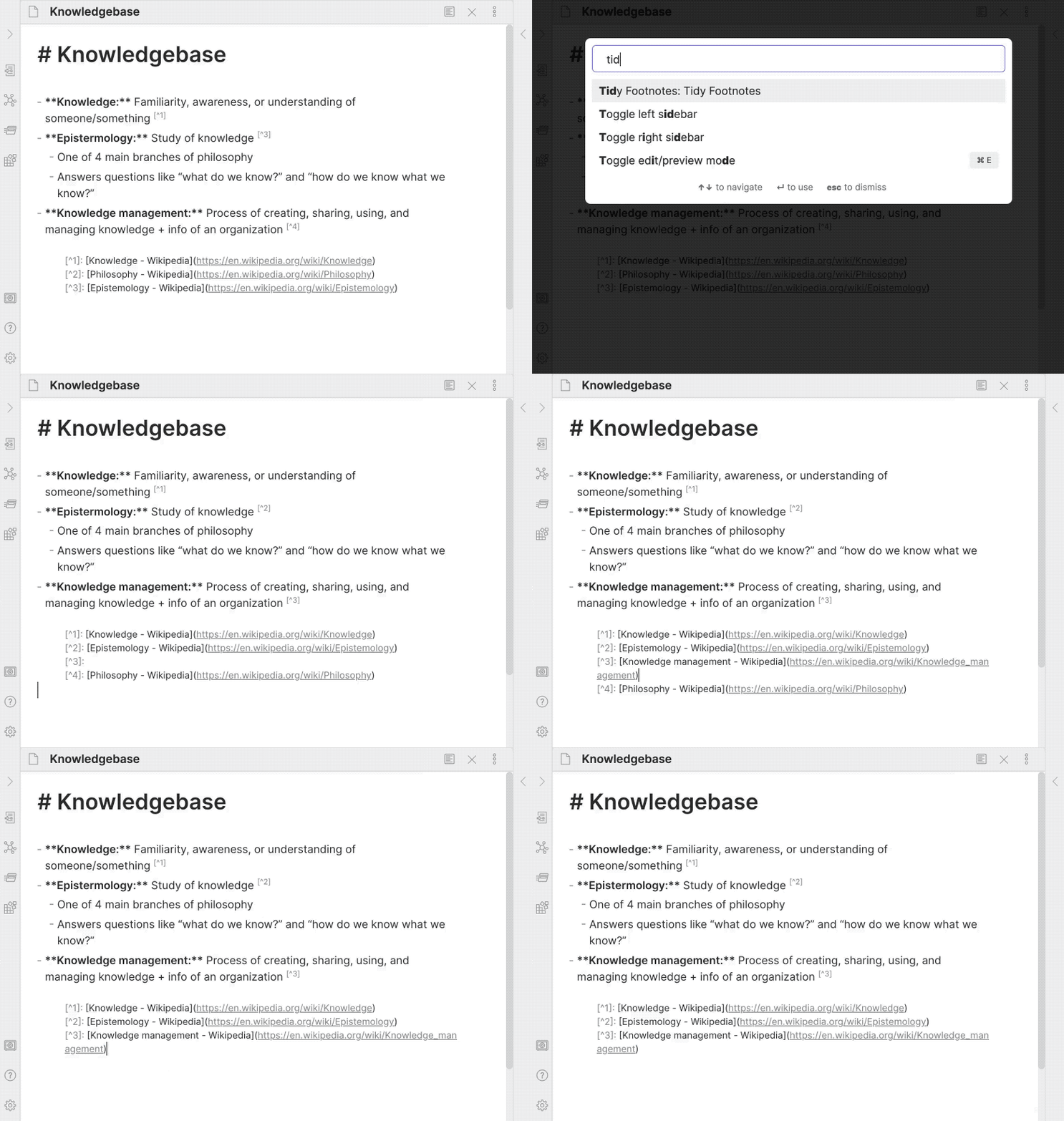
Inspired by obsidian-footnotes plugin.
How to Install
From inside Obsidian:
- Go to Settings → Community plugins.
- Disable Safe mode.
- Click Browse, search for Tidy Footnotes, and click Install.
- Click the toggle button to enable the plugin.
For manual installation, download this repo and copy over main.js and manifest.json to your vault: VaultFolder/.obsidian/plugins/obsidian-tidy-footnotes/.
How to Use
Run Tidy Footnotes: Tidy Footnotes from the Command Palette. Or, set it as a hotkey from Settings → Hotkeys.
Caveats
- Currently, footnotes in code blocks are also parsed instead of being ignored.
- The original positions of footnote definitions are not maintained. The plugin will always move all definitions to where the first definition is found.
- Non-numbered foonotes (e.g.,
[^abc]) doesn't affect the re-indexing of numbered footnotes.
Development
- Clone this repo.
yarnto install dependencies.yarn devto start compilation in watch mode.bash install-built.sh /path/to/your/vault -dto create symbolic links of built files to your vault for quick development.
Note: CodeMirror is imported for testing with the Doc interface. It may break in the future if the version no longer matches what Obsidian uses.
Release
- Run
yarn build. - Run
npm version [patch/minor/major]to bump version inmanifest.jsonandversions.json. - Add changes in
CHANGELOG.md. - Add a new version tag and push it.
git tag -a 1.0.1 -m "1.0.1" git push origin 1.0.1 - Go to “Releases” in GitHub and edit the latest release (created by GitHub Actions). Insert the changelog texts in the description and ensure
main.jsandmanifest.jsonare attached. - Click “Publish release”.
Support
If you really like this plugin and want to support its development, please consider buying me a coffee 🙂 Thanks!
HealthFair
ReviewCaution
About
Tidy footnotes by consolidating all definitions into a single block sorted by appearance. Re-index numbered footnotes so inline order becomes sequential (e.g., [^1][^4][^2] → [^1][^2][^3]).Details
Current version
0.1.2
Last updated
2 years ago
Created
5 years ago
Updates
3 releases
Downloads
23k
Compatible with
Obsidian 0.11.13+
Platforms
Desktop, Mobile
License
MIT
Sponsor