Regex Pipeline
 no337124k downloads
Set up custom regex rules to automatically format notes.
- Overview
- Scorecard
- Updates12
(Sharing rulesets in Discussions is welcomed)
Regex Pipeline is an Obsidian plugin that allows users to setup custom regex rules to automatically format notes, this is especially useful in scenerios like building personal knowledge database, because you often clip webpage from same sources.
Usage
Mr. Partan provided a nice writeup about how to use the plugin, I recommend it if you are not familiar with regex or software usage. (September 2021, v1.0.9)
First, enable the plugin, a file named index.txt should be created at .obsidian/regex-rulesets/. Due to how Obsidian protects your disks, you have to specify what ruleset files are there to be read, that's why we need a index file.
Starting from version 1.0.8, you can add rulesets through the + button in the menu, but you still have to go to .obsidian/regex-rulesets/ and modify the files you want to edit/remove, because it's hard to provide good editing experience that rivals common editors like VSCode.
Starting from version 1.1.0, you can apply rulesets via the right-click menu. The available option count can be adjusted in the settings.
Starting from version 1.2.0, quick rulesets (mentioned right above) can be invoked through Obsidian's command system when "Quick Commands" are set to above 0 in the settings.
Writing Rulesets
A ruleset contains one or more rule, the format looks like:
:: Any "SEARCH" becomes "REPLACE"
"SEARCH"->"REPLACE"
✅ These work:
"SEARCH"->"REPLACE"
"SEARCH"
->"REPLACE"
"SEARCH"
->
"REPLACE"
"SEARCH"->
"REPLACE"
❌ These do NOT work (Empty line inbetween not allowed; Nothing except new line is allowed right before and after the ->)
"SEARCH"

->
"REPLACE"
"SEARCH"->

"REPLACE"
"SEARCH"
->

"REPLACE"
Multi-line replacement string:
"SEARCH"->"REP
LACE"
:: Any "SEARCH" becomes "REP
:: LACE"
Regex Flags
By default, gm (multiline) flag is appended to the SEARCH regex, you can overwrite this by providing your own flags, for example, use gmu flag in this way:
"SEARCH"gmu->"REPLACE"
Noted that gm flags are bascially neccessary for this plugin to be useful, you seldom wants to replace only 1 occurances or operate on a note only contains 1 line.
Replace With Nothing
"SEARCH"->""
:: Any "SEARCH" becomes ""
Basically this is how we remove matched content.
Indexing
Rulesets must be saved in .obsidian/regex-rulesets/, and must be included in the index.txt, one file per line. The order of the lines determines the displaying order of the rulesets in the menu.
Applying Rulesets
Press the sidebar button of this plugin to show the rulesets menu, select your ruleset, and it'll be applied.
The menu is available as a command so you can also bind it to a shortcut.
Note: The plugin support applying rules to selection, if anything is selected, only selection is modified!
Examples
NumberToAlphabet .obsidian/regex-rulesets/number-to-alphabet.txt
"1"->"A"
"2"->"B"
"3"->"C"
"4"->"D"
"5"->"E"
"6"->"F"
"7"->"G"
"8"->"H"
"9"->"I"
Table_c2 This ruleset help you transform selected content into a table of 2 columns! Every 2 non-empty line will form a row.
.obsidian/regex-rulesets/Table_c2
"^(.+)$\n\n^(.+)$"->"| $1 | $2 |"
Linebreak with br tag
This ruleset replace all newline with <br>.
"^(.+)\s+?\n(?=^.+)"->"$1<br>"
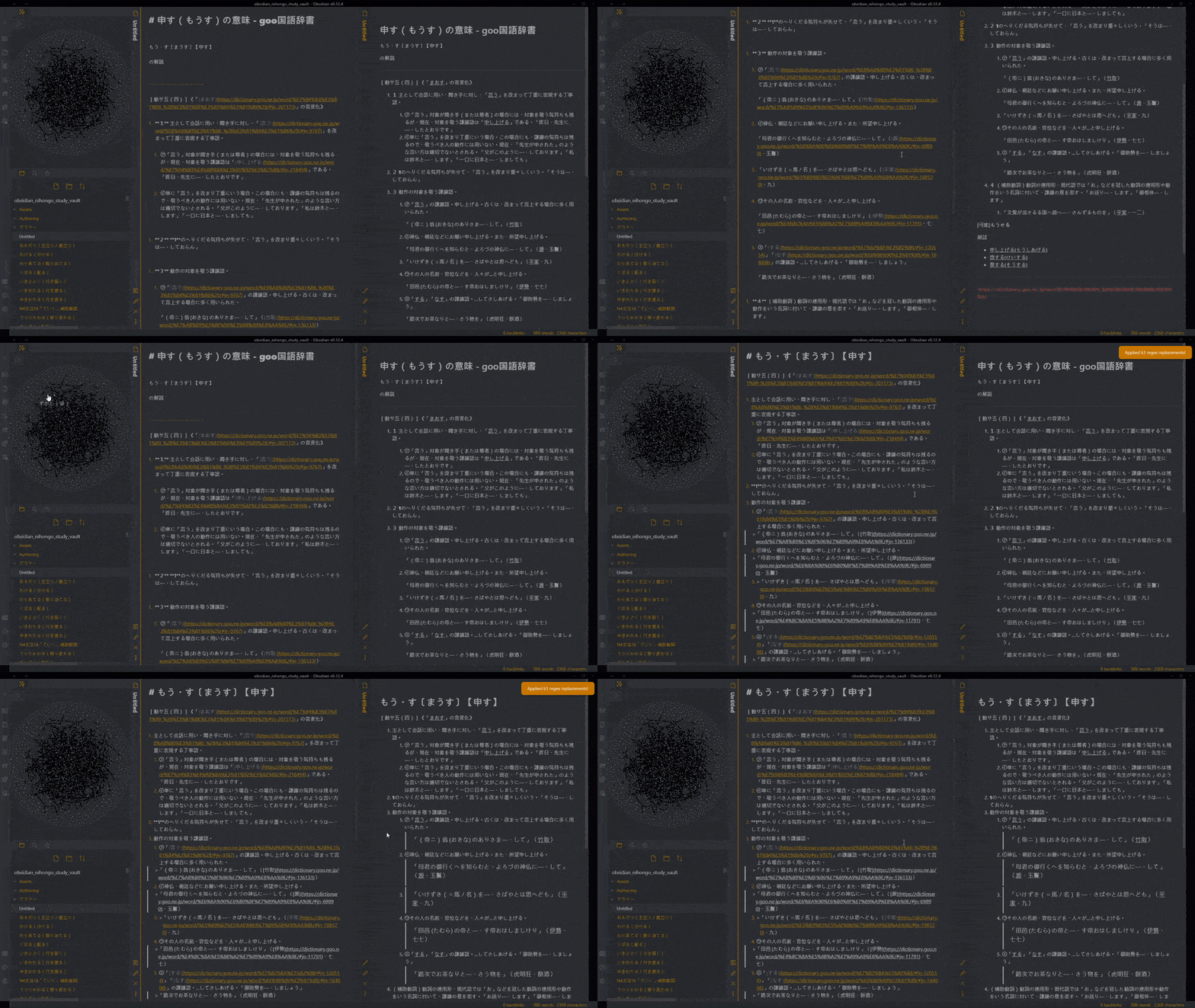
Take a look in samples folder for more examples, including a very complex one like the above gif!
Recommendations
- Markdownload (https://github.com/deathau/markdownload): for clipping webpages, don't forget to configure it to match your editing preferences.
FAQ
My ruleset file doesn't work,The notification says there's 0 replacement, but I'm sure the format is correct.
It's possible that your ruleset file is in non-UTF8 encoding, this happens with some editor applications, please refer to #12.