Rant-Lang
 lanice4k downloads
Thin wrapper around the high-level procedural templating language Rant.
- Overview
- Scorecard
- Updates21
Thin wrapper around the Rant language Rust crate to be used in Obsidian.
"Rant is a high-level procedural templating language with a diverse toolset for easily creating dynamic code templates, game dialogue, stories, name generators, test data, and much more." - from Rant's GitHub page
Table of Contents
Usage
Use a code block with the rant type, in which you can enter a Rant program.
The program is then compiled and executed with Rant, and the result shown in the Obsidian preview mode.
Use the command Re-rant with random seed (active file) (default hotkey: Cmd+R/Ctrl+R) to run Rant again on each block in the active (preview) file.
It's also possible to insert a Rant program inline by starting an inline code block with "rant:".
Within a rant block (both inline and code blocks), the result of the program is then rendered with the Obsidian MarkdownParser.
That means that you can add styling, links, or other markdown-processing elements inside a rant block, and they will be rendered accordingly.
In order to avoid Rant syntax errors, you can wrap these elements in double quotes, because Rant treats everything inside double quotes as string literals, and will not evaluate the content.
For common markdown operations, the following global functions are added to the Rant context: bold, italic, bold-italic, highlight, link
You can also embed the result of an existing rant codeblock into any other document or other rant block by using block links, see these examples for details.
Examples
Note: As Rant chooses random block elements to run, the output of the following examples will vary with each re-run of Rant, so what's shown here is just one possible result.
A Rant program that produces a shuffled deck of cards, taken from the official Rant examples:
```rant
[shuffle:
  [rep: 2] {(:Joker)}
  [cat: **(A;2;3;4;5;6;7;8;9;10;J;Q;K); **(♠;♥;♣;♦) |> list]
]
```
Could produce this output (with a random order on each re-rant):

Inline
An inline Rant program:
This inline Rant block is `rant: {neat|awesome|fantastic}`!
Result:

Styling
This is an example of how to apply markdown styling using the global markdown functions (the single backtick before the bold function serves as hint):
```rant
`[bold: {Hello|Hi|Hey}] world!
```
Result:

Links
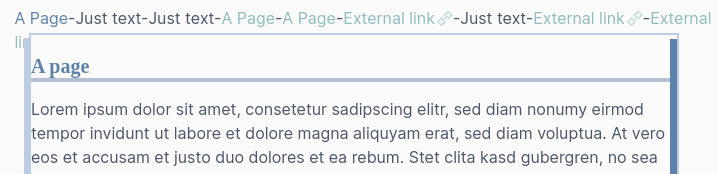
You can use any form of links within a Rant code block, and it properly renders (including page preview on hover):
```rant
[rep:10][sep:"-"]{[link: A Page]|"[External link](https://www.wikipedia.org)"|Just text}
```
Result:
Dice-roller
Example using the dice-roller plugin within a Rant block:
```rant
Suddenly "`dice: 2d4`" {goblins|dragons|gelatinous cubes} charge at you!
```
Result:

Lists
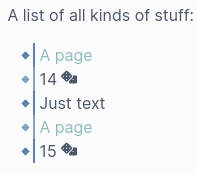
A Rant program can output lists like this:
```rant
A list of all kinds of stuff:\n
[rep:5][sep:\n]{"- [[A page]]"|"- Just text"|"- `dice: 2d12`"}
```
Result:
Embedding Rant Blocks
Inline
When you have a rant codeblock inside a document called Programs that you want to embed in another document, first give it an ID using the ^ notation:
```rant
{heads|tails|edge}
```
^coin-flip
Then you can embed it like so:
Flipping a coin... It landed on `rant: [[Programs#^coin-flip]]`!
Within codeblocks
Inside a rant codeblock, you can import rant codeblocks from other documents by starting the codeblock with import: [[File#^{block-id}]] statements.
Important:
import:statements can only be used as very first lines in a rant codeblock. Once any line does not begin withimport:, the regularrantprogram starts, and you can't import anything else. One import per line.
Here is an example, we define rant blocks that define functions, import the block, and call the functions:
```rant
[$flip-coin: heads; tails] {
    {<heads>|<tails>}
}
```
^flip-coin

```rant
import: [[Programs#^flip-coin]]

[$flip-coin-with-values] {
    [flip-coin: Heads; Tails]
}
```
^flip-coin-with-values

```rant
import: [[Programs#^flip-coin-with-values]]

"Flipping a coin... "[flip-coin-with-values]!
```
As you can see, nested imports are supported, so you can import one (or multiple) programs in one block, and then import that block in another, and so on.
Installation
From within Obsidian
- Open Settings > Community plugins
- Make sure "Safe mode" is off
- In the community plugins browser, search for "Rant-Lang"
- Install & Enable
- Profit
Via BRAT
- Add
lanice/obsidian-rantto the list of Beta plugins in theObsidian42 - BRATsettings menu - Enable the plugin in the Community plugins settings menu
Manually
- Download the latest release
- Extract the
obsidian-rantfolder from the zip to your vault<vault>/.obsidian/plugins/ - Reload Obsidian
- Enable the plugin in the Community plugins settings menu