Search...Search plugins and themes...
⌘K
Sign in
  • Get started
  • Download
  • Pricing
  • Enterprise
  • Account
  • Obsidian
  • Overview
  • Sync
  • Publish
  • Canvas
  • Mobile
  • Web Clipper
  • CLI
  • Learn
  • Help
  • Developers
  • Changelog
  • About
  • Roadmap
  • Blog
  • Resources
  • System status
  • License overview
  • Terms of service
  • Privacy policy
  • Security
  • Community
  • Plugins
  • Themes
  • Discord
  • Forum / 中文论坛
  • Merch store
  • Brand guidelines
Follow us
DiscordTwitterBlueskyThreadsMastodonYouTubeGitHub
© 2026 Obsidian

Pretty BibTeX

sandrofigosandrofigo9k downloads

Show raw BibTeX bibliography entries in a prettier way.

Add to Obsidian
  • Overview
  • Scorecard
  • Updates3

This plugin renders bibliography entries in the BibTeX format in a more readable way.

Demonstration

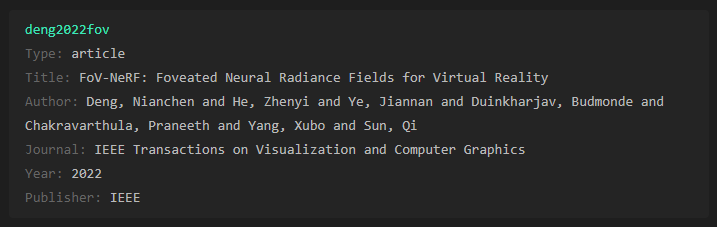
Creating a standard code block with the language set to "bibtex" will transform your raw bibliography entry:

```bibtex
<your BibTeX entry goes here>
```

Before:
Code block before enabling the plugin

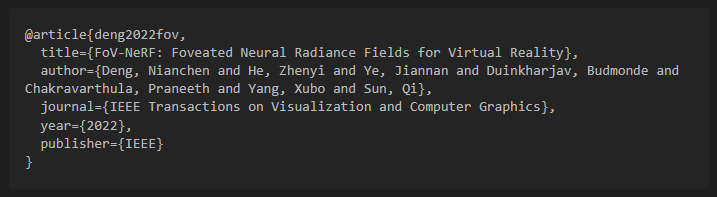
After:

Code block after enabling the plugin

The header color is defined by the 'Accent color' in Obsidian.

FAQ

  • Q: After enabling the plugin or changing settings, I don't see the BibTeX entries rendered correctly, what can I do?
  • A: Close and reopen the affected notes in your vault or restart Obsidian.

Collaboration

Support this plugin with a ⭐️, report an issue or if you feel adventurous and would like to extend the functionality or make the plugin ✨ prettier ✨ open a pull request.

68%
HealthFair
ReviewCaution
About
Transform standard bibtex code blocks into styled, easy-to-scan bibliography entries that present fields and values clearly. Match header color to Obsidian's Accent color for consistent visuals.
CodeFormattingAppearance
Details
Current version
2.0.1
Last updated
2 years ago
Created
4 years ago
Updates
3 releases
Downloads
9k
Compatible with
Obsidian 0.15.0+
Platforms
Desktop, Mobile
License
MIT
Report bugRequest featureReport plugin
Author
sandrofigosandrofigo
sandrofigo.com
GitHubsandrofigo
  1. Community
  2. Plugins
  3. Code
  4. Pretty BibTeX

Related plugins

Heading Level Indent

Indenting content under headers based on their level.

Better Bullets

Improves readability of bulleted notes.

Multi-Column Markdown

Create Markdown documents with multiple columns of content viewable in reading mode.

Minimal Theme Settings

Control the colors and fonts in Minimal Theme.

Templater

Create and use dynamic templates.

Hider

Hide interface elements such as tooltips, status bar, titlebar, and more.

Mermaid Tools

Improved Mermaid.js experience: visual toolbar with common elements and more.

Style Settings

Adjust theme, plugin, and snippet CSS variables.

Linter

Format and style your notes. Linter can be used to format YAML tags, aliases, arrays, and metadata; footnotes; headings; spacing; math blocks; regular Markdown contents like list, italics, and bold styles; and more with the use of custom rule options.

Link Favicons

See the favicon for a linked website.