Search...Search plugins and themes...
⌘K
Sign in
  • Get started
  • Download
  • Pricing
  • Enterprise
  • Account
  • Obsidian
  • Overview
  • Sync
  • Publish
  • Canvas
  • Mobile
  • Web Clipper
  • CLI
  • Learn
  • Help
  • Developers
  • Changelog
  • About
  • Roadmap
  • Blog
  • Resources
  • System status
  • License overview
  • Terms of service
  • Privacy policy
  • Security
  • Community
  • Plugins
  • Join the community
  • Discord
  • Forum / 中文论坛
  • Merch store
  • Brand guidelines
Follow us
DiscordTwitterBlueskyThreadsMastodonYouTubeGitHub
© 2026 Obsidian

Paste As Html

maotong06maotong0613k downloads

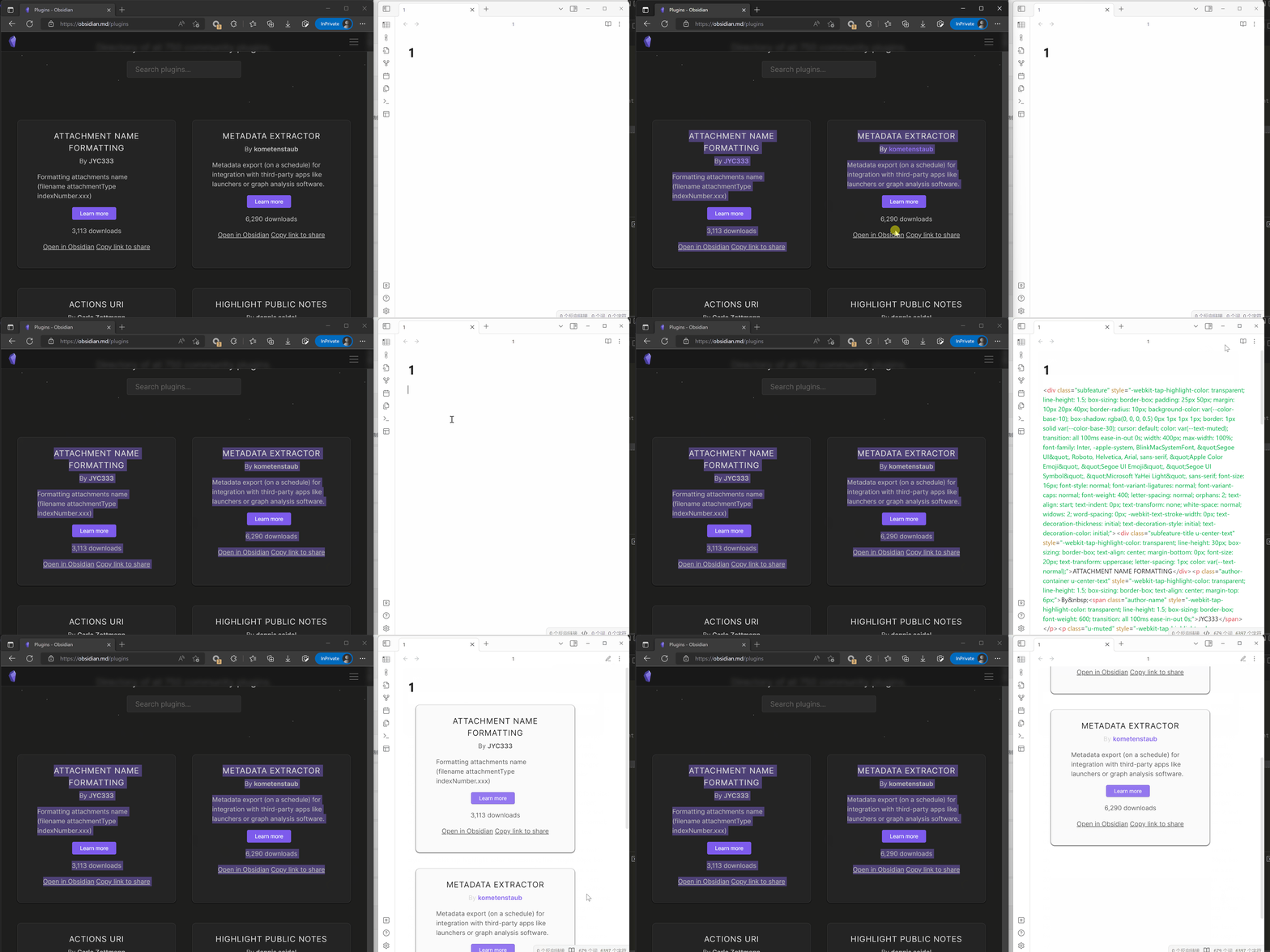
Paste As HTML, Keep the original CSS style. Paste from web browser.

Add to Obsidian
  • Overview
  • Scorecard
  • Updates3
  1. install this plugin
  2. copy html at browser
  3. paste by : ctrl + p -> command paste as html
  4. the web text well paste as html, and Keep the original css style
Alt text

70%
HealthGood
ReviewSatisfactory
About
Paste HTML copied from a browser into Obsidian notes as formatted HTML. Retain original CSS styles and structure so web content appears like the source page.
HTMLImportFormatting
Details
Current version
1.0.2
Last updated
3 years ago
Created
3 years ago
Updates
3 releases
Downloads
13k
Compatible with
Obsidian 0.15.0+
Platforms
Desktop, Mobile
License
MIT
Report bugRequest featureReport plugin
Sponsor
Support
Author
maotong06maotong06
github.com/maotong06/obsidian-paste-as-html-plugin
GitHubmaotong06
  1. Community
  2. Plugins
  3. HTML
  4. Paste As Html

Related plugins

Importer

Import data from Notion, Evernote, Apple Notes, Microsoft OneNote, Google Keep, Bear, Roam, and HTML files.

Zotero Integration

Insert and import citations, bibliographies, notes, and PDF annotations from Zotero.

Readwise Official

Sync highlights from Readwise to your vault.

Linter

Format and style your notes. Linter can be used to format YAML tags, aliases, arrays, and metadata; footnotes; headings; spacing; math blocks; regular Markdown contents like list, italics, and bold styles; and more with the use of custom rule options.

Weread

Sync Tencent Weread highlights and annotations.

Easy Typing

Auto format when typing.

Admonition

Admonition block-styled content.

ZotLit

Integrate with Zotero, create literature notes, and insert citations from a Zotero library.

Kindle Highlights

Sync your Kindle book highlights using your Amazon login or uploading your My Clippings file.

Local Images Plus

A reincarnation of Local Images to download images in Markdown notes to local storage.