Search...Search plugins and themes...
⌘K
Sign in
  • Get started
  • Download
  • Pricing
  • Enterprise
  • Account
  • Obsidian
  • Overview
  • Sync
  • Publish
  • Canvas
  • Mobile
  • Web Clipper
  • CLI
  • Learn
  • Help
  • Developers
  • Changelog
  • About
  • Roadmap
  • Blog
  • Resources
  • System status
  • License overview
  • Terms of service
  • Privacy policy
  • Security
  • Community
  • Plugins
  • Themes
  • Discord
  • Forum / 中文论坛
  • Merch store
  • Brand guidelines
Follow us
DiscordTwitterBlueskyThreadsMastodonYouTubeGitHub
© 2026 Obsidian

External Link Helper

nakalsionakalsio4k downloads

Makie inserting external links easier to your notes.

Add to Obsidian
  • Overview
  • Scorecard
  • Updates1

This plugin lets you search external links found in your notes. The search features with two possible actions.

1. Inserting an external link previously used in the notes

If you had a large number of external links used in your notes over some period of time, it is not easy to find them when you need to re-use them in your new notes. This plugin allows you to search the external links from the suggestion modal dialog and insert the selected link into your editor. You can open the modal dialog from the command palette, External Link Helper: Open external link suggestions.
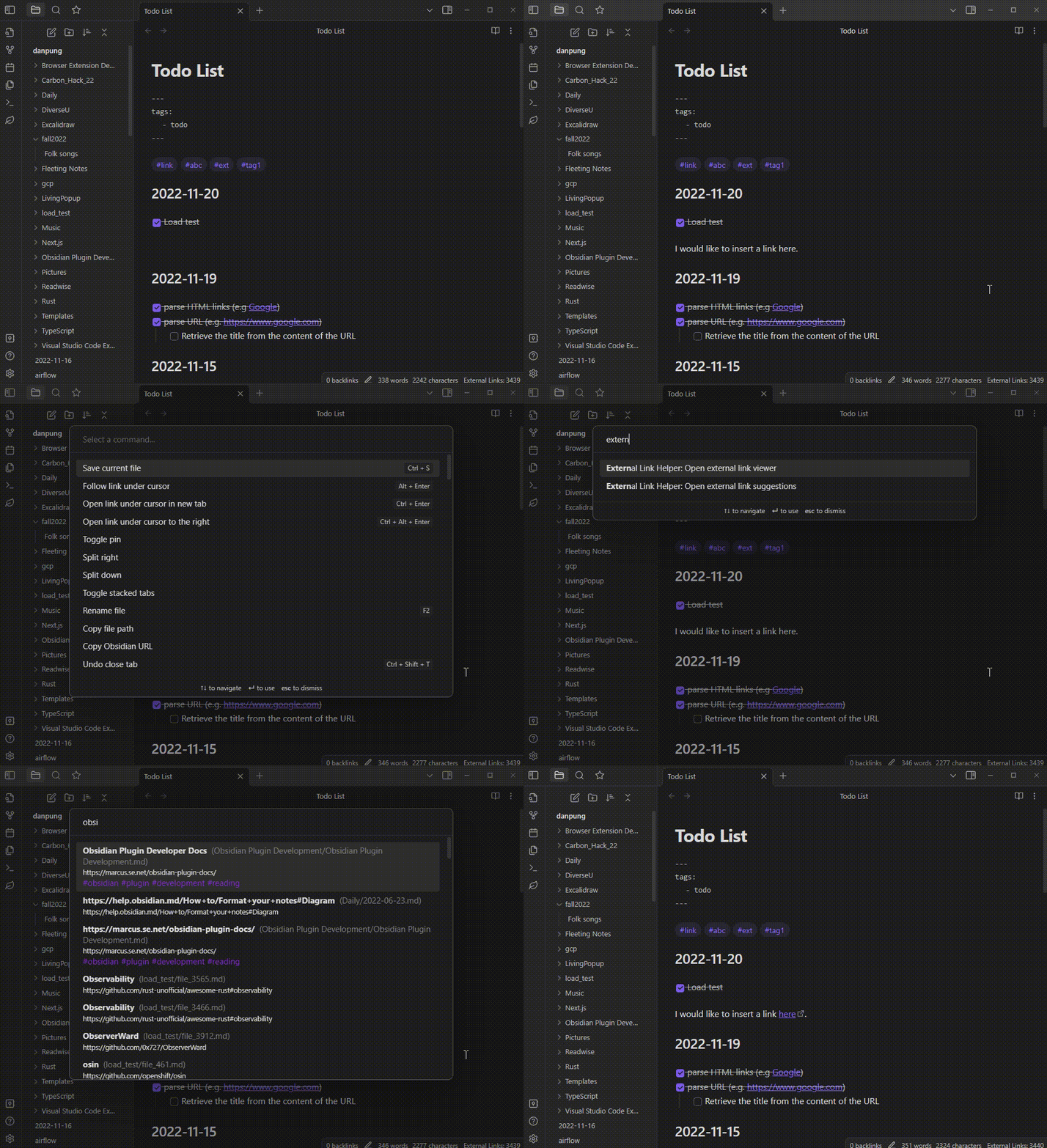
Insert external link demo

2. Find my favorite links using fuzzy search.

When you work on a note and need to open a website, you can open a search view, fuzzy-search the link and click to open it. You can open this external link viewer by click on the leaf ribbon icon, or choose it from the command palette, External Link Helper: Open external link viewer.
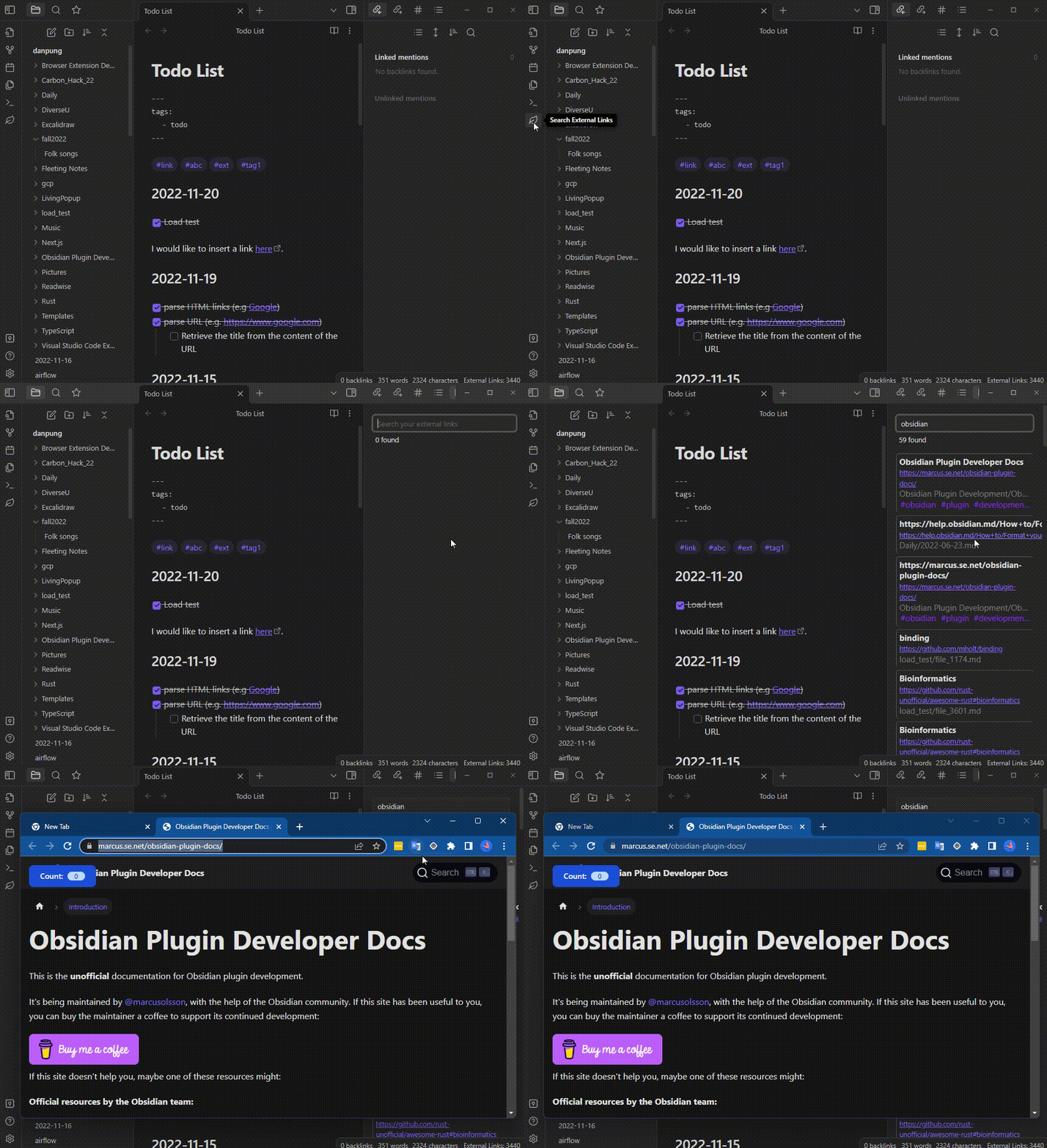
Search and open external link demo

A few more things that you can do in the external link viewer.

  1. Clicking on the name of the source markdown file will open the note.
  2. Clicking on the associated tags will search the external links that match the selected tag.

3. Settings

  1. You can adjust how the plugin will find the external links in your notes from the settings.
  2. You can adjust how fuzzy search will match your links.
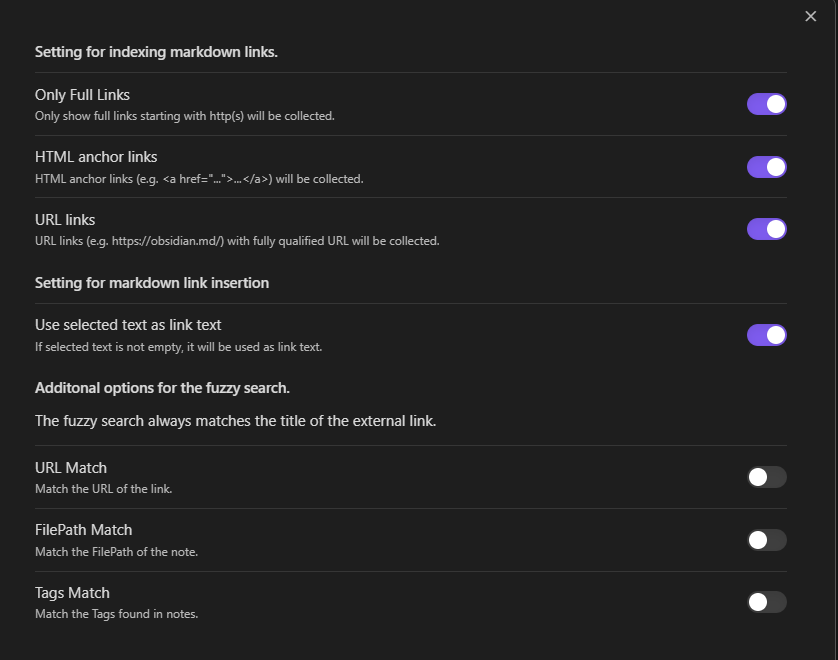
Settings

65%
HealthFair
ReviewCaution
About
Search external links across your vault and insert previously used URLs into the current note via a suggestion modal. Open a fuzzy-searchable link viewer to find and open links, jump to their source notes, or filter results by associated tags.
LinksSearchNavigation
Details
Current version
0.8.0
Last updated
3 years ago
Created
4 years ago
Updates
1 release
Downloads
4k
Compatible with
Obsidian 0.15.0+
Platforms
Desktop, Mobile
License
GPL-3.0
Report bugRequest featureReport plugin
Author
nakalsionakalsio
github.com/nakalsio/obsidian-danpung
GitHubnakalsio
  1. Community
  2. Plugins
  3. Links
  4. External Link Helper

Related plugins

Smart Connections

AI link discovery copilot. See related notes as you write. Lookup using semantic (vector) search across your vault. Zero-setup local model for embeddings, no API keys, private.

Quick Switcher++

Enhanced Quick Switcher, search open panels, and symbols.

Quiet Outline

Make outline quiet and more powerful, including no-auto-expand, rendering heading as Markdown, and search support.

Strange New Worlds

Reveal networked thought and the strange new worlds created by your vault.

Home tab

A browser-like search tab for your local files.

Semantic Notes Vault MCP

Give Claude Desktop and other AI assistants semantic access to your notes through a built-in Model Context Protocol (MCP) server.

Table of Contents

Create a table of contents for a note.

Better Search Views

Upgrade global search, backlinks and queries with outliner-like context trees.

Surfing

Surf the net like a web browser.

floating toc

A floating directory that hovers a widget of the current directory on the notes page.