Search...Search plugins and themes...
⌘K
Sign in
  • Get started
  • Download
  • Pricing
  • Enterprise
  • Account
  • Obsidian
  • Overview
  • Sync
  • Publish
  • Canvas
  • Mobile
  • Web Clipper
  • CLI
  • Learn
  • Help
  • Developers
  • Changelog
  • About
  • Roadmap
  • Blog
  • Resources
  • System status
  • License overview
  • Terms of service
  • Privacy policy
  • Security
  • Community
  • Plugins
  • Join the community
  • Discord
  • Forum / 中文论坛
  • Merch store
  • Brand guidelines
Follow us
DiscordTwitterBlueskyThreadsMastodonYouTubeGitHub
© 2026 Obsidian

Copy Search URL

Carlo ZottmannCarlo Zottmann5k downloads

Add a button to the search view to copy the search URL.

Add to Obsidian
  • Overview
  • Scorecard
  • Updates5
Plugin logo thingie: a list icon, a plus, a link icon

Copy Search URL

This plugin adds a menu entry to the "X results" context menu in Obsidian's search view. Clicking it will copy the Obsidian URL for the current search to the clipboard. This allows for easier bookmarking of pre-defined searches.

Showcase
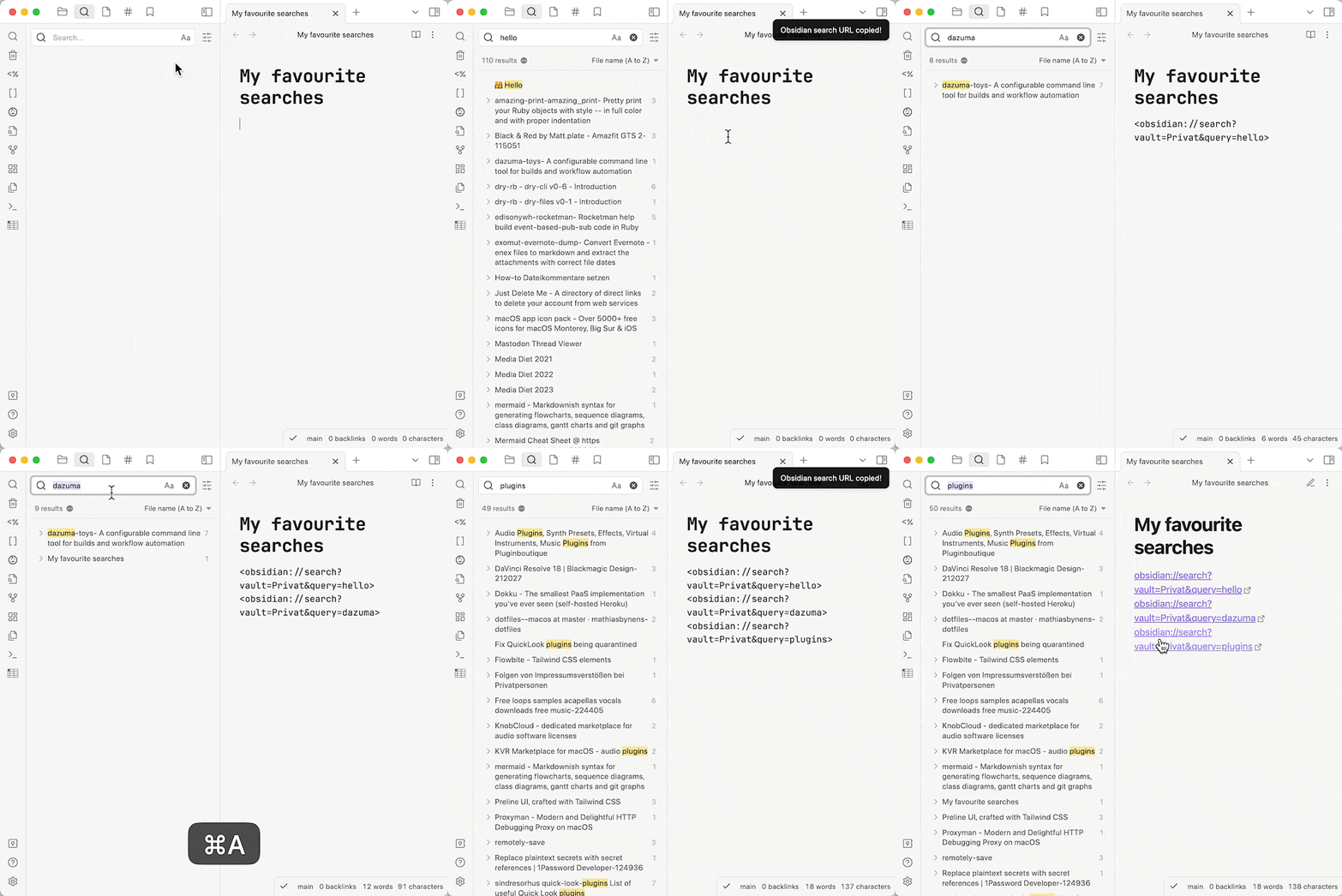
Showcase GIF: both editor and search view are open, a search for "hello" is done, then a mouse click on the new "Copy Obsidian search URL" context menu entry is done, the result is manually pasted in the editor, then another search is done for "dazuma", the menu entry is clicked, the result is pasted into the editor as well, then a third search is done for "plugins", the menu entry is clicked, that result is also pasted into the editor. Obsidian is then switched into reading mode, the three links are clicked in succession, bringing up their related searches

Bug Reports & Discussions

For bug reports please use this repo's Issues section — thank you!

I've moved all plugin discussions to the ActionsDotWork Forum which is a hub for both my Obsidian plugins and the macOS/iOS productivity apps I'm building: Carlo's Obsidian Plugins - ActionsDotWork Forum.

The forum supports single-sign-on via GitHub, Apple and Google, meaning you can log in with your GitHub account.

Installation

  1. Search for "Copy Search URL" in Obsidian's community plugins browser. (This link should bring it up.)
  2. Install it.
  3. Enable the plugin in your Obsidian settings under "Community plugins".

That's it.

Installation via BRAT (for pre-releases or betas)

  1. Install BRAT.
  2. Add "Copy Search URL" to BRAT:
    1. Open "Obsidian42 - BRAT" via Settings → Community Plugins
    2. Click "Add Beta plugin"
    3. Use the repository address czottmann/obsidian-copy-search-url
  3. Enable "Copy Search URL" under Settings → Options → Community Plugins

Please note

This plugin adds functionality (a button) to a core plugin. The jury's out on whether that idea is a wise one, tho — either way, here we are. ;)

I wanted this functionality for a while so I've built it myself. It was a good learning experience for me.

Development

Clone the repository, run pnpm install OR npm install to install the dependencies. Afterwards, run pnpm dev OR npm run dev to compile and have it watch for file changes.

Thanks to …

  • the obsidian-tasks crew for the "starter templates" for the GitHub Action workflow and the handy release.sh script
  • the humans of Discord channel #plugin-dev for pointing me in the right direction

Author

Carlo Zottmann, [email protected], https://zottmann.org/

License

MIT, see LICENSE.md.

65%
HealthFair
ReviewCaution
About
Add a "Copy Search URL" command to the search results context menu. Copy the Obsidian URL for the current search to the clipboard for easy bookmarking or sharing of predefined searches.
SearchCommands
Details
Current version
1.2.1
Last updated
3 years ago
Created
4 years ago
Updates
5 releases
Downloads
5k
Compatible with
Obsidian 1.2.0+
License
MIT
Report bugRequest featureReport plugin
Sponsor
Support
Author
Carlo ZottmannCarlo Zottmannczottmann
actions.work/
GitHubczottmann
GitHubczottmann
c.zottmann.dev
  1. Community
  2. Plugins
  3. Search
  4. Copy Search URL

Related plugins

Quick Switcher++

Enhanced Quick Switcher, search open panels, and symbols.

Smart Connections

AI link discovery copilot. See related notes as you write. Lookup using semantic (vector) search across your vault. Zero-setup local model for embeddings, no API keys, private.

Commander

Customize your workspace by adding commands everywhere, create macros and supercharge your mobile toolbar.

Omnisearch

Intelligent search for your notes, PDFs, and OCR for images.

MCP Tools

Securely connect Claude Desktop to your vault with semantic search, templates, and file management capabilities.

Task Collector (TC)

Change task status and collect tasks within a document using hotkeys and context menus.

Citations

Automatically search and insert citations from a Zotero library.

Paste URL into selection

Paste URL "into" selected text.

Tag Wrangler

Rename, merge, toggle, and search tags from the tag pane.

Tray

Run Obsidian from the system tray for customisable window management and global quick notes.