
- Overview
- Scorecard
- Updates24
Now you can rename a bunch of files from the directory and all references also will be updated across the vault.
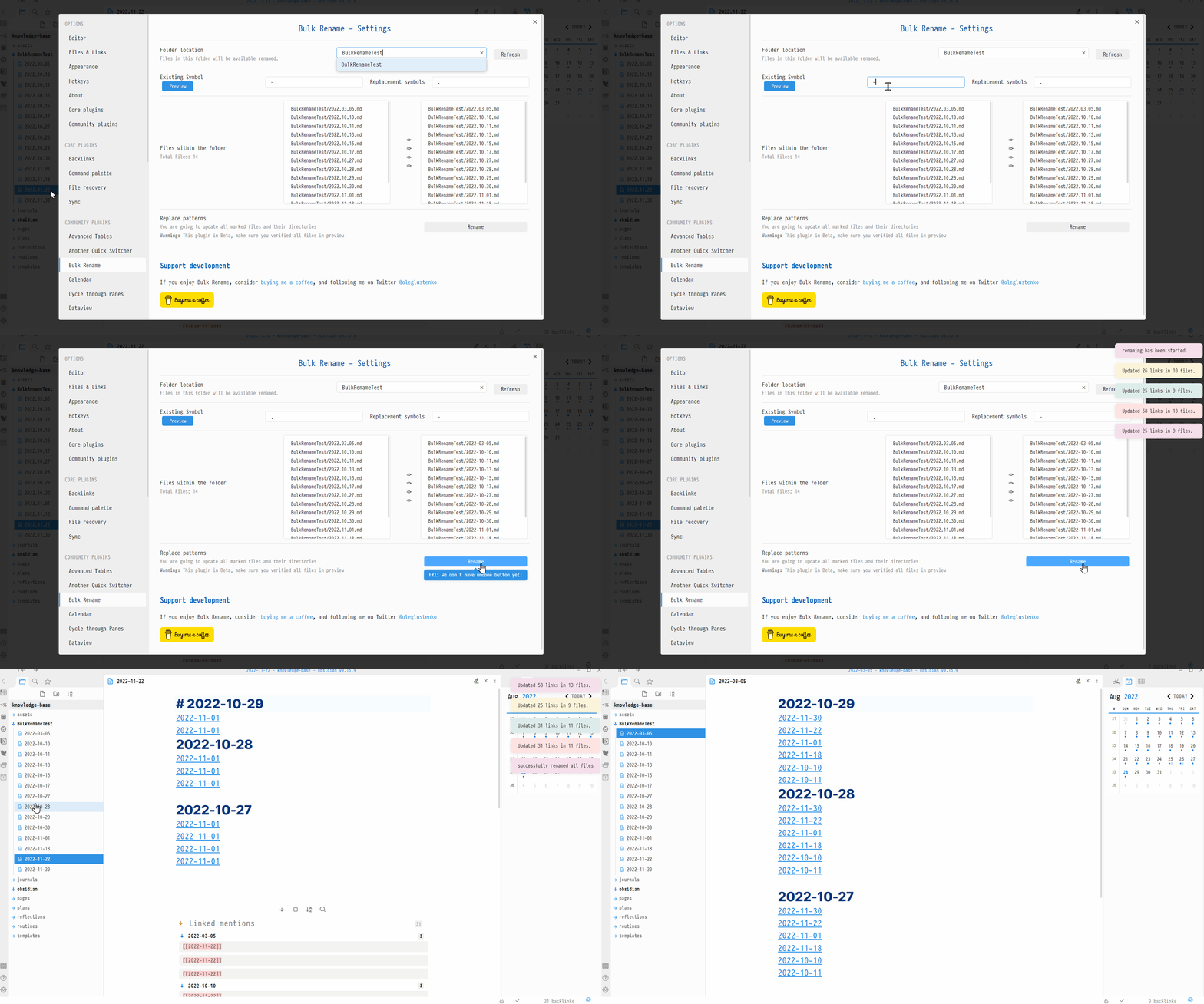
Under the hood this plugin is using obsidian API for renaming, but we just applying it for many files
Features
Whenever we're updating Replacement Symbols you can set new Directory Location too so, you can also move files to another directory
Rename/Move files based on folder location
Click Search By Folder
Update Folder Location where are you wanting to get files from, put Existing Characters from the file path later on update Replacement Symbols those symbols will be used for in a new path.
Rename/Move files based on tags
Click Search By Tags
Put tags in Tags names field search will be completed across the vault, use coma separator if you need more than 1 tag Click Refresh Update Existing Characters field with a pattern you are looking for in existing notes, set Replacement Symbols
Search By RegExp
Usage of Search By RegExp You have two fields, RegExp pattern, and RegExp Flags
RegExp pattern will be wrapped into / /
Supported flags:
- g - global
- i - ignore case
- m - multiline anchors
- s - dot matches all (aka singleline) - works even when not natively supported
- u - unicode (ES6)
- y - sticky (Firefox 3+, ES6)
- n - explicit capture
- x - free-spacing and line comments (aka extended)
- A - astral (requires the Unicode Base addon)
Click Preview or Enter to see intermediate results(nothing will be changed/moved/renamed).
Click Rename whenever you're done
API
- folder location - Files from which folder you need to rename
- Symbols in existing files - the symbols/characters that we have in the files
- Replacement Symbols - a new symbols that will be pasted instead
- Files within the folder - this is for information purpose
- RegExp pattern - pattern of RegExp to match
- RegExp flags - flags that will be applied to RegExp pattern
Rename Button will start renaming all files by respective path.
Motivation
This plugin was developed to cover my needs. Originally I've started to use my daily files with _ delimiter. So my files looked like this: 2022_01_01, over the time I realized other platform out of the box configured to prefer dashes, like this 2022-01-01
Here is many guides on how to rename files, what kind of script we need to run, what version of python or Node.js we need to install and so on.
Why Not to have this functionality build-in into Obsidian?
And rename a bunch of files and update their reference in code base respectively. So now you can rename a bunch of files at once and all imports also will be updated in the vault
Installation
Follow the steps below to install Tasks.
- Search for "Bulk Rename" in Obsidian's community plugins browser
- Enable the plugin in your Obsidian settings (find "Bulk Rename" under "Community plugins").
- Welcome on board! Follow the guides above, share your findings!
Support development
If you enjoy Bulk Rename, consider buying me a coffee, and following me on twitter @oleglustenko