Nudge
 Peter502 downloads
Manage tasks in a single plain-text todo.txt file, with lists, due dates, priorities, and recurrence.
- Overview
- Scorecard
- Updates19
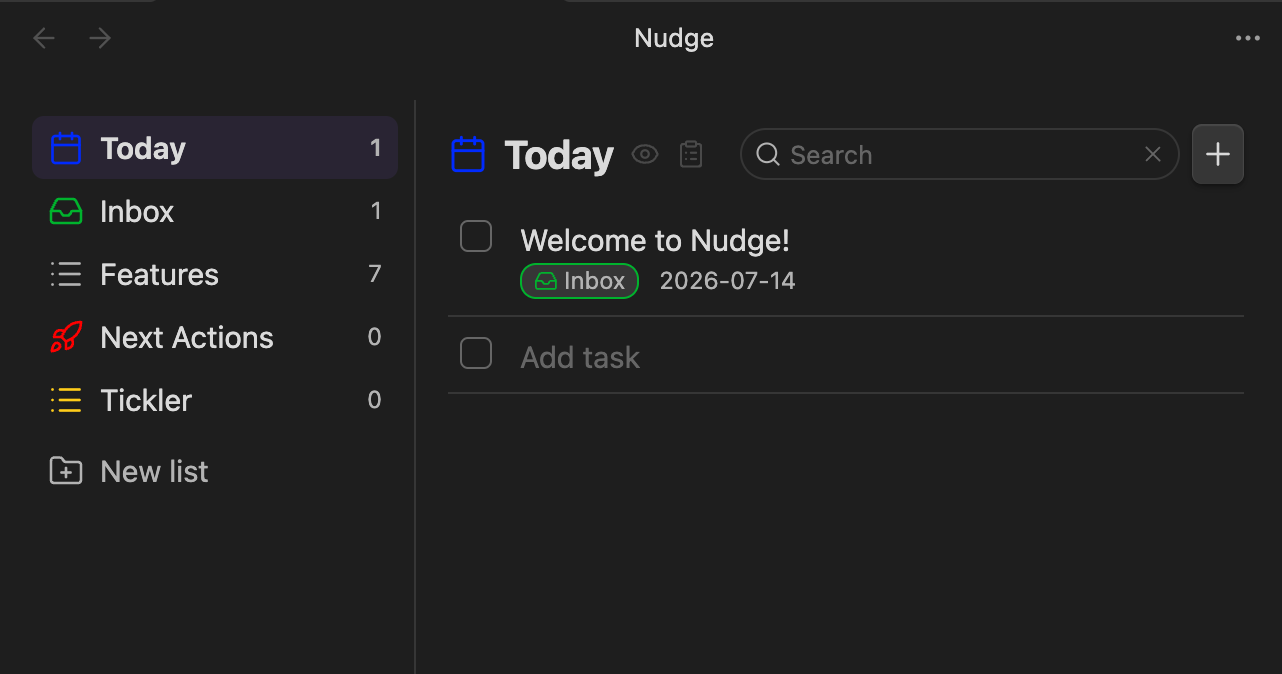
A task manager for Obsidian, backed by a single
todo.txt file. Desktop-only (macOS). Passive by
design — items just surface in Today when their due date arrives; there are
no OS notifications.
See SPEC.md for the full design.
Features
- Custom view with a Today filter plus one list per
+projecttag. - A configurable Default list (default
Inbox), always pinned under Today. - Structured create/edit modal — no hand-typed todo.txt syntax. Fields: text,
list, due date, priority, link, and a recurrence picker (stored as
rec:<RRULE>). - Completing a recurring item spawns its next occurrence, anchored on the original due date.
- Drag and drop to reorder, move between lists, or drop into Today.
- Fuzzy search across all lists (the magnifying glass in the header, or a configurable hotkey — e.g. Cmd+F — set in the plugin settings): live results as you type, matching item text and link URLs, with matched characters highlighted. Esc returns to the previous view.
- Every change is a read-modify-write against the file, so external edits
(e.g. an agent rewriting
todo.txt) show up automatically. - Optional macOS Dock badge (off by default) counting overdue tasks — optionally including tasks due today, which matches the Today view count.
Install (unpacked dev plugin)
- Build the plugin:
npm install npm run build # or: npm run dev (watch mode) - Copy/symlink the plugin folder into your vault's plugins directory so it
contains
manifest.json,main.js, andstyles.css:ln -s "$(pwd)" "<YourVault>/.obsidian/plugins/nudge" - In Obsidian: Settings → Community plugins, disable Restricted mode, then enable Nudge.
Adding items
- The + button in the panel header (on every view, including Today).
- The New task ribbon icon or command.
- A configurable global hotkey (default
Cmd+N), set in the plugin settings. It uses a capture-phase listener so it can override Obsidian's own binding for that combo. - Single-click a row to complete/uncomplete it; use the pencil button to edit.
Creating items via Obsidian URI
The plugin registers a protocol handler so external tools, shortcuts, or links can create tasks:
obsidian://nudge?text=Buy%20milk&list=Groceries&due=2026-07-20&priority=high&link=https%3A%2F%2Fexample.com
| Arg | Maps to | Notes |
|---|---|---|
text |
description | If present, the item is created directly. If omitted, the prefilled modal opens instead. |
list |
+Project |
Whitespace is stripped. Defaults to the configured Default list. |
due |
due: |
YYYY-MM-DD. |
priority |
(A)/(B)/(C) |
Accepts high/med/low or A/B/C (case-insensitive). |
link |
link: |
URL. |
rec |
rec: |
A raw RRULE, e.g. FREQ=WEEKLY;BYDAY=MO. |
modal |
— | modal=1 opens the prefilled create modal instead of creating directly. |
Modes:
- Direct create — when
textis provided (andmodalis not set): the item is appended (with today's creation date), a notice is shown, and open views refresh. - Prefilled modal — when
textis omitted ormodal=1: the create modal opens with the given fields filled in for review.
Encoding notes: URL-encode all values — especially the rec RRULE's ;
and =, and :// in links. With multiple vaults, add &vault=<name> to
route to the right one.
HealthExcellent
ReviewSatisfactory
About
Manage tasks in Obsidian via a single todo.txt and a Today view that surfaces items when due (macOS only). Create and edit tasks with a modal (fields: text, list, due, priority, link, recurrence), drag-and-drop between lists, auto-advance recurring items, and reflect external file edits instantly.Details
Current version
0.5.6
Last updated
Last month
Created
2 months ago
Updates
19 releases
Downloads
502
Compatible with
Obsidian 1.8.0+
Platforms
Desktop only
License
MIT