Note Repetition
 Timon Wendland27 downloads
Queue whole notes for spaced repetition or a regular fixed interval.
- Overview
- Scorecard
- Updates2
You save an article because it changed how you think about something, and a month later you can't say what it argued. Most notes get written once and never read again, so a vault slowly fills with ideas you agreed with at some point.
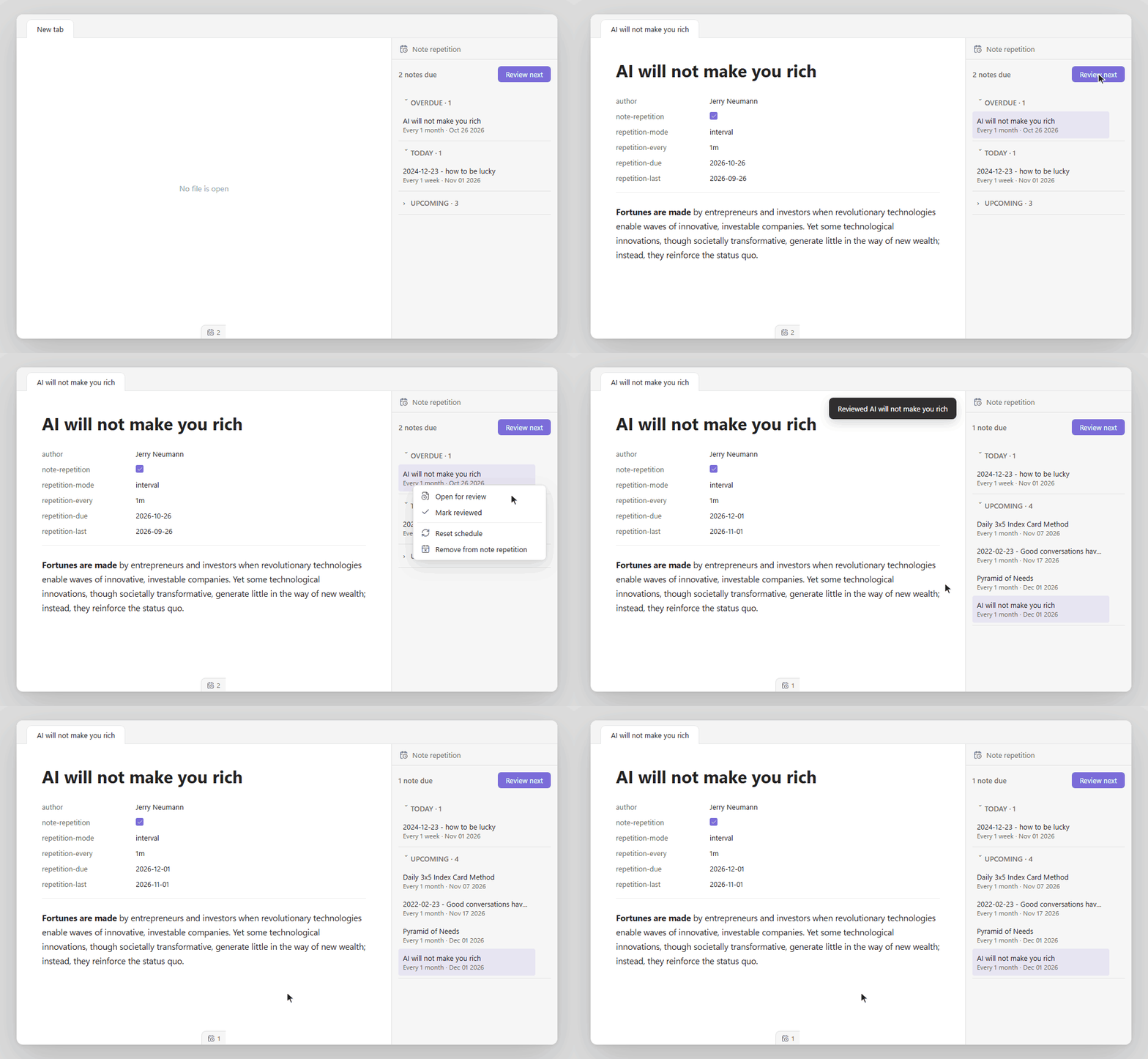
Note Repetition puts whole notes back in front of you on a schedule. Mark a note with one property and it joins a queue, either at a fixed rhythm (say, once a month) or with spaced repetition, where you rate each review and the gap grows when you remember the note well. There are no flashcards and no card syntax. You read the note as you wrote it, and the schedule lives in its properties, so it stays plain Markdown.
Install
Note Repetition is not in the community plugin list yet. Until it is, download main.js, manifest.json and styles.css from the latest release into .obsidian/plugins/note-repetition/ in your vault. Then open Settings → Community plugins and enable Note Repetition.
To build it yourself, see Development.
Add a note
Add these properties to the note:
note-repetition: true
repetition-mode: spaced
For a fixed interval, use:
note-repetition: true
repetition-mode: interval
repetition-every: 1w
You can also use the file menu (Add to review queue, Repeat weekly, Repeat monthly) or the commands below.
Properties
| Property | Set by | Value | Function |
|---|---|---|---|
note-repetition |
You | true |
Adds the note to the queue. |
repetition-mode |
You | spaced or interval |
Selects the mode. If it is missing, the plugin uses the default mode from the settings. |
repetition-every |
You | A number and a unit: d, w, m or y (example: 3m) |
Sets the fixed interval. Necessary for interval mode. |
repetition-due |
Plugin | Date, YYYY-MM-DD |
Date of the next review. |
repetition-last |
Plugin | Date, YYYY-MM-DD |
Date of the last review. |
repetition-interval |
Plugin | Days | Current interval. Spaced mode only. |
repetition-ease |
Plugin | Number, 130 or more (default 250) | Current ease. Spaced mode only. |
If a value is not correct, the queue shows an error for that note.
To build the queue, the plugin reads the properties of every Markdown note in the vault, except the ignored paths. It writes only to the properties of notes that you add or review, and it sends nothing over the network.
Review notes
- To open the queue, click the calendar-clock icon in the ribbon or use the command Open review queue.
- To open the next due note, use Review next due note.
- For an interval note, use Mark current interval note reviewed. The next due date is today plus the interval.
- For a spaced note, use Review current spaced note: Again, Hard, Good or Easy.
- To start the schedule again, use Reset current note schedule.
- To remove a note, use Remove from review queue in the file menu.
Spaced schedule
The plugin calculates the next interval from the current interval I (days), the ease E (percent) and the delay D (days after the due date).
| Rating | Ease | New interval |
|---|---|---|
| Easy | E + 20 | (I + D) × E × 1.3 / 100 |
| Good | No change | (I + D / 2) × E / 100 |
| Hard | E − 20, minimum 130 | (I + D / 4) × 0.5, minimum 1 |
| Again | E − 20, minimum 130 | 0. The note is due again today. |
The values 250 (start ease), 1.3 (easy bonus) and 0.5 (hard factor) are defaults. The settings tab does not show them. To change them, edit baseEase, easyBonus and lapsesIntervalChange in the data.json file of the plugin.
The maximum interval is 36,525 days. The plugin rounds the interval to full days for the due date.
Settings
| Setting | Function |
|---|---|
| Default mode | Mode for notes that you add from a command or the file menu. |
| Default fixed interval | Interval for new interval notes. Examples: 7d, 1w, 1m, 1y. |
| Start of review day | Time in HH:mm:ss. A review before this time counts for the previous day. |
| Upcoming horizon | Number of future days that the queue shows. |
| Ignored paths | Glob patterns, one for each line. The plugin ignores matching notes. Default: **/*.excalidraw.md. |
| Open queue on startup | Opens the queue when Obsidian starts. |
| Open next note after review | Opens the next due note after each review. |
| Choose next note randomly | Selects the next due note at random, not by due date. |
| Show file-menu actions | Adds the repetition actions to the file menu of Markdown notes. |
| Show status bar | Shows the number of due notes in the status bar. |
| Enable reminders | Shows a reminder when notes are due. The plugin does not show a reminder while you type. |
| Reminder interval | Minutes between reminder checks (1 to 1,440). |
| Reminder message | Text of the reminder. If it is empty, the reminder shows the number of due notes. |
| Check on startup | Does one reminder check after startup. |
Development
| Command | Function |
|---|---|
pnpm dev |
Builds the plugin and builds it again when a file changes. |
pnpm build |
Does a type check and makes a production build in build/main.js. |
pnpm test |
Runs the tests in tests/note-repetition. |
pnpm check |
Runs the format check, lint, tests, build and version check. Run it before each commit. |
Keep the version the same in package.json, manifest.json and versions.json. pnpm check:version checks this.
Origin and license
This plugin is a rewrite based on obsidian-spaced-repetition by Stephen Mwangi and contributors. The note review idea and the scheduling formula come from that project. The flashcard functions are removed.
The license is MIT. See LICENSE.
PS: The queue in the demo is my own. I write about taste, agency and what AI does to both on friction.