Nebula Graph
 scoot242 downloads
A fast, GPU-rendered graph of your vault with glowing nodes, live layout, focus, and search.
- Overview
- Scorecard
- Updates1
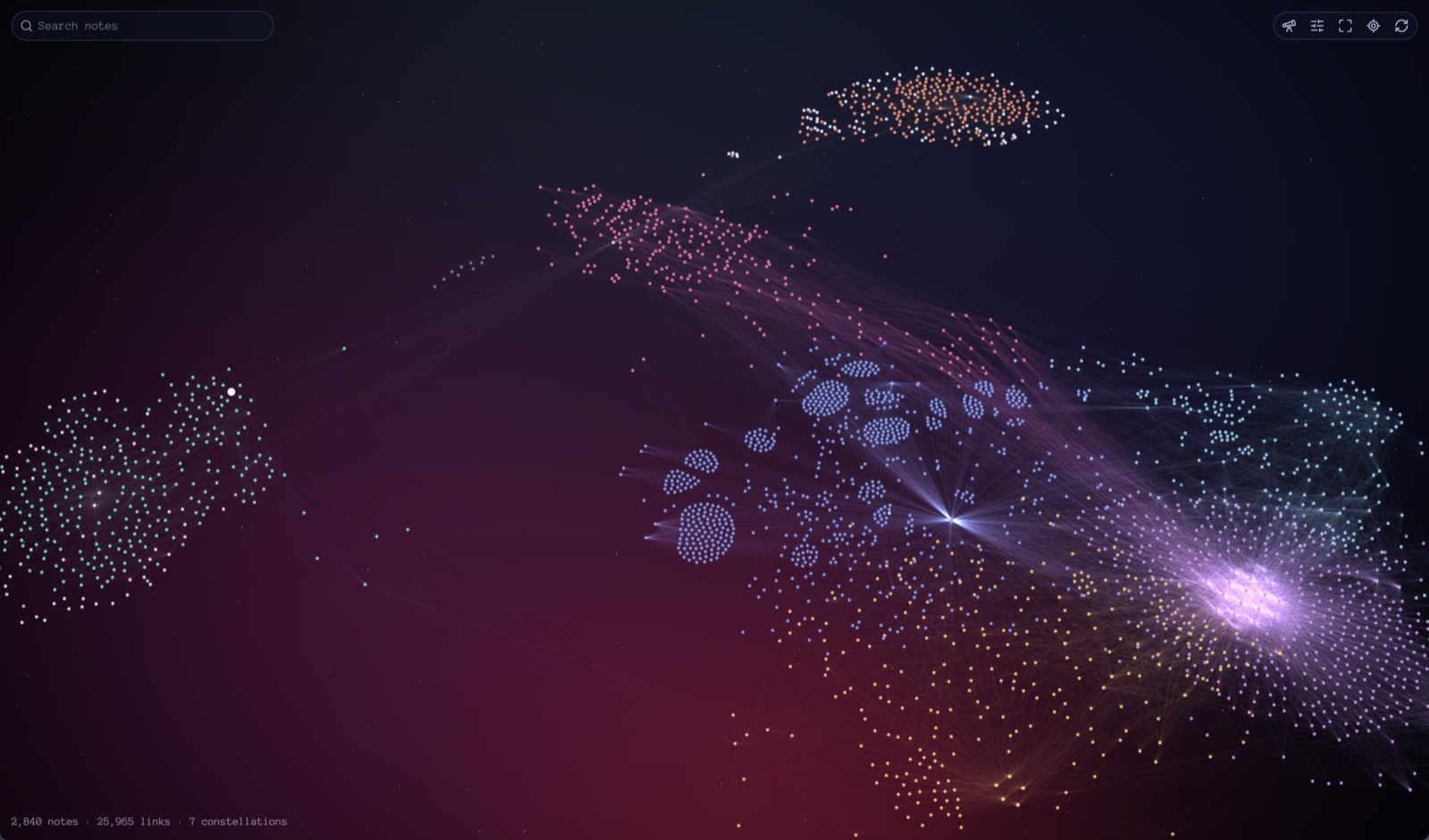
A fast, GPU-rendered graph of your Obsidian vault. Notes glow like stars on a deep-space backdrop, clusters of linked notes become named constellations, and the whole thing stays smooth on vaults with thousands of notes.
Highlights
- Fast. A raw WebGL2 renderer draws every note and link in a handful of draw calls, and the layout runs in a Web Worker so the app never stutters. A 2,600-note vault lays out in a second or two. Once the layout settles, the graph does no work at all until something changes.
- Constellations. Notes that link to each other more than to the rest of the vault form constellations, named after their most connected note (or a name you give them). Jump to any constellation to frame it and light it up.
- Your layout. Force, Clustered (each constellation its own island) or Radial (rings around the open note). Drag a note to pin it; pins follow renames, and the graph reopens exactly as you left it.
- Your colors. Color by folder groups or by constellation, edit your own color groups, pick link and label colors, tint the nebula, or switch to your theme's background.
- Motion and 2.5D. Spin the graph, set every note orbiting a sun note, or tilt the graph back in perspective with notes raised by constellation, folder depth or last edit.
- Idle screen. Leave the app idle and the camera tours your constellations, drawing their star figures while the stars twinkle. Any input ends it.
Installing
Nebula Graph is not in the community plugin directory yet. To install it by hand:
- Download
main.js,manifest.jsonandstyles.cssfrom the latest release. - Put them in
<your vault>/.obsidian/plugins/nebula-graph/. - In Obsidian, open Settings → Community plugins, reload the list and turn on Nebula Graph.
It needs Obsidian 1.7.2 or later and a device with WebGL2.
Using it
Open the graph from the ribbon (sparkles icon) or the command Nebula Graph: Open graph.
| Action | How |
|---|---|
| Zoom | Scroll or pinch; zoom follows the cursor |
| Pan | Drag empty space |
| Open a note | Click it (Cmd or Ctrl-click for a new tab) |
| Focus a note | Hover it: its links and neighbors light up |
| Move a note | Drag it; it stays pinned where you drop it |
| Unpin a note | Alt-click it |
| Search | Type in the search box; Enter flies to the best match, Escape clears |
| Fit the graph | Double-click empty space, or the fit button |
| Jump to a constellation | Telescope button, or Nebula Graph: Jump to constellation |
| Change settings | Sliders button: every setting, right inside the graph |
Other commands: Show active note in graph and Start constellation tour.
Settings
Every setting is in Settings → Nebula Graph and in the panel inside the graph.
- Appearance: background (nebula or theme), starfield, nebula tint, label color and size, node size, glow, link thickness, opacity and color, label density, ring around the active note.
- Colors: color by folders or constellations, and your own color groups (
path:,tag:orfile:queries, first match wins). By default the core graph's color groups are used. - Content: tags, attachments, orphans, unresolved links, excluded folders.
- Layout: mode, constellation detail, pin dragged notes, repulsion, link distance, gravity, folder clustering, unpin all, reset layout.
- 2.5D: on or off, height from (constellation, folder depth or last edit), tilt, height.
- Motion: none, spin or orbit; speed; the sun (most connected note or active note).
- Constellation names: rename any constellation.
- Idle screen: constellation tour on or off, and how long to wait.
Privacy and resource use
- Nothing leaves your vault: no network requests, no telemetry.
- The plugin writes two files in its own folder:
data.json(settings, pins and constellation names) andlayout.json(the last settled layout, so the graph reopens in place). - Motion and the idle tour redraw at 30 frames per second only while they run, and pause when the window loses focus. Otherwise the graph draws only when something moves.
Development
npm install
npm run dev     # rebuild main.js on every save
npm run build   # type-check and production build
npm run lint    # Obsidian's plugin review rules
npm test        # unit and performance tests
npm run e2e     # end-to-end test against a running Obsidian (see below)
npm test runs the unit and performance tests on Node's built-in test runner; CI runs it on every push along with the build and lint.
npm run e2e drives a running Obsidian through the Obsidian CLI. It needs the vault that holds this plugin open (default name "Nebula Dev Vault", set NEBULA_VAULT to change it). It writes a test fixture into the vault's Fixture/ folder, then checks rendering, clicking, colors, search, constellations, every layout mode, pins across a reload, the settings panel, motion, 2.5D, the tour's frame rate, zero idle frames and a clean error log. Its timed checks retry when they detect someone using the machine, so run it while the computer is idle.
Source layout:
src/main.ts: plugin lifecycle, commands, saved data.src/settings.ts: settings, validation, and the settings page shared by the tab and the in-graph panel.src/graph/: graph building and coloring, constellations (Louvain), layout targets.src/physics/: force simulation, Web Worker, and main-thread fallback.src/render/: WebGL2 renderer and shaders.src/view/: the graph view, camera, labels, motion, 2.5D and the idle tour.