myBrain
 Carl Bechstrom903 downloads
A high-performance semantic network graph displaying notes in structured Parents, Children, Friends, and Siblings quadrants.
- Overview
- Scorecard
- Updates43
myBrain is a high-velocity, bidirectional structural graph network that maps, classifies, and visualizes connections within your vault in real-time. Built specifically for users who need instant relational awareness without heavy database overhead.
"Structure is liberation. Your notes belong to you, and your graph should think the way you do."
🚀 What's New in v1.0.50
This update introduces automated Obsidian setting compliance and an advanced interactive inspection panel for hidden vault tracking.
- Privacy & Settings Compliance: Fully integrated with Obsidian's core folder settings. The graph now automatically skips and filters out notes located inside your globally configured "Excluded files" directories right at birth.
- Hidden / Cause Inspection Panel: Enhanced the status badge (
i) on the center node. Desktop users can now use Cmd/Ctrl/Alt + Hover (or standard click), and mobile users can Long-Press the badge to open a live, glowing telemetry list breakdown. - Dynamic Rule Grouping: Suppressed nodes matching your plugin blacklist filters are compiled in memory and instantly partitioned into isolated dropdown clusters inside the popup panel based on the exact rule that filtered them (e.g., specific
#tagsor filename@fragments). - Scan-Speed Layout Protection: Completely refactored the vector line tracing boundaries. By pre-computing area dimensions exactly once per paint loop, the graph guarantees high-velocity scroll operations and completely eradicates phantom clipping trimmings.
⚡ Previous Highlights (v1.0.47)
- Seamless Zooming: Vector lines now recalculate perfectly when using pinch-to-zoom on Mac trackpads or changing application font sizes.
- Popout Windows: Full native support for dragging the graph view out into its own detached, standalone Obsidian window.
- Better Mobile Touch: Improved mobile touch highlighting and completely fixed the annoying iOS "ghost hover" bug where Safari remembered old touches.
Unlike standard chaotic force-directed link graphs, myBrain is a highly structured semantic graph view built for speed, clarity and large vaults. It layouts your notes using a predictable, clean layout matrix relative to your active focused note.
All node partitions, column expansions, and connections are built inside a 100% Hardware-Accelerated CSS Grid. Bypasses text-parsing chains and heavy canvas layers via an O(1) Just-In-Time (JIT) memory mesh.
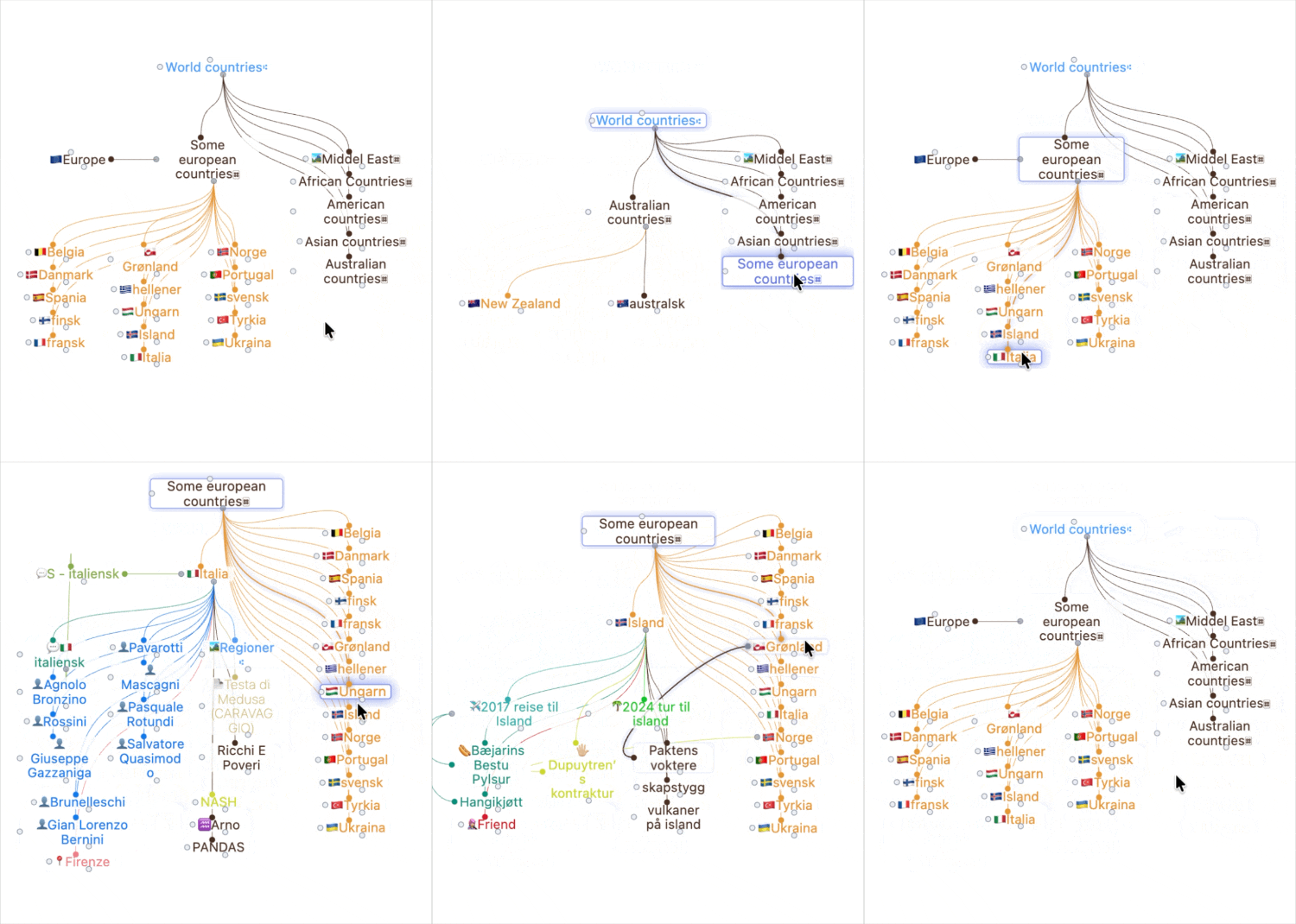
Typical display
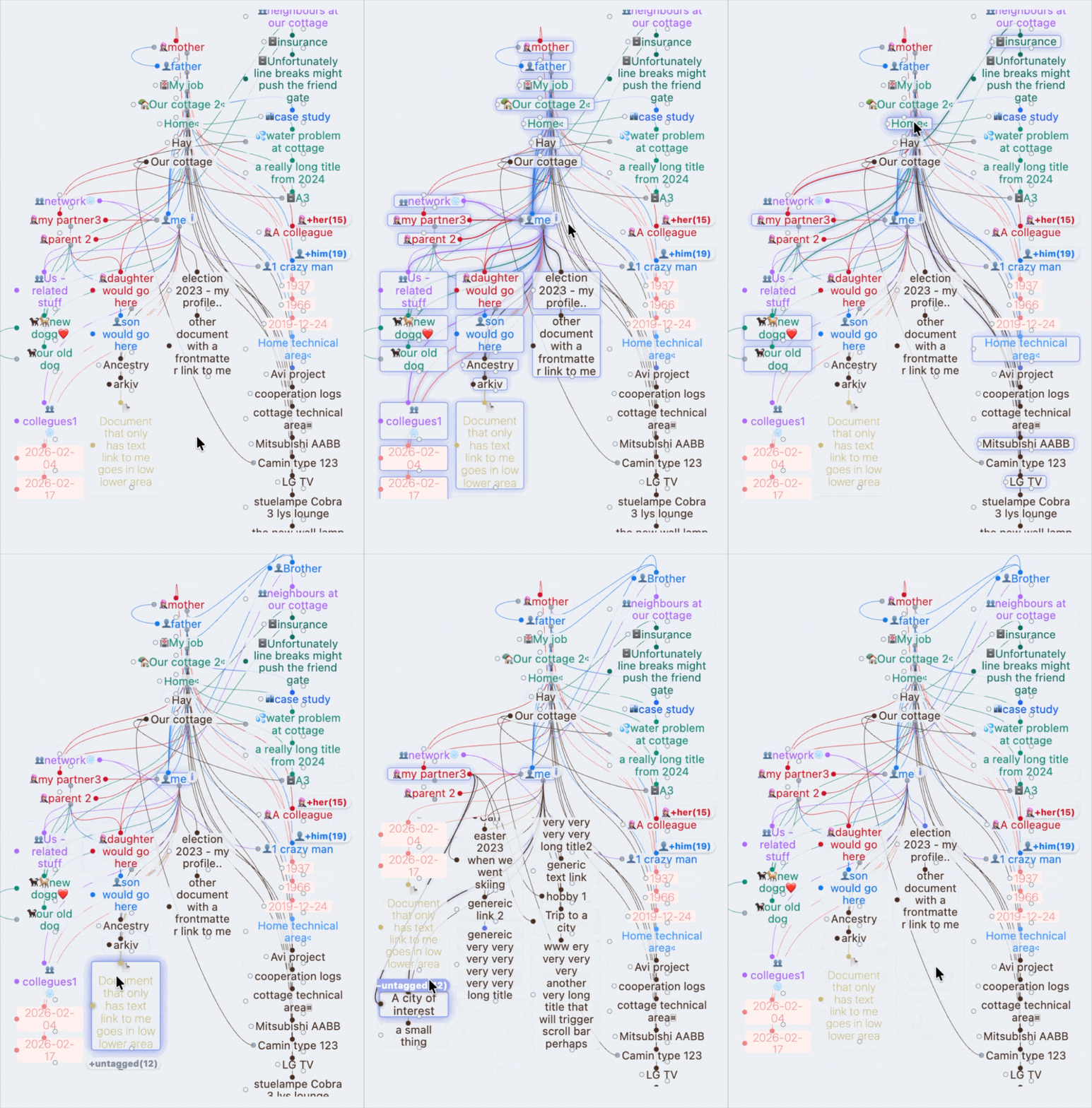
In a crowded environment
📦 Installation
Option 1: Community Plugins (recommended)
- Search for
myBrainin Obsidian's Community Plugins. - Click Install and then Enable.
Option 2: BRAT (beta/testing)
- Install the
BRATplugin from Community Plugins. - Go to BRAT settings -> Add Beta Plugin.
- Paste this repository URL:
https://github.com/CarlB01/myBrain
Option 3: Manual installation
- Download the latest release (
main.js,manifest.json,styles.css). - Create a folder named
mybraininside your vault under.obsidian/plugins/. - Move the downloaded files into that folder and restart Obsidian.
🚀 Quick Start Guide
Get up and running with myBrain in less than 2 minutes. The plugin works automatically with your existing links, but you can unlock its full power using note properties (frontmatter).
1. The 5-Minute Layout Map
myBrain automatically organizes your vault relative to your active note based on how you link them:
- Parents: Add links to your parent notes in the frontmatter properties.
- Friends: Lateral peer connections. Note: Unlike ExcaliBrain, notes do not become friends just by linking to each other. Instead, it is enough that just one of the notes explicitly defines the other as a friend in its properties.
- Siblings: Notes that share the exact same parent note. Note: You do not define siblings manually; myBrain calculates and computes them automatically based on shared parents.
- Children: Standard forward links present inside your body text, or explicitly defined child properties.
💡 Smart Link Direction: You don't need to worry about link directionality for hierarchies. Whether a parent links down to a child, or a child links up to a parent, myBrain automatically resolves the relationship and routes them into the correct semantic quadrants.
2. Configure Your Note Properties (Optional)
To tell myBrain explicitly how notes are related, add these keys to your note's properties (YAML frontmatter):
---
parents: [[My Parent Note]]
children: [[My Child Note]]
friends: [[My Friend Note]]
---
(You can customize these property names under Settings → myBrain if you prefer using up, down, peer, etc.).
3. Open the View
You can open the semantic graph view in two ways:
- Method 1 (Fastest): Click the ✨ (Sparkle) icon in your Obsidian left ribbon/toolbar.
- Method 2: Open the command palette (
Ctrl+PorCmd+P), typemyBrain: Open semantic graph view, and press Enter.
Tip: Drag and drop the opened myBrain tab anywhere you like in your workspace sidebar or main layout!
🎨 Conceptual Layout Matrix
           PARENTS
             │  \
             │   ---┐
             ▼      ▼
FRIENDS ◄► CENTER   SIBLINGS
             │
             ▼
           CHILDREN
Architectural Mapping Matrix
| Quadrant Area | Target Content Routing | Sourcing Logic |
|---|---|---|
PARENTS (Upper) |
Native structural ancestors and collection headers. | Sourced explicitly via your configured properties/tags. |
FRIENDS (Left) |
Reciprocal lateral relationships and peer connections. | Routed horizontally via direct cross-links. |
CENTER NOTE |
The active focus anchor context of the current viewport. | Binds the primary origin coordinates live. |
CHILDREN (Lower) |
Downstream target children and unmapped core links. | Sourced from child fields and raw bodytext tokens. |
SIBLINGS (Right) |
Peer cluster nodes sharing a mutual parent anchor. | Tier 1: Verified frontmatter. Tier 2: Bodytext siblings. |
How undefined nodes are handled
- Links from the center note that are not explicitly defined as children are treated as undefined and automatically gathered at the bottom of the lower area.
- In the Siblings group, undefined siblings are sorted last.
Collapse groups
When a quadrant contains many nodes of the same type, they can optionally be collapsed with a +/- button to keep the view clean and readable.
⚡ Technical Core & Architecture
Unlike traditional graph views that treat your vault as a heavy database requiring constant query-chain parsing, myBrain operates as an on-demand memory network. It functions as a lightweight logical overlay, translating native Obsidian cache footprints into structured visual matrices.
💨 Near-Instant Cache Performance
- No Database Bottlenecks:
myBraininterfaces directly with Obsidian's internal memory maps, bypassing external indexing threads entirely. - Constant-Time Filtering: All property mappings and tag trajectories are processed into lightning-fast lookup tables. Searching for rules takes a fraction of a microsecond.
- Smart Connection Mapping: While analyzing overlapping cross-network paths naturally requires a deep check, the inner-loop is optimized down to raw dictionary pointers (
resolvedLinks[A]?.[B]) to protect your CPU.
🔋 Hardware-Friendly Footprint
- Garbage Collection Prevention: Deep iteration loops are protected from memory allocation spikes. The system recycles raw pointer variables, generating zero mid-loop array garbage and saving laptop battery.
- Processed Once: Heavy string-lowercasing and emoji-stabilization routines are executed exactly once when a note is loaded into memory, completely sparing the rendering loop from redundant labor.
- Debounced Reflows: Rapid-fire keystrokes or large folder renames are safely collapsed into a single, coordinated redrawing pass.
📖 Deep Dive: Looking for the unvarnished engineering truths, data structures, and edge-case handling? Read the comprehensive Technical Description.
Excalibrain-like structure
If your existing structure is Excalibrain-friendly and front-matter based there would be little or no rewrites necessary.
Supercharged Links Ready
Respects your existing tag-based font colors, customized icons, and core appearance settings natively out of the box. (Consider re-supercharged links with support for light/dark mode - and more).
Dynamic Top-to-Bottom Column Wrapping
Unlike standard horizontal CSS flex layouts, myBrain utilizes CSS Multi-column layout containers inside its responsive areas.
- Design Intent: This enforces a strict top-to-bottom, left-to-right newspaper-style wrapping for clustered note groups, preserving structural hierarchy without hardcoding element heights.
- Obsidian Partial Support Mitigation: To fully shield the layout engine from edge-case Chromium reflow bugs during high-frequency tab swaps, the plugin encapsulates this layout using a protective off-screen render curtain (
.is-calculating) combined with strict element containment rules (break-inside: avoid). This ensures flawless geometric coordinate tracking across both desktop and mobile viewports.
🔒 Privacy, Security & Permissions
This repository triggers an automated notice during the Obsidian community submission check called Vault Enumeration because it utilizes app.vault.getMarkdownFiles(). This behavior is completely intentional and represents the structural foundation required for the semantic graph to function.
🛡️ Dual-Layer Exclusion Architecture (Critical Distinction)
To guarantee both maximum privacy and deep relational integrity, myBrain operates using a strict two-layer filtering architecture. It is vital to distinguish how these layers handle data:
Layer 1: Obsidian Core Exclusion (
metadataCache.isTargetIgnored)- Behavior: Files matching Obsidian's global "Excluded files" app settings are intercepted before graph indexing occurs.
- Impact: These records are completely blocked from entering the plugin's environment. They are never instantiated as
Nodememory models, carry zero performance footprint, and will not appear in theHidden / Causeinspection popup because they do not exist inside the plugin's data cache.
Layer 2: Custom myBrain Blacklist Filters (
ignoreTags/ignoreNameFragments)- Behavior: Files that are part of the active graph network but match your custom plugin rules (e.g.,
#privateor@fragments) are captured dynamically during relationship mapping. - Impact: These notes are gracefully suppressed from the main visual quadrants, stored in an isolated, pre-compiled tracking cache (
ignoredNotes), and are exclusively compiled inside the interactiveHidden / Causepanel for telemetry inspection.
- Behavior: Files that are part of the active graph network but match your custom plugin rules (e.g.,
- Total Data Isolation: Regardless of the filtering layer, all relationship calculations and caches are handled entirely in-memory on your local hardware device. Note metadata, file paths, and content strings are never serialized, tracked, or transmitted to external endpoints.
📰 The Backstory & Legacy
For decades, the semantic power of mapping information into strict Parents, Children, Friends, and Siblings relationships belonged to closed, proprietary database silos. As a healthcare professional, I depended on this structured mode of thought every day.
When Licat and Silver launched Obsidian, it felt like home. When Zsolt introduced ExcaliBrain, it was a revelation. I even had the privilege of collaborating briefly with Zsolt to help adapt its behavior to real-world semantic workflows.
However, as the years passed, it became clear that a graph framework bolted onto a heavy vector drawing canvas (Excalidraw) introduced rigid limitations. It restricted downstream interface interactions and made dynamic scaling harder than necessary.
When Zsolt hinted at gatherings that it was time for a native implementation to take over, I accepted the challenge. I went back to the drawing board—mapping out how nodes could dynamically project into strict semantic quadrants without sacrificing speed.
myBrain is the result: a clean, uncompromising, lightning-fast native implementation designed to bring cognitive structure back to the user on their own terms.
🔮 Roadmap & Future Horizons
- Colorize Lines & Gates: This update adds colorization for relationship lines and gate nodes, improving readability and direction-scanning in dense graphs. (v1.0.38).
- Interactive context popup menus to add parents/children on the fly.
- Multi-generation expansion toggles to view grandparents/grandchildren rows.
- Inline node image decoding when targeted hyperlink references represent image assets.
- Specialized handling of decrypted content blocks protected by Meld Encrypt (if possible).
🤝 Acknowledgments
This plugin would not exist without the immense inspiration, code legacy studies, and cognitive frameworks pioneered by:
- Harlan and the creators of TheBrain for proving that structured association is a beautiful way to organize human knowledge.
- Zsolt Viczián for creating ExcaliBrain, for the short and motivating period of collaboration, and for inspiring the native renaissance of this structure.
- Licat and Silver for giving the world Obsidian, an extensible, local-first ecosystem where we can build anything.
Developed with passion by a healthcare worker who loves graphs and believes semantic structure should belong to everyone. If you enjoy this work, consider starring the repository!