Modules
 polyipseity6k downloads
Load JavaScript and related languages like TypeScript modules from the vault and the Internet.
- Overview
- Scorecard
- Updates17
Load JavaScript and related languages like TypeScript modules from the vault and the Internet.
Repository · Changelog · Community plugin · Related · Features · Installation · Usage · Contributing · Security
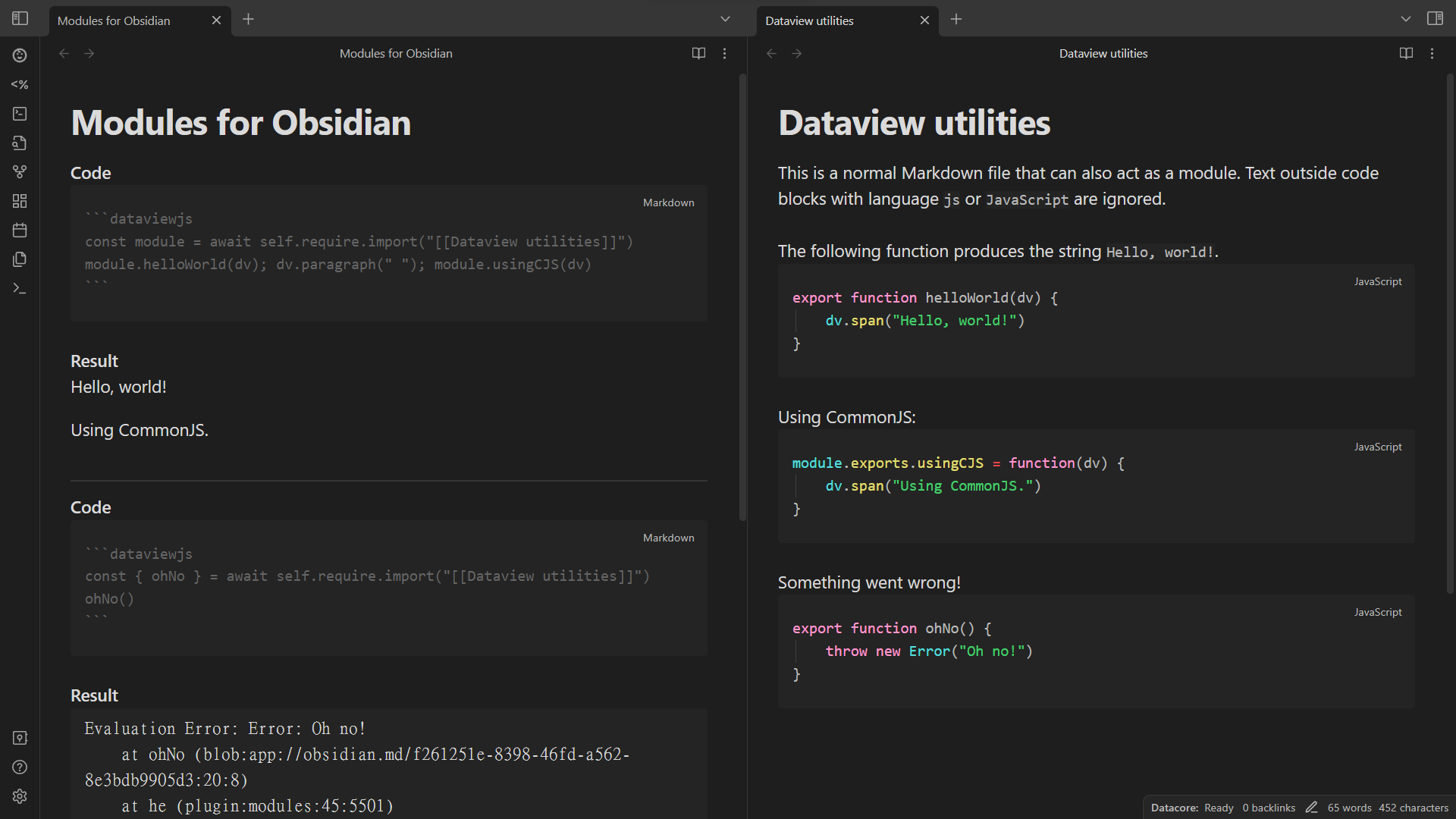
For first time users, read the installation section first!
This file is automatically opened on first install. You can reopen it in settings or command palette.
Features
- Load JavaScript and TypeScript modules from the vault and the Internet on all platforms.
- Load modules at startup.
- No configuration needed.
- Resolves relative paths, vault paths, Markdown links, wikilinks, and external links.
- Loads Markdown files as code.
- Supports using other modules inside modules.
- Loads CommonJS (
module.exports) and ES modules (export). - Supports circular dependencies for CommonJS modules.
- Configurable require name.
- Adds source maps for debugging.
- Supports popular plugins like Dataview and Templater.
Installation
- Install plugin.
- Community plugins
- Install the plugin from community plugins directly.
- Manual
- Create directory
modulesunder.obsidian/pluginsof your vault. - Place
manifest.json,main.js, andstyles.cssfrom the latest release into the directory.
- Create directory
- Building (rolling)
- Clone this repository, including its submodules.
- Install
bun. See https://bun.sh for installation. - Run
bun installin the root directory. - Run
bun run obsidian:install <vault directory>in the root directory.
- Obsidian42 - BRAT (rolling)
- See their readme.
- Community plugins
- Enable plugin.
- (optional) Configure plugin settings.
Usage
- Enable the plugin.
- To import a module:
// Using `require.import` is recommended.
await self.require.import("obsidian") // builtin modules such as the Obsidian API
await self.require.import("vault/path/to/a module.md") // vault path
// The following three require context and may not be able to infer the current directory. Please file an issue if so. Context inference is only available for top-level code, i.e. not inside functions or classes.
await self.require.import("../relative/path/to/a module.js") // relative path
await self.require.import("[omitted or whatever](markdown/link/to/a%20module.js.md)") // Markdown link
await self.require.import("[[wikilink/to/a module|omitted or whatever]]") // wikilink
// The following one requires enabling external links in settings.
await self.require.import("https://esm.sh/scratchblocks") // external link
// You can workaround the inability to infer the current directory.
await self.require.import("../relative/path/to/a module.js", { cwd: context.currentDirectory })

// If `await` is not supported, use `require` instead. It has less support for loading modules, however.
self.require("obsidian")
self.require("vault/path/to/a module.md")
// The following three require context and may not be able to infer the current directory. Please file an issue if so. Context inference is only available for top-level code, i.e. not inside functions or classes.
self.require("../relative/path/to/a module.js")
// The following three may not work in startup scripts.
self.require("[omitted or whatever](markdown/link/to/a%20module.js.md)")
self.require("[[wikilink/to/a module|omitted or whatever]]")
// The following one requires enabling external links and adding the link to preloaded external links in settings.
self.require("https://esm.sh/scratchblocks") // external link
// You can workaround the inability to infer the current directory.
self.require("../relative/path/to/a module.js", { cwd: context.currentDirectory })
- To use entities in a module:
const { eat, pi } = await self.require.import("[[module]]")
eat(2 * pi)
// OR
const mod = await self.require.import("[[module]]")
mod.eat(2 * mod.pi)
- To create a module, create a JavaScript or related language file or a Markdown file with JavaScript or related language code blocks.
- For
require(but notrequire.import), the module file needs to be preloaded, which can be configured in settings. By default, preloaded files have the following extensions:.js,.js.md,.mjs,.mjs.md,.ts.md,.mts.md,.ts,.ts.md - Modules should not have global or side effects because they are cached and thus not reloaded on every requiring.
- For Markdown files, code block languages that are loaded can be configured in settings.
- For non-JavaScript languages, ensure the module file has the correct file extension (also applies to
.xxx.md) or prepend the following metadata:
- For
// { "language": "TypeScript" }

export const variable: string = "string"
---
module:
  language: TypeScript
---

```TypeScript
export const variable: string = "string"
```
- Module exports can be CommonJS-style or ES module-style:
// ES module-style, supported by `require.import`.
export function fun() {}
export const variable = "string"
export default 42 // The default export has the name `default`.

// CommonJS-style, supported by both `require` and `require.import`.
module.exports.fun = function() {}
module.exports.variable = "string"
module.exports.default = 42
exports.abbreviatedForm = {}
- To create a startup module, export a function (supports async) to run at startup using
export defaultor assigning tomodule.exportsand add the module to plugin settings:
// ES module-style
export default function() {
    console.log("Hello world!")
}

// CommonJS-style
module.exports = function() {
    console.log("Hello world!")
}
- The full API is available from
src/@types/obsidian-modules.ts.
Contributing
Contributions are welcome!
Changesets
This project uses changesets to manage the changelog. When creating a pull request, please add a changeset describing the changes. Add multiple changesets if your pull request changes several things. End each changeset with ([PR number](PR link) by [author username](author link)). For example, the newly created file under the directory .changeset should look like:
---
"example": patch
---

This is an example change. ([GH#1](https://github.com/ghost/example/pull/1) by [@ghost](https://github.com/ghost))
Linting, Commit, and Hooks
This project uses the following tools to ensure code and commit quality:
- ESLint: Linting for TypeScript/JavaScript. Run with
bun run check(lint only) orbun run fix(auto-fix lint issues). - Prettier: Code formatting. Run with
bun run format(format all files) orbun run format:check(check formatting only). - markdownlint: Lints Markdown files. Run with
bun run markdownlintor auto-fix withbun run markdownlint:fix. - commitlint: Enforces conventional commit messages. Used automatically on commit via Husky.
- husky: Manages Git hooks. Pre-commit runs
lint-stagedand pre-push runs commitlint. - lint-staged: Runs linters on staged files. Markdown files are auto-fixed before commit.
Lint-staged note: The lint-staged configuration (
.lintstagedrc.mjs) invokes formatter/linter binaries directly (for exampleprettier --write,eslint --cache --fix,markdownlint-cli2 --fix) so that the list of staged files is passed through to the tool. Invoking these viabun runwould prevent lint-staged from forwarding filenames and cause the tool to operate on its default glob (or the entire repo). Usebun run formatto format the entire repository when needed.
To set up locally:
- Run
bun installto install dependencies and set up hooks. - On commit, staged Markdown files will be linted and auto-fixed.
- Commit messages are checked for conventional format.
You can manually run:
bun run check— lint all code (no formatting)bun run fix— auto-fix lint issues (no formatting)bun run format— format all code with Prettierbun run format:check— check formatting with Prettierbun run markdownlint— check all Markdown filesbun run markdownlint:fix— auto-fix Markdown filesbun run commitlint— check commit messages in range
Configuration files:
.eslintrc.*oreslint.config.mjs— ESLint rules.prettierrc— Prettier rules.prettierignore— Prettier ignore patterns.markdownlint.jsonc— markdownlint rules.commitlintrc.js— commitlint config.husky/— Git hooks
Testing
This repository uses Vitest for fast unit tests. Tests live under tests/ and should be named *.spec.ts or *.spec.js.
- Run locally (non-interactive, coverage):
bun run test(runsvitest run --coverage). - Run locally (interactive / watch):
bun run test:watch. - Git hooks: The pre-push hook runs
bun run test(see.husky/pre-push) and will block pushes if tests fail.
See vitest.config.mts for minimal config and further instructions.
Todos
The todos here, ordered alphabetically, are things planned for the plugin. There are no guarantees that they will be completed. However, we are likely to accept contributions for them.
- User-defined module aliases.
- Add bare module transformation support for more CDNs such as https://cdn.jsdelivr.net.
- Faster import analysis and transformation.
- Autocomplete with JSDoc.
Translating
Security
We hope that there will never be any security vulnerabilities, but unfortunately it does happen. Please report them!
Supported versions
| Version | Supported |
|---|---|
| rolling | ✅ |
| latest | ✅ |
| outdated | ❌ |
Reporting a vulnerability
Please report a vulnerability by opening a private vulnerability report. We will get back to you as soon as possible.