Search...Search plugins and themes...
⌘K
Sign in
  • Get started
  • Download
  • Pricing
  • Enterprise
  • Account
  • Obsidian
  • Overview
  • Sync
  • Publish
  • Canvas
  • Mobile
  • Web Clipper
  • CLI
  • Learn
  • Help
  • Developers
  • Changelog
  • About
  • Roadmap
  • Blog
  • Resources
  • System status
  • License overview
  • Terms of service
  • Privacy policy
  • Security
  • Community
  • Plugins
  • Themes
  • Discord
  • Forum / 中文论坛
  • Merch store
  • Brand guidelines
Follow us
DiscordTwitterBlueskyThreadsMastodonYouTubeGitHub
© 2026 Obsidian

Mochi Cards Pro

xhaydenxhayden2k downloads

Create flashcards on Mochi.cards using the API provided by Mochi's Pro subscription.

Add to Obsidian
  • Overview
  • Scorecard
  • Updates5

This is a lightweight obsidian plugin that allows me to create flashcards quickly with Mochi using the premium API it supplies. It will only work if you have Mochi pro.

You must have Mochi Pro for this plugin to work and provide your API key in the plugin settings.

The only Mochi Templates that work have to start in this format:

<< Name >> 
<input value="">

The part after that doesn't matter.

To export a card, write it in this format:

# Card Name
Card Content

Anything can be in the content. Markdown and LaTeX both work. You can export multiple cards at a time. For example,

# What does Modus Ponens mean?
If a conditional statement is true and the hypothesis is true, the conclusion is therefore true.
$$\begin{array}{c} p \\ p \rightarrow q \\ \hline \therefore q \end{array}$$

# What is Dichotic Listening?
Each ear is a separate channel of information. It's much easier to only pay attention to one or the other. Broadbent has a Filter Model of Selective Attention that shows this limiting of channels.
![](https://upload.wikimedia.org/wikipedia/commons/2/23/Broadbent_Filter_Model.jpg)
There's a buffer where you can go back and recover what was heard in the other ear by thinking about it.

To export, simply select the cards you want to export, use CMD+P to open the command picker, and chose "Export Card from Text". Follow the prompts.

To export cards, you have to highlight the cards you'd like to export.

Demo
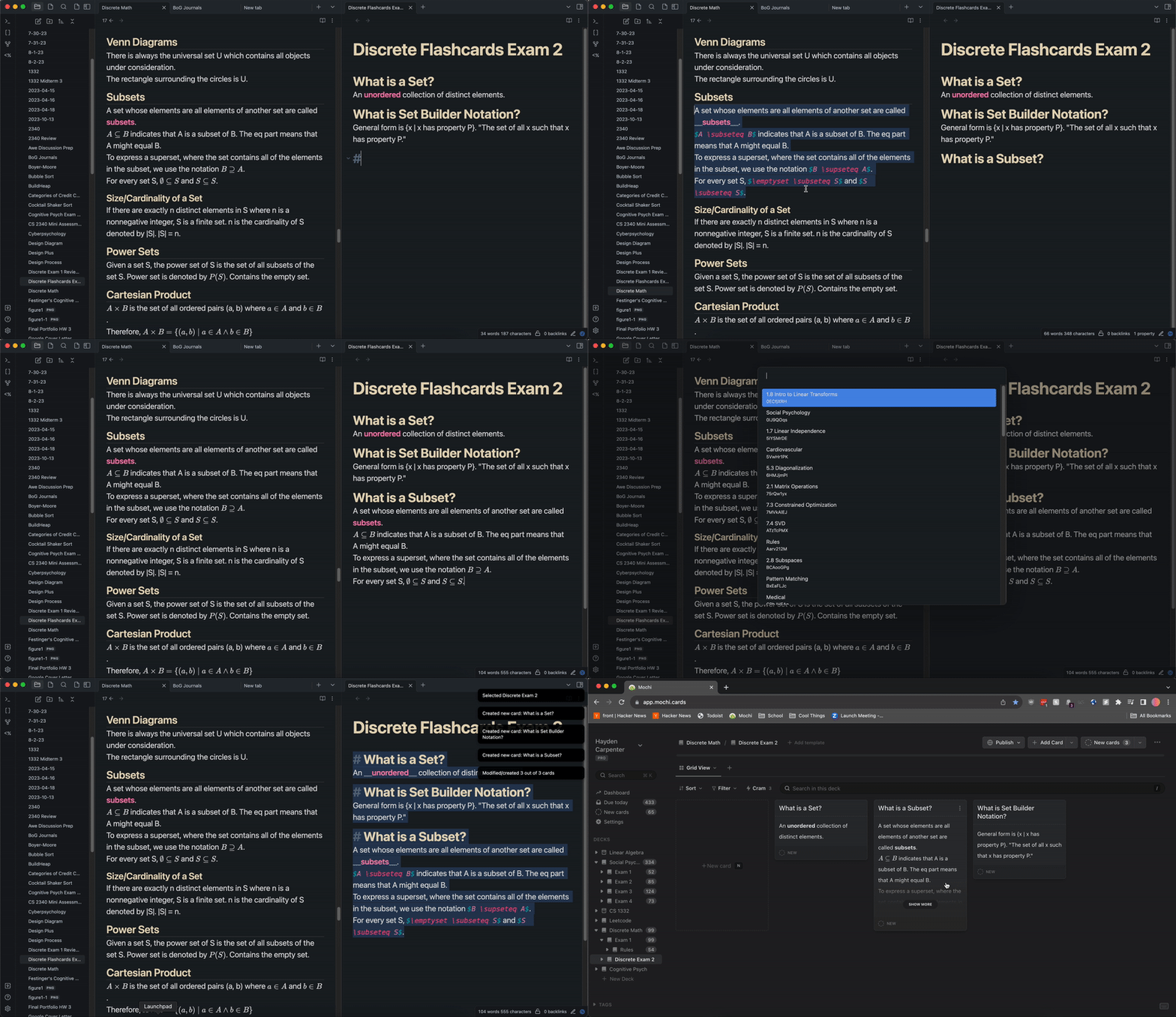
Demo

74%
HealthGood
ReviewCaution
About
Create Mochi flashcards from Markdown notes using Mochi Pro's premium API; supply your Mochi Pro API key to enable exports. Author cards as headings like # Card Name with any Markdown or LaTeX content, select one or many, then run the Export Card from Text command to send them to Mochi. Use Mochi templates that start with << Name >> <input value="">.
Flashcards
Details
Payments
Paid
Current version
0.0.5
Last updated
8 months ago
Created
3 years ago
Updates
5 releases
Downloads
2k
Compatible with
Obsidian 0.15.0+
Platforms
Desktop, Mobile
License
Unlicense
Report bugRequest featureReport plugin
Author
xhaydenxhayden
hayden.gg
GitHubxhayden
  1. Community
  2. Plugins
  3. Flashcards
  4. Mochi Cards Pro

Related plugins

Spaced Repetition

Fight the forgetting curve by reviewing flashcards & entire notes.

Obsidian_to_Anki

Anki integration designed for efficient bulk exporting. Previously known as Obsidian_to_Anki.

Yanki

Sync flashcards from a folder in your vault to Anki. Pure Markdown syntax. No fuss.

Flashcards

Anki integration.

Quiz Generator

Generate interactive flashcards from your notes using models from OpenAI (ChatGPT), Google (Gemini), Ollama (local LLMs), and more. Or manually create your own to use with the quiz UI.

Review

Add a link to the current note to a daily note on a future date (or a past date, you time traveller).

Aosr

Another Obsidian spaced repetition. Use flashcards to review and remember knowledge.

Weave

Enhance knowledge learning and memory consolidation with incremental reading, memory decks, and practice quiz decks.

Repeat

Review notes using periodic or spaced repetition.

LearnKit

A native study system for your Obsidian vault. LearnKit turns notes into durable knowledge with flashcards, spaced repetition, tests, and more.