MiYo Tomo Hashi
 Marcus Breiden334 downloads
Direct integration with Tomo, the Claude Code agent, for session interaction and automated vault updates.
- Overview
- Scorecard
- Updates49
MiYo Tomo Hashi — Obsidian ↔ MiYo Tomo Bridge
Three things in one Obsidian plugin:
- A — Tomo session: A live chat tab that attaches to a running MiYo Tomo (called Tomo further) Docker container. Talk to Tomo from inside Obsidian.
- B — Tomo context: A loopback bridge that gives Tomo (running Claude Code) live editor context — active file, cursor position, and current selection — over a localhost WebSocket. Disabled by default; opt-in.
- C — Tomo instruction executor: An instruction executor that runs
_instructions.jsonfiles Tomo emits, applying batch vault edits with full preview, run logs, and idempotent re-runs.
Part of the MiYo family. The plugin is referred to as MiYo Tomo Hashi in the Obsidian community-plugin index and in the settings UI; "Hashi" alone is used as a short form throughout this README and the source. 橋 means bridge.
Why MiYo Tomo Hashi?
tldr; you don't need, or can't really use this plugin without MiYo Tomo
Tomo (Claude Code) generates a lot of vault-shaped output — MOCs to create, notes to move, daily logs to update — and Tomo's review step is where you decide what to apply. Hashi is what runs the apply step automated, with two opinions baked in:
- Apply happens locally, with a preview. Nothing in your vault changes until you've seen the action list. Even auto-run mode shows the preview first, just without blocking. And if you have the peace of mind.. Tomo Hashi even does everything in the background.. your choice.
- Re-running is safe. Every action has an idempotency probe. Hashi writes
applied: truenext to each action it commits, so a re-trigger picks up where it stopped — after a crash, after manual cleanup, after a partial cancellation.
If you're already using Tomo for inbox processing or daily-note summaries, Hashi turns its review-output into one click.
Hashi itself doesn't have any AI component, it is pure code.
Three components, one plugin
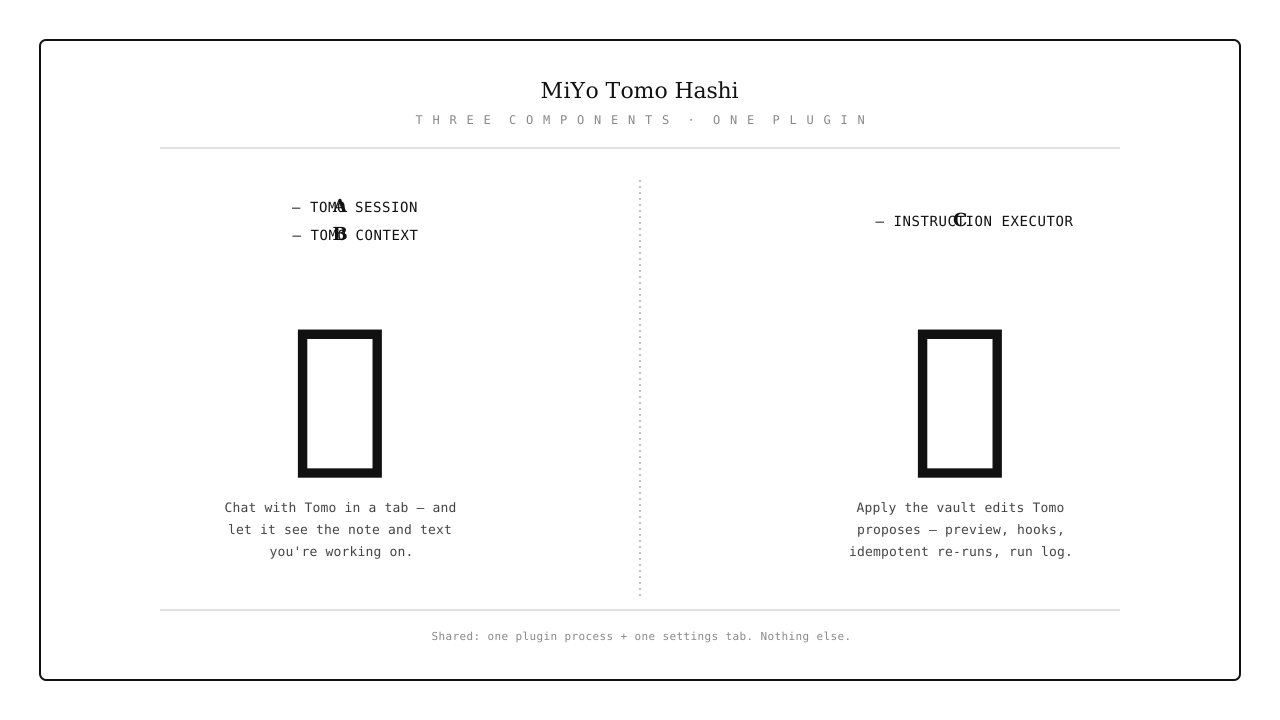
All three components share the plugin process and the settings tab, but nothing else. You can use Hashi for instruction sets without ever connecting to a Tomo container, enable Tomo context without using the chat view, or use any combination independently. See How It Works for the architectural boundary.
Features
A — Tomo session GUI
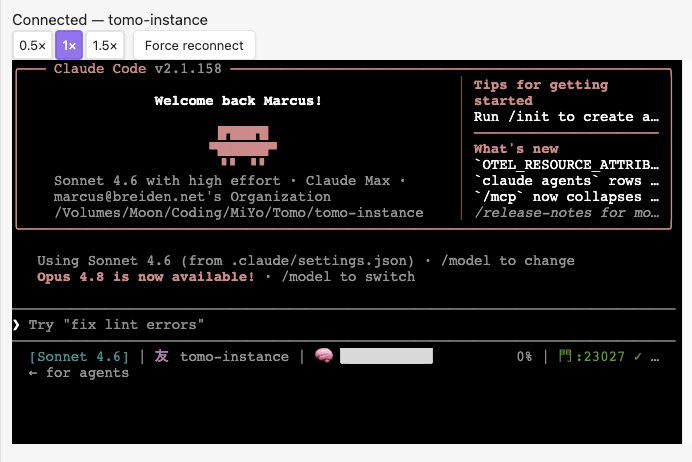
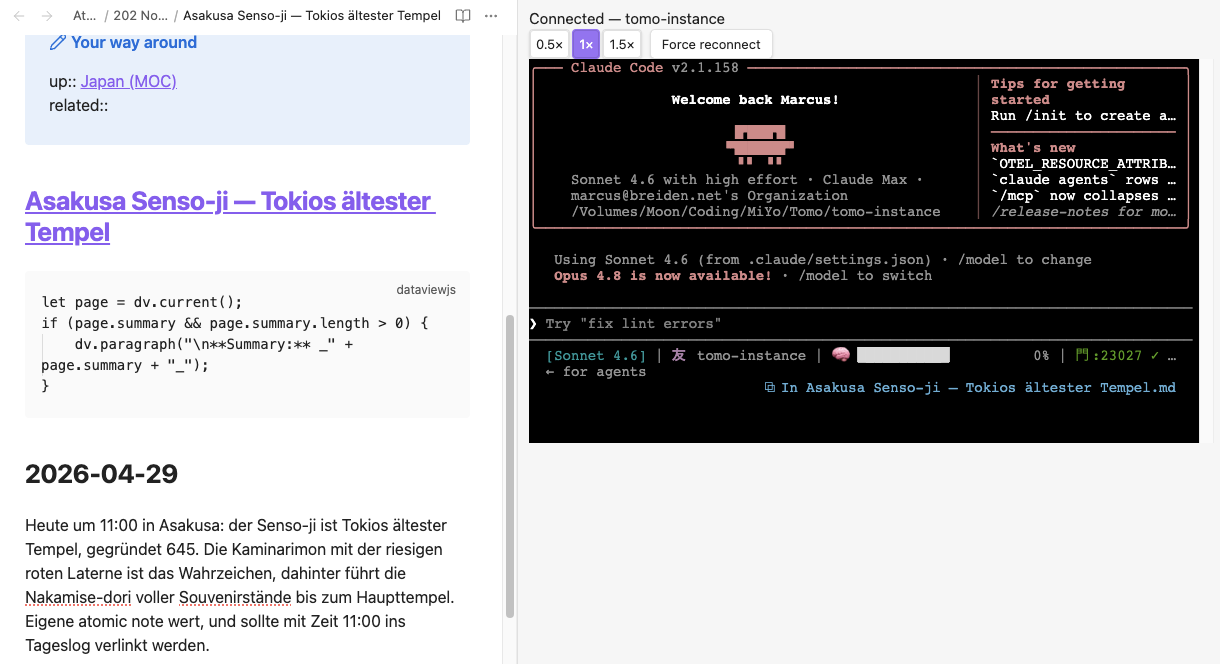
A way to talk to Tomo directly from inside Obsidian. It displays the Docker console 1:1 and lets you interact with Tomo while the Tomo Docker container runs in the background — it doesn't manage Tomo, though.
- Unified chat tab rendering the Tomo container's TUI via xterm.js
- Bidirectional input — type directly into the terminal;
@filereferences are injected into the session via the file-menu action - Connection state in the status bar (友) and chat-view header
- Force reconnect with fixed-schedule backoff (5 attempts, 15.5 s budget)
- Auto-reconnect on plugin load — by container label, with a Notice telling you which one
- Zoom controls (0.5× / 1× / 1.5×), persisted across reloads
- Sync-aware — the persisted instance name handles Obsidian Sync correctly (with a visible warning)
- No external surface — Docker socket is outbound only, no ports opened
B — Tomo context (ambient editor context for Tomo)
A way to let Tomo know what you're working on — which note is open, which text is selected. That lets you ask Tomo things like: "Can you find more material like this in my vault?" Tomo gets the selected text directly as context (so for this part you can circumvent MiYo Kado access control to files), but for anything further Tomo uses Kado again.
- Localhost WebSocket server bound to
127.0.0.1(default port23027, configurable). Loopback-only — not reachable from any other host. - Claude Code IDE protocol — gives Claude Code in your Tomo container live ambient context: the active file path (vault-relative), cursor position, and currently selected text.
- Disabled by default (
ideBridgeEnabled: false). Enable it in Settings → MiYo Tomo Hashi → Tomo context and copy the generated token + port into your Tomo settings. - Auth-gated — the
x-claude-code-ide-authorizationbearer token is checked before the WebSocket handshake completes; wrong or missing token gets HTTP 401. - Tomo handles its side — after you copy the token and port into Tomo, Tomo writes the container-side discovery lock file. Hashi doesn't touch that side.
- Ephemeral only — the bridge streams editor state live; nothing it sends is logged or persisted.
C — Instruction executor
Delegate the tedious work — moving, renaming, and editing notes from your Inbox to the right place — after you've approved the suggestion document. Hashi does the same steps you would, plus a few more via extensible hooks. Approval happens in one of two review surfaces — the Suggestions Editor for /inbox runs, or the Garden-Audit Editor for /garden-audit vault-health scans — both opened by the same Open Tomo editor command:
- Alias needs reconfiguring after a rename? → a hook does it.
- A different note needs updating after a delete? → a hook.
- Don't know how to write one? → ask Tomo 🙂
Cut down on the busywork — with the peace of mind that Hashi does only what you want. (A backup is still recommended 🙂 — shameless plug: my own Obsidian Archivist does exactly that.)
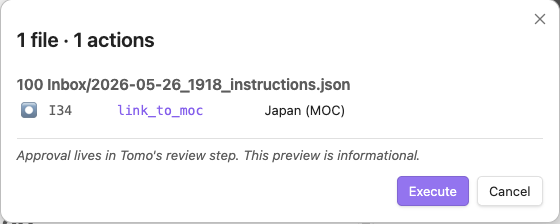
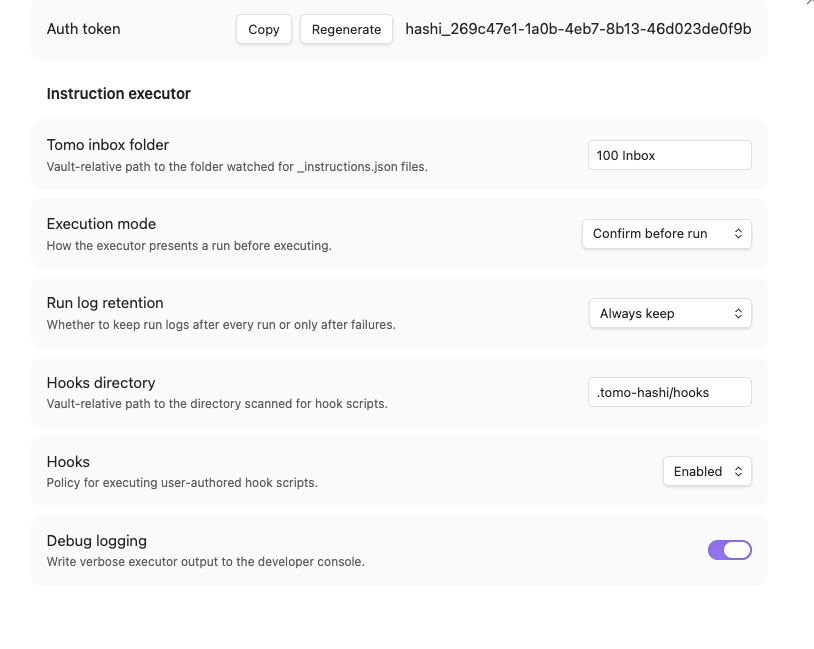
- Three execution modes: Confirm before run / Auto-run with preview / Silent
- Preview → progress → summary modal, all stages in one Modal instance
- Idempotent re-runs with a partial-resume banner ("N of M remaining (X already applied)")
- Per-run log as a markdown file in your inbox folder, with retention policy
- Status bar 橋 indicator (idle / running / error)
- Path safety —
.obsidian/,.git/,.trash/, hooks dir, and traversal-escape paths are denied - Optional hooks —
.cjsfiles in your vault, full plugin privilege, with an ask-mode disclosure modal - Schema validation — vendored Tomo schema, ajv-compiled at module load
- 16 action kinds — create_moc, move_note, move_asset, link_to_moc, insert_under_marker, replace_section, add_relationship, edit_note_text, edit_frontmatter, remove_up_link, resolve_dead_link, update_tracker, update_log_entry, update_log_link, delete_source, skip
- Instruction Fixer — a repair bench for actions that failed or were skipped: fix the mechanical detail (a wrong anchor, a moved target) and re-run, without a full Tomo regeneration. Anchors and markers are picked straight out of the target note, so every offered value is one the executor can resolve. Fail-closed — only opens for editing what a trusted run outcome says actually failed
Documentation
| Document | Audience | Content |
|---|---|---|
| Installation | Everyone | Community Plugins, BRAT, manual install |
| Configuration | Vault owners | Settings reference, all three components |
| How It Works | Vault owners | Three-component architecture, layer boundaries |
| Session View | Tomo users | Chat tab, terminal, zoom, file-prefill — branch A |
| Chat | Tomo users | Picker, reconnect schedule, status bar 友 — branch A |
| Context | Tomo users | Enable + Tomo wiring, auth token, connection troubleshooting — branch B |
| Suggestions Editor | Tomo users | Tabbed review of _suggestions.json, worthy/suppressed cards, MOC placement, Save = approve — branch C |
| Garden-Audit Editor | Tomo users | Tier-grouped review of _garden-audit.json, apply/skip targets, candidate chips, Save = approve — branch C |
| Instruction Executor | Tomo users | Modal stages, modes, partial-resume, status bar 橋 — branch C |
| Instruction Fixer | Tomo users | Repair failed/skipped actions and re-run, fail-closed edit gate — branch C |
| Action Reference | Tomo users | All 16 action kinds with idempotency rules — branch C |
| Hooks | Power users | .cjs hook authoring, policy, disclosure modal — branch C |
| Run Log | Vault owners | Log format, retention, hook output — branch C |
| Development | Contributors | Build, test, lint, architecture, test vault |
| Dependency Security | Contributors / reviewers | Supply-chain advisories, bundle-level reachability, overrides rationale |
Quick Start
- Install Tomo and Kado
- Configure both
- Install the plugin
- Start the Tomo Instance for your Vault.
Quick start — A — Tomo session GUI
- Settings → MiYo Tomo Hashi → Tomo chat → Connect → pick the container in the picker
- Run the command: MiYo Tomo Hashi: Show chat window
- The chat view opens automatically; type to interact, watch Claude Code's TUI render inline
Quick start — B — Tomo context
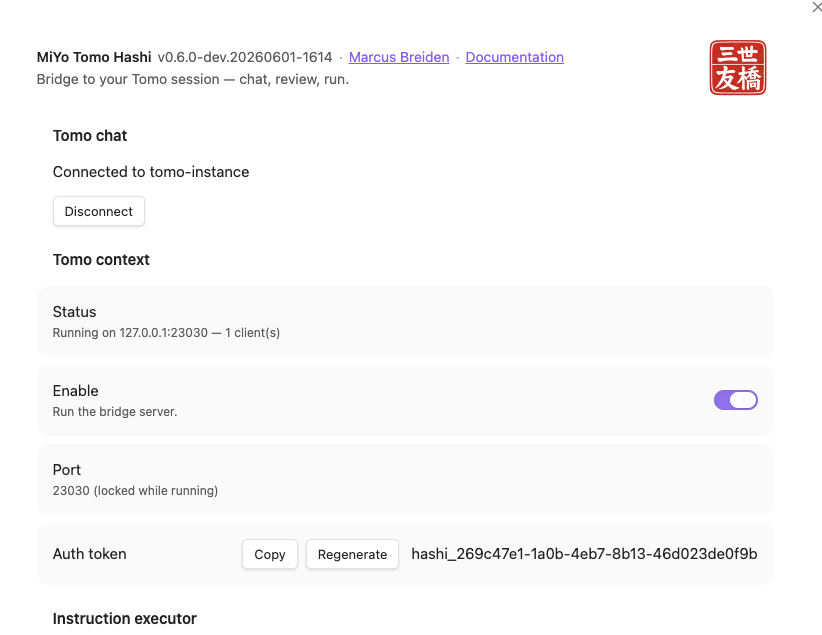
- Settings → MiYo Tomo Hashi → Tomo context
- Configure the port if necessary
- Enable the bridge server
- Copy the Auth token
- Stop Tomo container
- Run /scripts/update-tomo.sh
- Pick your instance if necessary
- Choose to enable Hashi context
- Paste the Auth token
- Make sure port is correct
- run Tomo container
Quick start — C — Instruction executor
- Settings → MiYo Tomo Hashi → Instruction executor
- Tomo inbox folder → set your inbox path (e.g.,
100 Inbox) - Run the full inbox process in Tomo till you have your instruction documents
- Command palette → "Execute instructions document" → review the action list → Execute
- Watch progress; check the run log file (
tomo-hashi-run-log_…md) afterwards
Screenshots
Settings
Execution flow
Screenshot — progress view with rows partway through, glyphs animating, sticky error banner.

Screenshot — summary view with stats line and View errors button.

Hook disclosure
Screenshot — hook disclosure modal asking the user whether to enable a hook (Disable focused as safe default).

Roadmap
- Granular hook policy — per-hook enable/disable persistence (currently session-scoped after the disclosure-modal decision).
- Action: copy_note — explicit copy variant of
move_note. - Rollback hint — when a run halts mid-way, surface a
git restore-style suggestion in the summary. - Mobile compatibility — currently
isDesktopOnly: truebecause of Docker socket and Nodefsuse. Mobile would need a non-Docker transport or drop the Tomo Chat interface. Let me know.
Known edge cases
- Operating systems. Desktop only (
isDesktopOnly: true). macOS is the primary, verified platform; Linux is experimental and Windows is user-contributed — Hashi runs the same code on all three (no per-OS gating), but only macOS is regularly exercised. On any OS, Docker reachability is the real gate, surfaced as a named error if the daemon or socket isn't available. - Auto-reconnect across Obsidian Sync devices. The persisted
chosenInstanceNameis replicated by Sync. On a second device, the auto-attach may land on a same-labelled but unrelated container. Hashi shows a Notice naming the instance it just attached to so a wrong-container connect is detectable.
Part of MiYo
Hashi is part of MiYo, a small family of Obsidian-adjacent tools focused on giving you control over what your assistants can see and do.
- MiYo Kado — security-first MCP gateway. The external-inbound surface for AI assistants. Default-deny, per-key scopes, audit log.
- MiYo Tomo — Claude Code AI workflows. The session you talk to from Hashi's chat view, and the source of the
_instructions.jsonHashi runs. - MiYo Tomo Hashi — this plugin. Paired with Tomo. Outbound Docker socket + optional loopback context bridge; no external surface off-host.
Scope boundary: Kado is the only external-inbound vault surface in the MiYo family. Hashi's Tomo context bridge is an opt-in loopback-only inbound surface (127.0.0.1, disabled by default) for its single consumer — Claude Code in your local Tomo container. It is not reachable from any other host and exposes no vault read/write capability (that's Kado's domain).
Privacy
See PRIVACY.md for the full statement. Short version: nothing leaves your machine. No telemetry, no crash reports, no third-party services.
Support
If MiYo Tomo Hashi is useful and you want to help me keep building, you can support development via:
Issues and pull requests are also very welcome.
Contributing
See the Development Guide for build, test, and lint commands. Short version:
- Open an issue first for non-trivial work so we can align on scope.
- Fork & branch from
mainwith a descriptive name (fix/<thing>,feat/<thing>). - Keep changes focused — one feature or one fix per PR.
- Tests & lint must pass —
npm run build,npm test,npm run lint. - Conventional commits — release notes are generated from commit history.
- Open a PR against
mainand reference the issue.
For security issues, please do not open a public issue — email [email protected] instead.