Mind map editor
 vulture0391k downloads
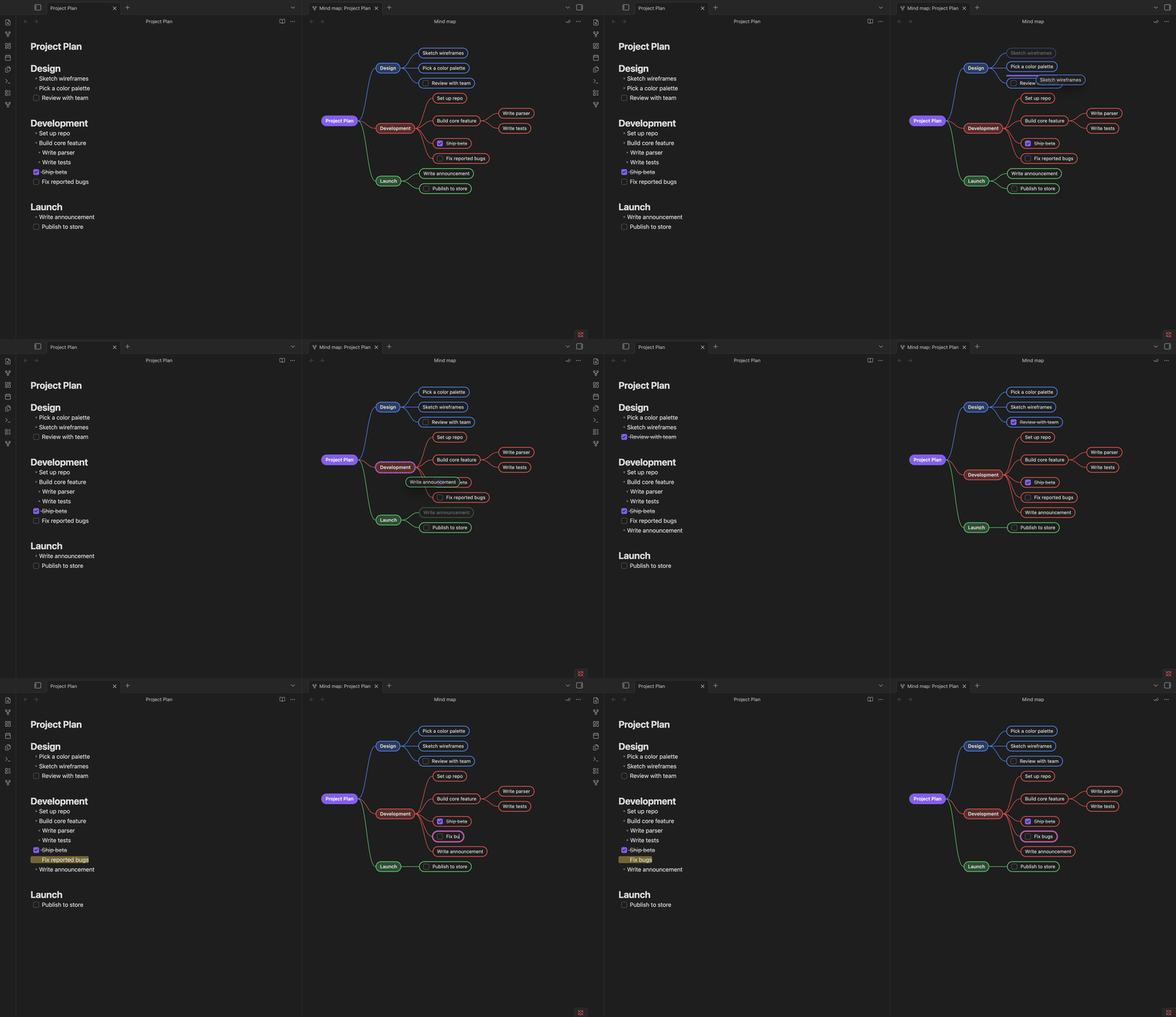
Edit your outline as a mind map, synced to Markdown.
- Overview
- Scorecard
- Updates15
Edit your outline as a mind map, synced to Markdown. No new file format, no markup to add.
Usage
- Open a Markdown file.
- Press Ctrl+P (Cmd+P on macOS) and run
Open mind map for the active file(or click the ribbon icon). Any note's map also opens fromOpen mind map linked to this noteon its right-click menu, in the file explorer or on its tab. - The map opens beside the note on desktop, or in another tab on mobile.
Features
- Markdown-native maps - Headings and lists form the map; edits write back to the same note.
- Direct editing - Add, rename, delete, multi-select, and drag nodes with undo/redo support.
- Tasks and folds - Toggle checkboxes, collapse branches, and optionally hide completed tasks.
- Rich node text - Show body text with inline Markdown, links, and image previews.
- Map/editor sync - Selection, cursor position, folds, and wikilinks stay in sync.
- Flexible views - Zoom, pan, fit, and reopen each map at its saved position.
- Link and Auto-open - Link a map to a Markdown tab, or reopen it automatically with a note.
- Node bookmarks - Save important nodes and jump back from the map header. The plugin follows identifiable edits made in Obsidian even while the map is closed.
- Visual hierarchy - Depth, headings, and customizable branch colors remain easy to distinguish.
Keyboard shortcuts
Active while the mind map pane is focused.
| Key | Action |
|---|---|
↑ / ↓ |
Select previous / next sibling, or walk the node's text line by line |
← / → |
Select parent / first child |
Ctrl/Cmd + ←/→ |
Collapse / expand the selected branch (also in the right-click menu) |
Shift + ↑/↓ |
Move the node among its siblings |
Enter |
Add a sibling (a child on the root) |
Tab |
Add a child |
F2 |
Rename the node |
Space |
Toggle the selected task's checkbox |
Ctrl/Cmd + B |
Add or remove a bookmark for the selected node |
Delete / Backspace |
Delete the selected node(s) and their subtrees |
Ctrl/Cmd + Z / + ⇧Z |
Undo / redo, through the Markdown pane's history - or one step of the map's own when the note is only open for reading |
Esc |
End an edit, else clear the selection |
Back/forward use Obsidian's own Navigate back / forward command:
Ctrl + Alt + ←/→ (Cmd + Option + ←/→ on macOS).
Commands
None of these come with a hotkey; bind the ones you want in Settings → Hotkeys.
| Command | What it does |
|---|---|
Open mind map for the active file |
Same as the ribbon icon |
Open mind map linked to the active file |
Desktop: opens a map tied to the active Markdown tab |
Fit mind map to viewport |
Fits the whole map in the viewport and centers it |
Toggle focus between mind map and Markdown editor |
Jumps between the two panes |
Collapse all branches / Expand all branches |
The ⌄⌃ header button, one direction at a time |
Fold all node text / Unfold all node text |
The ≡ header button, likewise |
Show or hide node text on the map |
The ¶ header button |
Refresh the mind map from the Markdown |
The ⟳ header button: rebuilds the map from its file |
Settings
Settings → Mind map editor:
- Hide completed tasks by default / Show node text by default - What a map starts with; each one is
then switched on its own from its header (
✓✓,¶). - Sync collapse state with Markdown folding (default on) - An editing pane folds both ways; a reading pane follows along by its headings. List folding also follows Obsidian's Editor → Fold settings.
- Split direction - Side by side / stacked, for any pane the plugin splits open. A map that can join one already there opens as a tab instead, wherever that pane sits.
- Remember linked maps (default off) - Enable Auto-open when explicitly linking a map.
- Close linked map with source (default off) - Close a linked map with its Markdown tab.
- Remove all node bookmarks - Remove every saved node bookmark from every note.
- Branch colors - Custom palette, one hex color per line.
Building, testing and releasing the plugin: docs/DEVELOPMENT.md.
HealthExcellent
ReviewPassed
About
Edit your outline as a live mind map that converts headings and bullets into nodes and syncs edits back to the original Markdown with no extra markup or file format. Rename, add, delete and drag nodes; toggle checkboxes; collapse checked tasks into summary pills; follow [[wikilinks]] and color branches.Details
Current version
1.7.1
Last updated
3 days ago
Created
2 months ago
Updates
15 releases
Downloads
1k
Compatible with
Obsidian 1.12.3+
Platforms
Desktop, Mobile
License
MIT
Sponsor