Search...Search plugins and themes...
⌘K
Sign in
  • Get started
  • Download
  • Pricing
  • Enterprise
  • Account
  • Obsidian
  • Overview
  • Sync
  • Publish
  • Canvas
  • Mobile
  • Web Clipper
  • CLI
  • Learn
  • Help
  • Developers
  • Changelog
  • About
  • Roadmap
  • Blog
  • Resources
  • System status
  • License overview
  • Terms of service
  • Privacy policy
  • Security
  • Community
  • Plugins
  • Themes
  • Discord
  • Forum / 中文论坛
  • Merch store
  • Brand guidelines
Follow us
DiscordTwitterBlueskyThreadsMastodonYouTubeGitHub
© 2026 Obsidian

Mermaid Live Link

pkcpkcpkcpkc26 downloads

Adds an Edit in mermaid.live link beneath Mermaid diagrams and styles them for sizing and clean PDF export.

Add to Obsidian
  • Overview
  • Scorecard
  • Updates2

An Obsidian plugin that adds an Edit in mermaid.live ↗ link beneath every Mermaid diagram, in both Live Preview and Reading view. One click opens the diagram in the Mermaid Live Editor with its code preloaded.
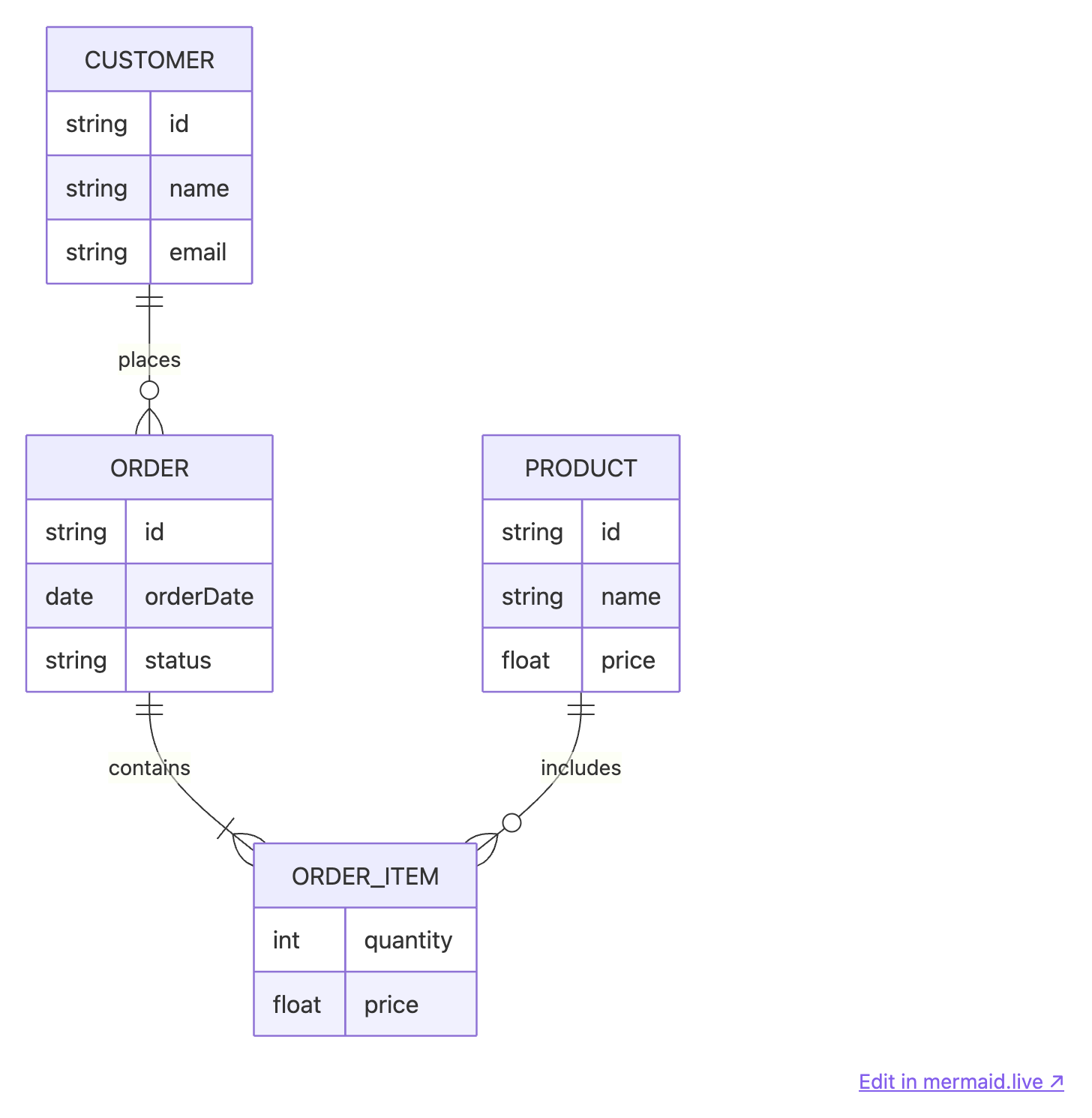
A Mermaid diagram with the Edit in mermaid.live link below it

It also ships styles that keep diagrams at a sensible width and make them print cleanly:

  • Diagrams scale to fit the note width instead of scrolling (and to at most 600 px wide in print).
  • When exporting to PDF, a diagram is never split across pages, never stranded below its headline, and is capped to fit one page.
  • The mermaid.live link is hidden in print and PDF export.

Installation

Manual

  1. Download main.js, manifest.json and styles.css from the latest release.
  2. Copy them to <your vault>/.obsidian/plugins/mermaid-live-link/.
  3. Reload Obsidian and enable Mermaid Live Link under Settings → Community plugins.

BRAT

Add this repository in the BRAT plugin.

Usage

Write a Mermaid code block as usual:

```mermaid
graph TD
  A --> B
```

The link appears below the rendered diagram, including diagrams inside callouts, lists and embedded notes. The diagram opens in mermaid.live with the dark theme when Obsidian uses a dark theme.

Privacy

The plugin makes no network requests. The diagram code is encoded into the link's URL and is only sent to mermaid.live if you click the link. This is why the code uses btoa (base64 encoding): it is the URL format mermaid.live expects.

Development

There is no build step: main.js is plain JavaScript. To try changes, symlink or copy this folder into <vault>/.obsidian/plugins/mermaid-live-link/ and reload the plugin.

Releasing

npm version patch   # or minor / major; updates manifest.json and versions.json
git push --follow-tags

Pushing the tag triggers the GitHub Action, which publishes a release with main.js, manifest.json and styles.css attached, along with GitHub artifact attestations for them. The tag must equal the version in manifest.json (no leading v).

License

MIT

HealthExcellent
ReviewPassed
About
Add an Edit in mermaid.live link beneath every Mermaid diagram in Live Preview and Reading view, opening the diagram in the Mermaid Live Editor with its code preloaded. Scale diagrams to fit the note width and apply print-friendly rules so diagrams don't split across pages, stay with their heading, and fit on one page; hide the mermaid.live link during printing and open the editor in dark mode when Obsidian uses a dark theme.
VisualizationLinks
Details
Current version
1.0.1
Last updated
2 weeks ago
Created
2 weeks ago
Updates
2 releases
Downloads
26
Compatible with
Obsidian 0.15.0+
Platforms
Desktop, Mobile
License
MIT
Report bugRequest featureReport plugin
Author
pkcpkcpkcpkc
GitHubpkcpkc
  1. Community
  2. Plugins
  3. Visualization
  4. Mermaid Live Link

Related plugins

Excalidraw

Visual PKM powerhouse. Create and edit Excalidraw drawings.

ExcaliBrain

An interactive, structured mind-map of your Obsidian vault.

Breadcrumbs

Visualise the hierarchy of your vault using a breadcrumb trail or matrix view.

Strange New Worlds

Reveal networked thought and the strange new worlds created by your vault.

Vault Graph

Your whole vault as one disc: notes packed into folder wedges on a fixed lattice, sized by links, with a growth heatmap, timeline, search and per-folder filters. Deterministic, not force-directed - the same vault always draws the same picture.

Leaflet

Interactive maps inside your notes.

Advanced Canvas

Supercharge your canvas experience. Create presentations, flowcharts and more.

Smart Connections

Find related notes and excerpts while writing. Your AI link building copilot displays relevant content in graph + list view. A local embedding model powers semantic search. Zero setup. No API key.

Advanced URI

Control everything with URI.

Mermaid Tools

Improved Mermaid.js experience: visual toolbar with common elements and more.