Search...Search plugins and themes...
⌘K
Sign in
  • Get started
  • Download
  • Pricing
  • Enterprise
  • Account
  • Obsidian
  • Overview
  • Sync
  • Publish
  • Canvas
  • Mobile
  • Web Clipper
  • CLI
  • Learn
  • Help
  • Developers
  • Changelog
  • About
  • Roadmap
  • Blog
  • Resources
  • System status
  • License overview
  • Terms of service
  • Privacy policy
  • Security
  • Community
  • Plugins
  • Themes
  • Discord
  • Forum / 中文论坛
  • Merch store
  • Brand guidelines
Follow us
DiscordTwitterBlueskyThreadsMastodonYouTubeGitHub
© 2026 Obsidian

Mention Things

stracker-philstracker-phil942 downloads

Define a list of prefixes to trigger an autocomplete suggestion to insert a link.

Add to Obsidian
  • Overview
  • Scorecard
  • Updates3

Obsidian plugin that adds support to mention other notes via customizable signs. Most commonly used to @-mention people:
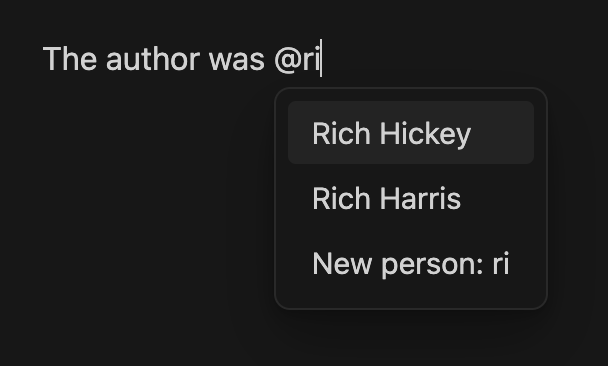
Preview of the auto-complete popup

When you hit enter on a suggestion, it'll create a link that looks like this:

The author was [[@Rich Hickey]]

and leave the cursor at the end.

Credits: This plugin is based on saibotsivad/obsidian-at-people by Tobias Davis

Options
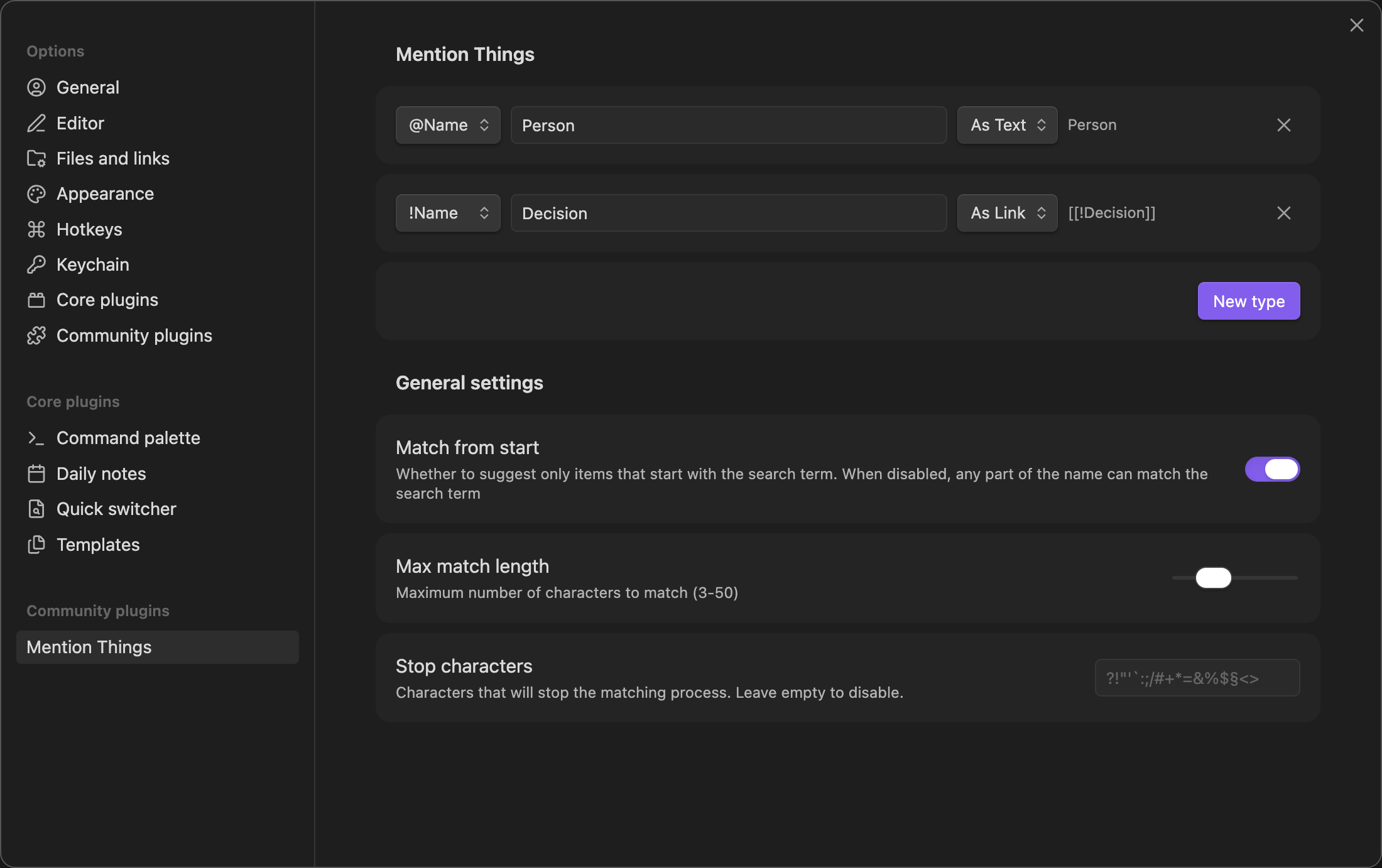
Screenshot of the settings page

Mention Types

Character - The symbol (like "@" or "&") that triggers the suggestion box while typing. Each character can be associated with a different type of mention.

Label - A descriptive name (like "Person" or "Project") that appears in the suggestion box when creating new entries. This helps identify what type of content you're creating.

Type - Whether the note-name should be inserted as a real link, or if you just want to auto-complete the filename as plain-text (useful when using Virtual Linker or similar plugins)

General Settings

Match from start - When enabled, only suggests items that begin with your search term. Recommended for faster, more precise matching.

Max match length - Limits how many characters you can type before suggestions stop appearing. Prevents suggestions from showing when typing longer text that happens to start with a mention character.

Stop characters - Any character in this list will immediately close the suggestion box when typed. Helpful for quickly dismissing suggestions when you type punctuation or special characters.

Changelog

1.1.0

  • New: Mention type (link/text)
  • New: Links use your Obsidian configuration (WikiLink or Markdown link)
  • New: Preview of the generated mention item
  • Change: Improved prefix list, removed invalid characters like >

1.0.2

  • Change: Switched to new Settings API

1.0.1

  • Public release

License

Published and made available freely under the Very Open License.

77%
HealthExcellent
ReviewSatisfactory
About
Create custom mention triggers (e.g., @) to insert linked note mentions or autocomplete filenames as plain text. Select suggestions to insert wiki-style links (e.g., [[@Name]]) and leave the cursor at the end. Define multiple mention types with labels and matching behavior for targeted suggestions.
AutocompleteLinksFiles
Details
Current version
1.1.0
Last updated
3 months ago
Created
2 years ago
Updates
3 releases
Downloads
942
Compatible with
Obsidian 0.15.0+
Platforms
Desktop, Mobile
License
OTHER
Report bugRequest featureReport plugin
Author
stracker-philstracker-phil
philippstracker.com
GitHubstracker-phil
  1. Community
  2. Plugins
  3. Autocomplete
  4. Mention Things

Related plugins

Advanced URI

Control everything with URI.

Note Refactor

Extract note content into new notes and split notes.

Find orphaned files and broken links

Find files that are not linked anywhere and would otherwise be lost in your vault. In other words: files with no backlinks.

Custom Attachment Location

Customize attachment location with variables($filename, $data, etc) like Typora.

YouVersion Linker

Automatically link bible verses in your notes to YouVersion bible.

Wikilink Types

Type @ inside wikilink aliases to add relationship types, auto-synced to YAML frontmatter.

Notebook Navigator

A better file browser and calendar inspired by Apple Notes, Bear, Evernote and Day One.

Local REST API & MCP Server

Unlock your automation needs by interacting with your notes over a secure REST API.

QuickAdd

Quickly add new notes or content to your vault.

Recent Files

Display a list of recently opened files.