Media Notes
 jemstelos26k downloads
Take notes on YouTube videos and podcasts with media controls and timestamps.
- Overview
- Scorecard
- Updates6
A best-in-class video note-taking experience in Obsidian.
Seamlessly capture and replay insights from YouTube videos, podcasts, and lectures into your knowledge base.
- One-Click Save - Instantly save from YouTube to Obsidian media note
- Media Hotkeys:- Pause and skip forward/back while staying in your note
- Timestamps - Insert clickable timestamp links to jump back to key moments
- Resume Playback - Resume videos from where you left off
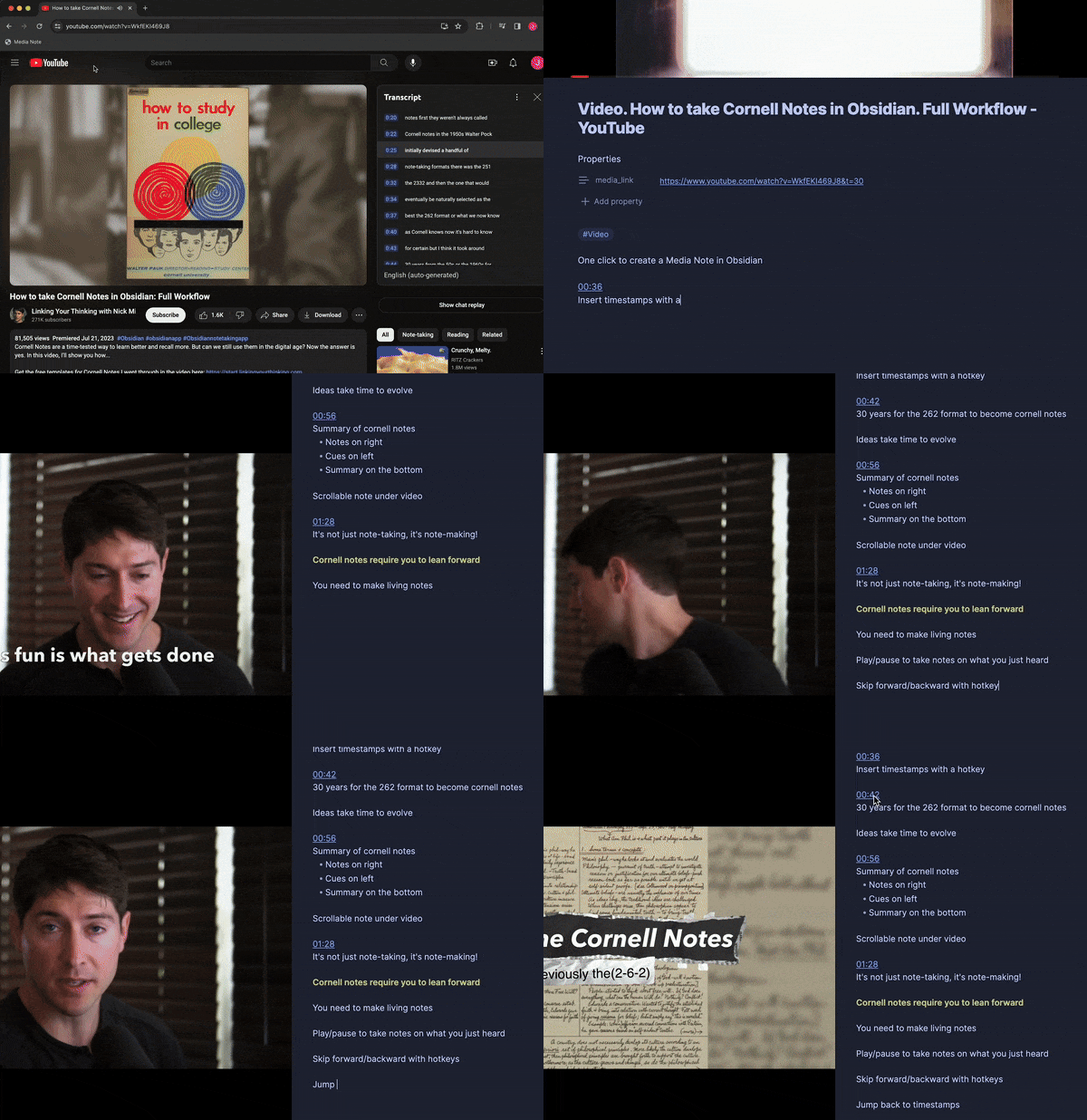
Create Media Note
Create media notes instantly from a Youtube page using the provided bookmarklet (instructions here).
This lets you click a button in your browser bar and automatically create a note for the YouTube video you're watching while continuing playback from the current location.
You can turn any Obsidian note into a media note by using the Add file property command, then typing in media_link and pasting the URL.
Media Controls
Setup hotkeys to allow you to control the playback of the media you're taking notes on without leaving your note.
Hotkeys can be setup however you like through the Hotkeys settings page. Suggestion hotkeys for Mac users that mirror YouTube's hotkey layout: ⌃J - Jump Backward ⌃K - Play/Pause ⌃L - Jump Forward ⌃I - Insert Timestamp
Inserting Timestamps
Timestamps can be inserted for the current time in the video with a hotkey.
Clicking links that have the timestamp format (HH:MM:SS) will jump the playback time for the note's media player to that timestamp.
Settings
Customize the viewing and note-taking experience with settings:
- Vertical/Horizontal Player Mode - this sets the default viewing behavior, you can still toggle the mode for any given note
- Player Size
- Progress Bar Visibility + Color
- Timestamp offset - you typically want to make a note on a point that was made a few seconds in the past
- Timestamp template - you may want to insert timestamps with a space at the end or the beginning, depending on your workflow
Format
A media note is just a markdown note with a media_link property that contains a supported URL format. For example:
---
media_link: https://www.youtube.com/watch?v=MFXWY8TqSWw
---

[02:01]() - A useful insight, ties to my thought that [[Connections are key to creativity.]]
Media notes display an embedded player fixed in the note pane, so that the note content can be scrolled while viewing the player.
Timestamps are inserted into the note as markdown links with a timestamp format:
[3:05:53]()
Clicking links that have the timestamp format (HH:MM:SS) will jump the playback time for the note's media player to that timestamp.
Installation
Search "Media Notes" in the Obsidian Community Plugins library to find this plugin and add it.
Roadmap
- Speed controls
- Pause when inserting timestamp
- Support jumping to timestamp links using keyboard shortcuts (e.g alt+enter)
- Support for jumping to timestamp link via https://github.com/mrjackphil/obsidian-jump-to-link
- Drag to resize media player frame
- Hotkey to toggle focus onto video and use YouTube hotkeys
- Support for other media content providers
If you'd like to provide feedback or suggestions for improvements, please use this form.
Recent Updates
- Improve bookmarklet to pause YouTube video and resume from the same spot in Obsidian
- Support newlines and YouTube url in timestamp templates
Support
If you receive value from this plugin and would like to support the work, please consider making a donation!