MathJax Complete
 Tomas Gutierrez61 downloads
Suggest and complete LaTeX commands inside math, with math previews.
- Overview
- Scorecard
- Updates2
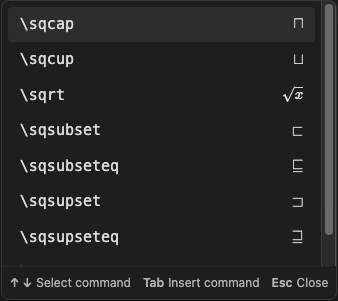
LaTeX command completion for Obsidian math, with a preview beside each suggestion.
Type \ inside $...$ or $$...$$ to open the command list, type more letters to filter the list, use the arrow keys to select a command, and press Tab to insert the command.
Features
- Uses Obsidian's built-in suggestion list.
- Shows the full available command list after one backslash.
- Shows math previews on the right of each command.
- Uses short labels for invisible effects.
- Reads built-in commands from Obsidian's loaded MathJax system.
- Inserts required braces and puts the cursor in the first empty input.
- Includes templates for supported math environments.
- Works offline. Matching and previews run locally.
Use
| Key | Action |
|---|---|
\ |
Open suggestions inside math. |
| Letters | Filter by command-name prefix. Matching is case-sensitive. |
| Up / Down | Select a command in the list. |
| Tab / Enter | Insert the selected command. |
| Esc | Close the list. |
You can also click a suggestion to insert it. For example, type \fr, select \frac, and press Tab to insert \frac{}{}.
Install
Requires Obsidian 1.14.5 or later.
- Download
main.js,manifest.json, andstyles.cssfrom the latest release. - Create a
mathjax-completefolder inside your vault's.obsidian/pluginsfolder. - Copy the three files into that folder.
- Open or reload Obsidian.
- Open Settings → Community plugins and enable MathJax Complete.
The plugin has been tested on macOS. Mobile use has not yet been tested.
Development
Use Node.js 24 or later.
npm ci
npm test
npm run build
npm run check:release
MathJax is used as a test dependency. The installed plugin uses the MathJax system supplied by Obsidian.
To report a problem, open an issue with your Obsidian version, an example of the problem, and the result you expected.