LaTeX-like Theorem & Equation Referencer
 ryotaushio36k downloads
A powerful indexing & referencing system for theorems & equations in your vault. Bring LaTeX-like workflow into Obsidian with theorem environments, automatic equation numbering, and more.
- Overview
- Scorecard
- Updates71
[!important] This plugin had been called Math Booster until version 2.1.4, but has been renamed for better clarity and discoverability. A big thank you to those who shared their thoughts here.
LaTeX-like Theorem & Equation Referencer is an Obsidian.md plugin that provides a powerful indexing & referencing system for theorems & equations in your vault, bringing $\LaTeX$-like workflow into Obsidian.
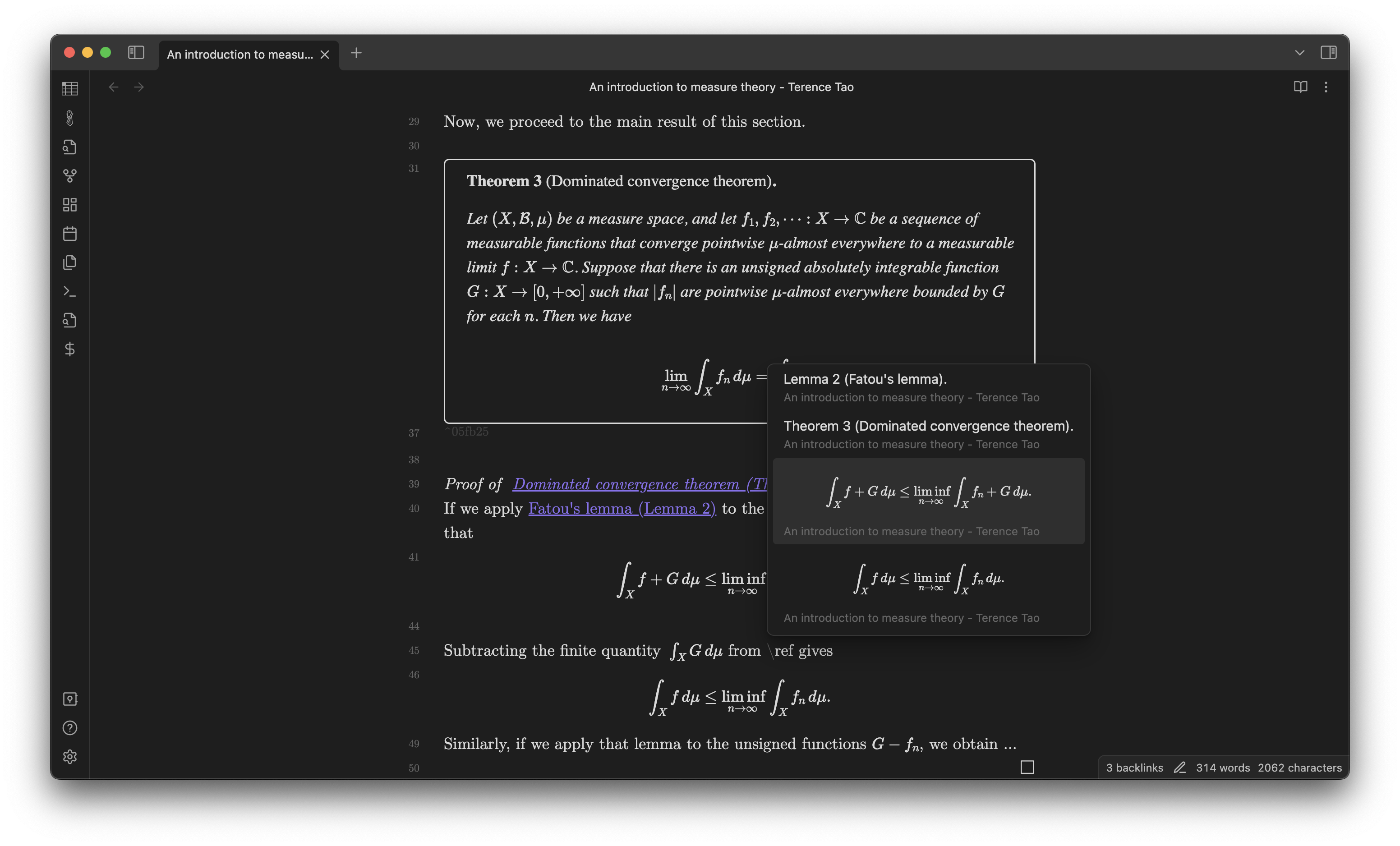
(The theorem in the screenshot is cited from Tao, Terence, ed. An introduction to measure theory. Vol. 126. American Mathematical Soc., 2011.)
Docs
https://ryotaushio.github.io/obsidian-latex-theorem-equation-referencer/
Features
- Theorem environments
- Automatic equation numbering
- Clever referencing
- Search & link autocomplete
- Custom link autocomplete
- Easily find & insert link to theorems & equations.
- Filter theorems & equations based on their locations (entire vault/recent notes/active note)
- Search modal: more control & flexibility than editor autocomplete, including Dataview queries
- Custom link autocomplete
- Proof environment (experimental)
[!note] For more modular and focused enhancements, some features are planned to be transitioned from this plugin to dedicated, specialized plugins in the near future. Below are the upcoming changes:
Transitioning to Better Math in Callouts & Blockquotes
- Rendering equations inside callouts
- Multi-line equation support inside blockquotes
Transitioning to Rendered Block Link Suggestions
Theorems & equations can be dynamically/automatically numbered, while you can statically/manually number them if you want. The number prefix can be either explicitly specified or automatically inferred from the note title.
Thanks to the integration with MathLinks, links to theorems/equations are displayed with their title or number, similarly to the cleveref package in LaTeX. (No need for manually typing aliases!)
You can also customize the appearance of theorem callouts using CSS snippets; see here.
Companion plugins
Here's a list of other math-related plugins I've developed:
- No More Flickering Inline Math
- Better Math in Callouts & Blockquotes
- MathJax Preamble Manager
- Auto-\displaystyle Inline Math
Installation
You can install this plugin via Obsidian's community plugin browser (see here for instructions).
Also, you can test the latest beta release using BRAT:
- Install BRAT and enable it.
- Go to Options. In the Beta Plugin List section, click on the Add Beta plugin button.
- Copy and paste
RyotaUshio/obsidian-latex-theorem-equation-referencerin the pop-up prompt and click on Add Plugin. - (Optional) Turn on Auto-update plugins at startup at the top of the page.
- Go to Community plugins > Installed plugins. You will find "LaTeX-like Theorem & Equation Referencer" in the list. Click on the toggle button to enable it. Since version 2 is still beta, it's not on the community plugin browser yet.
Dependencies
Obsidian plugins
This plugin requires MathLinks version 0.5.3 or higher installed to work properly (Clever referencing).
In version 2, Dataview is no longer required. But I strongly recommend installing it because it enhances this plugin's search functionality significantly.
Fonts
You have to install CMU Serif to get some of the preset styles for theorem callouts displayed properly.
Additionally, Noto Sans JP is required for render the preset styles properly in Japanese.
Contributing
- Feel free to create a new issue if something is not working well. Questions are also welcomed.
- Please send a pull request if you have any ideas to improve this plugin and our experience!
- Contribution to the docs is also highly appreciated: see here.
Roadmaps
- Import from LaTeX: ArXiv papers, research/literature notes written in LaTeX, ...
- Export to LaTeX: Write research notes in Obsidian, and then export them into LaTeX.
Support development
If you find this plugin useful, please support my work by buying me a coffee!