Search...Search plugins and themes...
⌘K
Sign in
  • Get started
  • Download
  • Pricing
  • Enterprise
  • Account
  • Obsidian
  • Overview
  • Sync
  • Publish
  • Canvas
  • Mobile
  • Web Clipper
  • CLI
  • Learn
  • Help
  • Developers
  • Changelog
  • About
  • Roadmap
  • Blog
  • Resources
  • System status
  • License overview
  • Terms of service
  • Privacy policy
  • Security
  • Community
  • Plugins
  • Themes
  • Discord
  • Forum / 中文论坛
  • Merch store
  • Brand guidelines
Follow us
DiscordTwitterBlueskyThreadsMastodonYouTubeGitHub
© 2026 Obsidian

Markdoc

kamoshikamoshi3k downloads

Basic support for Markdoc files.

Add to Obsidian
  • Overview
  • Scorecard
  • Updates1

This plugin enables editing .mdoc files inside Obsidian and adds basic syntax highlighting for Markdoc tags.

What does it do?

File

All markdoc files are accessible from the Obsidian file explorer as can be seen on the screenshot above. This means they can be edited like any other markdown file.
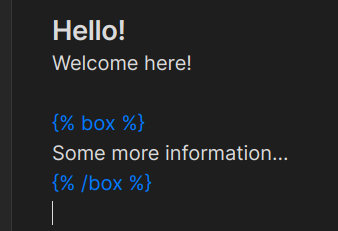
Highlight

Very basic syntax highlighting for markdoc blocks is provided by this plugin.

How to use

If you would like to manually install this plugin you need to download three different files:

  • manifest.json
  • main.js
  • styles.css

Inside your vault locate the .obsidian directory and create a new subdirectory. Copy the three aforementioned files inside the newly created subdirectory. Lastly, reload the obsidian app and in settings under the "Community plugins" enable this plugin.

After finishing these steps the plugin should be installed.

HealthGood
ReviewCaution
About
Edit .mdoc files directly in Obsidian and access them from the file explorer like regular Markdown notes. Add basic syntax highlighting for Markdoc tags to improve readability while authoring.
FormatsSyntaxFiles
Details
Current version
0.0.1
Last updated
3 years ago
Created
3 years ago
Updates
1 release
Downloads
3k
Compatible with
Obsidian 0.15.0+
Platforms
Desktop, Mobile
License
MIT
Report bugRequest featureReport plugin
Author
kamoshikamoshi
github.com/kamoshi
GitHubkamoshi
  1. Community
  2. Plugins
  3. Formats
  4. Markdoc

Related plugins

Importer

Convert your data to Markdown files you can use in Obsidian. Works with Apple Notes, OneNote, Evernote, Notion, Google Keep, and many other formats.

Notebook Navigator

A better file browser and calendar inspired by Apple Notes, Bear, Evernote and Day One.

Claudian

Embeds Claude Code/Codex and other local Agents as AI collaborators in your vault.

Advanced URI

Control everything with URI.

Local REST API with MCP

Unlock your automation needs by interacting with your notes over a secure REST API.

Find orphaned files and broken links

Find files that are not linked anywhere and would otherwise be lost in your vault. In other words: files with no backlinks.

Omnisearch

Intelligent search for your notes, PDFs, and OCR for images.

Recent Files

Display a list of recently opened files.

QuickAdd

Quickly add new notes or content to your vault.

Text Extractor

A (companion) plugin to facilitate the extraction of text from images (OCR) and PDFs.