Loud Outline
 Dan131 downloads
Like Quiet Outline, but louder! Shows each note's headings, tasks and lists as expandable nodes right in the file explorer — no separate outline pane needed.
- Overview
- Scorecard
- Updates9
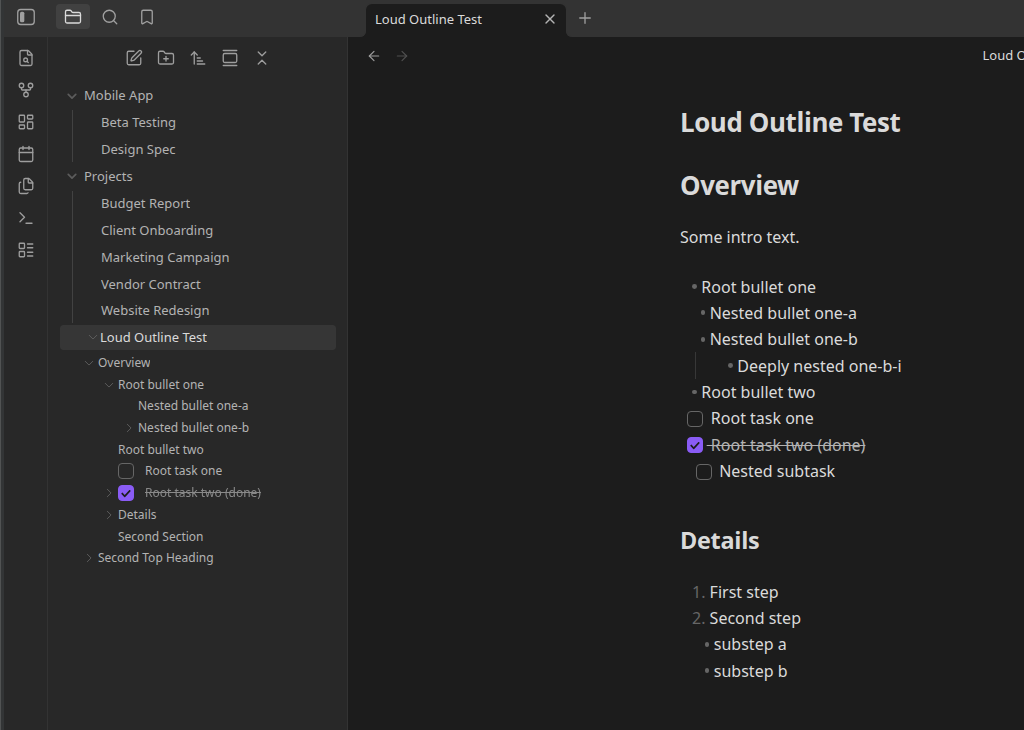
Like Quiet Outline, but louder! Shows each note's headings, tasks and lists as expandable/collapsible nodes directly in Obsidian's native file explorer — the same interaction as a folder expanding to reveal the files inside it, except a file expands to reveal its own outline.
No separate outline pane. The file tree is the outline.
Features
- Headings in the file tree. Every markdown file's H1–H6 structure is parsed and rendered as nested, expandable child rows under that file, respecting heading level nesting (an H2 nests under its preceding H1, an H3 under its preceding H2, and so on).
- Click to navigate. Clicking a heading (or task/list) node opens the file if it isn't already active and scrolls the cursor to that line.
- Tasks and nested lists, too. Task lists (
- [ ]/- [x]) and ordinary nested bullet/numbered lists also appear as tree nodes:- A list under a heading nests its root item under that heading, and any items nested inside the list nest the same way inside the tree.
- A list at the top of a file (above any heading, or in a file with no headings) nests directly under the file itself.
- Toggle-able. Turn tasks/lists off in settings to fall back to headings-only.
- Checkboxes are clickable. Clicking a task's checkbox in the tree toggles it exactly like clicking that same checkbox in Reading View/Live Preview does, written straight back to the file — no need to open the note first.
- Matches custom checkbox styling. Checkboxes in the tree pick up the same styling as the note itself — CSS-only "alternate checkbox" snippets/themes automatically, plus exact color/label parity with Checklist Status Sets if it's installed, instead of always falling back to a generic checked/unchecked box. For tasks it governs, the dot is interactive too — left-click cycles status, right-click opens its status picker, right from the tree.
Why
Quiet Outline and the built-in Outline core plugin both show a note's heading structure in their own dedicated sidebar pane, disconnected from the file tree. Loud Outline borrows that navigation mechanic but folds the result into the file explorer itself instead of adding another pane — and extends it to tasks and lists, which neither of those show.
Installation
From within Obsidian (once available in the Community Plugins directory)
Settings → Community plugins → Browse → search "Loud Outline" → Install → Enable.
Manual
- Download
main.js,manifest.jsonandstyles.cssfrom the latest release. - Copy them into
<your-vault>/.obsidian/plugins/loud-outline/. - Reload Obsidian and enable Loud Outline under Settings → Community plugins.
Settings
- Show tasks and lists — on by default. When off, the tree falls back to showing headings only.
Development
npm install
npm run dev    # esbuild watch mode
npm run build  # type-check + production bundle
This follows the standard Obsidian sample plugin build setup (esbuild + TypeScript).