Local Sidekick
 HPuntu434 downloads
A local Pi and Ollama llm agent chat sidebar for Obsidian vaults.
- Overview
- Scorecard
- Updates20
A light Obsidian plugin I got Codex to build for me so I could use local LLM agents through a simple interactive chat sidebar in Obsidian via Ollama and the Pi agent harness.
DISCLAIMER: I am not a javascript/node developer. This is a vibe-coded project with human oversight prioritising safe, conservative agent capabilities and simplicity. If anyone has relevant experience or suggestions for improvements, I'd be happy to hear from you. I know that one or two similar agent plugins exist, but I wanted one specifically designed for local agents as a lightweight sidebar chat rather than a full dashboard or ACP generalist.
About
Local Sidekick is a local-first LLM sidebar for Obsidian, for Pi and Ollama users who want vault-aware chat without anything leaving their machine.
What It Does To Your Vault
Read this before installing.
Local Sidekick reads your vault. That is the point of it. By default it launches Pi with its read-only tools enabled — read, grep, find, and ls — rooted at your vault. The agent can open and search your notes on its own, without asking each time. The plugin also assembles context itself from @-mentions, the current note or selection, vault search, and pinned notes.
What it will not do by default:
- Write. Every change arrives as a proposal. You see a diff and approve each one individually, and only Markdown files inside the vault can be written.
- Delete. Not implemented at all.
- Run shell commands. Only exact entries in a allowlist you maintain, only when you type
@cmd(...)yourself, and never through a shell. - Reach the network. Web fetch is off. Enabled, it is HTTPS-only to hosts you list explicitly.
- Phone home. No telemetry, and no local server. Prompts go to your local Ollama and nowhere else.
Agent prompt runs load only Sidekick's bundled vault-tools extension. User extensions, skills, templates and context files are disabled for those runs. Pi user configuration for discovery is a separate opt-in for discovery and model selection; those processes can execute user extension code and must be trusted. Local Sidekick does not provide an OS sandbox for Pi.
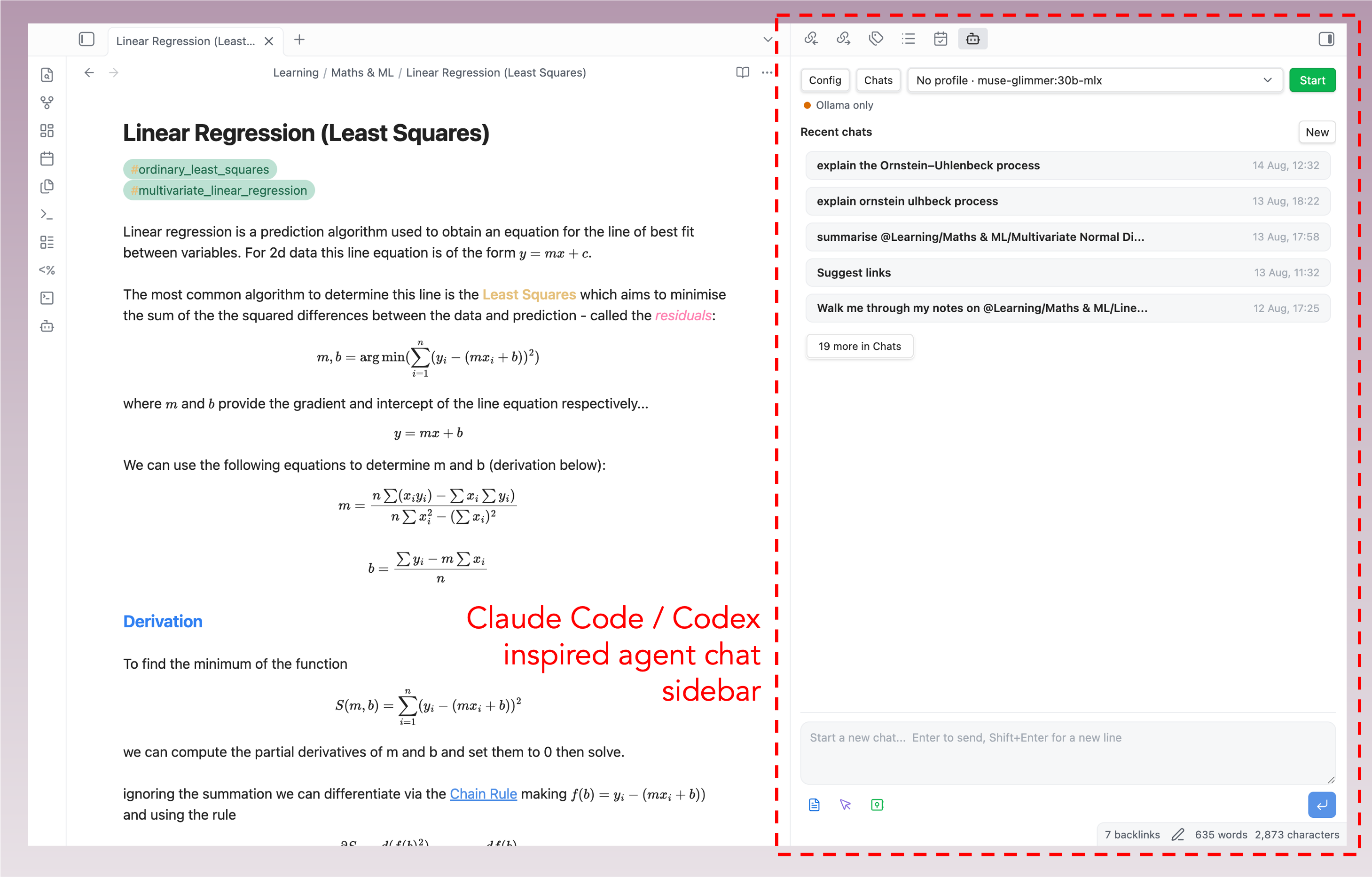 Local Sidekick seamlessly uses your Obsidian theme for its UI, supporting dark and light mode. It can be launched from the command palette or from the small AI agent icon on the left toolbar. Doing so will open the interactive dashboard as a tab in the right hand sidebar. An agent status panel at the top of the sidebar gives real time information on the local models being used alongside interactive buttons to find local models. Below a new chat can be started from an interactive prompt box with model selection or a recent chat from session history continued.
Features
- Local model workflow through Pi and Ollama.
- Vault-native Sidekick agent profiles, prompt library files, and memory files under
Sidekick/. - Persistent chat sessions with a history landing page.
- Compact model rail with discovered Pi/Ollama models and capability badges.
- Markdown and math rendering through Obsidian's renderer.
- Vault file mentions with
@, including Markdown, text-like files, attachments, and best-effort PDF text extraction. - Prompt context helpers:
@search(query)for local vault search.@semantic(query)for lightweight related-note search.@vault-indexfor filenames and top headings.@linksor@links(query)for conservative internal link suggestions.@cmd(command)for exact allowlisted local commands.@url(url)for optional HTTPS web fetch context from explicitly allowlisted hosts.
- Reviewed Markdown edit proposals with visible diffs and approval before write.
- Chat export to Markdown, defaulting to a
Chats/folder in the vault. - Starter research tutor, writing editor, code reviewer, vault linker, and glossary curator profiles.
- Explicit export of Sidekick profiles into Pi prompt templates and skills under
.pi/. - Obsidian command palette actions for opening the sidebar, exporting chats, checking Pi/Ollama, refreshing Sidekick memory files, and suggesting internal links.
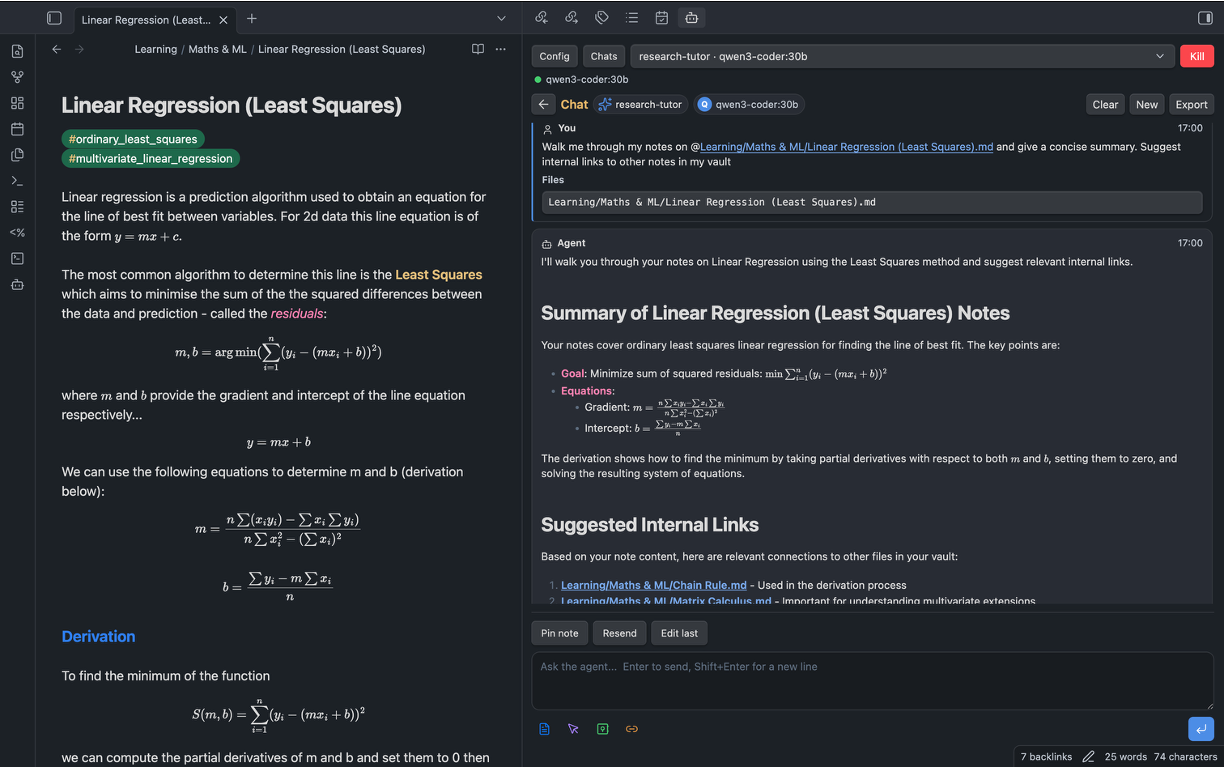 Chat session agent reply streams are rendered in markdown with your Obsidian theme, handling math and standard formatting. For a full Obsidian IDE experience use the terminal plugin alongside this so you never have to leave Obsidian!
Internal Link Suggestions
Sidekick also includes a plugin-native internal link suggester, available from the command palette or with @links, that proposes connections between notes without requiring Pi tool support. It builds conservative candidates from Markdown filenames and top-level headings, ranks them with local related-note search, and shows reviewed diffs before any note is changed.
New Agentic Productivity Features Introduced in v0.1.8
To better exploit the local-first nature of Sidekick, v0.1.8 introduces a set of features for turning your vault into a persistent source of agent instructions, memory, and workflow configuration.
- Sidekick can now create a
Sidekick/folder in the root of your vault, including template.agent.mdprofiles for different use cases. .agent.mdprofiles can specify preferred local models, tool usage preferences, included memory files, and system-style instructions written directly in Markdown.- Agent profiles can be selected from the UI, with model choices narrowed to the models that make sense for that profile.
- Custom prompts, vault memory, project summaries, glossaries, and other reusable context can now live as ordinary Markdown files inside the vault and be referenced with
@. - Users can ask the agent to help generate or update profile files and memory files, making it easier to maintain things like a vault glossary or project index over time.
- Sidekick can export selected profiles, prompts, and skills in a Pi-compatible format for use outside the plugin.
Requirements
- Obsidian desktop
1.5.0or newer. - Node.js and npm for building from source.
- Ollama running locally.
- Pi installed and available as
pi, or configured with an absolute executable path in plugin settings. - At least one Ollama model configured in Pi.
Tool use depends on the selected model. Some Ollama models can chat but do not support tools. When a model does not support tools, set Pi tools to Disabled and use explicit @ context, @search, @semantic, and @vault-index instead.
Installation
Install from inside Obsidian: open Settings → Community plugins, browse, search for "Local Sidekick", install, and enable it. You can also build from source (below).
From Source
- Clone this repository.
- Install dependencies:
npm install
- Build the plugin:
npm run build
- Create this folder in your vault:
.obsidian/plugins/local-sidekick/
- Copy these files into that folder:
main.js
manifest.json
styles.css
- Reload Obsidian and enable
Local SidekickinSettings -> Community plugins.
For alpha testing, use a copied vault or a small test vault first.
Pi And Ollama Setup
The expandable thinking scale at the bottom-right of the composer sets effort for the next prompt.
Medium is the default, including for older saved Default preferences. Selected levels
override the saved session level when a prompt starts. The selection is saved in Sidekick.
Unsupported selections fall back to Medium or another supported level when switching models.
Extra high appears when the model explicitly maps thinkingLevelMap.xhigh to a provider value.
Ollama models expose low, medium, and high, subject to thinkingLevelMap exclusions.
Off requires an explicit thinkingLevelMap.off provider value (such as none)
and is unavailable for GPT-OSS. Levels depend on the model and Ollama version;
they do not specify a duration. The prompt timeout remains a separate deadline.
- Start Ollama.
- Pull the local models you want to use.
- Tell Pi about those models. This step is required and is not automatic — Pi does not read Ollama's inventory. List each model in
~/.pi/agent/models.json:
{
  "providers": {
    "ollama": {
      "api": "openai-completions",
      "apiKey": "ollama",
      "baseUrl": "http://127.0.0.1:11434/v1",
      "models": [
        { "id": "gemma4:31b" },
        { "id": "qwen3-coder:30b" }
      ]
    }
  }
}
apiKey must be present even though Ollama ignores it. A model you have pulled but not listed here appears in the model picker marked not in Pi; click it to copy the entry to paste into this file.
4. In Obsidian, open Settings -> Local Sidekick.
5. Confirm:
Ollama hostpoints to your local Ollama server, usuallyhttp://127.0.0.1:11434.Pi executableis eitherpior the absolute path to your Pi binary.Pi toolsisRead-only(the default) orDisabledif you want Pi fully tool-free.Pi user configuration for discoveryis off, unless you trust every extension your Pi setup loads.
- Open the sidebar and click
Ollama,Pi, andRPCto confirm discovery.
The sidebar can still be useful without Pi tools. File mentions and local context directives are often safer and more reliable than asking a model to inspect the vault on its own.
Usage
Open the command palette and run Open Sidekick. Local Sidekick opens as a right sidebar so your main note stays visible.
Start a new chat from the session landing page, or select a previous session. Use the agent profile selector to choose a local .agent.md profile, then use the model rail at the top to switch among that profile's model choices. Use @ in the composer to attach vault files as context.
Useful prompt patterns:
Summarize @Projects/Example/MAIN.md and list only facts supported by that file.
Use @vault-index and @semantic(EGNO interpolation) to suggest related notes.
Use @links for this note and propose only high-confidence Obsidian links.
Use @cmd(git status) and tell me whether the vault plugin repo is clean.
/agent research-tutor
Explain @Projects/Example/MAIN.md and quiz me on the key definitions.
When the agent proposes edits, it must use reviewed edit blocks. The plugin renders a diff and requires approval before applying changes.
Sidekick Agent Profiles And Memory
Nothing is written to your vault on install. The starter profiles are created only when you ask for them, from Settings -> Local Sidekick -> Create starters, the sidebar Create button, or the Create Sidekick starter files command. Until then no Sidekick/ folder exists and the profile picker is empty, which is expected.
When you do, Local Sidekick creates a vault-root Sidekick/ folder for portable agent profiles and durable local memory files:
Sidekick/
  Agents/
    research-tutor.agent.md
    writing-editor.agent.md
    code-reviewer.agent.md
    vault-linker.agent.md
    glossary-curator.agent.md
  Prompts/
    summarize-note.prompt.md
    research-questions.prompt.md
    glossary-update.prompt.md
  Memory/
    vault-summary.md
    user-preferences.md
    project-index.md
    glossary.md
Create these starter files from Settings, the sidebar Create button, or the Create Sidekick starter files command. Sidekick/Prompts/*.prompt.md files are ordinary Markdown prompt snippets: mention them with @, copy from them, or include them from an .agent.md profile. Refresh Sidekick/Memory/project-index.md with the Refresh Sidekick project index command; it is generated from local Markdown filenames and top headings.
A .agent.md file uses simple YAML frontmatter plus Markdown instructions:
---
name: research-tutor
description: Socratic research helper for careful note-grounded explanations.
models:
  - ollama/qwen3-coder:30b
  - ollama/deepseek-r1:32b
tools: disabled
include:
  - Sidekick/Memory/vault-summary.md
  - Sidekick/Memory/user-preferences.md
  - Sidekick/Memory/glossary.md
---

You are a careful research tutor working inside an Obsidian vault.
Use only supplied vault context as evidence for claims about the user's notes.
The Markdown body is added to the prompt as system-style guidance. include files are read through the Obsidian vault API and added as explicit context. models filters the model rail to the profile's preferred choices while still letting the user pick among those local models. tools currently supports only disabled and read-only; broader Pi tools are still not exposed by Local Sidekick.
You can also select a profile inline by making /agent profile-name the first line of a prompt. Use /agent clear as the first line to clear the current profile.
The vault-linker and glossary-curator starters formalize the existing internal-link and glossary workflows: they use the generated project index, related-note search, and reviewed edit proposals so link/glossary changes stay conservative and inspectable.
Use Export Sidekick Pi resources when you want matching Pi resources outside the Local Sidekick prompt path. This creates or updates .pi/prompts/*.md, .pi/skills/sidekick-vault-linker/SKILL.md, .pi/skills/sidekick-glossary-curator/SKILL.md, and merges prompts/skills entries into .pi/settings.json. This is explicit because .pi/settings.json can affect Pi runs started directly from the vault root.
Safety
Local Sidekick reads your vault by default and writes to it only with your approval. The list below is what that means precisely.
Reading — on by default
- Pi runs with its read-only tools:
read,grep,find, andls, rooted at your vault. The agent decides when to use them; it does not ask per file. - The plugin separately reads notes you attach with
@, Note/Selection/Vault context, pinned notes, and Sidekick profile and memory files. .agent.mdprofiles and memory files are ordinary vault files that steer prompt instructions, model choice, and tool mode. Inspect them before using profiles from a vault you did not create.- External workspace roots are opt-in and read-only.
Writing — requires your approval every time
- Changes arrive as reviewed Markdown edit proposals. You see a diff and approve each one.
- Markdown only, inside the vault only. Writes outside the vault are blocked.
- Deletes are not implemented.
Export Sidekick Pi resourceswrites.pi/resources only when you invoke it. Inspect the generated.pi/settings.jsonif you also run Pi directly in the vault.
Executing — narrow and explicit
- Pi
bash, edit, and write tools are not requested by the plugin. - The plugin launches the local
piexecutable to run the agent. That is inherent to local agent workflows, and is why automated scanners report process execution. - Pi and safe commands are launched without a shell, so pipes, redirects, and chaining are unavailable through these paths.
@cmd(...)runs only exact entries from your safe command allowlist, and only when you type it. The default list isgit statusandgit diff --stat. Commands run from the vault root — avoid adding package-manager scripts unless you trust the repo.- Non-default Pi executable paths require per-session confirmation, because vault settings can come from elsewhere.
Network — off by default
- Web fetch is disabled. Enabled,
@url(...)requires HTTPS and an explicit host allowlist, and blocks localhost, private, link-local, reserved, and metadata IP ranges after DNS resolution. - No telemetry. Prompts go to your local Ollama and nowhere else.
User configuration during discovery
Pi user configuration for discovery permits user extensions during model discovery and selection only. It is off by default. These extensions are trusted local code, not sandboxed plugins. Prompt runs ignore this setting and use the bundled vault tools exclusively.
None of this makes local agent workflows risk-free. Local models hallucinate, misread paths, and propose wrong edits. Read the diffs before approving them.
Local Data And Sync
Local Sidekick stores settings, chat history, proposed edits, approvals, and session metadata in the plugin's Obsidian data file inside the vault configuration. That data is local to your vault, but it may be copied by Obsidian Sync, iCloud, Dropbox, Git, or any other sync/backup tool that includes your .obsidian folder.
Treat .obsidian/plugins/local-sidekick/data.json as private vault data. It may contain prompts, model replies, note excerpts, proposed file contents, and local settings. Do not publish or share it accidentally.
Persistent Pi session files are stored under the plugin folder in your vault configuration. Local Sidekick prepares that folder through Obsidian's vault adapter before launching Pi.
Because vault plugin data can be imported from someone else, Local Sidekick asks for per-session confirmation before using a non-default Pi executable path. Keep Pi executable set to pi unless you intentionally trust the configured behavior.
What Enforces Tool Limits
Local Sidekick passes an explicit Pi tool allowlist: the built-in read,grep,find,ls, plus the bundled vault tools allowed by the composer mode. Disabled passes --no-tools and loads no extension. Pi enforces availability of its native tools. An unexpected native tool event is still an after-the-fact report, not proof it was prevented.
The bundled vault tools are different: they request operations over Pi's existing stdin/stdout RPC channel. Obsidian validates the request and performs the write only after approval. The extension never writes notes itself, and the plugin opens no listening sockets. The extension source is embedded in main.js, materialized in a private temporary directory per run, and removed on completion or cancellation.
Pi's read-only tools run with the working directory set to your vault, but the plugin does not confine Pi to the vault.
Pi Extensions And User Configuration
Prompt runs always disable auto-discovered Pi extensions, skills, prompt templates, and context files. Sidekick explicitly loads only its bundled extension alongside --no-extensions. Pi 0.75.4 is integration-tested; runs fail before sending the prompt if the extension cannot initialize its tools.
Pi tool-filter semantics have changed across versions. The plugin does not depend on tool flags alone to exclude arbitrary user extensions.
The user-configuration opt-in now applies only to discovery and model selection. It does not add third-party tools to agent prompt runs.
Pi tools are a separate setting. Read-only enables native read tools and Sidekick's managed vault tools. Native bash, edit, and write stay off. Disabled removes all tools, including the managed vault tools.
Tool-Based Vault Editing
- Chat exposes
read_notebut no mutation tools. Reviewed edits also exposescreate_note,append_note, andedit_note. Choose the mode in the composer; it stays fixed during a run. - No prompt regex decides edit intent, and chat Markdown is never parsed into new edit proposals. The model chooses whether to call a tool based on your request. Approval remains mandatory for every write.
- Each edit pauses at a visible diff. Approve and apply writes that exact change and returns the result to Pi; Deny returns a denial without writing. There is no separate Apply step for live agent tools.
edit_noterequires a priorread_notein the same run, its version, and one exact text match. Appends preserve existing contents. Create refuses to overwrite an existing note.- Create and append can use the stored previous answer ID instead of regenerating its text.
- Tool targets must be vault-relative Markdown paths, outside hidden folders and Obsidian configuration. Symlink paths are rejected. New notes require an existing parent folder.
- Existing-note updates use Obsidian's atomic
vault.processcallback to reject changes made since review. The result is read back for verification and returned to the model as applied, denied, conflict, cancelled, or failed. - Approval waiting does not consume the model execution timeout. Stop cancels pending reviews; completed writes are not rolled back. Pending tool edits restored after a restart cannot be applied.
- This is not an OS filesystem sandbox. Native Pi reads are not confined by these vault-tool path checks, and concurrent external filesystem/symlink changes remain a limitation.
Local Harness Testing
npm run check runs unit and transport tests. npm run test:pi additionally runs the installed Pi against a scripted localhost provider and temporary vault, covering approval, denial, Chat mode, and abort. It uses neither your Ollama models nor your real vault or Pi configuration.
npm run package:harness creates dist/local-sidekick-harness-test/ and a zip with a separate plugin ID. Install that folder under your vault's plugin directory to test without replacing local-sidekick or local-sidekick-thinking. It starts with separate settings and chat history. Disable the other Sidekick instances while testing.
Untrusted Vaults And Notes
Anything in a vault can end up in a prompt, and a note can contain text written to steer the model. Local Sidekick contains the outcome — every edit is a proposal you approve individually after seeing its diff, limited to Markdown files inside the vault — but it cannot tell a malicious instruction from a legitimate one. Reviewing what you open is your responsibility, particularly for vaults you did not create.
PDF Support
PDF mention support is best-effort. The plugin tries to extract text from common text-based PDFs inside the vault and adds that text as prompt context.
Limitations:
- No OCR.
- Scanned PDFs may produce no text.
- Encrypted or unusual PDFs may fail extraction.
- Very large PDFs are skipped.
- Compressed and decompressed PDF streams have stricter per-stream and total limits to reduce UI freezes from malicious or unusual PDFs.
- Extracted text is capped before it is sent to the model.
When PDF extraction fails, the plugin should tell the model that content was unavailable rather than letting it infer details from the filename.
Internal Link Suggestions
Sidekick includes a plugin-native internal link suggester, available from the command palette or with @links, that proposes connections between notes without requiring Pi tool support. It builds conservative candidates from Markdown filenames and top-level headings, ranks them with local related-note search, and shows reviewed diffs before any note is changed.
Troubleshooting
"Offline error" when starting Pi or RPC
Pi runs a version check against the network at startup, and the result is cached for a few days. On an offline machine that cache eventually expires, and the next launch fails with an offline error even though your models are local. Local Sidekick launches Pi with PI_SKIP_VERSION_CHECK=1 so this check never runs and the plugin stays fully local. If you still see network errors on launch, confirm you are on a build from v0.1.11 or later.
For fully offline use, keep an ollama/ model selected in the model rail. A cloud-provider model such as anthropic/... still needs network access for inference; only ollama/ models run entirely against your local Ollama host.
Known Limitations
- This is alpha software.
- Local models may hallucinate unless given exact context.
- Some Ollama models do not support tools.
- Pi behavior depends on the installed Pi version and local configuration.
- PDF extraction is not a full PDF parser and does not perform OCR.
- Web fetch is intentionally limited, disabled by default, HTTPS-only, and requires an explicit host allowlist.
- The reviewed edit path currently targets Markdown files.
- There is no automated end-to-end test suite yet.
Commands
The plugin registers these Obsidian commands:
Open SidekickInsert Sidekick blockRefresh Sidekick agent profilesCreate Sidekick starter filesRefresh Sidekick project indexExport Sidekick Pi resourcesCheck Ollama statusCheck Pi executableDiscover Pi RPCStop agent runClear agent eventsStart new persistent agent sessionExport active agent chat to MarkdownSuggest internal links for current noteRun agent safety self-check