Search...Search plugins and themes...
⌘K
Sign in
  • Get started
  • Download
  • Pricing
  • Enterprise
  • Account
  • Obsidian
  • Overview
  • Sync
  • Publish
  • Canvas
  • Mobile
  • Web Clipper
  • CLI
  • Learn
  • Help
  • Developers
  • Changelog
  • About
  • Roadmap
  • Blog
  • Resources
  • System status
  • License overview
  • Terms of service
  • Privacy policy
  • Security
  • Community
  • Plugins
  • Themes
  • Discord
  • Forum / 中文论坛
  • Merch store
  • Brand guidelines
Follow us
DiscordTwitterBlueskyThreadsMastodonYouTubeGitHub
© 2026 Obsidian

List to table converter

paddomannopaddomanno1k downloads

Convert a list (or multi-line text) to a table.

Add to Obsidian
  • Overview
  • Scorecard
  • Updates4

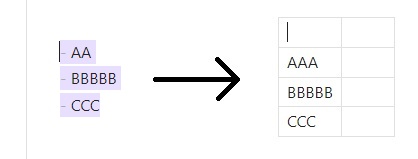
This plugin adds a simple command you can use to convert a list (lines of text / bullet list / nubmered list / checkboxes) to a table. It puts every line into a separate row of the table.
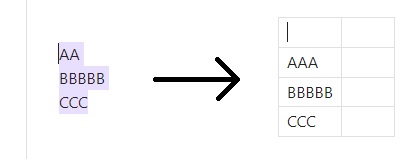
Demo image

Demo image 2

Usage

  1. Select some lines (does not have to be exact, i.e. can include blank lines)

  2. Open command palette (default: Ctrl+P or Cmd+P)

  3. Use this command to convert:

    List to table converter: Convert list to table
    

Settings

Adjust your preferences for the resulting table here!

You can choose to generate an empty header row or not, and how many columns should be added after your content.

License

GNU GPLv3

78%
HealthExcellent
ReviewSatisfactory
About
Convert selected lines or list items (plain lines, bullets, numbers, checkboxes) into a Markdown table, placing each line in its own row. Add an empty header row and extra columns as needed to shape the resulting table.
TablesEditingFormatting
Details
Current version
1.0.5
Last updated
Last month
Created
8 months ago
Updates
4 releases
Downloads
1k
Compatible with
Obsidian 1.9.12+
Platforms
Desktop, Mobile
License
GPL-3.0
Report bugRequest featureReport plugin
Author
paddomannopaddomanno
github.com/paddomanno
GitHubpaddomanno
  1. Community
  2. Plugins
  3. Tables
  4. List to table converter

Related plugins

Advanced Tables

Improved table navigation, formatting, and manipulation.

Easy Typing

Auto format when typing.

Datacore

An even faster reactive query engine for the data obsessed.

List Callouts

Create simple callouts in lists.

Symbols Prettifier

Prettify the symbols with actual symbols you commonly type, like arrows.

Smart Typography

Convert quotes to curly quotes, dashes to em dashes, and periods to ellipses.

Number Headings

Automatically number or re-number headings.

Markdownlint

Use markdownlint to make the contents of your files more consistent.

Meta Bind

Make your notes interactive with inline input fields, metadata displays, and buttons.

Outliner

Work with your lists like in Workflowy or Roam Research.