Link to Verse
 aygjiay1k downloads
From a bible reference selected creates a markdown link to a configured bible site.
- Overview
- Scorecard
- Updates8
Easily create links to Bible passages in your Obsidian notes using any online Bible tool.
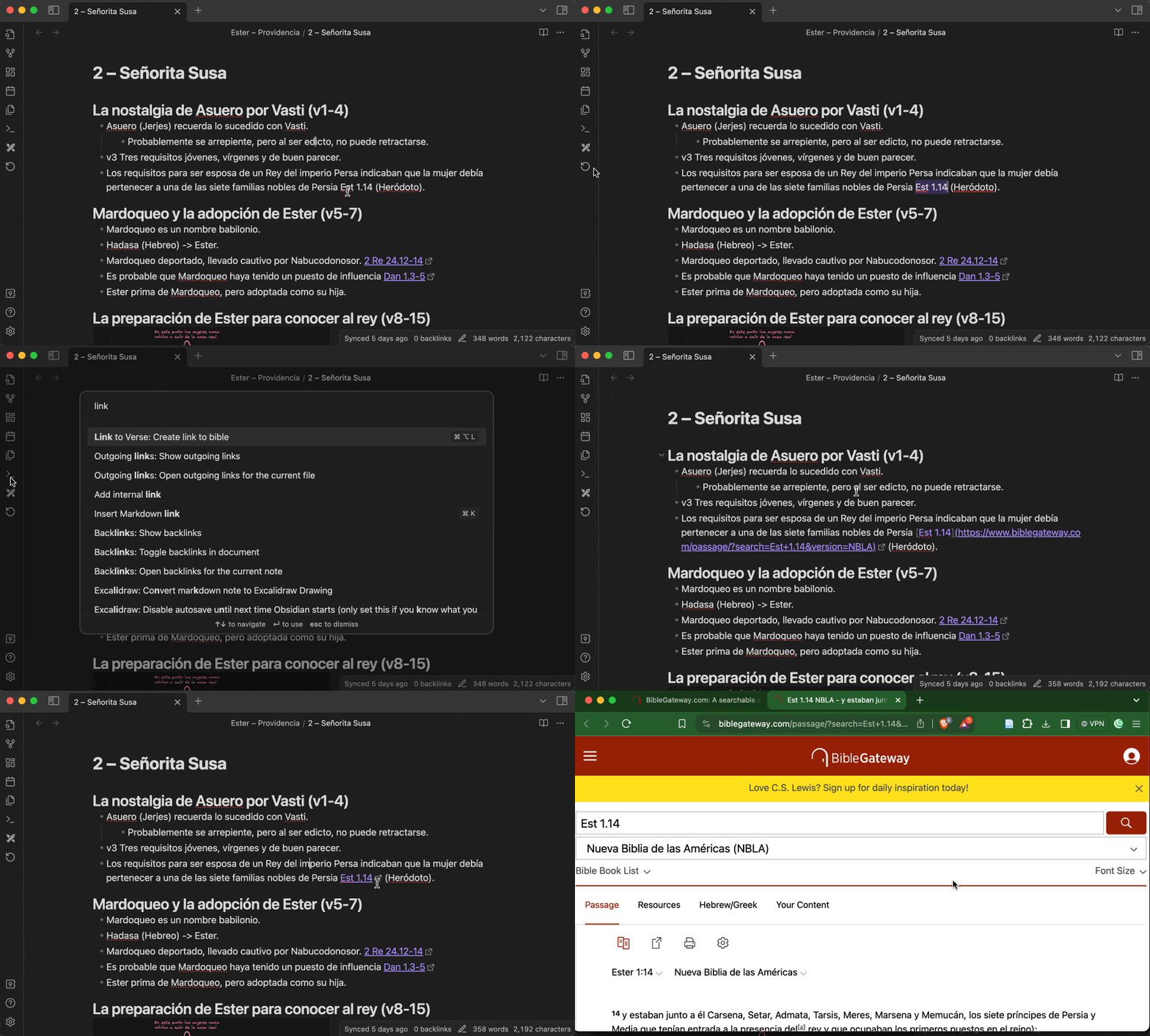
✨ Features
- 🔗 Quick Links: Instantly generate links to Bible passages.
- 📖 Easy Reference: Input Bible references in a natural format (e.g., John 3:16).
🛠 Installation
From Obsidian Plugin Marketplace
- Open Obsidian.
- Navigate to
Settings>Community plugins. - Click on
Browseand search forLink to Verse. - Click
Installand thenEnable.
Manual Installation
- Download the latest release from the Releases page.
- Extract the contents of the zip file to your Obsidian plugins folder:
<vault>/.obsidian/plugins/obsidian-link-to-verse. - Enable the plugin in Obsidian via
Settings>Community plugins.
🚀 Usage
- Open any Markdown note in Obsidian.
- Select a Bible reference (e.g.,
John 3:16) from your note. - Press
Ctrl+P(orCmd+Pon Mac) to open the command palette. - Type
Create link to Bibleand select the command. - Your Bible reference will be replaced by a link to the passage in your note.
⚙️ Configuration
You can configure the plugin settings to fit your preferences:
Default Version
Specify your preferred default Bible version.
- Example:
NLT(New Living Translation)
Link Template
Define the template for the URL linking to the Bible passage. The template should include a {{verse}} placeholder and optionally a {{version}} placeholder.
- Example:
https://www.biblegateway.com/passage/?search={{verse}}&version={{version}}
Presets
Use the preset dropdown if you want a built-in template instead of managing the URL manually.
- Custom: Keep using your own URL template.
- Bible Gateway:
https://www.biblegateway.com/passage/?search={{verse}}&version={{version}} - Olive Tree:
olivetree://bible/{{book}}.{{chapter}}.{{verse}} - route.bible:
https://route.bible/?q={{verse}}&utm_source=obsidian_link_to_verse&utm_medium=link
Setting Configuration
- Go to
Settings>Community plugins>Link to Verse>Options. - Enter your preferred Bible language (used to recognize book names and some abbreviations) (currently supported:
sp,en). - Enter your preferred default Bible version (e.g.,
NLT). - Enable the use of
+instead of URL-encoded spaces. - Enable book name validation against an internal dictionary and use the defined book name.
- Set the link template to your desired format (e.g.,
https://www.biblegateway.com/passage/?search={{verse}}&version={{version}}).
Supported Tokens in Link Template
Two template types are currently supported:
Default template supports tokens:
verse(Required): Contains the full Bible reference, including book, chapter, and verse or range of verses.version(Optional): Contains the Bible version. If included but missing in the selected reference, the default version set in the plugin configuration will be used.
Olive Tree template supports tokens:
book(Required): Contains the book name of the Bible reference.chapter(Required): Contains the chapter number.verse(Required): Contains the verse number.
Link to Verse detects the template type based on the tokens used. If your template includes book, chapter, and verse, it is identified as an Olive Tree template; otherwise, it defaults to the Default template.
📚 Examples
BibleGateway Support
Settings:
- Bible language:
en - Default version:
NLT - Encode spaces to '+':
enabled - Validate book name:
enabled - Link template:
https://www.biblegateway.com/passage/?search={{verse}}&version={{version}}
Case 1
Input: John 3:16
Output: [John 3:16](https://www.biblegateway.com/passage/?search=John+3:16&version=NLT)
Case 2
Input: Jn 3:16
Output: [Jn 3:16](https://www.biblegateway.com/passage/?search=John+3:16&version=NLT)
Olive Tree URL Support
Settings:
- Bible language:
en - Default version:
NLT - Encode spaces to '+':
disabled - Validate book name:
disabled - Link template:
olivetree://bible/{{book}}.{{chapter}}.{{verse}}
Since Olive Tree does not support Bible translations, they are ignored.
Case 1
Input: 1 Timothy 3:16
Output: [1 Timothy 3:16](olivetree://bible/1%20Timothy.3.16)
Case 2
Input: SS 4:7
Output: [SS 4:7](olivetree://bible/SS.4.7)
🛡️ License
This project is licensed under the MIT License. See the LICENSE file for details.
🤝 Contributing
Contributions, issues, and feature requests are welcome! Feel free to check the issues page if you want to contribute.
🙏 Acknowledgements
- Obsidian for the excellent markdown-based knowledge management tool.
- BibleGateway for providing a great and free online Bible tool.
📬 Contact
If you have any questions, suggestions, or issues, please visit the GitHub repository and open an issue.
"Your word is a lamp to my feet and a light to my path." - Psalm 119:105