Search...Search plugins and themes...
⌘K
Sign in
  • Get started
  • Download
  • Pricing
  • Enterprise
  • Account
  • Obsidian
  • Overview
  • Sync
  • Publish
  • Canvas
  • Mobile
  • Web Clipper
  • CLI
  • Learn
  • Help
  • Developers
  • Changelog
  • About
  • Roadmap
  • Blog
  • Resources
  • System status
  • License overview
  • Terms of service
  • Privacy policy
  • Security
  • Community
  • Plugins
  • Themes
  • Discord
  • Forum / 中文论坛
  • Merch store
  • Brand guidelines
Follow us
DiscordTwitterBlueskyThreadsMastodonYouTubeGitHub
© 2026 Obsidian

Link Doctor

AnthirayasAnthirayas2 downloads

Find broken links, headings, blocks and embeds, and spot empty notes, in a side panel and a dashboard.

Add to Obsidian
  • Overview
  • Scorecard
  • Updates3

Find the broken links in your vault and jump straight to them.
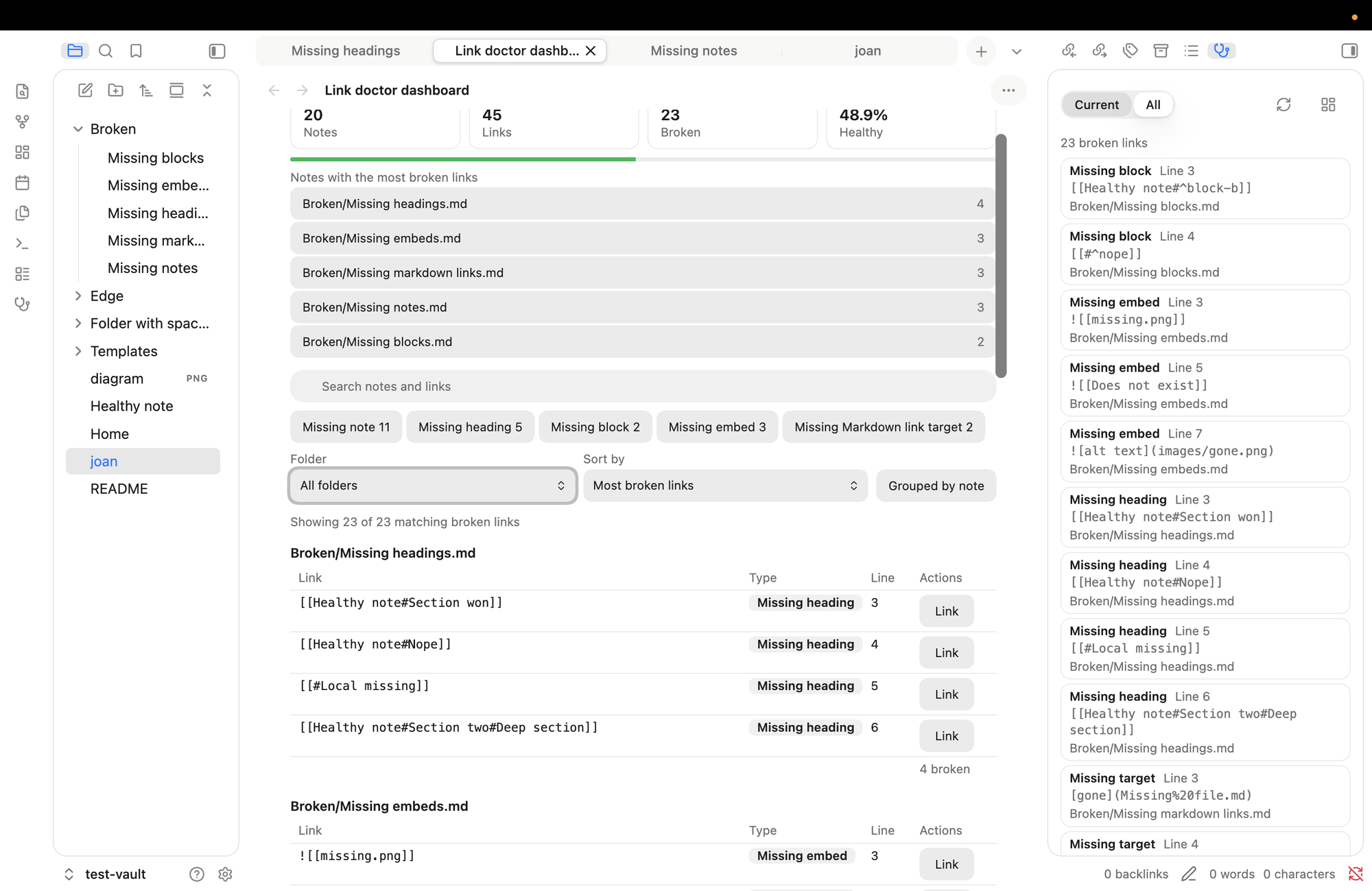
The dashboard and the side panel

What it checks

  • Links to notes that don't exist: [[Missing note]]
  • Links to missing headings: [[Note#No such heading]]
  • Links to missing blocks: [[Note#^no-such-block]]
  • Embeds of missing files: ![[missing.png]]
  • Markdown links to missing files: [text](missing.md)

It also lists empty notes, meaning notes with nothing but frontmatter. Web links aren't checked.

It matches names the way Obsidian does (ignoring case and accent differences, handling relative paths and aliases) and works on desktop and mobile. It never edits your notes, and it makes no network requests. It lists every file path in your vault (never file contents) so it can tell whether a link target exists.

How to use it
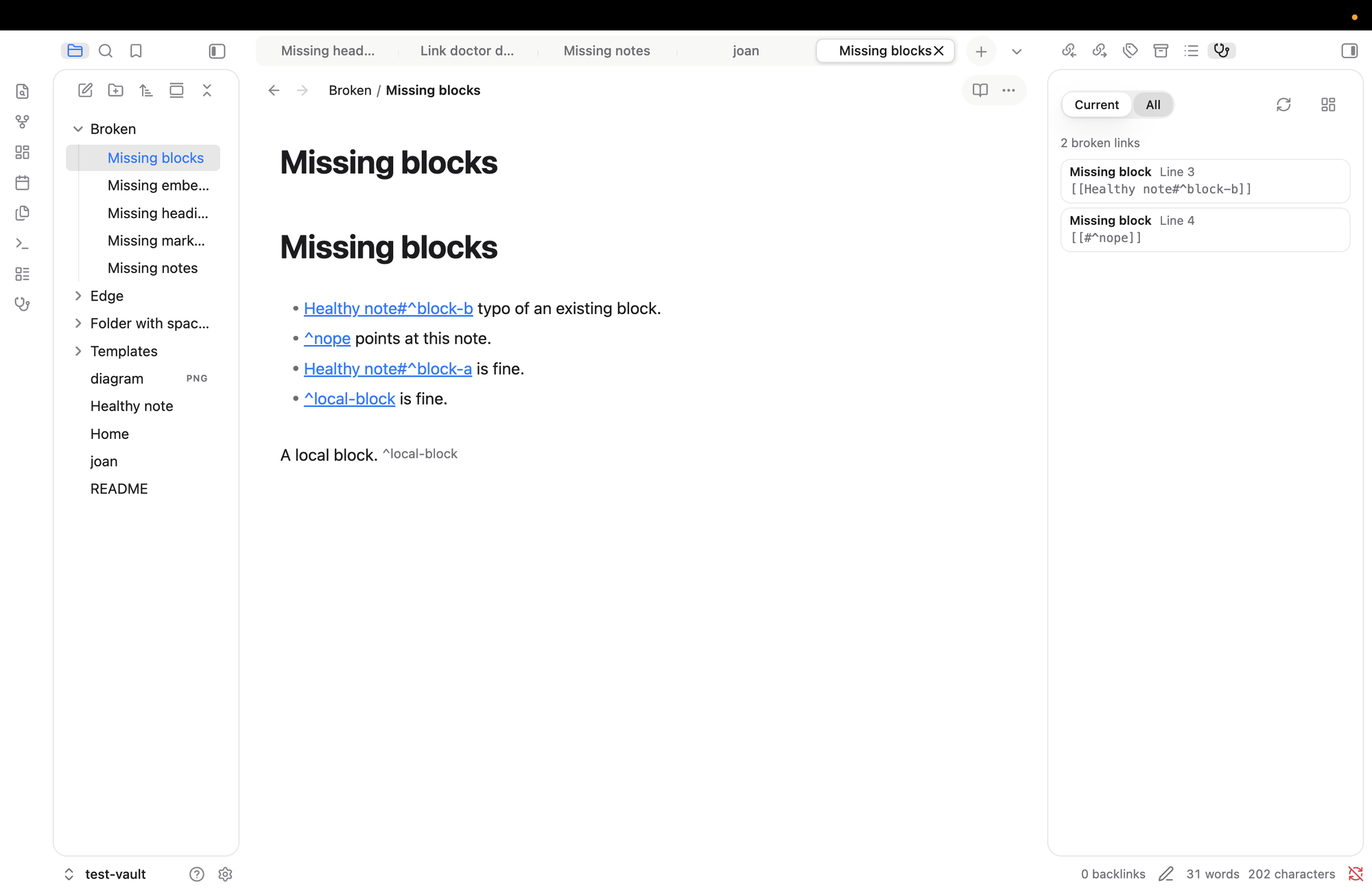
The side panel next to a note

Side panel (stethoscope icon in the ribbon): Current shows the broken links in the note you're in, All shows the whole vault. Click a row to open the note with the link selected.

Dashboard (grid icon in the panel): health summary, search, filters by type and folder, grouping by note, and a Link button on every row.

Settings

Choose the panel's starting mode, open notes in a new tab or the current one, switch link types on or off, ignore folders (for example Templates/ or Archive/**), and set how quickly results refresh.

Good to know

  • It reads Obsidian's own index, so a brand-new note may take a moment to appear. Press Rescan vault if something looks stale.
  • It finds broken links and takes you to them. It never changes your notes: there are no fix buttons, by design.

Install

Needs Obsidian 1.13 or later. (Older versions of Obsidian get version 0.1.1 automatically.)

Once it's in the community list, search for Link Doctor in Settings, then Community plugins. To try it by hand, copy main.js, manifest.json and styles.css from a release into <your vault>/.obsidian/plugins/link-doctor/ and enable it.

For developers

npm install
npm run verify    # lint, types, tests, build
npm run dev       # watch build

Needs Node 22 or later. More in docs/. MIT licence.

HealthExcellent
ReviewPassed
About
Find broken links across your vault — including wikilinks, heading and block refs, embeds and Markdown links — and list notes that contain only frontmatter or blank lines. Display results in a side panel and dashboard with search, filters and grouping, and jump straight to any broken link to fix it.
LinksSidebarSearch
Details
Current version
0.1.2
Last updated
5 hours ago
Created
5 hours ago
Updates
3 releases
Downloads
2
Compatible with
Obsidian 1.13.0+
Platforms
Desktop, Mobile
License
MIT
Report bugRequest featureReport plugin
Author
AnthirayasAnthirayasjrayas
GitHubjrayas
  1. Community
  2. Plugins
  3. Links
  4. Link Doctor

Related plugins

Smart Connections

Find related notes and excerpts while writing. Your AI link building copilot displays relevant content in graph + list view. A local embedding model powers semantic search. Zero setup. No API key.

Tag Wrangler

Rename, merge, toggle, and search tags from the tag pane.

Another Quick Switcher

Another choice of Quick switcher.

Notebook Navigator

A better file browser and calendar inspired by Apple Notes, Bear, Evernote and Day One.

Excalidraw

Visual PKM powerhouse. Create and edit Excalidraw drawings.

ExcaliBrain

An interactive, structured mind-map of your Obsidian vault.

Advanced URI

Control everything with URI.

Breadcrumbs

Visualise the hierarchy of your vault using a breadcrumb trail or matrix view.

Quick Switcher++

Enhanced Quick Switcher, search open panels, and symbols.

Supercharged Links

Add attributes to internal links with the values of target note's frontmatter attributes.