LeetLog Bridge
 YzYhhhstudy458 downloads
Receives events from the LeetLog browser extension and auto-writes LeetCode practice notes (timing, submissions, accepted code) into your vault.
- Overview
- Scorecard
- Updates10
📗 LeetLog
Auto-capture your LeetCode grind into local Markdown notes — Obsidian-ready, you only write the insights.
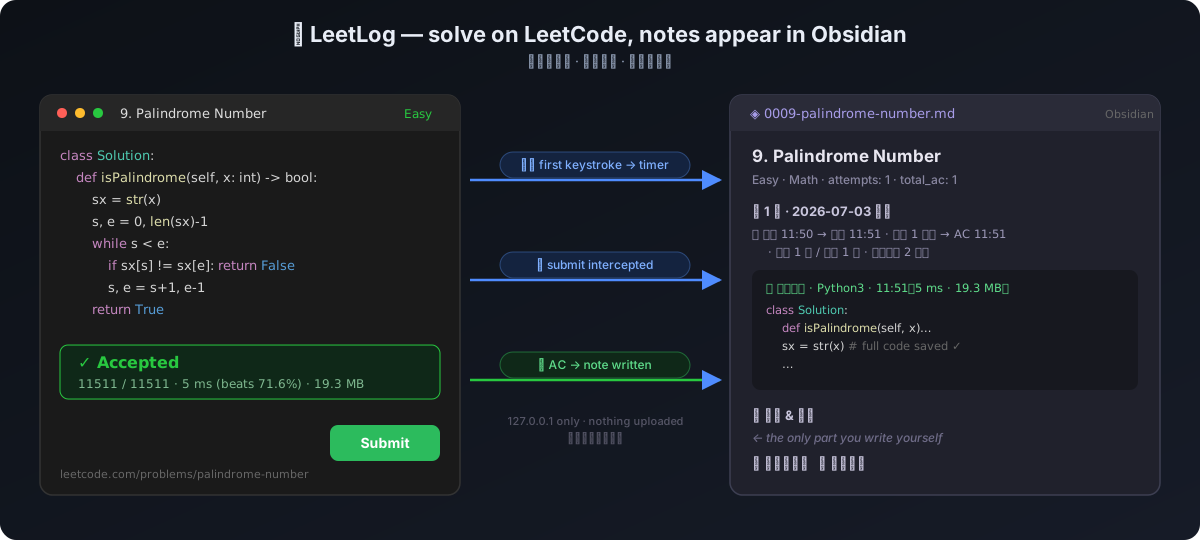
The moment you type your first keystroke on a problem, the timer starts. Every submission is counted. The moment you get Accepted, your code, runtime stats and timing land in a structured Obsidian note. Revisiting an old problem? The same note accumulates every attempt — see exactly what past-you was thinking.
Why not existing tools?
| LeetHub family | Timer extensions | LeetPlug | LeetLog | |
|---|---|---|---|---|
| Archive accepted code | ✅ pushes to GitHub | ❌ | ❌ | ✅ into local notes |
| Auto timing (from first keystroke) | ❌ | ✅ | ✅ | ✅ |
| Submission / AC counts | ❌ | ❌ | ✅ | ✅ |
| Re-attempt history | ❌ | ❌ | partial | ✅ |
| Space for your own insights | ❌ | ❌ | ❌ | ✅ core design |
| Where your data goes | GitHub | local | third-party server | never leaves your machine |
How it works
LeetCode page
  │  interceptor.js — hooks fetch/XHR: captures your code on submit,
  │                   polls the judge result; detects first keystroke
  ▼
content.js ──POST──▶ local bridge  127.0.0.1:8763  (leetlog_server.py)
                          │  resolves problem metadata, times the session,
                          │  counts submissions, assembles Markdown
                          ▼
            your-vault/LeetCode/0013-roman-to-integer.md
No DOM scraping (breaks on every UI redesign). LeetLog intercepts the network layer instead:
the submit request already contains your code; the judge endpoint returns Accepted/runtime/memory.
Result polling is dual-channel: the classic /check/ endpoint, with GraphQL submissionDetails
as fallback. Everything flows leetcode.com page → 127.0.0.1 → local files. Nothing is uploaded.
In folder mode the extension skips the bridge entirely and writes the notes itself.
Install (~2 minutes)
The browser extension alone is enough — it captures your practice and can write the Markdown notes straight into any folder. Bridges (Obsidian plugin / Python server) are optional upgrades for deeper integration.
1. Install the browser extension
One click from the Chrome Web Store (works in Chrome / Edge / Arc / Brave). Microsoft Edge Add-ons listing is in review.
Newest features before the store catches up (load unpacked)
Store review adds a few days of lag per release. For the freshest build:
chrome://extensions → enable Developer mode → Load unpacked → select the
extension/ folder of this repo.
2. Choose where notes are written (pick one)
Option A — folder mode (simplest, zero extra software)
In the extension's ⚙️ Options page, switch to folder mode and pick any folder —
your Obsidian vault's LeetCode/ subfolder works great. The extension writes the Markdown
notes directly via the browser's File System Access permission. Nothing leaves your machine.
Option B — Obsidian plugin bridge (in-app notices, settings UI, legacy-note import)
In Obsidian: Settings → Community plugins → Browse → search "LeetLog Bridge" → Install → Enable — or open obsidian.md/plugins?id=leetlog-bridge. Port, notes folder and note template language (English / 中文) live in the plugin settings. Auto-updates through Obsidian.
Option C — Python server (works without Chrome folder permissions or Obsidian)
python3 server/leetlog_server.py
Zero dependencies (Python stdlib). First run auto-detects your Obsidian vault and writes
~/.config/leetlog/config.json (edit vault path / note folder there).
Bridges share port 8763 — run at most one; folder mode needs neither.
Auto-start on login (macOS launchd, optional)
cat > ~/Library/LaunchAgents/com.leetlog.server.plist << 'EOF'
<?xml version="1.0" encoding="UTF-8"?>
<!DOCTYPE plist PUBLIC "-//Apple//DTD PLIST 1.0//EN" "http://www.apple.com/DTDs/PropertyList-1.0.dtd">
<plist version="1.0"><dict>
  <key>Label</key><string>com.leetlog.server</string>
  <key>ProgramArguments</key><array>
    <string>/usr/bin/python3</string>
    <string>/absolute/path/to/leetlog/server/leetlog_server.py</string>
  </array>
  <key>RunAtLoad</key><true/>
  <key>KeepAlive</key><true/>
</dict></plist>
EOF
launchctl load ~/Library/LaunchAgents/com.leetlog.server.plist
Click the extension icon anytime to see 🟢 status, note location, and active problems.
The generated note
---
id: 13
title: "Roman to Integer"
difficulty: Easy
tags: [Hash Table, Math, String]
attempts: 2
first_attempt: 2026-07-03
last_attempt: 2026-08-10
total_submissions: 5
total_ac: 2
total_runs: 9
---

# 13. Roman to Integer

> [!abstract]- Problem
> Roman numerals are represented by seven different symbols… *(statement auto-captured
> into a folded callout — read your mistake notebook offline, on the subway)*

🎬 [YouTube: Roman to Integer explained](…) *(video-solution search links land right below
the statement — Bilibili too for leetcode.cn problems)*

## Attempt 1 · 2026-07-03 Fri
⏱ start 10:34 → first submit 10:42 · coding 8 min → AC 10:49 · 2 submits / 1 AC · 6 runs · 15 min on problem

### ✅ Accepted · python3 · 10:49 (12 ms · 17.1 MB)
> [!success]- Code
> ```python
> class Solution: ...
> ```

*(each AC keeps its heading in the outline; the code itself sits in a callout that is
folded by default — expand only what you want to reread)*

### 💭 Thoughts & insights
### 📚 What I learned (new functions / data structures / patterns)
### 🔀 Alternative solutions
The frontmatter is designed for Obsidian Properties / Dataview — one query gives you a "mistake notebook", "problems untouched for 30+ days", or per-tag accuracy.
Ready-made dashboards — copy templates/ into your vault:
leetlog.base— Obsidian Bases (core feature, 1.9+, works on mobile, no plugin needed): mistake notebook, spaced-repetition due list, rusty problems, all-problems table grouped by difficultyleetlog-dashboard.md— Dataview version with extras Bases can't do yet (per-tag accuracy aggregation, totals paragraph); requires the Dataview pluginleetlog-review-queue.md— Dataview spaced-repetition queue (1/3/7/14/30-day intervals stepped by attempt count)
Import your legacy notes
Years of hand-written notes in one giant markdown file? Split them into LeetLog's one-file-per-problem format:
In Obsidian (LeetLog Bridge ≥ 0.3.8): open the legacy note → command palette → Import legacy notes → review the split plan → Import. Or from the terminal:
python3 server/lc_import.py my-old-notes.md --dry-run   # preview the split plan
python3 server/lc_import.py my-old-notes.md             # do it (or pass a folder of .md)
A heading is recognized as a problem if it contains a leetcode.com/.cn problem link,
a problem number ("13. Roman to Integer", "LC146 …", "#13"), or an exact English title.
Everything until the next recognized heading goes with it — into a new note (metadata
auto-filled) or appended to the existing LeetLog note (your captured attempts are never
touched). Idempotent: re-running skips already-imported sections. Unrecognized headings are
listed for manual review, never guessed. --site cn makes created notes link to leetcode.cn.
Optional cloud sync (beta)
Local-first stays the default — nothing is uploaded unless you opt in. In the extension's ⚙️ Options you can pair with LeetLog Cloud (private beta) using a one-time pairing code. It adds, on top of your local notes:
- Automatic mistake notebook — problems ranked by "stuck signals" (WA rate, debug intensity, coding time), each score explainable
- Spaced-repetition flashcards (1/3/7/14/30-day intervals) with email reminders; the extension badge shows today's due count
- Cross-site aware: solved the same problem on both leetcode.com and leetcode.cn? Cards and tables show bilingual titles (Two Sum · 两数之和) with links to both sites
- Anki export, personal stats dashboard
Cloud sync is independent of the local bridge — either, both, or neither.
Timing semantics
⏱ start 11:10 → first submit 11:18 · coding 8 min → AC 11:25 · 2 submits / 1 AC · 20 min on problem
   ↑ first keystroke   ↑ first submit   ↑ keystroke→submit   ↑ first Accepted     ↑ keystroke→leave/switch
- Coding time = first keystroke → first submit (your real "solving" time)
- Time on problem = first keystroke → closing the page / switching to another problem (includes post-submit review & optimization)
- Keep optimizing after AC: code blocks append, counters accumulate
- Run (non-submit) executions are counted too — per-attempt in the ⏱ line, cumulative
in
total_runs(debugging intensity is a review signal) - Coming back within 6 hours counts as the same attempt; later opens "Attempt N+1"
- 🌐 Note template language: English or 中文 (Obsidian plugin setting /
langin the Python config)
Session rules
- Judge results come through two channels: after capturing the
submission_id, the extension polls/check/, falling back to GraphQLsubmissionDetails— no DOM dependency - Server restarts don't lose state (
~/.config/leetlog/state.json) - Solving while the bridge is down? Events are buffered in the extension's offline queue (toolbar badge shows the count) and replayed with their original timestamps once the bridge is back — timing stays accurate, nothing is lost
Known limits
- Relies on LeetCode's current submit endpoints (
/submit/+/submissions/detail/<id>/check/); far more stable than DOM scraping, but an API overhaul would need an interceptor update - Chrome 111+ (content script MAIN world)
- leetcode.cn is fully supported (verified end-to-end); the statement capture prefers the Chinese translation there
Roadmap
v0.3 (current): extension (0.6.x) + three interchangeable writers — the LeetLog Bridge Obsidian plugin (live in the community marketplace), the Python server, and extension-only folder mode. Optional cloud sync in private beta. Verified end-to-end on production leetcode.com and leetcode.cn. Live on the Chrome Web Store; Edge Add-ons in review.
Next
- Extension-only mode: pick a folder once in the Options page, the extension writes Markdown directly via the File System Access API — no bridge, no Obsidian required
- Offline queue in the extension: buffer events in
chrome.storagewhen the bridge is down, replay on reconnect (original timestamps preserved) — never lose a session
Features
- Chrome Web Store — live · [x] Edge Add-ons — in review · [ ] Firefox port
- Capture the problem statement into the note as a folded callout (offline reading)
- Dataview index templates — see
templates/ - Count Run (non-submit) executions (
total_runs+ per-attempt ⏱ line) - Video-solution links under the statement (YouTube; Bilibili for leetcode.cn)
- Optional cloud sync: auto mistake notebook, SRS flashcards, due-count badge (beta)
- Cross-site bilingual titles when the same problem is done on .com and .cn
-
lc import: split legacy hand-written notes into per-problem files (server/lc_import.py)
❤️ Support
LeetLog is free and local-first, and will stay that way. If it saves you time:
- ⭐ Star this repo — costs nothing, helps other grinders find it
- 💖 Sponsor on GitHub — keeps the roadmap moving
License
MIT