LaTeX Color Sync
 lunevoilee143 downloads
Sync LaTeX formula color with nearby markdown text color.
- Overview
- Scorecard
- Updates2
What This Plugin Does
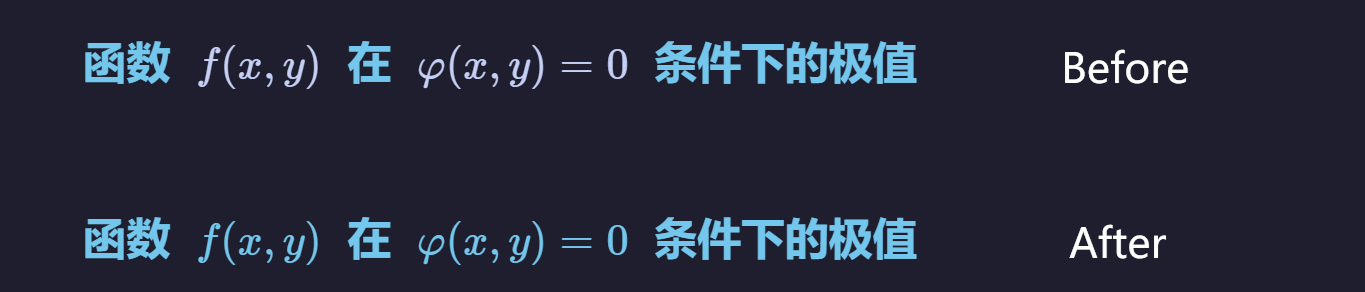
LaTeX Color Sync keeps formula color aligned with nearby text color in Obsidian source mode.
It rewrites formulas to this format:
\\textcolor{#RRGGBB}{...}
Typical use case: when your heading/link/quote text has theme color, your math formula can follow the same color automatically.
Two Ways It Works
1) Auto Sync While Typing
- When your edit inserts a newline (
\\n), the plugin auto-syncs nearby formula colors. - You can disable this in settings if you prefer fully manual control or work with very large notes.
2) Manual Commands
You can also trigger sync from the command palette for partial or full-document updates.
Commands
| Command | When to use | What it changes |
|---|---|---|
Sync LaTeX Color In Selection Or Current Line |
You only want to update part of a note | Rewrites formulas in selected lines (or current line) |
Sync LaTeX Color In Current Document |
You want to normalize one whole note | Rewrites formulas across the current note |
Recommended Workflow
- Start with
Sync LaTeX Color In Selection Or Current Line. - If result is good, run
Sync LaTeX Color In Current Document. - If needed, press
Ctrl/Cmd+Zto rollback immediately.
Settings
| Setting | Default | Keep it ON if... | Turn it OFF if... |
|---|---|---|---|
| Language | Auto |
You want UI to follow app language | You want to force a fixed language |
| Show summary after manual command | On |
You want feedback after each run | You prefer no popups |
| Auto sync on newline insertion | On |
You want formulas updated whenever editing inserts a newline (\\n) |
You edit very large files and prefer manual sync |
| Also process previous line on newline insertion | On |
Your formula is often on the line you just broke | You want minimal auto-processing |
| Prefer DOM color sampling | On |
You want color to follow real rendered text | Your theme is very custom and fallback behaves better |
| Overwrite existing top-level LaTeX color | On |
You want plugin to keep formulas consistent | You want to keep manually assigned top-level colors |
| Skip formulas containing embedded color commands | On |
You want safe behavior for complex formulas | You intentionally want plugin to wrap those formulas too |
Why Sometimes "No Changes"
If command says no changes, common reasons are:
- No valid
$...$or$$...$$span in target lines. - Formula color already matches target color.
- Formula is in excluded region (code block, inline code, frontmatter, HTML-like block).
- Formula contains embedded color commands and skip setting is enabled.
Compatibility
- Obsidian
>= 1.5.0 - Desktop and mobile (
isDesktopOnly: false) - Source mode editor (CodeMirror 6)
Known Limits
- Formula delimiters must open and close on the same line.
- Extremely custom macros or unusual delimiter styles may need manual edits.
Development And Packaging
You can keep source code split in src/, but release output must be a single root main.js.
- Install tooling:
npm install
- Build a production bundle:
npm run build
- For local development watch mode:
npm run dev
Build result:
- Input:
src/main.js(+ imported modules insrc/) - Output:
main.jsat repo root (single bundled file for Obsidian release)
GitHub Actions Release Flow
This repository includes .github/workflows/release.yml:
- Trigger: push a tag like
v0.3.2(or0.3.2) - Action: install dependencies, build
main.js, upload release assets - Uploaded files:
main.js,manifest.json,styles.css
Important: the tag version must match manifest.json version exactly.
Privacy
This plugin does not send note content to external services and does not collect telemetry.
Project Files
- Changelog: CHANGELOG.md
- Contributing: CONTRIBUTING.md
- Issue templates:
.github/ISSUE_TEMPLATE/
License
MIT. See LICENSE.