Khiip
 Khiip101 downloads
Capture + recall through your local Khiip daemon — URLs in, markdown in your vault, semantic recall over everything
- Overview
- Scorecard
- Updates6
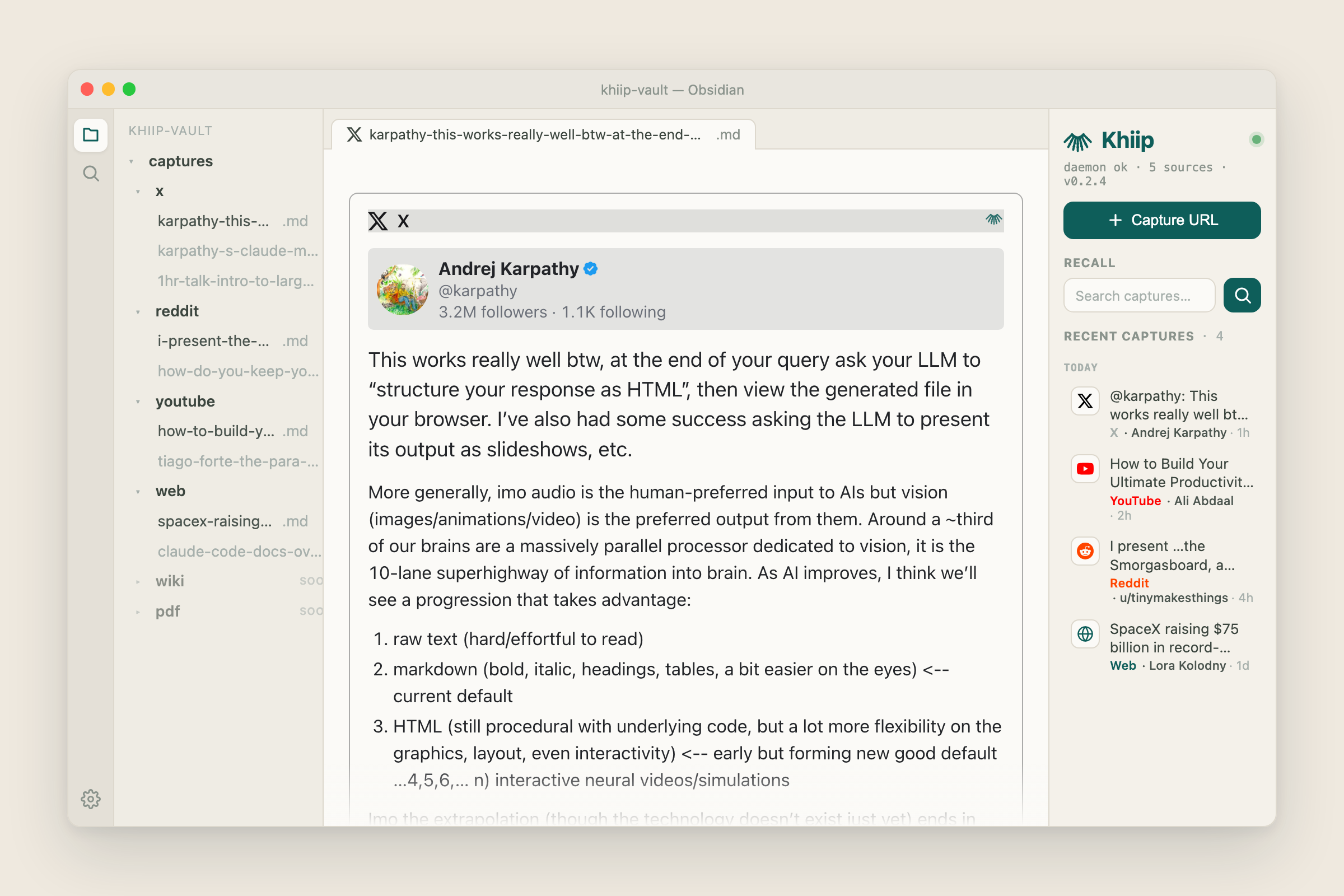
Capture URLs into your Obsidian vault and recall them semantically. The plugin is a thin client over the local Khiip daemon (github.com/KhiipAI/khiip) — the daemon does extraction, embedding, and storage; the plugin gives you a command palette + sidebar surface inside Obsidian.
⏸️ Status: paused
The daemon package this plugin depends on is not currently published, so a fresh install will not have anything to connect to. The plugin is being reworked alongside it.
Already installed? Nothing has been changed or removed on your machine, and your captured notes are plain markdown in your own vault — they keep working with or without khiip.
What the plugin does
- Command palette:
Khiip: Capture URL— prompts for a URL, posts to the daemon, opens the resulting noteKhiip: Recall by query— focuses the sidebar search inputKhiip: Open daemon settings— opens the settings tab
- Sidebar (right pane): daemon status indicator, on-demand recall search, recent captures list
- Settings tab: daemon URL, API-key override, daemon-reported metadata
- Context menus:
- Right-click a recent-capture row in the sidebar — Open, Re-capture, or Copy URL
- Right-click a link in the editor — Capture this link with Khiip
Prerequisites
- Khiip daemon running locally. Install it (
uv tool install khiip, orpip install khiip) and start it withkhiipd serve(default:http://127.0.0.1:8478). Source + docs: github.com/KhiipAI/khiip. - API key auto-discovered. The daemon writes
~/.config/khiip/auth.tomlon first launch (mode 600). The plugin reads it directly; you don't usually need to paste it in. - Daemon vault = Obsidian vault. For click-to-open captures to resolve inline, point the daemon's
vault_pathat your Obsidian vault (or a subfolder of it). The plugin will tell you the absolute path if the resolution misses.
Network use
By default the plugin makes HTTP requests only to your local Khiip daemon on 127.0.0.1:8478 and contacts no external servers. It ships no telemetry or analytics. It auto-discovers the daemon's API key from the local auth.toml (only when the daemon URL is loopback), and reads your clipboard solely to pre-fill the capture box.
If you set a non-local Daemon URL (e.g. a Tailscale or remote host) in settings, the plugin sends capture/recall requests — and the API key you paste there, as a Bearer token — to that host. Keep remote daemons on a trusted network. All fetching and extraction of captured URLs happens inside the daemon, never in the plugin.
Install
Khiip is in the Obsidian Community plugins directory: Settings → Community plugins → Browse → search "Khiip" → Install → Enable.
To track the newest build before it syncs to the directory, use BRAT:
- Install the BRAT community plugin in Obsidian
- BRAT settings → Add Beta Plugin →
KhiipAI/khiip-obsidian - Settings → Community plugins → enable Khiip
BRAT polls the GitHub releases for this repo and auto-updates when a new tag ships.
Develop locally
git clone [email protected]:KhiipAI/khiip-obsidian.git
cd khiip-obsidian
npm install
npm run build    # one-shot production build
npm run dev      # watch mode
Symlink the build into an Obsidian vault to test:
mkdir -p /path/to/vault/.obsidian/plugins
ln -s "$(pwd)" /path/to/vault/.obsidian/plugins/khiip
Reload Obsidian (or toggle the plugin off + on in Community plugins) to pick up rebuilds.
Run the smoke checklist in SMOKE.md before cutting any release.
Cutting a release
Tags MUST match manifest.version exactly (Obsidian's registry rejects mismatches), and they're bare versions — no v prefix. .npmrc enforces this for npm version.
# Bump everything in lock-step (package.json, manifest.json, versions.json),
# create a commit + a tag matching the new version. The preversion check
# aborts if your npm tag-version-prefix is non-empty (would produce
# `v0.0.2`-style tags that the release workflow's strict-semver gate rejects).
npm version patch    # 0.0.1 → 0.0.2 — or `minor` / `major` / explicit semver

# Push the version-bump commit, then push the SPECIFIC tag (NOT `--tags`,
# which would push every stray local tag you may have from experiments):
VERSION=$(node -e "console.log(require('./package.json').version)")
git push origin main
git push origin "$VERSION"
The release workflow (.github/workflows/release.yml) fires on tag push, runs the typecheck + production build, verifies the tag matches manifest.version, and uploads main.js, manifest.json, and styles.css as flat release assets. BRAT picks the new version up on next poll.
If the build fails, delete the tag (git tag -d <ver> && git push origin :refs/tags/<ver>), fix, and re-cut. Don't force-push a tag with the same name once a release exists for it.
Re-cutting the same version (e.g. republishing after a history rewrite): npm version refuses an unchanged version, so tag by hand after clearing the prior tag and its release — gh release delete <ver> --cleanup-tag --yes, then git tag <ver> && git push origin <ver>.
Obsidian community-plugin directory submission
As of 2026-05, submissions go through the community.obsidian.md dashboard — the old PR to obsidianmd/obsidian-releases is retired. Sign in with an Obsidian account, link GitHub, choose Plugins → New plugin, enter this repo's URL, and accept the developer policies. An automated security + policy review gates the listing (minutes); once it passes, the plugin is searchable in-app within ~24h. Requirements (already in place):
- A tagged GitHub release (tag ==
manifest.version, novprefix) withmain.js,manifest.json, andstyles.cssattached as individual assets manifest.jsonid(khiip) — lowercase, contains no "obsidian", does not end in "plugin"versions.jsonmaps every version to itsminAppVersion- README (with the network-use disclosure above) + LICENSE at the repo root
- No undisclosed network calls, telemetry, or self-update mechanism; no obfuscated code
License
Apache 2.0 — see LICENSE. The Khiip daemon is AGPL-3.0; this plugin consumes the daemon over its public REST API only and is not a derivative work.