Kanso Todos
 Puneeth Shetty46 downloads
Compact, visual task lists inside your notes, backed by plain-text YAML.
- Overview
- Scorecard
- Updates3
A compact, visual task list inside any note, backed by plain-text YAML.
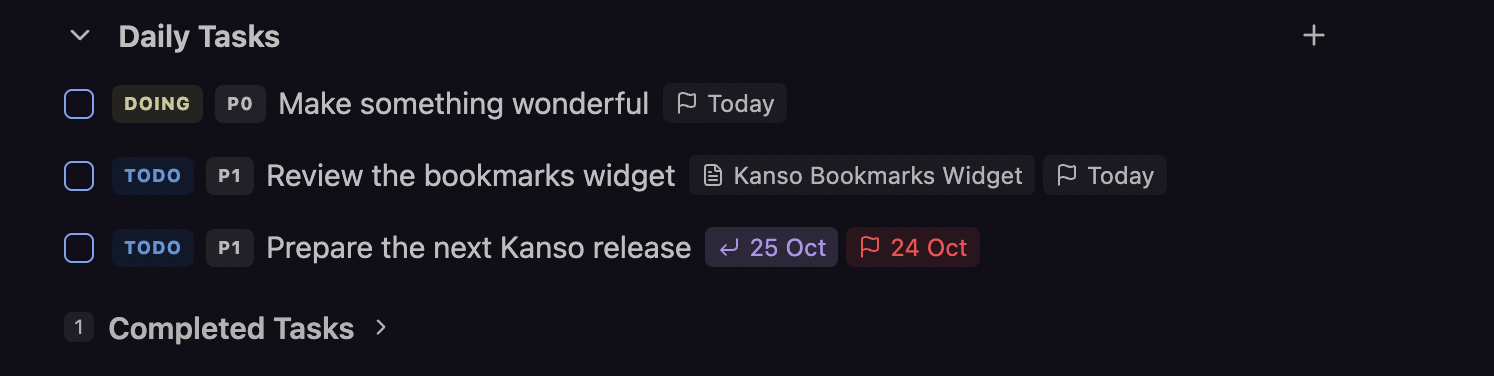
Kanso (簡素) means simplicity or plainness in Japanese. Keep tasks beside the notes they belong to. Add and edit them through a theme-native widget, with status, priority, due dates, and links to source notes.
Features
- Add and edit tasks inline without writing YAML.
- Track Todo, Doing, and Completed states, with P0-P2 priorities.
- Set due dates with local-calendar labels and overdue highlighting.
- Link tasks to source notes and open them directly.
- Collapse a list or expand its completed tasks independently in each pane.
If you've found Kanso Todos useful, please consider buying me a coffee.
Demo
Add a task with priority and a due date, complete it, and collapse the list:

Installation
Open Settings -> Community plugins -> Browse, search for Kanso Todos, then install and enable it.
For manual installation, download main.js, manifest.json, and styles.css
from a release.
Place them in <vault>/.obsidian/plugins/kanso-todos/, then enable Kanso Todos
under Community plugins.
Requires Obsidian 1.8.7 or later. Desktop and mobile are intended platforms; see the release checklist for validation status.
Getting started
- Open a Markdown note in Live Preview.
- Run Kanso Todos: Insert todos widget from the command palette.
- Select Add task, enter a title, and optionally set Priority, Due, or Source note.
- Press Enter or select Add.
You can also put this empty block in a note or daily-note template:
```kanso-todos

```
The empty widget does not write anything until you interact with it.
For a custom heading, use a named empty list; todos is optional:
```kanso-todos
version: 2
title: My tasks
```
The first task you add creates the list in the YAML. An explicitly supplied
todos field must be a list (todos: []), not a blank or scalar value.
Working with tasks
Use the checkbox to complete a task; reopening it resets its status to Todo. Select the Todo/Doing badge to switch active status. Select a priority badge to cycle P0, P1, and P2; use Edit to set or clear optional properties.
Open a task's actions menu to edit or delete it. Deletion is immediate, with no plugin-specific undo. New tasks appear first; changing status or completing a task does not reorder the underlying YAML.
Enter in the title saves the form. Mod+Enter (Ctrl+Enter on Windows/Linux) saves from anywhere in the form; Escape cancels. If another pane changes a task while you edit, your draft is retained. Review the conflict before saving again: the second explicit save replaces the newer editable values.
List collapse and the Completed section are temporary pane-local state, not settings synchronized between devices. There is no settings page.
Storage and compatibility
Tasks are stored in a top-level, unindented kanso-todos code block in the note.
They are not Markdown checkboxes and are not indexed by the Tasks plugin,
Dataview task queries, or Obsidian's checkbox search as ordinary Markdown tasks.
Kanso Todos does not aggregate tasks across your vault or synchronize checkboxes.
Rollover links
Kanso Todos can display and follow existing rollover.previous and
rollover.next references. Entries with a next link become read-only historical
rows; incoming-only entries remain editable. Advanced authoring details are in the
data reference.
Development
npm ci
npm test
npm run build
npm run check-release
npm run dev watches source changes. Production builds exclude sourcemaps.
Copy the generated main.js, manifest.json, and styles.css into a test vault's
.obsidian/plugins/kanso-todos/ folder. Do not edit the generated bundle.
Feedback
Report bugs or suggest improvements through GitHub Issues. For layout issues, include your Obsidian version, platform, theme, and a minimal sample block without personal task data.