JSON Toolbox
 Genglin Zheng3 downloads
View JSON as a collapsible rich tree with inline previews for images, colors, links, timestamps, JWT and more. Format, validate, convert to YAML or a table.
- Overview
- Scorecard
- Updates5
Full online version (30+ JSON tools): https://jsontoolbox.cc Chinese docs: README.zh.md
View JSON in Obsidian as a collapsible rich tree with inline previews for images, colors, links, timestamps, JWTs, Base64 and more — then format, validate, convert to YAML, or turn it into a table.
Features
- Reading-mode auto-render:
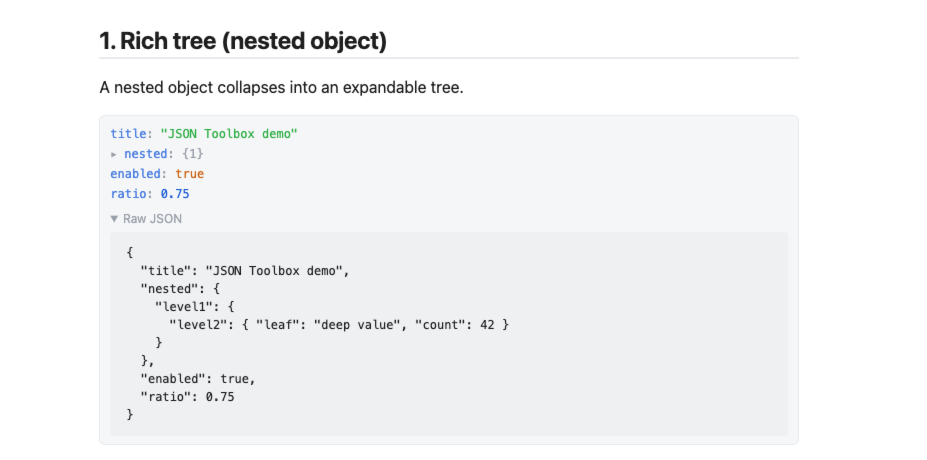
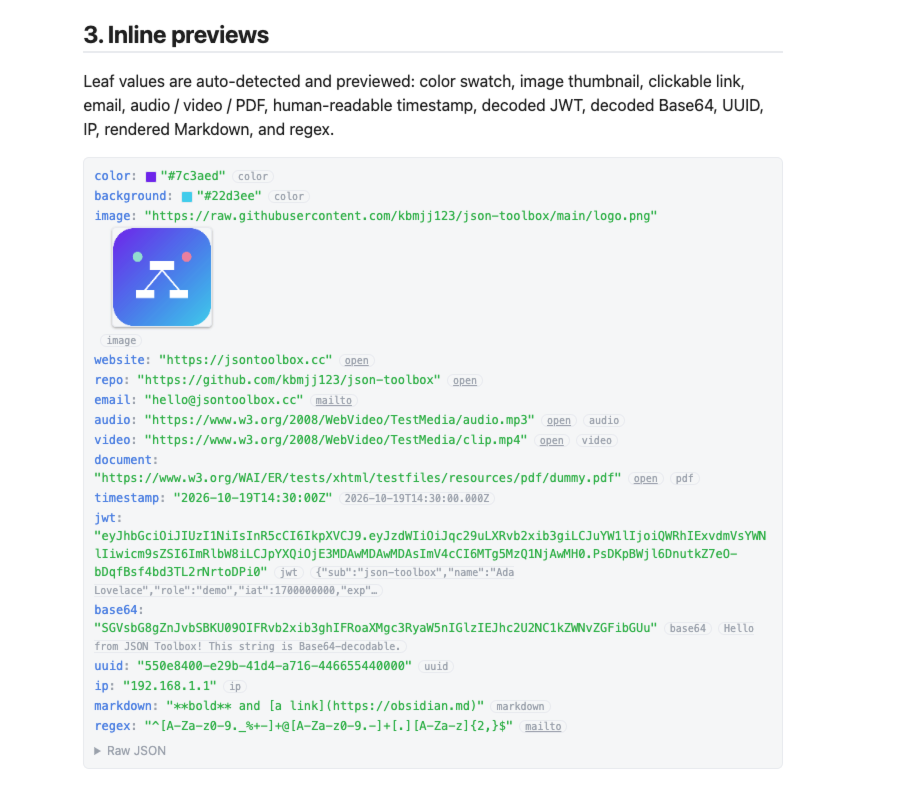
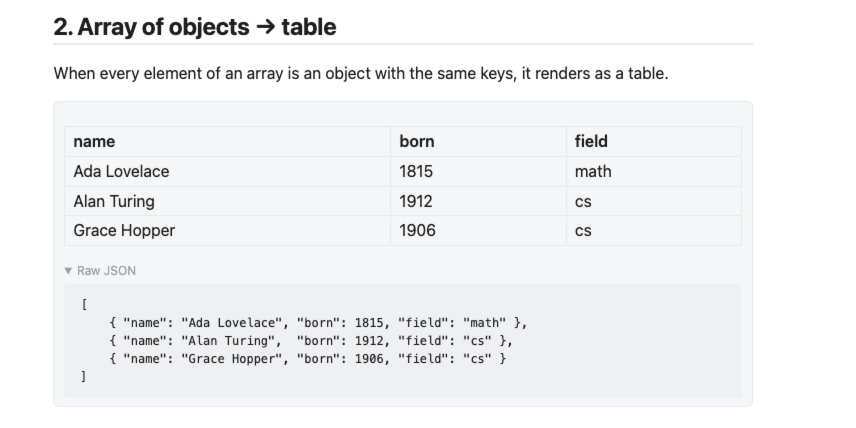
json/yamlcode blocks turn into a collapsible rich tree automatically; arrays of objects render as a table. - 14 inline preview kinds: image, color swatch, clickable URL, email, audio, video, PDF, timestamp, JWT, Base64 (incl. inline images), UUID, IP, Markdown, regex.
- Keep original source: the original JSON / YAML is preserved in a collapsible section under every preview.
- 5 commands: Open JSON Viewer · Format JSON · Validate JSON · JSON ↔ YAML · JSON → Table/CSV.
- Fully local: parsing, formatting and conversion run inside your vault. No telemetry, no accounts, no cloud sync.
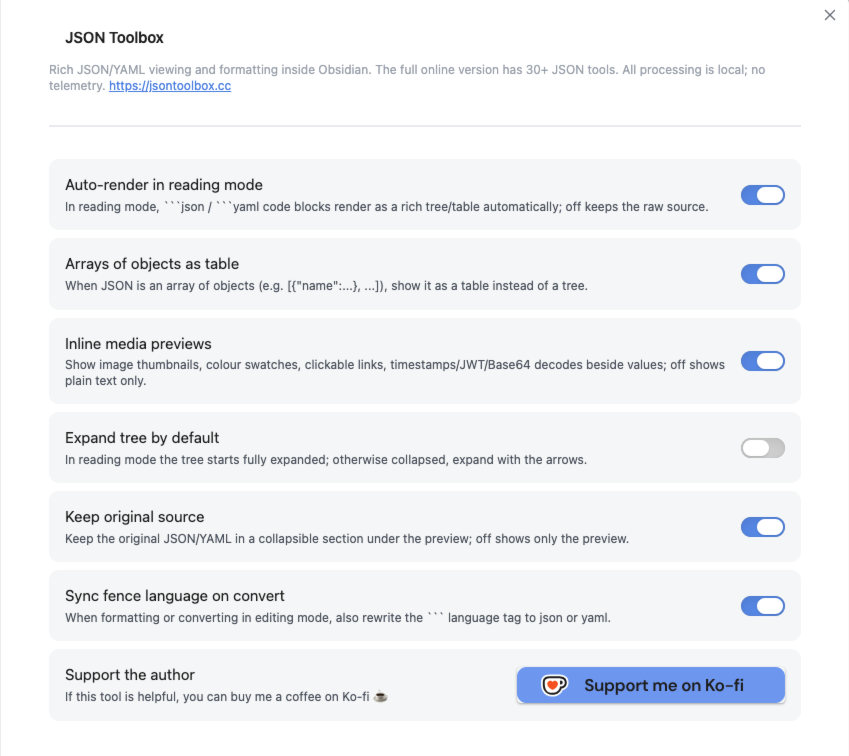
- 6 settings toggles, localized to your Obsidian language (Chinese / English).
Example
Copy the block below into a json code block in reading mode to see the rich tree, the array-of-objects table, and every inline preview (color, image, link, email, media, timestamp, JWT, Base64, UUID, IP, Markdown, regex):
{
  "title": "JSON Toolbox demo",
  "nested": {
    "level1": {
      "level2": { "leaf": "deep value", "count": 42 }
    }
  },
  "color": "#7c3aed",
  "background": "#22d3ee",
  "image": "https://raw.githubusercontent.com/kbmjj123/json-toolbox/main/logo.png",
  "website": "https://jsontoolbox.cc",
  "repo": "https://github.com/kbmjj123/json-toolbox",
  "email": "[email protected]",
  "audio": "https://www.w3.org/2008/WebVideo/TestMedia/audio.mp3",
  "video": "https://www.w3.org/2008/WebVideo/TestMedia/clip.mp4",
  "document": "https://www.w3.org/WAI/ER/tests/xhtml/testfiles/resources/pdf/dummy.pdf",
  "timestamp": "2026-10-19T14:30:00Z",
  "jwt": "eyJhbGciOiJIUzI1NiIsInR5cCI6IkpXVCJ9.eyJzdWIiOiJqc29uLXRvb2xib3giLCJuYW1lIjoiQWRhIExvdmVsYWNlIiwicm9sZSI6ImRlbW8iLCJpYXQiOjE3MDAwMDAwMDAsImV4cCI6MTg5MzQ1NjAwMH0.PsDKpBWjl6DnutkZ7eO-bDqfBsf4bd3TL2rNrtoDPi0",
  "base64": "SGVsbG8gZnJvbSBKU09OIFRvb2xib3ghIFRoaXMgc3RyaW5nIGlzIEJhc2U2NC1kZWNvZGFibGUu",
  "uuid": "550e8400-e29b-41d4-a716-446655440000",
  "ip": "192.168.1.1",
  "markdown": "**bold** and [a link](https://obsidian.md)",
  "regex": "^[A-Za-z0-9._%+-]+@[A-Za-z0-9.-]+[.][A-Za-z]{2,}$",
  "people": [
    { "name": "Ada Lovelace", "born": 1815, "field": "math" },
    { "name": "Alan Turing",  "born": 1912, "field": "cs" },
    { "name": "Grace Hopper", "born": 1906, "field": "cs" }
  ]
}
Screenshots
Place images in
assets/screenshots/using the exact filenames below (broken images before they are added are expected placeholders).
Commands
| Command | What it does |
|---|---|
| Open JSON Viewer | View selected JSON as a collapsible rich tree with inline previews |
| Format JSON | Pretty-print selected JSON (2-space indent) |
| Validate JSON | Validate selected JSON and locate the error |
| JSON ↔ YAML | Convert selection between JSON and YAML (auto-detects direction) |
| JSON → Table/CSV | Turn a JSON array/object into a table |
Inline previews
Automatically detected on leaf values: color, image, audio, video, pdf, url, email, timestamp, jwt, base64, uuid, ip, markdown, regex.
Settings
The settings tab offers 6 toggles:
- Auto-render in reading mode
- Arrays of objects as table
- Inline media previews
- Expand tree by default
- Keep original source
- Sync fence language on convert
Labels follow your Obsidian interface language (Chinese / English); command names stay in English.
Privacy
All processing (parsing, formatting, validation, conversion) happens locally — no telemetry, no accounts, no cloud sync.
One exception: inline media previews (image / audio / video / PDF) fetch the remote URL found in your JSON in order to render the preview. Nothing is uploaded — the URL is only fetched to render the preview.
Install
From the community store (recommended)
- Settings → Community plugins → Browse, search for JSON Toolbox
- Install and enable
Manual / BRAT
Download main.js, manifest.json, styles.css from the GitHub Release into <vault>/.obsidian/plugins/json-toolbox/.
Support
If this tool helps you, you can buy me a coffee on Ko-fi: https://ko-fi.com/kbmjj123
License
MIT