JSON Table Viewer
 usero2-endofday313 downloads
Renders JSON as beautiful tables, supporting nested arrays as nested tables.
- Overview
- Scorecard
- Updates2
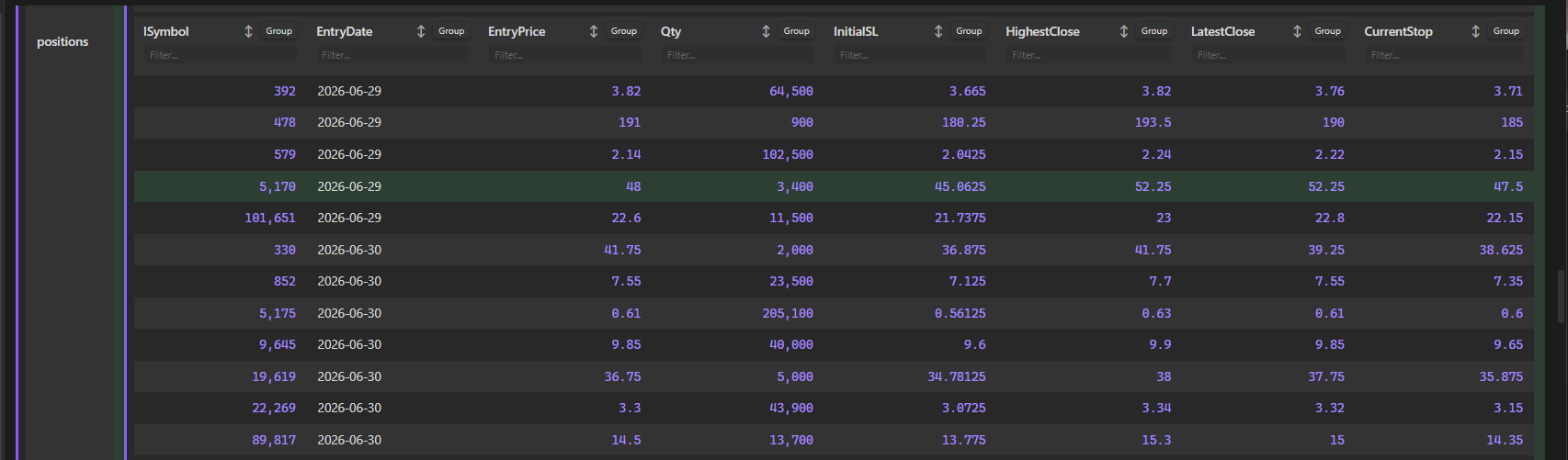
A premium Obsidian plugin that transforms standard JSON data into beautiful, interactive, and recursively nested tables. It works both inside note code blocks and as a direct file viewer for .json files in your vault.
Features
- Recursive Table Rendering: Automatically converts nested objects and arrays into vertically or horizontally nested tables, with visual left-border indicators to display nesting depth.
- Interactive Headers:
- Sorting: Click any column title or arrow indicator to cycle through Ascending (
▲) -> Descending (▼) -> Unsorted (↕). - Filtering: Type in the
Filter...input box below headers to filter matching rows instantly. - Grouping: Group rows dynamically by any column values. Group headers are collapsible and show item counts (e.g.,
📁 exchange: IB_US (2 items)). - Each nested table maintains its own independent sort, filter, and group states.
- Sorting: Click any column title or arrow indicator to cycle through Ascending (
- Direct
.jsonViewer: Registers the.jsonfile extension so that clicking any JSON file inside Obsidian's file explorer opens it directly as an interactive, structured table. - Live Reloading: Listens to vault file modifications and automatically re-renders note tables when the referenced JSON file changes.
- Smooth Sticky Scrolling:
- Sticky Headers: Column headers stay locked at the top of the viewport when scrolling down tall tables.
- Sticky Property Keys: Property keys in vertical tables (such as
compilerOptionsorposition) align to the top and scroll dynamically with the viewport inside their row container.
- Rich Visuals & Highlights:
- Zebra Striping: Alternating row backgrounds using Obsidian's native
var(--background-secondary-alt)variable. - Yellow Hover Highlights: Premium soft yellow/gold highlight on hover.
- Row Selection: Click anywhere on a row (excluding inputs, buttons, and links) to toggle a soft green highlight selection.
- Formatted numbers, clickable URL links, and colored badges for booleans.
- Zebra Striping: Alternating row backgrounds using Obsidian's native
Installation
Manual Installation
- Download
main.js,manifest.json, andstyles.cssfrom the latest release. - In your vault, navigate to
.obsidian/plugins/and create a folder namedobsidian-plugins-json-table-viewer. - Paste the three downloaded files into that folder.
- Open Obsidian, go to Settings -> Community Plugins, reload the list, and toggle on JSON Table Viewer.
Usage
1. Direct JSON Codeblocks
You can write raw JSON directly inside a json-table codeblock:
{
  "portfolioName": "Growth Fund",
  "active": true,
  "holdings": [
    { "symbol": "AAPL", "shares": 50, "price": 172.5 },
    { "symbol": "MSFT", "shares": 25, "price": 420.2 }
  ]
}
2. Referencing JSON Files in your Vault
You can display tables by referencing .json files stored in your vault:
path: data/portfolio.json
(Or simply write data/portfolio.json or file: portfolio.json)
License
This plugin is licensed under the MIT License.
HealthExcellent
ReviewCaution
About
Render JSON data as interactive, recursively nested tables inside note code blocks or open .json files directly as structured tables. Sort, filter, group and collapse rows with per-table state; use sticky headers, live reloading, nesting depth indicators, clickable links, formatted numbers and visual highlights for selection and booleans.Details
Current version
1.0.1
Last updated
2 months ago
Created
2 months ago
Updates
2 releases
Downloads
313
Compatible with
Obsidian 0.15.0+
Platforms
Desktop only
License
MIT
Sponsor