Search...Search plugins and themes...
⌘K
Sign in
  • Get started
  • Download
  • Pricing
  • Enterprise
  • Account
  • Obsidian
  • Overview
  • Sync
  • Publish
  • Canvas
  • Mobile
  • Web Clipper
  • CLI
  • Learn
  • Help
  • Developers
  • Changelog
  • About
  • Roadmap
  • Blog
  • Resources
  • System status
  • License overview
  • Terms of service
  • Privacy policy
  • Security
  • Community
  • Plugins
  • Themes
  • Discord
  • Forum / 中文论坛
  • Merch store
  • Brand guidelines
Follow us
DiscordTwitterBlueskyThreadsMastodonYouTubeGitHub
© 2026 Obsidian

InlineCodeHighlight

dimavadimava5k downloads

Apply syntax highlighting to inline codeblocks.

Add to Obsidian
  • Overview
  • Scorecard
  • Updates2

Write '<lang> in inline code, and it'll render as such
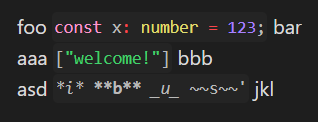
example

foo `'ts const x: number = 123;` bar
aaa `'json ["welcome!"]` bbb
asd `'md *i* **b** _u_ ~~s~~'` jkl
HealthFair
ReviewCaution
About
Highlight inline code using language tags to apply syntax coloring directly inside text. Render inline snippets (e.g., TypeScript, JSON, Markdown) with proper formatting so code appears readable within sentences.
CodeSyntax
Details
Current version
1.0.1
Last updated
3 years ago
Created
3 years ago
Updates
2 releases
Downloads
5k
Compatible with
Obsidian 0.15.0+
Platforms
Desktop, Mobile
License
MIT
Report bugRequest featureReport plugin
Author
dimavadimava
github.com/dimava
GitHubdimava
  1. Community
  2. Plugins
  3. Code
  4. InlineCodeHighlight

Related plugins

VSCode Editor

Edit Code Files like VSCode.

Shiki Highlighter

Highlight code blocks with Shiki.

Code Editor

Edit non-markdown text files (code, config, data) directly with syntax highlighting, line numbers, and word wrap.

Argument Map with Argdown

Write Argdown code blocks and view the maps in reading mode.

Strudel REPL

Live-coding music environment — Strudel REPL integrated into your vault.

Code Suite

Execute code inside your notes: Shiki syntax highlighting with 65+ themes, live streaming output, inline Matplotlib and Plotly graphs, shared variables, and styled HTML and PDF export with outputs.

Code Viewer

View and edit code files with native syntax highlighting.

Ace Code Editor

An enhanced code editor using Ace editor, providing syntax highlighting, code folding, and other advanced editing features.

CM Code Editor

Code file editor with syntax highlighting and code folding.

CodeBlock Language Detector

Automatically detects and adds language tags to code blocks without specified language for proper syntax highlighting.