Horizon
 Mario Miletta300 downloads
Calendar for your vault: daily and periodic notes, tasks, and dated notes in one place.
- Overview
- Scorecard
- Updates8
Calendar for your Obsidian vault: daily and periodic notes, tasks, and dated notes in one place.
Part of the marioverse Obsidian plugin suite.
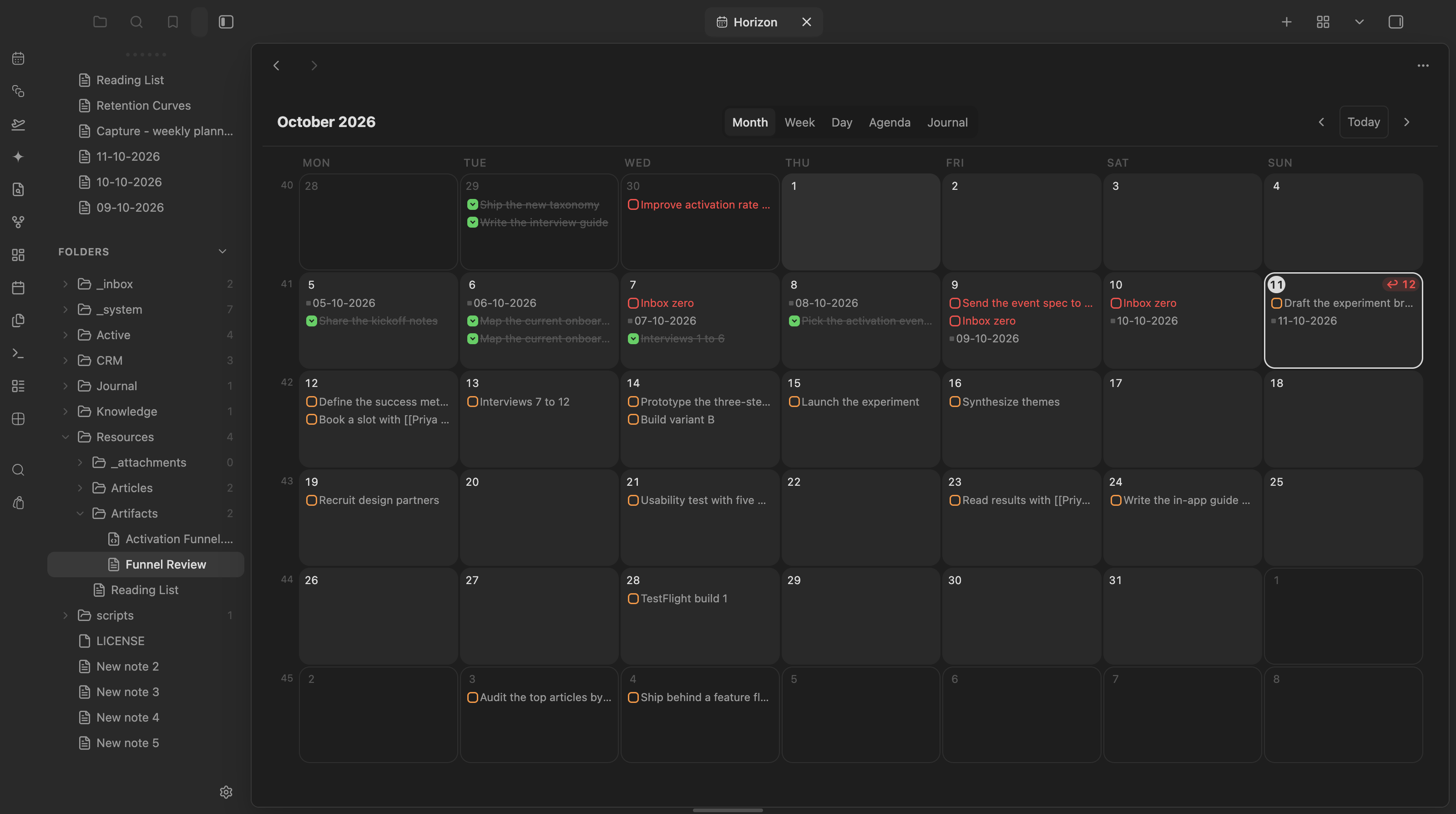
The month grid, with daily notes and open, done and overdue tasks shown right on their date.
Views
- Sidebar mini calendar — month at a glance with content dots: daily note (accent), due tasks (orange), overdue (red), scheduled (cyan), done (green), dated notes (gray). ISO week numbers open weekly notes.
- Calendar tab (ribbon icon or
Horizon: Apri il calendario) with three modes:- Mese — 7-column grid with content chips per day; "+N altri" jumps to the week view
- Settimana — hour grid for the week: an all-day lane per day (all-day events, tasks, untimed notes) above timed events and timed notes placed by time, with a current-time line
- Giorno — the same grid for a single day
- Agenda — chronological list of the upcoming days that have content
- Diario — a text-first feed of existing daily notes, newest first, with expandable previews
Data sources
- Daily / weekly / monthly / yearly notes — existence resolved live from the per-period folder + filename format configured in settings (monthly/yearly are off by default)
- Tasks with obsidian-tasks-plugin emoji dates: 📅 due, ⏳ scheduled, ✅ done. Cancelled tasks (status
-) are hidden - Notes with a
datefrontmatter property (periodic notes are excluded to avoid duplicates) - Google Calendar events (read-only, optional) — see below
Google Calendar
Horizon reads your Google calendars and shows their events in every view. It never writes to Google.
Setup (once, on desktop):
- In Google Cloud Console create a project, enable the Google Calendar API, configure the OAuth consent screen (External, add yourself as a test user, then publish it: tokens of an app left in Testing expire after 7 days).
- Create an OAuth client of type Desktop app.
- In Horizon settings → Google Calendar paste the client ID, store the client secret as an Obsidian secret, and press Connect. Sign-in happens in the browser and returns to a one-shot local port.
The refresh token lives in Obsidian's secret storage on that device, never in the vault. Calendars follow your Google Calendar selection; switch single ones off in settings. Events refresh every 5 minutes, or with Refresh Google Calendar.
Click an event for: Join call (Meet, Zoom or Teams link), Open/Create meeting note, Open daily note, Open in Google Calendar. A meeting note gets date, gcal_event and a daily link; a Granola note with the same title on the same day is reused instead of creating a new one. On phones events show only after connecting there, which needs the desktop sign-in flow, so mobile stays without events for now.
Rich mini-cards
Notes in Agenda, Week, the day popover, and Bases views render as mini-cards: title (with time), a clean two-line excerpt, and the note's cover image (frontmatter cover/image/thumbnail → first embed → first external image). Hydration is async and LRU-cached. In the compact Month grid, hovering a note chip shows a floating hover-card with image and a longer excerpt. Settings: card length slider and a richCards toggle to fall back to compact chips.
Overdue triage
Open overdue tasks roll up to a pinned "In ritardo" section on today in the Agenda (with a batch "Porta tutto a oggi"), and today's cell shows a red ↩ N badge in every view. Right-click any task chip for snooze presets (Oggi / Domani / Lunedì prossimo / +1 settimana). Every reschedule Notice carries a 10-second Annulla that re-applies the old date through the same guarded writes.
Bases view
Horizon registers as a Bases view: any .base gains a month calendar. The Base decides which notes (filters); the view option dateProperty decides when (default date — set it to created for Granola meeting notes). Timestamps with an explicit offset (Granola writes UTC Z) are converted to the local day and time.
Template tokens
Beyond {{title}} / {{date:FMT}} / {{time:FMT}}, periodic-note templates can use:
{{agenda}}— the target day's calendar events and meetings (with times) and open tasks, as plain bullets with source links (never- [ ]lines: no task duplication){{week-digest}}— pre-compiled weekly review: Fatto (done per day), Meeting e note, In arrivo (due next week).
Agents
(app.plugins.getPlugin('horizon') as HorizonPlugin).api exposes: getAgenda(from, to), getOverdue(), rescheduleTask(ref, kind, day), toggleTaskDone(ref), exportAgenda(), propose(proposal). Reads come from the live index; writes go through the guarded line-edit path.
- Agenda export — disabled by default; when enabled, writes to the configurable
.horizon/agenda.jsonpath at most every 5 minutes of activity. - Ghost proposals — agents append to the configurable
.horizon/proposals.jsonpath (kind: 'reschedule' | 'new-task',targetKey, optionalreason). Horizon renders dashed ✦ ghost chips on the target days; ✓ accepts, ✕ dismisses.
Interactions
- Click a day (or its number in the tab view) → open the daily note, creating it from the template when missing ({{title}}, {{date:FMT}}, {{time:FMT}} tokens fill against the target day). Mod-click opens in a new tab
- Click a week number → open/create the weekly note
- Hover a day with a note → native page preview
- Checkbox on a task chip → toggle done with a
✅date, Tasks-plugin compatible. Recurring (🔁) tasks open at the line instead — completing them needs the Tasks rrule engine - Drag a task chip onto another day (any view, including the sidebar) → its date field is rewritten in the source file. Writes are guarded: exact text at the expected line, unique-match fallback, abort on ambiguity
Notes
- Replaces the community Calendar plugin — disable it manually to avoid two sidebar calendars
- The stale Periodic Notes config is ignored on purpose; Horizon keeps its own per-period settings (first launch seeds the daily period from
daily-notes.json) - Templater syntax in templates passes through unexecuted (core-Templates tokens only)
Mobile
Verified — isDesktopOnly: false in manifest.json; styles.css ships a pointer: coarse media query with 44px hit areas plus a max-width: 480px responsive rule for compact layouts.
Development
pnpm i
pnpm dev        # esbuild watch
pnpm build      # typecheck + production build
pnpm test       # node native test runner (74+ unit tests, no Obsidian needed)
pnpm lint
Architecture: a pure per-day index (src/index/) fed by metadataCache events, consumed by two ItemViews (src/ui/). All date math is UTC-immune (src/dates.ts); file writes go through guarded line edits (src/edits/). Pure modules never import the Obsidian runtime, so the whole read/write logic tests headless.
Try it
See it running in the Obsidianverse sample vault, a small, fictional vault with the whole plugin suite pre-configured.