History
 Juhyeok Kim73 downloads
Tracks note history and renders an interactive history calendar.
- Overview
- Scorecard
- Updates12
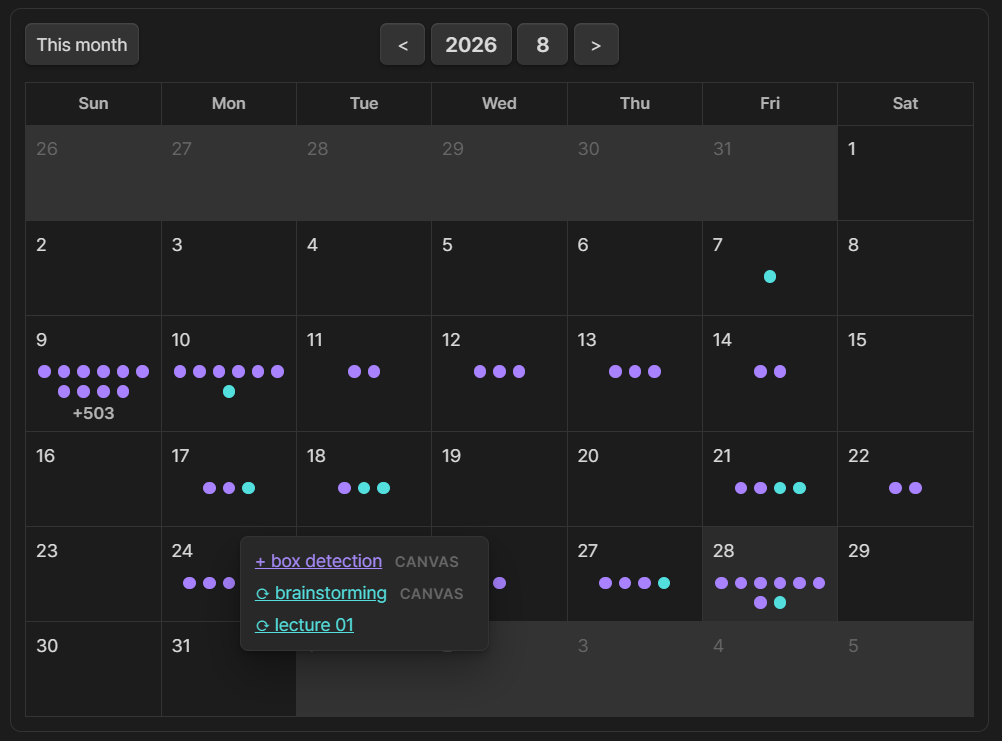
History automatically records when notes and canvases are created or edited, then displays the activity in an interactive calendar. Purple dots mark creation dates, cyan dots mark edit dates, and hovering over a day reveals every file. Narrow calendars switch the dots to compact colored counts.
How to use
- Enable the plugin. History automatically manages the
historyfrontmatter property for Markdown notes and the roothistoryarray for Canvas files. - Add this code block to any note where you want the calendar:
```history
```
- To keep the same calendar in the right sidebar, run History: Open history calendar from the command palette.
Optionally scale a note-embedded calendar to a maximum width; its controls and height shrink proportionally. In editing or reading mode, hover the calendar and drag its bottom-right handle; the new max-width is saved back to the code block. Sidebar calendars use the same proportional scaling when their pane is resized, but do not show the handle.
```history
max-width: 502
mode: number
align: center
ratio: 1.2
font-size: 1.0
marker-size: 1.2
```
mode: number always shows purple and mint event counts instead of dots; omit it for automatic display. Dot mode centers six dots on each of two rows before showing +N on a centered third row. align accepts left, center, or right. Embedded calendars default to max-width: 502; ratio is cell width divided by height and defaults to 1.2. font-size scales header, weekday, and date text plus button geometry from 0.5 to 2.0 and defaults to 1.0. marker-size independently scales dots, counts, and +N from 0.5 to 2.0 and defaults to 1.2; width scaling still applies afterward. Sidebar defaults are number markers, ratio 0.6, font size 2.0 (configurable up to 3.0), and marker size 3.0 (configurable up to 4.0); these controls are grouped under the final section in History settings. An optional setting shows × buttons in hover popups for removing individual history dates after confirmation; it is off by default.
Calendar dates also integrate with Obsidian's Daily Notes core plugin. Dates with an existing daily note are bold and underlined; clicking a date opens its note or asks before creating a missing one with your configured folder, format, and template.