Highlight Non-ASCII
 saltyfireball786 downloads
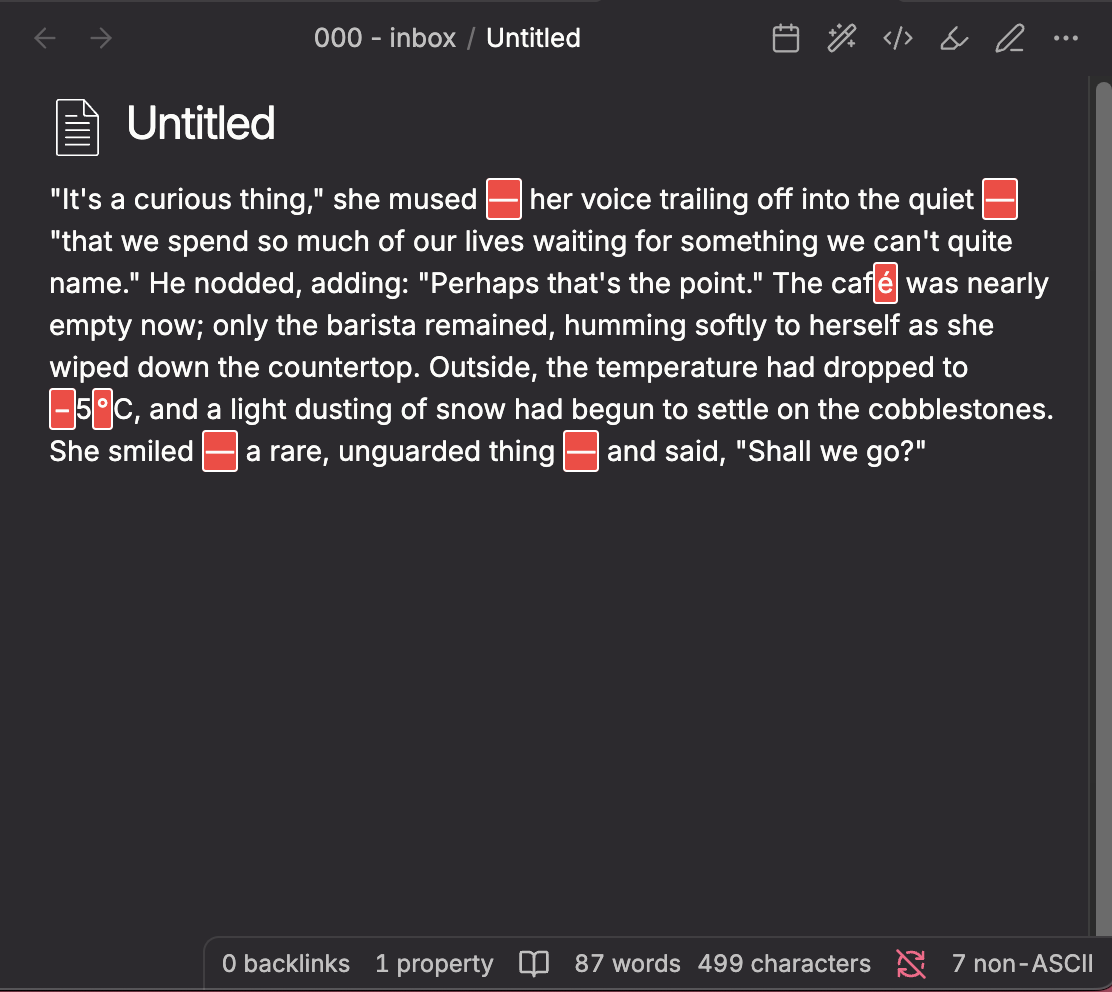
Highlights non-ASCII characters in your notes with a red background in both Edit and Reading views.
- Overview
- Scorecard
- Updates15
An Obsidian plugin that highlights any character outside the standard ASCII range (0x00-0x7F) in both Edit Mode (Live Preview) and Reading View.
Useful for catching invisible Unicode characters, accidental special characters, or non-standard punctuation in your notes.
Features
Highlights non-ASCII characters with a visible red background
Works in Edit Mode (Live Preview) with optional Reading View support
Auto-replace -- batch replace common non-ASCII characters with ASCII equivalents via the command palette
Configurable replacement rules with a find/replace list in settings
Configurable allowlist to exclude specific characters (accented letters, emojis, etc.)
Per-note control via frontmatter
Status bar counter -- shows the number of non-ASCII characters in the current note alongside Obsidian's word and character counts
Reading view toggle -- optionally enable highlighting in preview/reading mode (off by default)
Customizable highlight CSS
Toggle on/off from settings or the command palette
Usage
Install and enable the plugin.
Non-ASCII characters will be highlighted automatically.
Use Settings > Highlight Non-ASCII to configure:
- Enable highlighting -- toggle the feature on or off
- Highlight in reading view -- enable highlighting in preview/reading mode (off by default, since edit mode is usually sufficient)
- Allowed characters -- paste characters that should NOT be highlighted (e.g. accented letters, specific emojis)
- Custom CSS -- edit the highlight style directly
Use the command palette: Toggle non-ASCII highlighting to quickly enable/disable.

Auto-replace
The plugin includes a batch replacement feature for cleaning up common non-ASCII characters like curly quotes, em dashes, and non-breaking spaces.
How to use
- Open a note that contains non-ASCII characters
- Open the command palette (
Ctrl/Cmd + P) - Run Highlight Non-ASCII: Auto replace non-ASCII characters
- All matching characters in the note will be replaced according to your configured rules
Default replacement rules
The plugin comes with these defaults out of the box:
| Find | Replace | Description |
|---|---|---|
' (U+2018) |
' |
Left single curly quote |
' (U+2019) |
' |
Right single curly quote |
" (U+201C) |
" |
Left double curly quote |
" (U+201D) |
" |
Right double curly quote |
-- (U+2013) |
- |
En dash |
--- (U+2014) |
-- |
Em dash |
... (U+2026) |
... |
Horizontal ellipsis |
(U+00A0) |
|
Non-breaking space |
Customizing rules
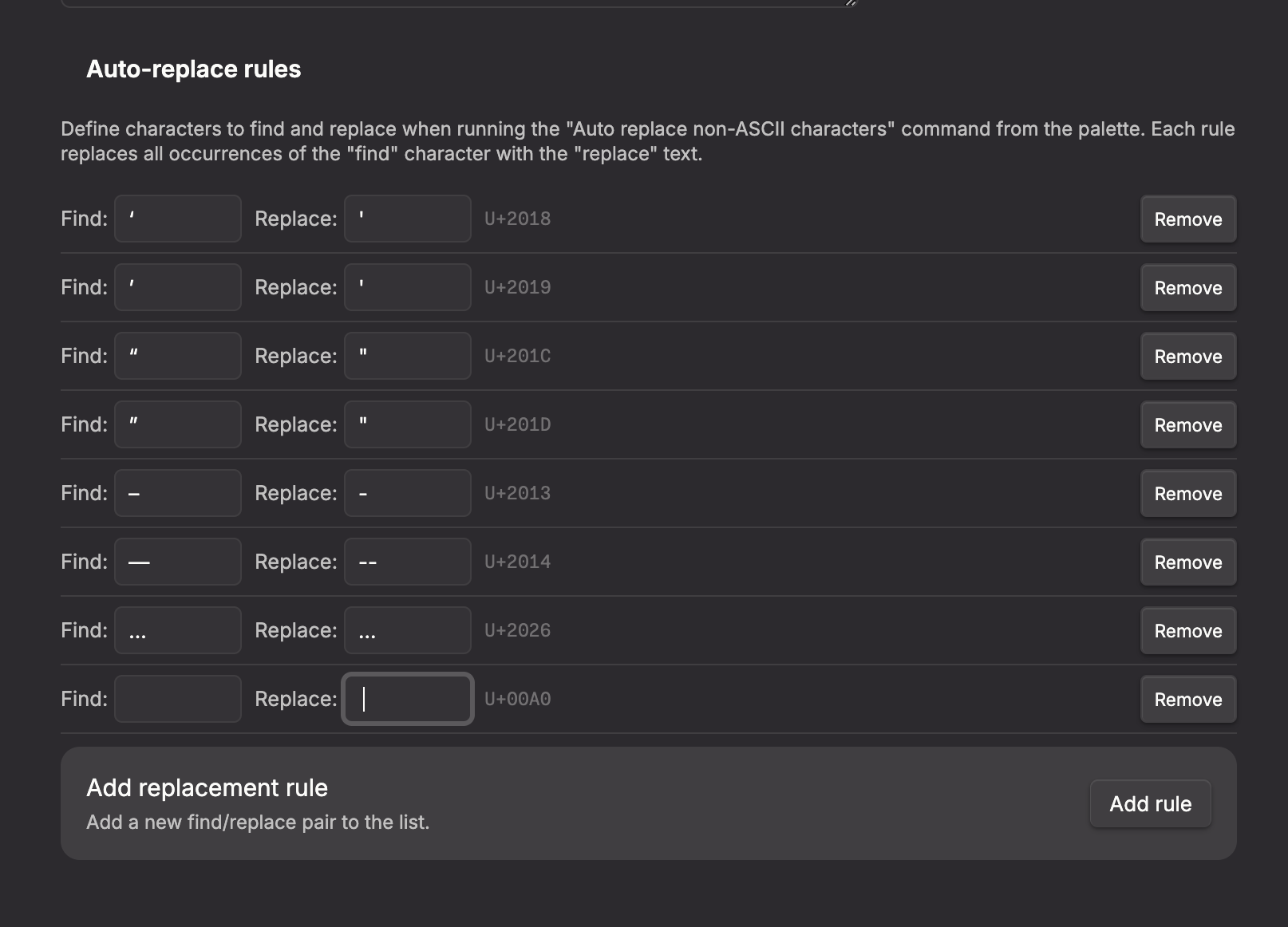
You can add, edit, or remove replacement rules in Settings > Highlight Non-ASCII under the Auto-replace rules section. Each rule shows:
- Find -- the character to search for
- Replace -- the text to replace it with
- Unicode codepoint -- the U+ identifier for the find character
- Remove button to delete the rule
Click Add rule to create a new find/replace pair.
Disabling for specific notes
Add the following frontmatter to any note where you want to turn off highlighting:
---
highlight-non-ascii: false
---
If the property is missing or set to true, highlighting remains active (as long as the global toggle is enabled).
Installation
Obsidian Community Plugin
This plugin is available in the official Obsidian community plugin directory. Install it from Settings > Community plugins > Browse and search for "Highlight Non-ASCII" or "Highlight Non-ASCII by saltyfireball".
Community plugin page: https://community.obsidian.md/plugins/highlight-non-ascii
More Plugins by saltyfireball
Browse all of my published Obsidian plugins on my profile: https://community.obsidian.md/users/saltyfireball
License
MIT -- see LICENSE for details.