Header Backlinks
 rekby485 downloads
Displays anchor icons next to headings targeted by internal links and lets you navigate to every note that references each heading.
- Overview
- Scorecard
- Updates7
Читайте на русском: README.ru.md.
An Obsidian plugin that shows an anchor icon in the editor gutter next to headings that are targeted by internal links ([[Note#Heading]] or [[#Heading]]). Click the icon to open a menu of all notes that link to that heading, then jump straight to the exact link line in the source file.
Features
- Vault-wide header backlinks: Scans markdown files for wiki-style links and embeds that include a
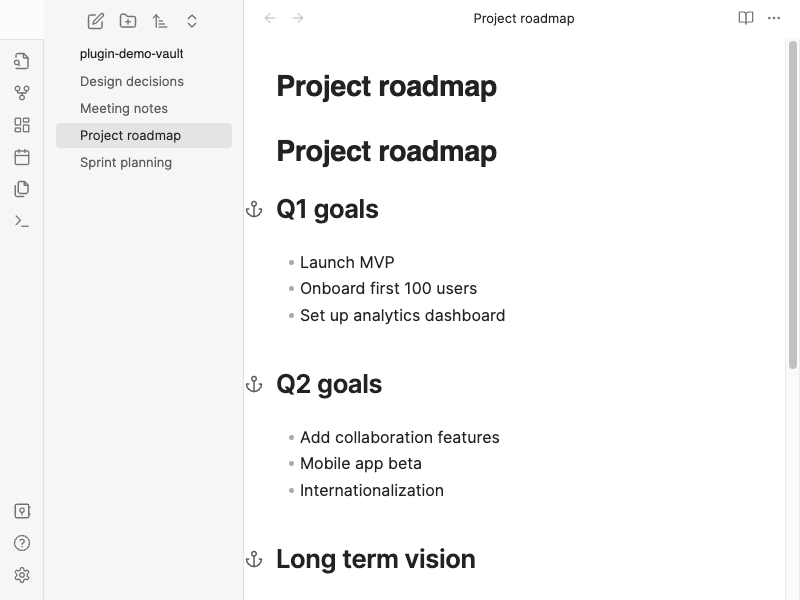
#fragment pointing at a heading. Builds a map of “which headings are linked from where.” - Gutter anchor icons: In Live Preview and Source mode, referenced headings get a small anchor in the left gutter (next to the line number column). Headings with no incoming header links show no icon.
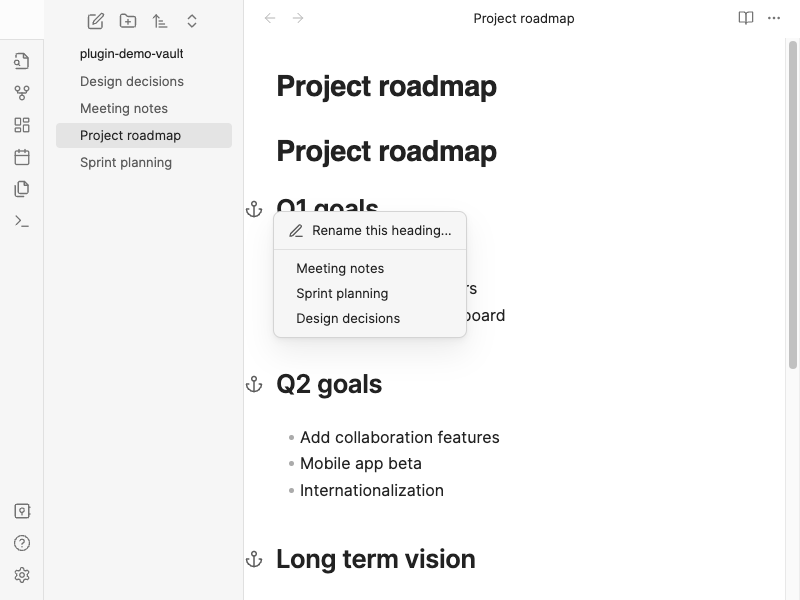
- Quick navigation: Click an anchor to open a context menu listing every source note. Choosing an entry jumps to the exact link line, and notes with multiple matches open a second chooser with
line: quoteentries. - Rename heading: The context menu includes a Rename this heading… action (uses the built-in Obsidian command) that renames the heading and updates all links pointing to it.
- Same-file links: Supports
[[#Heading]]/[[#Some heading]]style links where the target is a heading in the same note. - Embeds included: References from
![[Note#Heading]]style embeds are counted the same as ordinary[[...]]links. - Stays up to date: When metadata changes (edits, new files, resolved links), the backlink map is rebuilt on a short debounce so the gutter stays in sync with the vault.
Usage
- In any note, create links to a heading in another file, for example
[[My note#Introduction]], or in the same file:[[#Introduction]]. - Open the target note (the one that contains the heading).
- In the editor, find the heading line: an anchor appears in the gutter if at least one link points to that heading.
- Click the anchor to see all notes that link to this heading; click a note name to jump to the link line, or choose a specific occurrence if the note links more than once.
Tip: The plugin matches headings by normalized text (trimmed, collapsed spaces, case-insensitive), consistent with how link fragments refer to heading titles.
Demo
Anchor icons in the gutter
Referenced headings show an anchor in the left gutter; headings without incoming header links have no icon.
Context menu
Click an anchor to list every note that links to that heading, then jump to the exact link you need.
Installation
From Obsidian Community Plugins
Note: This method will be available after the plugin is accepted into the Obsidian community plugin list (PR). For now, use BRAT or manual installation below.
- Open Settings → Community plugins.
- Turn off Restricted mode if needed, then open Browse.
- Search for Header Backlinks.
- Click Install, then Enable.
Via BRAT
If the plugin is not yet in the community list or you prefer installing from GitHub:
- Install the BRAT plugin from Community Plugins.
- Open Settings → BRAT → Add Beta plugin.
- Enter this repository URL:
https://github.com/rekby/obsidian-header-backlinks - Add the plugin and enable Header Backlinks under Community plugins.
Manual installation
- Download
main.js,manifest.json, andstyles.cssfrom the latest release. - Create the folder
<Vault>/.obsidian/plugins/header-backlinks/. - Copy the three files into that folder.
- Reload Obsidian and enable Header Backlinks in Settings → Community plugins.
Development
npm install
npm run dev          # watch mode
npm run build        # typecheck + production bundle
npm run lint         # ESLint
Demo assets
Regenerate English and Russian README screenshots and demo GIFs (requires a local Obsidian test setup configured for WebdriverIO and ffmpeg for GIF encoding):
npm run demo              # screenshots (docs/demo/ + docs/demo/ru/) + GIFs (docs/demo/*.gif + docs/demo/ru/*.gif)
npm run demo:screenshots  # README PNGs only (both languages, one run)
npm run demo:capture      # demo frame capture + manifests (EN + RU); then `npm run demo:render` for GIFs
npm run demo:screenshots:ru   # Russian README PNGs only (faster iteration)
Known limitations
- Only heading links (
#fragment) are considered, not block references (^block-id). - Notes with several links to the same heading open a second chooser so you can pick the exact occurrence.
License
See LICENSE.