Haoo Cardbox
 Haoo28 downloads
Turn notes into cards, sort them into domain piles, and arrange them on a board with links and ink to build a MOC.
- Overview
- Scorecard
- Updates6
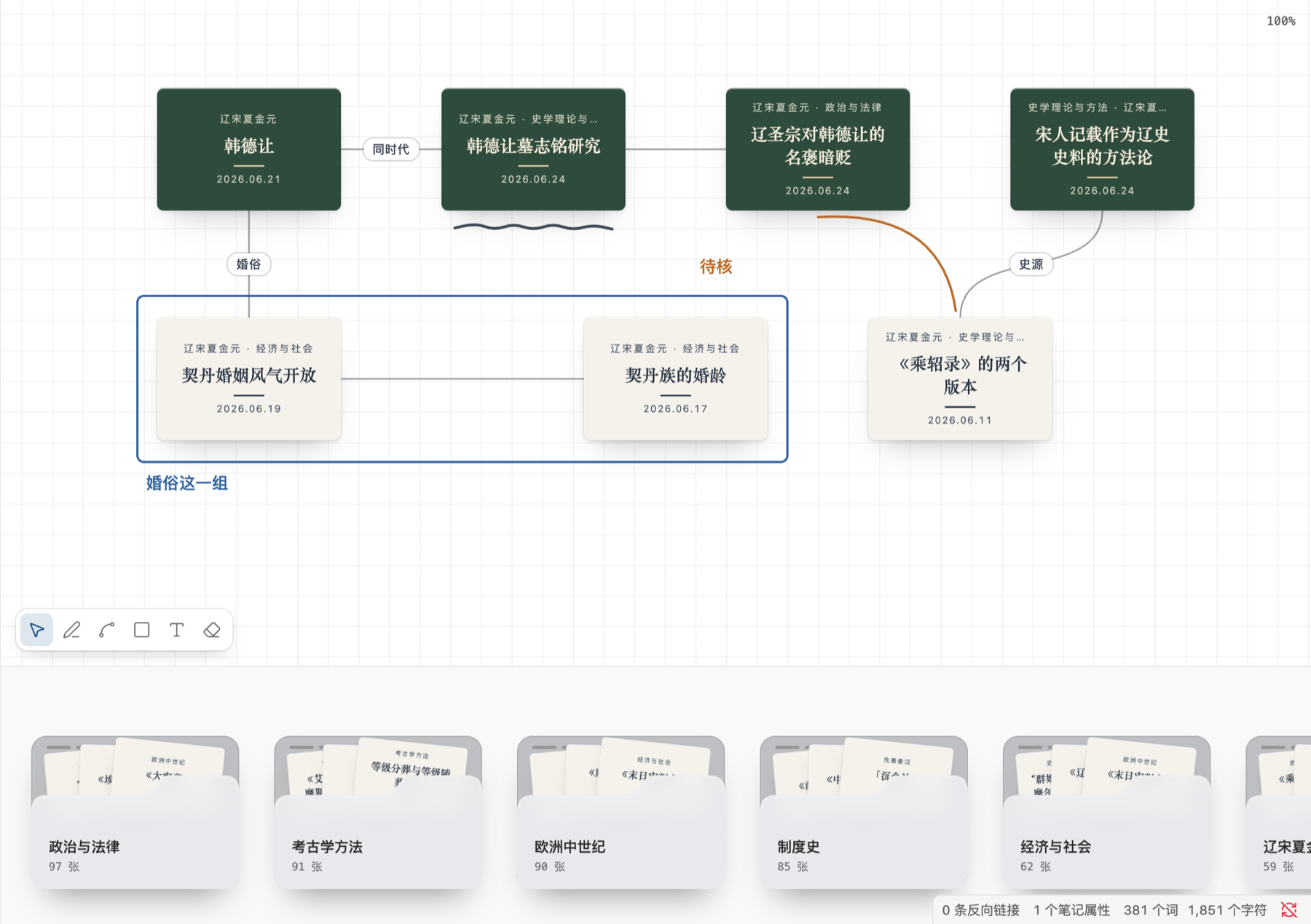
把写好的笔记变成一张张卡片,按领域装进文件夹;摊开卡堆挑卡,放上画板亲手摆位、连线、圈画,排成一篇 MOC 的骨架。
一块画板就是一篇 Markdown 笔记:上面是你自己写的手写区,中间是插件根据画板自动生成的 MOC 正文(一串 [[卡片]] 链接),末尾是藏起来的画板数据。所以反向链接、关系图谱、搜索、同步都能直接用,画板不是一座孤岛。
桌面端专用(
isDesktopOnly)。当前是 v1:卡堆栏、画板、连线、标注、卡片上色、导出.canvas都已可用。
前置条件
- Obsidian 1.5 或更高,桌面端(macOS / Windows / Linux)。
- 笔记带
domain/*标签,一个领域对应一个卡堆;前缀可以在设置里改。 - 想在卡片上区分类型,就在 frontmatter 里写
type:literature(文献)、permanent(永久)、fleeting(闪念,flash和「闪念」也认);不写算未分类。
安装
从源码构建一次:
npm install
npm run build      # 产物在 dist/
把 dist/ 里的 main.js、manifest.json、styles.css 拷进库的 .obsidian/plugins/haoo-cardbox/(文件夹名要和 manifest 的 id 一致),然后在「设置 → 第三方插件」里启用。
开发时更省事的做法:把 .obsidian/plugins/haoo-cardbox/ 直接做成指向本仓库 dist/ 的符号链接,跑 npm run dev 监听构建,改完在 Obsidian 里重载插件。
用起来
画板
- 「新建画板」在命令面板里,或点左侧 ribbon 图标;新建的画板放在当前笔记所在的文件夹。
- 拖空白处平移,普通滚轮上下平移,
⌘+ 滚轮或双指捏合缩放。 - 拖卡片摆位,选中的几张一起动;
⌘单击在右侧分栏打开原笔记,⌘悬停看 Obsidian 原生的页面预览。 - 双击翻面,看来源、作者、日期和正文开头;再双击翻回。
- 右键卡片:在右侧打开、翻面、卡片颜色、从画板上拿下。
⌘Z/⇧⌘Z撤销和重做卡片、连线、标注(平移缩放不算)。
卡堆栏
- 画板下方一排文件夹,一个领域一个,按卡片数从多到少排;多了横向滚动,竖着滚轮也能左右翻。
- 悬停文件夹,露出的卡往上抽出一截;点开后卡片散开在画板上方,画板压暗。
- 在散开的卡里点选,或按住
⇧/⌘多选,拖到画板上;多张落下时每行 4 张排成一小块。 - 已经在当前画板上的卡会压暗、拖不动。按
Esc、再点文件夹或点画板空白处收回。 - 右键文件夹换颜色(七种),设置里可以统一默认色或一键全部改回默认。
连线
- 悬停卡片,四边出现接点,从接点拖到另一张卡上就连一条曲线;按住
⌥从卡面直接拖也行。 - 双击连线写短标签(最多 12 个字),清空就去掉。
- 单击选中一条线按
Delete删除;一对卡片只有一条线,不分方向。
标注
- 工具条在画板左下角:
V选择、P画笔、L直线、R矩形、T文字、E橡皮擦,Esc回到选择。 - 三种颜色(墨、赭、靛),跟着主题变深浅;直线画完可以拖中间的点弯成曲线,按住
⇧吸附到 15° 一档。 - 矩形只描边;文字直接写在画板上,双击可以改。
- 选中标注后能挪位置、改颜色、
Delete删除;橡皮擦碰到哪条就擦掉整条。 - 标注在卡片之上但不贴在卡片上:缩放后仍圈在原来的位置,挪走卡片时标注留在原处。
卡片颜色
- 默认纸色只区分笔记类型:文献是纸白、闪念淡黄、永久深绿、未分类淡灰。
- 右键「卡片颜色…」可以在卡片下方打开取色条,给选中的卡换成七种卡纸之一,或者「跟类型」还原。
- 颜色存成
#rrggbb,跟着画板笔记保存;导出.canvas时会一起带上。字色按底色深浅自动选深字或浅字。
画板笔记
- frontmatter 里有
skeuo-board: 1的笔记,打开时默认进画板;视图菜单里可以「用 Markdown 打开」。 - 手写区在 MOC 正文上方,插件永远不覆盖;数据块读不出来时画板不打开,笔记原样保留。
- 改名一篇笔记或文件夹,所有画板里的路径跟着改;删除笔记后卡片变成虚线框的缺失卡片,位置和连线都留着,可以重新指向另一篇笔记。
设置
- 领域标签的前缀:默认
domain/,可以换成自己已有的标签体系。 - 文件夹的默认颜色:跟着主题(浅色雾白、深色石墨),也可以指定一种;单独换过色的文件夹可以一键全部改回默认。
数据格式
画板数据放在笔记末尾 %% 注释里的一个 skeuo-board 代码块,字段沿用 JSON Canvas:nodes(file、x、y、width、height,可选 flipped、missing、color)、edges(fromNode、toNode、可选 label),标注放在额外的 strokes 字段,另外还有 viewport。读不懂的顶层字段会原样保留。
「导出为 .canvas」会生成原生画板文件,卡片、坐标、连线、标签和卡片颜色照原样带过去;标注和缺失卡片原生画板不支持,导出时会提示。
开发
npm run dev             # 监听构建
npm run check           # tsc --noEmit
npm run check:obsidian  # Obsidian 社区插件自检:manifest/versions 检查 + 官方 ESLint 规则
npm test                # node:test,先 esbuild 打包再跑
npm run build           # 生产构建到 dist/
src/core/是纯逻辑(归堆、画板笔记读写、MOC 正文、改名删除跟随、拖放排布、撤销、导出),不 import Obsidian,是唯一的测试接缝。src/ui/是画板和卡堆栏(原生 DOM 和 SVG),src/obsidian/是适配层(视图、设置、监听库变化)。- 术语以 GLOSSARY.md 为准;「画板存成 Markdown 笔记」这个决定见 docs/adr/0001-board-as-markdown-note.md。
已知限制
- 只支持桌面端,不做 iPad / 手机。
- 标注不进
.canvas导出。 - 画板的撤销历史只在内存里,关掉画板就清空。
许可
MIT。