Hans SafeDoc
 Hans Lin 林思翰88 downloads
Read-only local pseudonymization for MD, TXT, CSV, DOCX, and XLSX with manual review.
- Overview
- Scorecard
- Updates3
Hans SafeDoc 是 Obsidian 電腦版的本機文件去識別化外掛。它只讀取來源,讓使用者逐項審核疑似敏感資料,再建立新的安全副本;原始文件不會被覆寫。
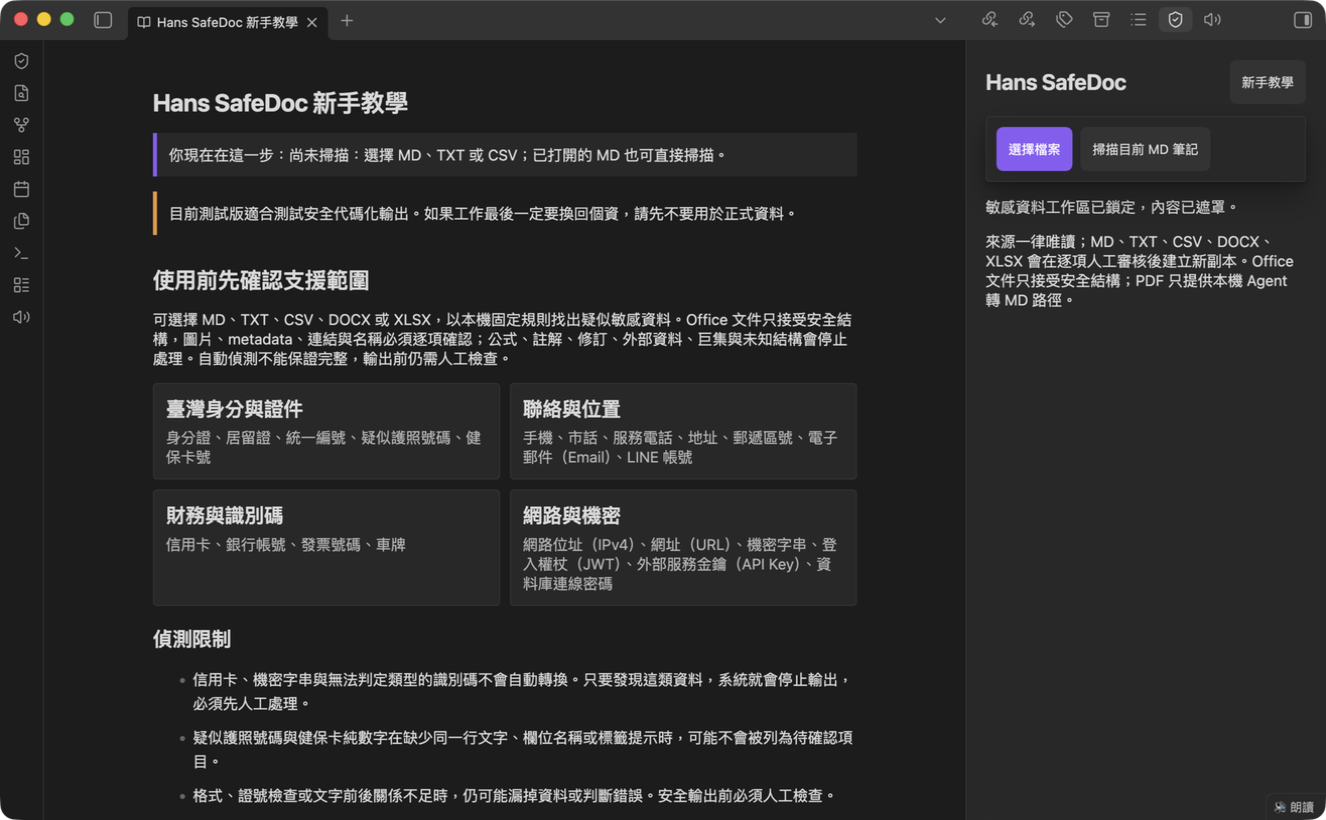
產品畫面
支援範圍與安全限制
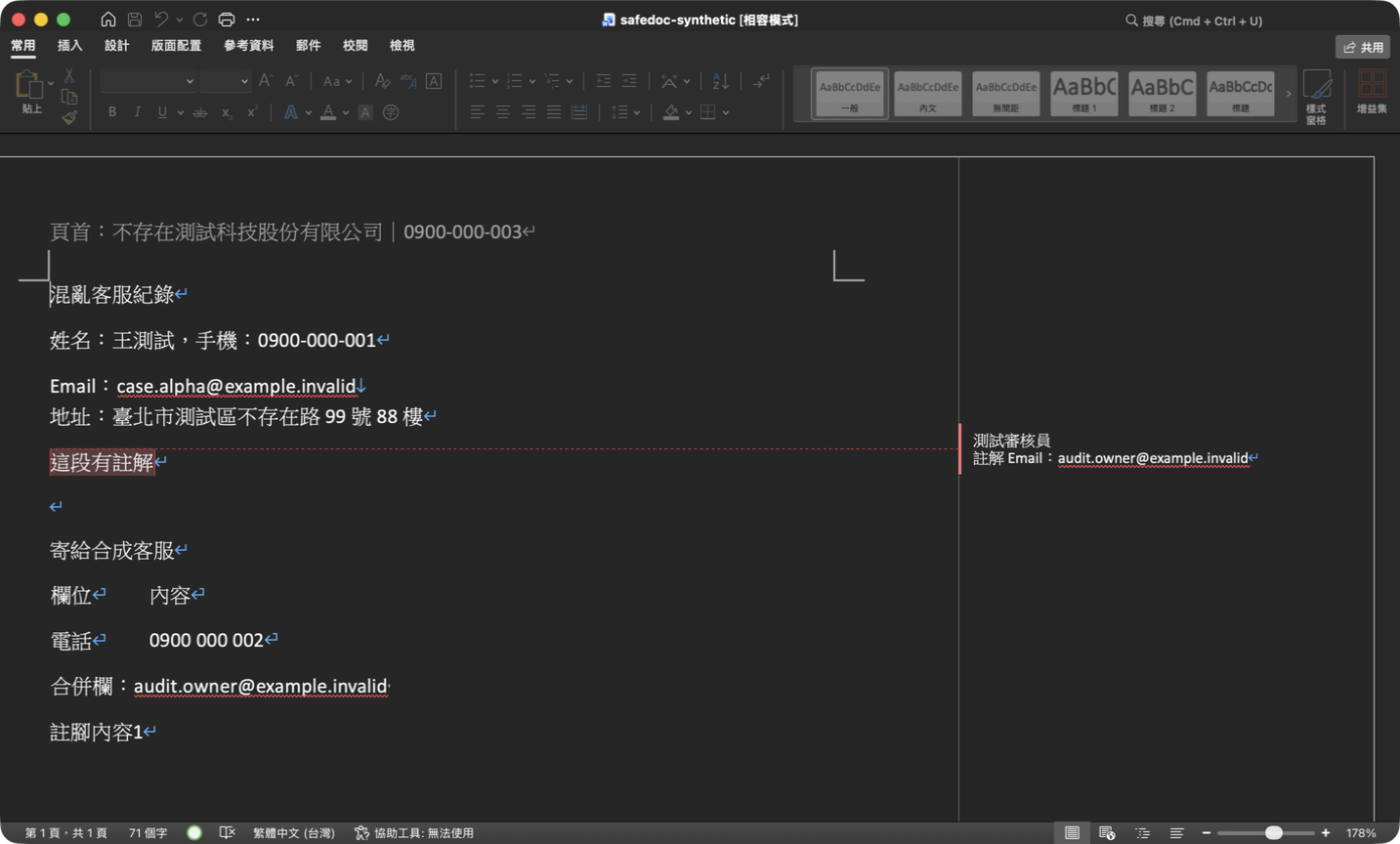
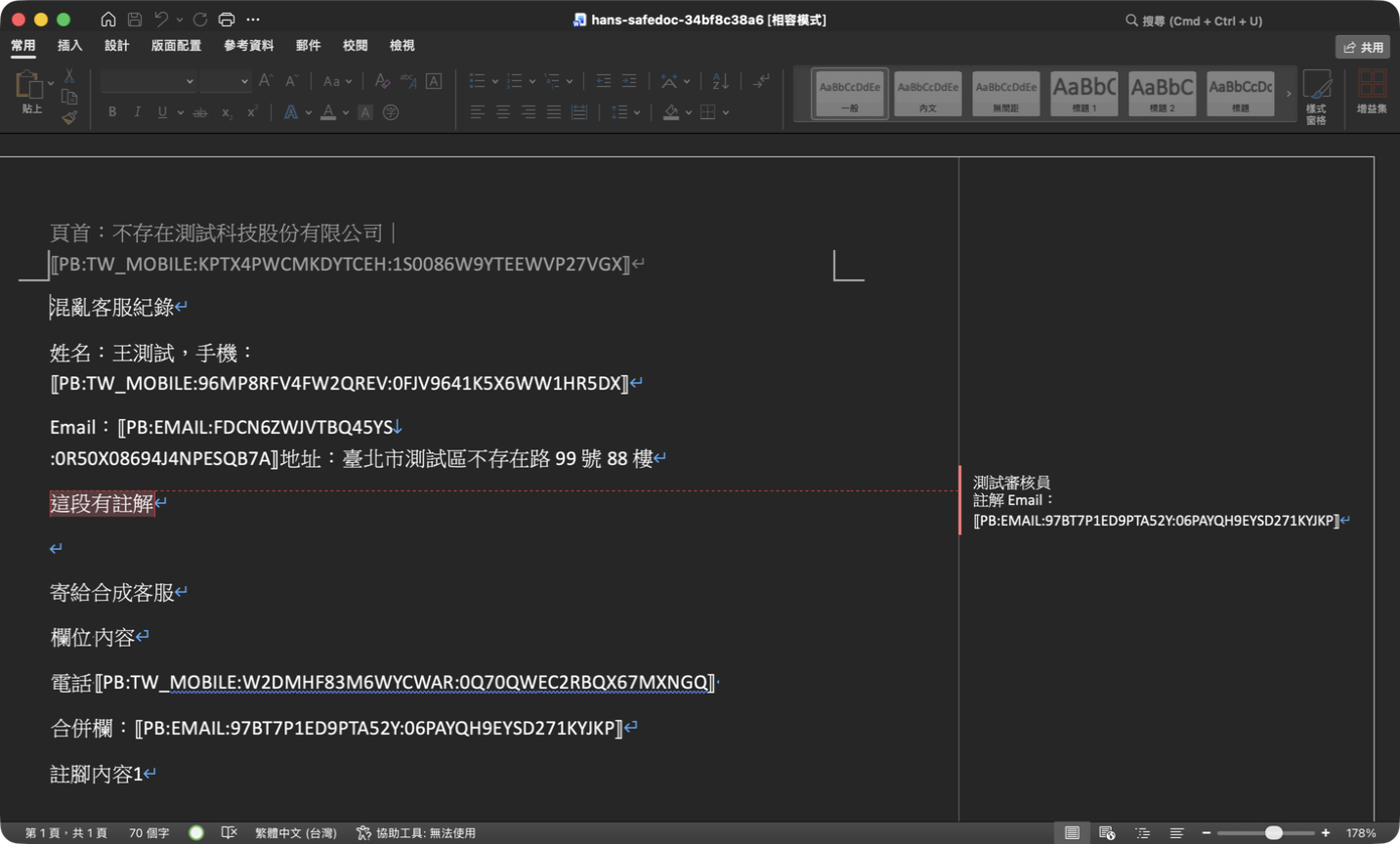
轉換前後
| 純合成原始文件 | Hans SafeDoc 安全副本 |
|---|---|
 |
 |
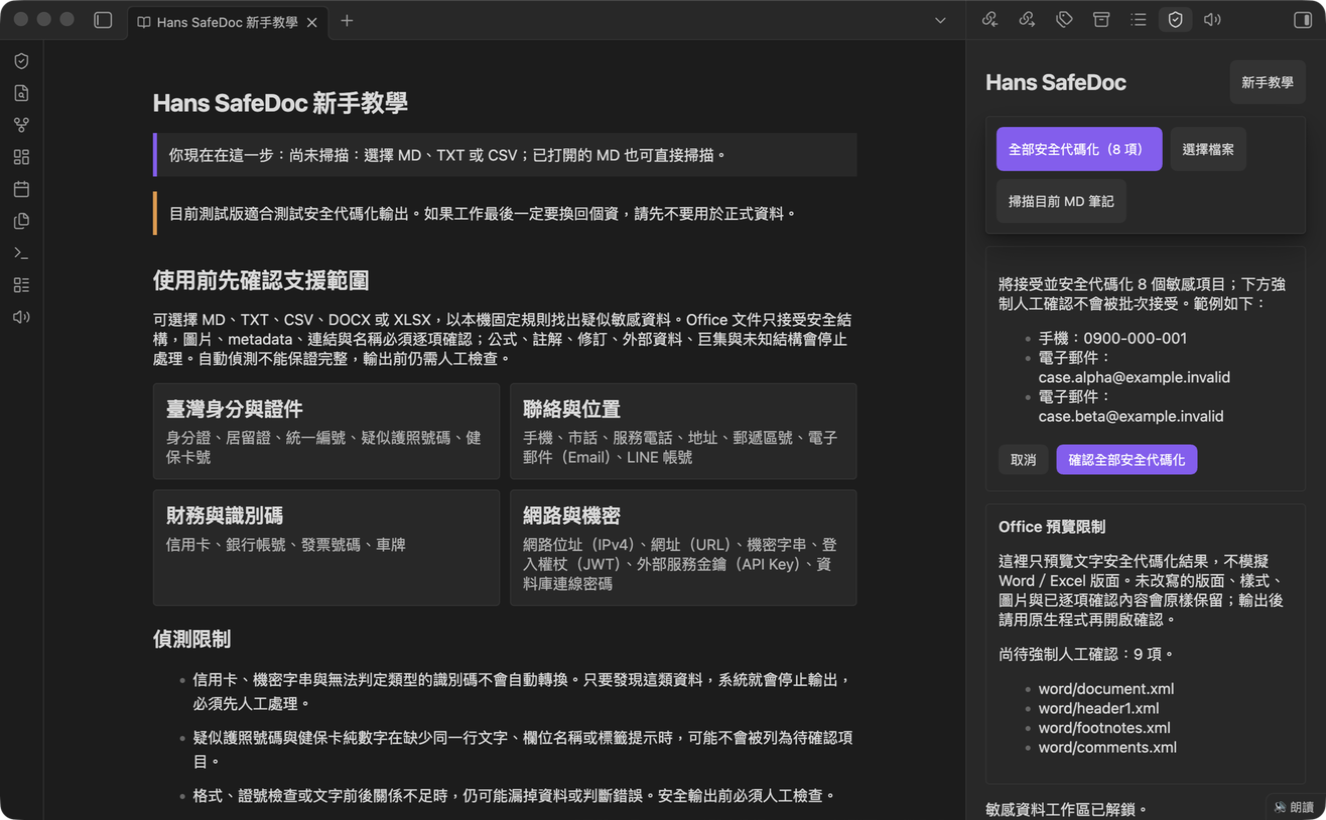
人工確認
安裝前先看
Hans SafeDoc 會盡量找出疑似敏感資料,但不能保證完整,也不構成法律上的匿名化認定。處理正式資料前請保留來源備份、逐項人工確認,並先用合成文件熟悉流程。
第一次使用
- 選擇檔案,或打開一篇 MD 後掃描目前筆記。
- 逐項決定接受或保留;批次接受也必須由使用者明確確認。
- 檢查轉換預覽。來源若在審核期間改變,流程會失效並要求重來。
- 設定本次 Job 的還原密碼。密碼不會儲存,遺失後無法找回。
- 只有 adapter 重新開檔與殘留檢查通過後,才會在 Obsidian Vault 外建立安全副本;加密對照表另存於作業系統應用程式資料夾,不會進入 Vault 或安全輸出。
格式範圍
v1.3 支援下列唯讀來源:
- Markdown(
.md):嚴格 UTF-8,輸出新副本。 - 純文字(
.txt):嚴格 UTF-8;UTF-16、NUL 與不安全編碼會阻擋。 - CSV(
.csv):用確定性 parser 自動判斷逗號、Tab 或分號;只有結果模糊時才詢問。欄數不一致與試算表主動內容會阻擋。 - Word OOXML(
.docx):支援通過精確allowlist的文字、表格、頁首、頁尾、註腳與安全圖片結構。圖片不做OCR,metadata、超連結、主題與圖片必須逐項確認後原樣保留;修訂、巨集、OLE、外部內容及未知結構會阻擋。 - Excel OOXML(
.xlsx):支援通過精確allowlist的shared/inline文字、格式化識別碼、隱藏工作表與合併儲存格。工作表名稱、定義名稱、表格名稱、metadata與超連結必須逐項確認;公式、註解、外部資料、巨集、pivot及未知結構會阻擋。
PDF 不由外掛直接解析。必須先由本機 AI Agent 以確定性工具逐頁轉成 Markdown,確認沒有漏頁或掃描頁,再把該 MD 交給 Hans SafeDoc。原始 PDF 與未安全化 MD 優先留在 Vault 外。
舊版 .doc/.xls、RTF、ODT/ODS、圖片、音訊、影片、Obsidian 畫布(Canvas)、Obsidian 資料庫檢視(Bases)、壓縮檔與其他未列格式都會阻擋。Obsidian 手機版不支援。
人名、組織、專案、產品、部門、系統與自訂詞可匯入工作階段 JSON 客戶字典做精確比對;格式範例見 examples/dictionary.simple.example.json。字典不做模糊猜測、不寫入 Vault 或外掛設定,鎖定工作區或關閉外掛後會清除,且所有結果仍必須人工確認。自動偵測不保證完整,也不是法律上的匿名化判定。
正式版只使用固定規則
MD/TXT/CSV/DOCX/XLSX 的固定規則可獨立使用,不需要安裝 Ollama(離線模型執行工具)或 LLM(大型語言模型)。正式版不提供模型下載、離線模型匯入或模型推論:第三方候選未通過正式分發的授權/來源審查,零外部權重的自建候選也未達既定precision與recall門檻,因此全部排除於release資產及production runtime之外。
- release source與artifact不含model catalog、模型檔、downloader、model manager或ONNX runtime。
- 舊模型研究證據保留於原工作區,不進clean-room source或產品功能。
- 文件掃描、預覽、Job 對照與還原維持全程本機、零遙測;人名與組織可能漏判,輸出前必須人工檢查。
加密 Job 與安全還原
- 建立安全輸出前必須設定 12–256 個字元的密碼。密碼只用來透過 scrypt 衍生 AES-256-GCM 金鑰,不會被儲存。
- 安全代碼對照、原文顯示值與 token key 只存在 Vault 外的加密 Job Store;安全輸出與客戶字典都不包含 Mapping。
- 同一 Job 內,相同類型與正規化後相同的資料會得到相同安全代碼;不同 Job 會使用不同 key 與代碼,避免不必要的長期串聯。目前外掛每次輸出建立獨立 Job,因此不把 PII 代碼當成跨系統交易索引;需要跨 Log 關聯時,應優先在來源系統建立不含個資的穩定 correlation ID。
- 每份安全輸出會附帶不含 Mapping 的安全分析包(Safe Package)
.safe-package.zip與.analysis-request.json;交給其他工具時必須兩份一起提供,並要求只回傳符合result-package.schema.json的 UTF-8 JSON。原生安全副本保留給本機版面檢查,不作為 Result JSON 的雜湊綁定來源。 - 「還原 AI 結果」只接受上述結構化 Result JSON。Job、安全分析包雜湊、匿名文件 ID、schema 或安全代碼任一不符,都會使整包還原停止。
- 還原結果永遠寫入新的
Hans SafeDoc Restored/<Job>-results[-N]/,不覆寫原始文件、安全輸出或 AI 回傳檔。還原副本再次包含個資,不應上傳雲端。
給 AI Agent:在本機操作 Hans SafeDoc
請複製首次教學或內建說明中的完整「本機操作」指令。指令會要求 Agent:原始文件不上雲、PDF 先在本機逐頁轉 MD、CSV 只用確定性 parser 判斷、遇人工審核立即停下、不得替使用者批次確認,且只有重新開檔與殘留檢查通過後才能回報安全副本。
給其他 AI:只處理安全分析包
請複製首次教學或內建說明中的完整指令,並只提供配對的 .safe-package.zip 與 .analysis-request.json。指令會限制 AI 不得讀取原始檔或還原個資、要求逐字保留每一個 ⟦PB:…⟧ 安全代碼,且只回傳符合 result-package.schema.json 的單一 UTF-8 JSON;完整性無法確認時必須停止。
安裝步驟
hans-safedoc 官方 listing 的「Add to Obsidian」啟用前,請使用下列手動安裝方式。
- 從 GitHub Release 下載與
manifest.version完全相同版本的main.js、manifest.json、styles.css。 - 將三個檔案放到
<Obsidian Vault>/.obsidian/plugins/hans-safedoc/。 - 重新啟動 Obsidian,在第三方外掛頁面啟用「Hans SafeDoc」。
- 先用內建合成練習筆記完成完整流程,再處理自己的文件。
開始閱讀
docs/MASTER-SPEC.md:唯一最高規格docs/DECISION-REGISTER.md:已鎖定決策docs/IMPLEMENTATION-PLAN.md:固定 Merge Order 與 Epicdocs/ACCEPTANCE-MATRIX.md:127 項驗收schemas/:18 份 machine-readable data contractsdocs/THREAT-MODEL-V1.1.md:Hans SafeDoc 1.1 Phase 1 威脅模型docs/UX-STATE-MAP.md:畫面、狀態與按鈕規則docs/TAIWAN-SYNTHETIC-BASELINE.md:版本化臺灣繁中合成偵測基線docs/MIGRATION-AND-RECOVERY.md:備份、復原、刪除與遷移docs/RELEASE-CHECKLIST-V1.1.md:v1.1 Phase 1 Release Gatesdocs/ENGINEER-EXECUTION-PROTOCOL.md:不中斷執行規則
規格優先順序
MASTER-SPEC
→ JSON Schema
→ Acceptance Matrix
→ Golden Fixtures
→ Decision Register
→ Implementation Plan
→ GitHub Issue
→ Code comments
→ Existing code
現有程式碼
reference/legacy-seed/ 只作為規則與測試起始素材,不是規格來源。回歸測試不得被用來宣稱企業資料準確率;它們只是最低安全基線。
開放產品決策
0
發現未明確描述的實作細節時,依 ENGINEER-EXECUTION-PROTOCOL.md 的安全優先順序自行決定,不等待產品負責人。
Release Stop
只有以下四類可以阻擋 Release,但其他工作繼續:
- STOP-01:可能毀損原始資料
- STOP-02:可能洩漏原始資料、Mapping 或金鑰
- STOP-03:無法安全遷移
- STOP-04:必要平台 API 不存在且無安全替代
套件驗證
BUILD-REPORT.md 列出:
- Schema 數量與驗證結果
- Acceptance Matrix 項目數
- Crypto test vector
- 規格檔案 Hash
- Legacy seed 是否成功納入
English
Hans SafeDoc is a desktop-only Obsidian plugin for reviewing and pseudonymizing local documents without overwriting the originals. It supports read-only MD, TXT, CSV, DOCX, and XLSX sources and creates a new safe copy only after item-by-item review and artifact verification.
Installation
- After the Obsidian directory review is approved, open Settings → Community plugins → Browse and search for Hans SafeDoc.
- Select Install, then Enable.
- If directory installation is not yet available, download
main.js,manifest.json, andstyles.cssfrom the GitHub Release matchingmanifest.version, then place them in<Vault>/.obsidian/plugins/hans-safedoc/and restart Obsidian.
Basic usage
- Open a Markdown note or choose a supported local file.
- Review every suspected sensitive value and every mandatory Office surface.
- Inspect the preview, then create a safe copy.
- Set and retain the per-Job restore passphrase, then open the output in its native application and verify it before sharing.
- To restore an AI-returned result, require one UTF-8 JSON object matching
result-package.schema.json, then choose the original Job and passphrase; Hans SafeDoc validates the Safe Package hash, document IDs, schema, and every token before writing a new Result Vault.
Privacy and limitations
- Document processing is local and includes no telemetry or network requests.
- The plugin reads only the selected source and writes a new safe copy outside the vault; it never overwrites the source.
- Token mappings are encrypted outside the vault with a passphrase-derived key. The passphrase is never stored and cannot be recovered by the plugin.
- A session-only exact-match customer dictionary can cover names, organizations, and internal terms without installing a model.
- Detection can miss names, organizations, and context-specific identifiers. Manual review is always required and does not constitute a legal determination of anonymization.
- DOCX and XLSX use a narrow fail-closed profile. Macros, formulas, external content, tracked changes, and unknown OOXML structures are blocked.
- PDF, legacy
.docand.xls, mobile Obsidian, and unsupported formats are not processed directly.