
- Overview
- Scorecard
- Updates44
Were you using Hermes? This plugin was briefly published as Hermes at v1.0.0 and renamed to Gryphon to avoid confusion with the gaining-mindshare Hermes agentic system. Same project, same security model, same code lineage. Migration: install Gryphon via BRAT (
polleoai/gryphon), then copy.obsidian/plugins/hermes/data.json→.obsidian/plugins/gryphon/data.jsonto keep your API key and settings. The plugin auto-renames theHermes/vault folder toGryphon/on first launch. The historical Hermes repo is archived at polleoai/hermes.
AI chat for Obsidian. Talk to Claude, GPT, or Gemini from inside your vault — read and edit files, run tools, all without leaving Obsidian.
Gryphon is a lightweight, reactive chat surface that connects your Obsidian vault to one of six LLM providers: Anthropic's Claude API, OpenAI's API, or Google's Gemini API directly, or any of their locally-installed CLI subprocesses (claude, codex, gemini). It runs on your local machine and reads/writes your vault files through a standard tool-use loop. Pick whichever provider you already have credentials for — there's no preference baked in.
Gryphon is not affiliated with Anthropic, OpenAI, or Google. References to the Anthropic API, OpenAI API, Google API, or any of their CLIs describe what the plugin can talk to; they do not imply endorsement. When using a CLI-subprocess mode, confirm your intended usage complies with that product's terms.
Screenshots
 |
 |
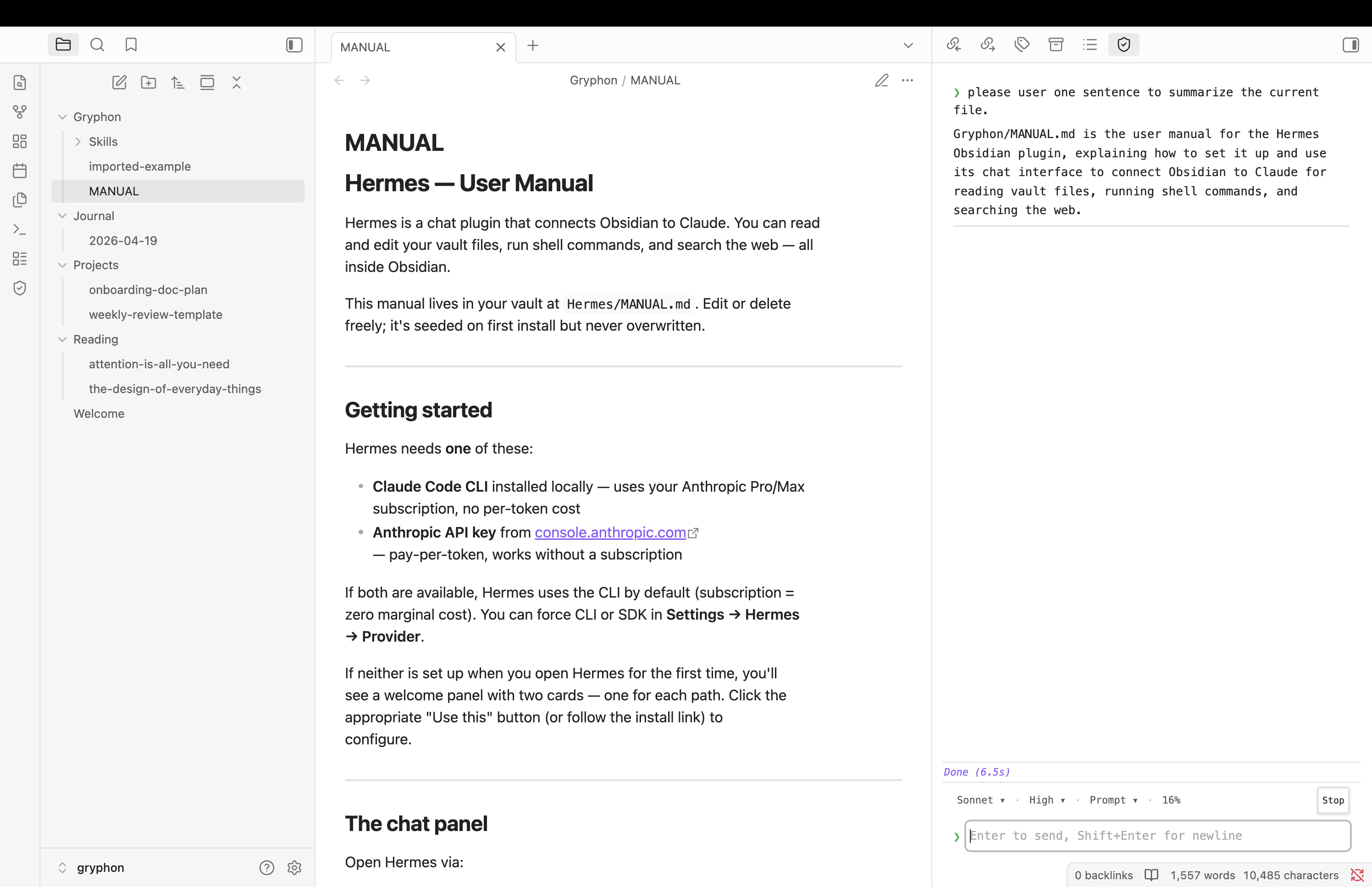
Chat panel with streaming response — note Gryphon/MANUAL.md in the file tree, seeded on first install |
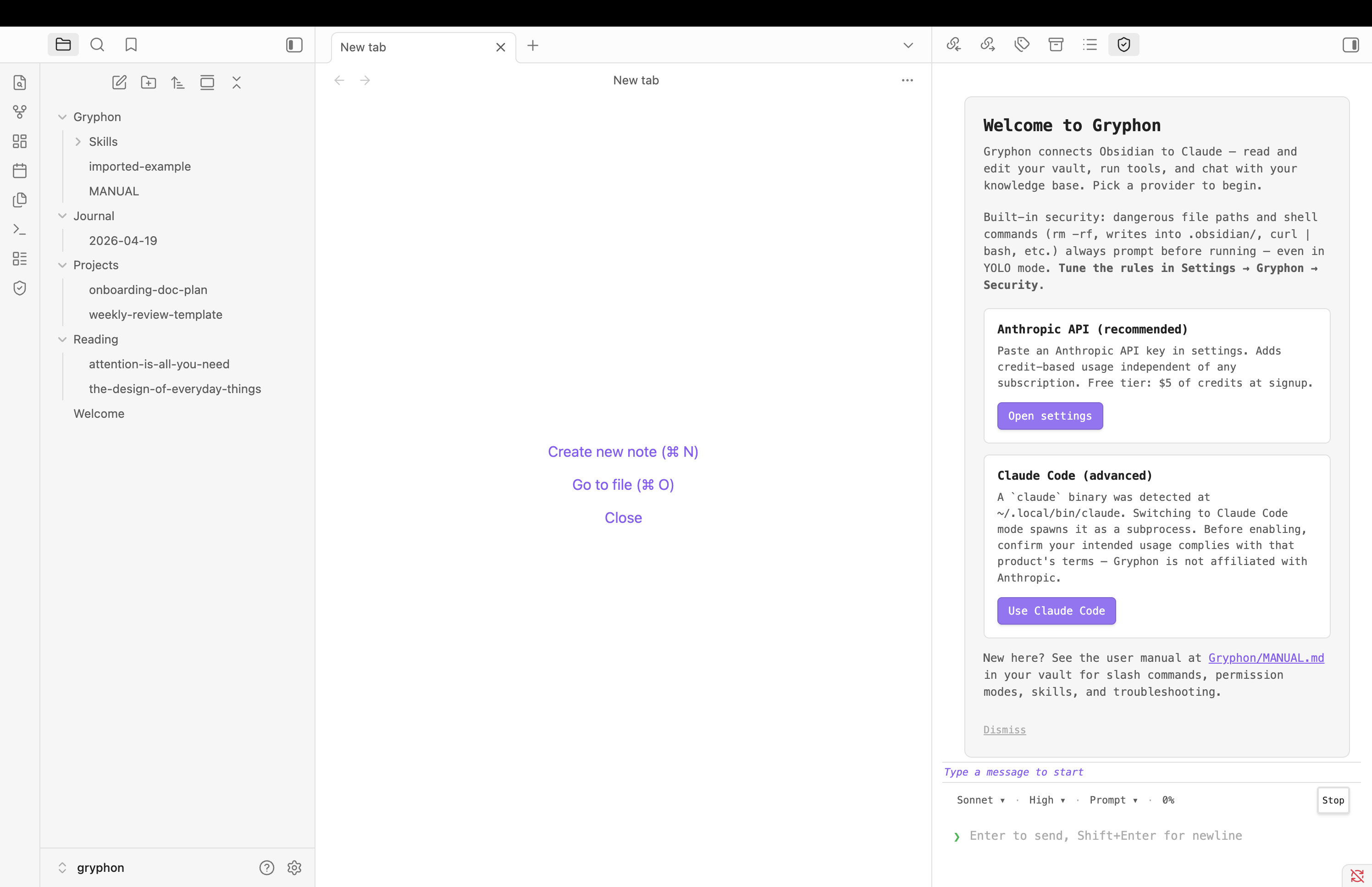
First-run welcome panel adapts to what's detected (API key, local CLI, or neither) |
 |
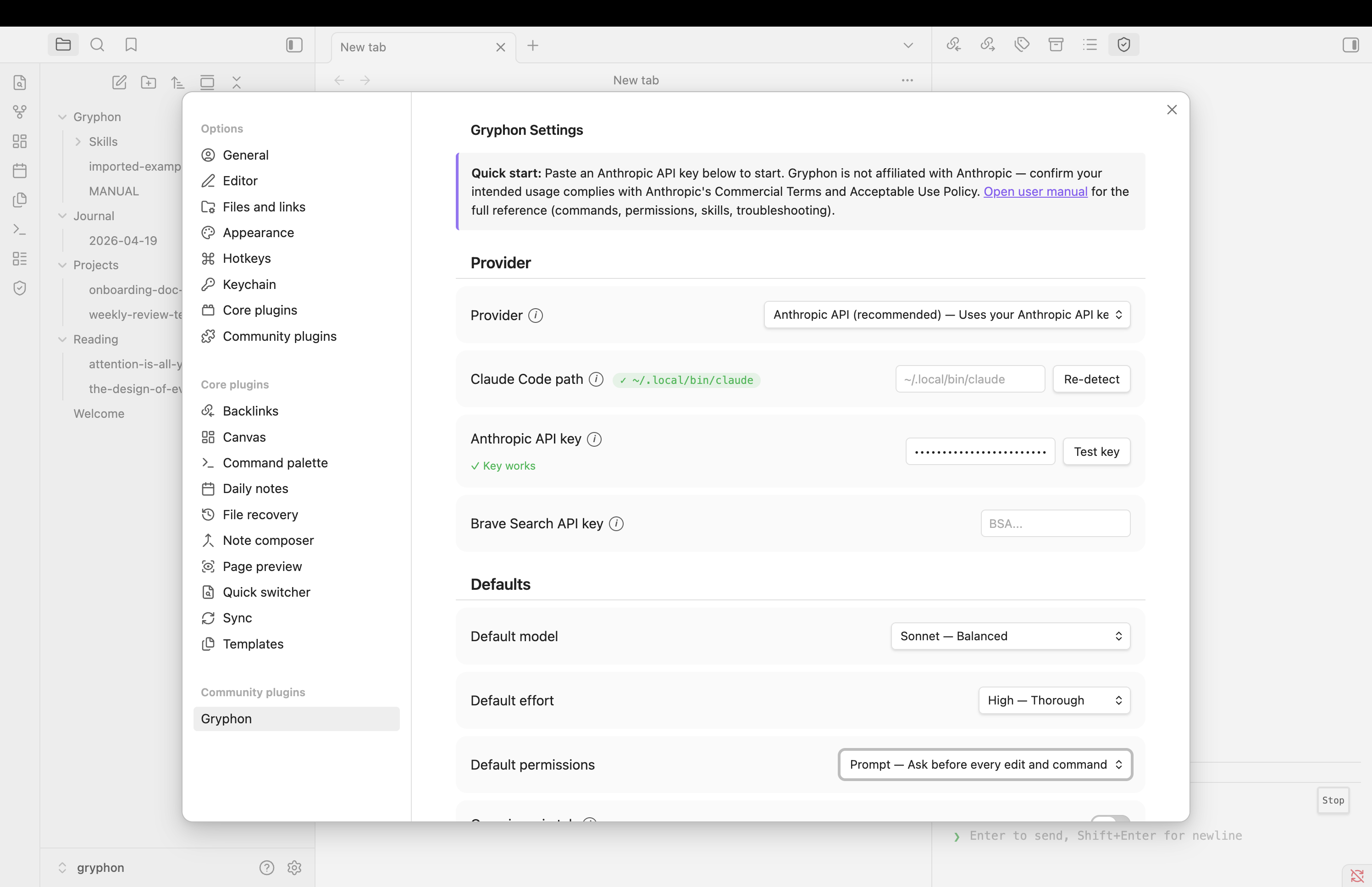 |
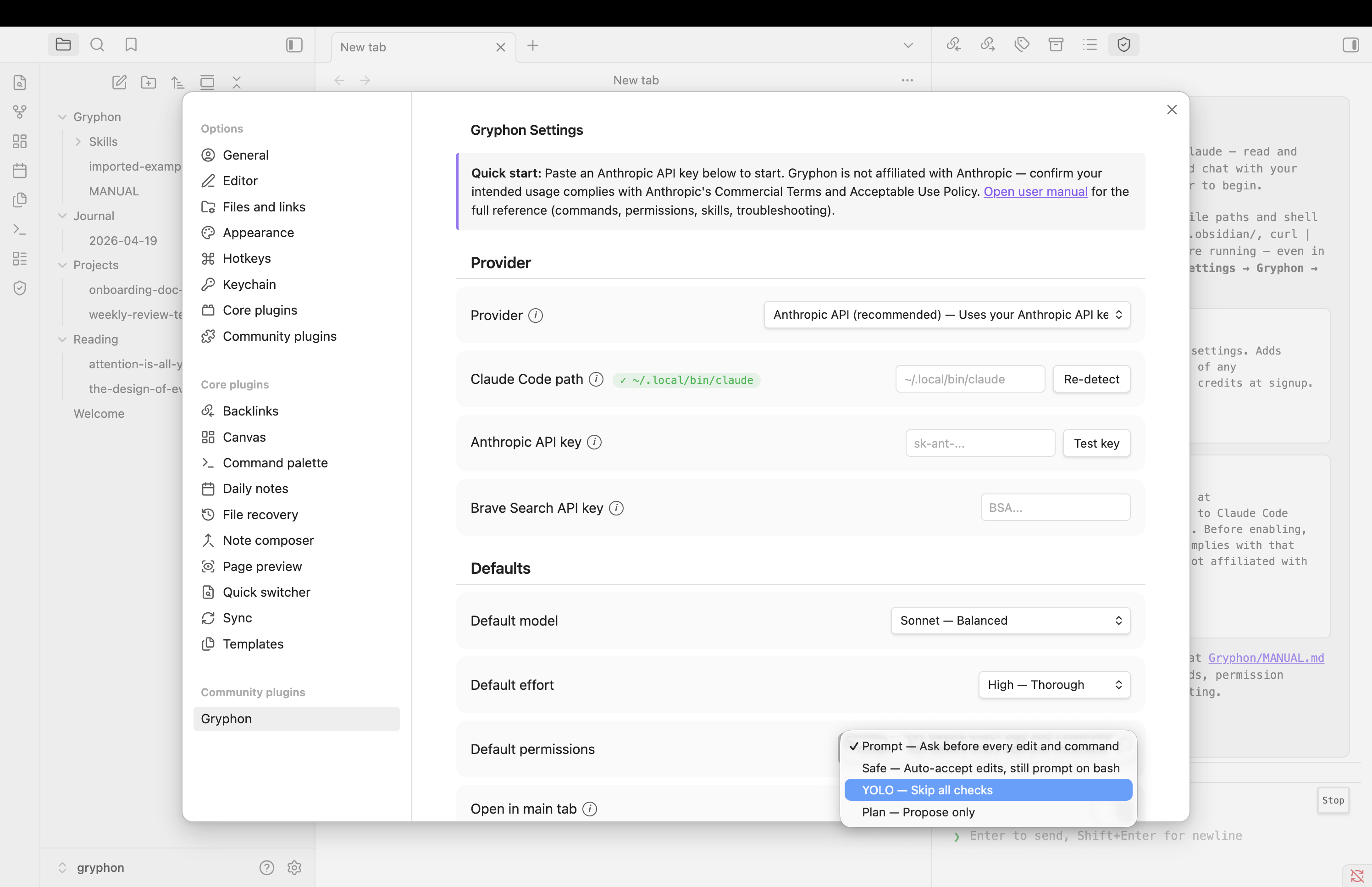
| Edit permission modal with diff preview | Settings tab — provider chooser, API key fields, defaults |
 |
|
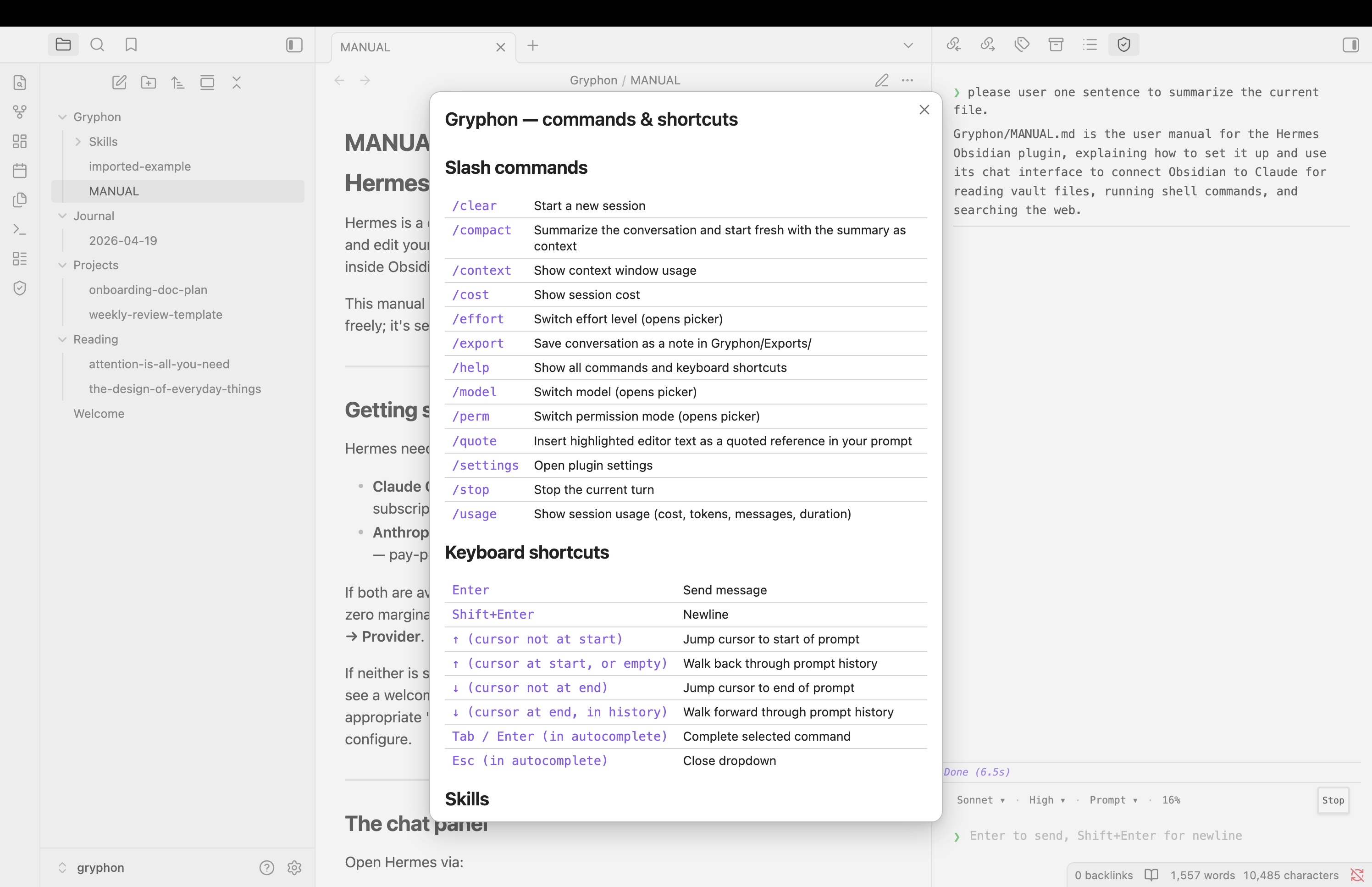
/help modal — slash commands, keyboard shortcuts, link to the in-vault manual |
Features
- Built-in security layer — a curated list of dangerous file paths (
.obsidian/,.git/,.claude/,.env, ...) and commands (rm -rf,Remove-Item -Recurse,curl | bash,format C:,sudo, registry mutation, ...) always surface an approval modal even in YOLO mode. Other Claude-for-Obsidian plugins defer entirely to Claude Code's permission modes — Gryphon adds a dedicated guardrail so a one-word "yes" in YOLO can't wipe your vault. See Built-in security below for the full model. - Streaming chat panel in a sidebar or main tab
- Vault-native tooling — Claude reads, writes, edits, searches, and runs shell commands with the vault as its working directory
- Anthropic API by default — connects to the Anthropic API directly. A Claude Code (local-CLI) mode is available as an advanced opt-in.
- Permission modes — Prompt, Safe (auto-accept edits), YOLO (skip all prompts), Plan (propose only). Independent of the built-in security layer above.
- Approve-per-call modal — every tool-use that matches one of your protected patterns surfaces in an Obsidian dialog with diff/command preview before it runs. Works in both Anthropic API mode and Claude Code mode on macOS, Linux, and Windows.
- Untrusted-content framing — web fetches, shell output, and out-of-vault reads are tagged when Claude sees them, so prompt injection in fetched content can't redirect the conversation
- Per-file provenance — files written from a web fetch are persistently flagged; subsequent reads show Claude the original source and treat the content as data, even after a plugin reload
- Session persistence — conversations survive plugin reloads, including full model context in Anthropic API mode
- Auto-compact at 95% (SDK mode) — Gryphon automatically summarizes the conversation and starts a fresh session seeded with the summary when the context window fills up; a status-line warning at 80% lets you intervene with
/compactfirst if you'd rather control the summary yourself. Claude Code mode delegates to Claude Code's own auto-compaction. - Skill loader —
.mdfiles inGryphon/Skills/become slash commands; five skills ship pre-populated - Terminal-style input — ↑/↓ jump cursor to start/end of prompt, or walk through prompt history
- Slash commands —
/clear,/compact,/context,/cost,/effort,/export,/model,/perm,/quote,/settings,/stop,/usage
Installation
Via Obsidian's Community Plugins directory — search for "Gryphon" in Obsidian → Settings → Community plugins → Browse, or open obsidian://show-plugin?id=gryphon directly. This is the recommended path for most users.
Via BRAT (for early access to release candidates) — the Beta Reviewers Auto-update Tool is a community plugin that installs plugins directly from GitHub releases and keeps them up to date.
- Install BRAT from Obsidian's Community Plugins directory (search for "BRAT").
- Open Settings → BRAT → Add Beta Plugin.
- Paste
polleoai/gryphonand click "Add Plugin". BRAT pulls the latest release. - Enable Gryphon in Settings → Community plugins.
- Future releases auto-update through BRAT.
From source (for contributors):
- Clone the repo into
.obsidian/plugins/gryphon/(relative to your vault root) - Run
npm installandnpm run build - In Obsidian → Settings → Community plugins → enable Gryphon
Requirements
You need at least one of the following — Gryphon picks up whichever provider you have credentials for:
- Anthropic API key from console.anthropic.com (Claude models, pay-per-token)
- OpenAI API key from platform.openai.com (GPT models, pay-per-token)
- Google API key from aistudio.google.com (Gemini models, free tier available)
- A locally-installed AI CLI —
claude,codex, orgemini. Gryphon detects whichever is on yourPATH.
Paste the API key for your chosen provider into Settings → Gryphon → API key, or set the corresponding env var (ANTHROPIC_API_KEY, OPENAI_API_KEY, GOOGLE_API_KEY). The plugin reads from settings first, env var as fallback.
Each provider mode is independent — you can switch between them per-conversation via /model or globally in Settings. Before using any CLI-subprocess mode, confirm your intended usage complies with that product's terms.
Provider modes
Six providers shipping today, plus an Auto-detect mode:
| Mode | How it works |
|---|---|
| Anthropic API | Direct HTTP calls to api.anthropic.com via @anthropic-ai/sdk. Pay-per-token. |
| OpenAI API | Direct HTTP calls to api.openai.com via the official openai SDK. Pay-per-token. |
| Google API | Direct HTTP calls to generativelanguage.googleapis.com via @google/genai (Gemini Developer API; Vertex AI also supported when credentials present). Free tier available. |
| Claude Code | Spawns a locally-installed claude binary as a subprocess and streams JSON over stdin/stdout. Requires Anthropic's CLI installed locally. |
| Codex CLI | Same pattern for OpenAI's codex CLI. |
| Gemini CLI | Same pattern for Google's gemini CLI. |
| Auto | Prefers any detected CLI (claude > codex > gemini priority), else falls back to whichever API key is configured. Opt-in; not the default. |
For CLI modes, confirm your intended usage complies with that product's Commercial Terms and Acceptable Use Policy. API modes require credits in the corresponding vendor's workspace.
Permission modes
Claude's ability to edit your files and run shell commands is gated by the Permission setting:
| Mode | Read tools | Normal edits | Normal shell | Protected path / command |
|---|---|---|---|---|
| Prompt (default) | Always allowed | Modal per file | Modal per command | Modal (always) |
| Safe | Always allowed | Auto-accept | Modal per command | Modal (always) |
| YOLO | Always allowed | Auto-accept | Auto-accept | Modal (always) |
| Plan | Always allowed | Refused | Refused | Refused |
Prompts include a preview: Edit shows old/new diff, Write shows the first 30 lines of content, Bash shows the full command with its working directory. You can tick "Remember for this session" to skip future prompts for the same file until plugin reload. Bash decisions are never cached — every command is asked individually.
All file operations are vault-scoped: paths like ../etc/passwd are rejected before the tool runs, even in YOLO mode. Security boundary is src/providers/anthropic-api/tools/path-utils.js.
Built-in security (what makes Gryphon different)
Most Claude-for-Obsidian integrations rely entirely on the user's vigilance at each approval prompt plus Claude Code's own permission modes. Gryphon adds a curated layer on top: a pre-populated list of known-dangerous file-path patterns (writes into .obsidian/, .git/, .claude/, .env) and command patterns (rm -rf, Remove-Item -Recurse, curl | bash, iwr | iex, sudo, format C:, registry mutation, recursive chmod, etc.) that always surface an approval modal before running — including in YOLO mode.
The design choice: convenience modes (Safe, YOLO) silence prompts for routine operations so Claude can iterate quickly; a separate rule set guards the dangerous ones so you can't accidentally YOLO away your vault, your git history, or your shell. The two axes are independent.
Users stay in full control of the rule set:
- Settings → Gryphon → Security → Protect file paths / Protect commands: per-feature master toggle if you want to rely on Claude Code's modes alone
- Settings → Gryphon → Security: per-pattern checkboxes (default rules + your own additions) for fine-grained tuning
- Custom paths accept literal strings (trailing
/= folder prefix); custom commands accept JavaScript regex
Every default pattern is listed with a user-readable "why this matters" tooltip so non-developers can decide whether to keep or uncheck it.
Privacy and data flow
Gryphon is local-first. The short version:
- Your API key lives in
.obsidian/plugins/gryphon/data.json(inside your vault) alongside other Obsidian plugin data. It is sent only as anx-api-keyheader toapi.anthropic.comwhen Anthropic API mode is active. Never logged, never exported, never sent anywhere else. - Vault content is sent to the Anthropic API (Anthropic API mode) or to the locally-installed
claudesubprocess (Claude Code mode) only when Claude invokes a Read/Grep/Glob/Write/Edit/Bash tool on your behalf during an active conversation. Outside an active turn, nothing leaves your machine. - Chat history persists to
chat-history.jsonin the plugin directory. In Claude Code mode, LLM turns also live in Claude Code's own session files under~/.claude/projects/(owned by Claude Code, not Gryphon — delete the relevant session file to rotate the Claude Code session). - No telemetry. Gryphon does not include analytics, crash reporting, or any opt-out-required data collection. There is no "phone home" path.
- Diagnostics are opt-in. Settings → Gryphon → Diagnostics → CLI debug logging turns on console-side debug output and hook-invocation tracing. Everything it produces is console or local-file only; nothing is sent off-device. Default off.
What leaves your machine:
| Action | Destination | When |
|---|---|---|
| Chat message (Anthropic API mode) | api.anthropic.com |
Per turn |
| Chat message (OpenAI API mode) | api.openai.com |
Per turn |
| Chat message (Google API mode) | generativelanguage.googleapis.com (Gemini API) or aiplatform.googleapis.com (Vertex AI) |
Per turn |
| Chat message (CLI mode) | Local claude / codex / gemini subprocess on your machine |
Per turn |
| Vault file read by Claude | Same as above, embedded in the turn | Only when Claude invokes a Read tool |
| WebFetch URL | The URL's origin (direct HTTP fetch) | Only when Claude invokes WebFetch |
| WebSearch query | api.search.brave.com (SDK with key) or the provider's built-in search (CLI) |
Only when Claude invokes WebSearch |
| Everything else | Nowhere | Ever |
The provider mode you select determines which endpoint the plugin reaches. Unused providers contact nothing. No analytics, crash reporting, or telemetry endpoint exists in Gryphon — there is no "phone home" path.
Bundled SDKs and their full endpoint surface
Gryphon bundles the official SDKs from the providers it supports (@anthropic-ai/sdk, openai, @google/genai, undici). The Obsidian Community Plugins scorecard reports all endpoint strings present in the bundle, including endpoints that are only reached in specific auth flows — for example, Google's @google/genai SDK probes Google Cloud metadata endpoints (169.254.169.254, metadata.google.internal, iamcredentials.googleapis.com, cloudresourcemanager.googleapis.com, oauth2.googleapis.com, accounts.google.com) when running inside a Google Cloud VM with Application Default Credentials. None of those are reached during normal Obsidian use on a desktop machine; they remain in the bundle because the SDK ships them.
The complete list of domains that could be contacted, by mode:
- Anthropic API mode:
api.anthropic.com - OpenAI API mode:
api.openai.com,auth.openai.com(only during OAuth flows if used) - Google API mode:
generativelanguage.googleapis.com,aiplatform.googleapis.com, and (only inside Google Cloud) the metadata + auth endpoints listed above - WebSearch (any API mode):
api.search.brave.com - WebFetch (any mode): whatever URL Claude is told to fetch — by definition arbitrary
- CLI modes: nothing direct (the CLI subprocess makes its own outbound requests on your machine)
System identity reads
Gryphon's CLI-detection logic reads a small amount of system information:
os.hostname()andos.userInfo()— used in cross-platform path normalization for hook scripts- Environment variables —
PATH,HOME,ANTHROPIC_API_KEY,OPENAI_API_KEY,GOOGLE_API_KEY,GRYPHON_VAULT,npm_config_*, plus platform-standard locations Claude Code / Codex / Gemini CLIs are typically installed under
None of this is transmitted off the device.
Vault access surface
Gryphon uses Obsidian's standard vault API: vault.read, vault.cachedRead, vault.modify, vault.create, vault.delete, vault.rename. All operations are vault-scoped — paths like ../etc/passwd are rejected before the tool runs, regardless of permission mode.
For vulnerability reports and the full data-handling breakdown, see SECURITY.md.
Skills
A skill is a .md file in the Gryphon/Skills/ folder of your vault, with YAML frontmatter:
---
name: tag-suggest
description: Propose tags for the active note
argument-hint: optional extra context
---
Read the active note and propose 3-5 tags that capture its core topics.
Tags should be lowercase-with-hyphens, avoid over-general terms, and
reference existing tags in the vault when possible.
{{args}}
Once saved, type /tag-suggest in Gryphon chat to invoke it. {{args}} expands to anything typed after the skill name.
Pre-populated skills include /tag-suggest, /backlinks, /forward-links, /summarize, /lint-note. Delete them from Gryphon/Skills/ if you don't want them; they won't be re-created.
Settings reference
| Setting | Purpose |
|---|---|
| Provider | Auto / Anthropic API / OpenAI API / Google API / Claude Code / Codex CLI / Gemini CLI (see Provider modes above) |
| Anthropic API key | For Anthropic API mode. Stored in data.json. Blank = check ANTHROPIC_API_KEY env var. |
| OpenAI API key | For OpenAI API mode. Stored in data.json. Blank = check OPENAI_API_KEY env var. |
| Google API key | For Google API mode. Stored in data.json. Blank = check GOOGLE_API_KEY env var. |
| Claude Code path | Path to claude binary. Leave blank for auto-detect. Used in Claude Code mode only. |
| Codex CLI path | Path to codex binary. Leave blank for auto-detect. Used in Codex CLI mode only. |
| Gemini CLI path | Path to gemini binary. Leave blank for auto-detect. Used in Gemini CLI mode only. |
| Brave Search API key | Enables WebSearch in any API mode. Free tier at brave.com/search/api. CLI modes use the provider's built-in search and ignore this. |
| Default model | Provider-dependent dropdown (e.g., Claude Haiku/Sonnet/Opus, GPT-4o/o1, Gemini Flash/Pro). |
| Default effort | Low / Medium / High (where the provider's API exposes a reasoning-effort parameter). |
| Permissions | Prompt / Safe / YOLO / Plan (see Permission modes above) |
| Open in main tab | Opens chat in main editor area instead of sidebar |
Keyboard shortcuts
| Key | Action |
|---|---|
| Enter | Send message |
| Shift+Enter | Newline |
| ↑ (cursor not at start) | Jump cursor to start of prompt |
| ↑ (cursor at start) | Walk back through prompt history |
| ↓ (cursor not at end) | Jump cursor to end of prompt |
| ↓ (cursor at end, in history) | Walk forward through prompt history |
| Tab / Enter in autocomplete | Complete selected command |
| Esc in autocomplete | Close dropdown |
Architecture
Gryphon is structured around a pluggable provider interface:
src/
├── plugin.js — Obsidian plugin entry + settings UI
├── chat-view.js — streaming chat UI
├── constants.js — slash commands, models, permission modes
├── skills.js — skill file loader + dynamic slash commands
├── bundled-skills.js — pre-populated skill content
├── utils.js — shared helpers
└── providers/
├── provider-interface.js — contract doc (JSDoc-only)
├── factory.js — selects CLI or SDK based on settings
├── cli/
│ └── claude-code-cli.js — subprocess wrapper for the local `claude` CLI
└── sdk/
├── anthropic-sdk.js — direct API client (streaming, history-aware)
├── tool-loop.js — multi-turn tool-use driver
└── tools/
├── path-utils.js — vault-scoped path validation
├── tool-registry.js — schemas + dispatcher
├── read.js
├── glob.js
├── grep.js
├── write.js
├── edit.js
├── web-fetch.js
├── web-search.js
├── bash.js
└── permission-gate.js
The provider-interface documents the contract every backend implements — one send(prompt) method, streaming callbacks, and read-only properties (resolvedModel, contextTokens, sessionId). Adding a new provider (OpenAI-compatible, Gemini, Ollama, etc.) means implementing that interface and adding a branch in factory.js.
Development
npm install # install SDK + esbuild
npm run build # bundle plugin → main.js at repo root
npm run dev # watch mode (rebuilds on every save)
Live install into a test vault
Set GRYPHON_VAULT to your vault root (comma-separate multiple vaults) and every build pushes main.js, manifest.json, styles.css into the vault's .obsidian/plugins/gryphon/ folder automatically:
GRYPHON_VAULT=/path/to/my-vault npm run dev
Enable Gryphon once in Obsidian so the plugin folder exists, then reload Obsidian (Cmd+R / Ctrl+R) after each edit to pick up fresh bytes. If GRYPHON_VAULT is unset, builds go only to the repo root and you copy manually.
Multi-instance notes
If you run two Obsidian windows pointing at the same vault (a rare but possible setup — e.g. launching Obsidian with open -n -a Obsidian on macOS), each window has its own Gryphon plugin instance:
| Shared across instances | Isolated per instance |
|---|---|
provenance.json, chat-history.json, data.json in the plugin dir |
IPC socket — per-instance sock file named gryphon-PID-HEX.sock where PID is the running process id and HEX is random — plus session flags and the Claude Code subprocess itself |
What works correctly:
- Each instance talks to its own local-CLI subprocess via its own socket. No cross-talk between CLI sessions.
- Hook scripts find the right plugin because the spawn env var points to the owning plugin's socket.
- Orphan-file cleanup respects live-pid semantics — one instance never unlinks files an active sibling might still be using.
Known limitation — provenance tag race:
- Two instances concurrently writing
provenance.jsoncan clobber each other. Gryphon mitigates by reloading the disk state at the start of every mutation, shrinking the race window to microseconds, but doesn't eliminate it. - Consequence of a lost tag: one file won't be flagged untrusted on reads until the next tag-producing operation re-tags it. Recoverable.
- Planned mitigation: advisory lockfile around mutations for bulletproof atomicity.
Known limitation — chat history:
chat-history.jsonis a single shared file and each instance saves its own view. One instance's save can overwrite the other's recent messages. Fix is outside Gryphon's current scope.
For most users running a single Obsidian window, none of this matters. If you do run multiple windows on the same vault, prefer opening separate chat sessions in separate windows rather than interleaving messages across windows.
License
MIT © POLLEO.AI.
Contributing
Contributions welcome. Open an issue or pull request at polleoai/gryphon.
Contact
For questions, feedback, or support: [email protected].
For security vulnerability reports, see SECURITY.md — the same address is monitored for private disclosures.