Grok Notes
 Chrostn Woods123 downloads
Talk to Grok on laptop, tablet, and phone. Sidebar chat on desktop, sheet on phone. Ask about a note or selection, summarize, rewrite, and insert the reply. Uses the xAI API — no CLI.
- Overview
- Scorecard
- Updates22
Talk to Grok from a note on laptop, tablet, and phone. Sidebar on desktop, sheet on mobile. No Grok CLI.
Current release: 1.5.7
Public name: Grok Notes. Plugin id and install folder stay grok-mobile so an existing API key in data.json is still found. The old Grok-Mobile repo URL redirects here.
Interface
Phone uses a sheet. Laptop and tablet use a sidebar. Quick actions sit in a 3 by 2 box on both.
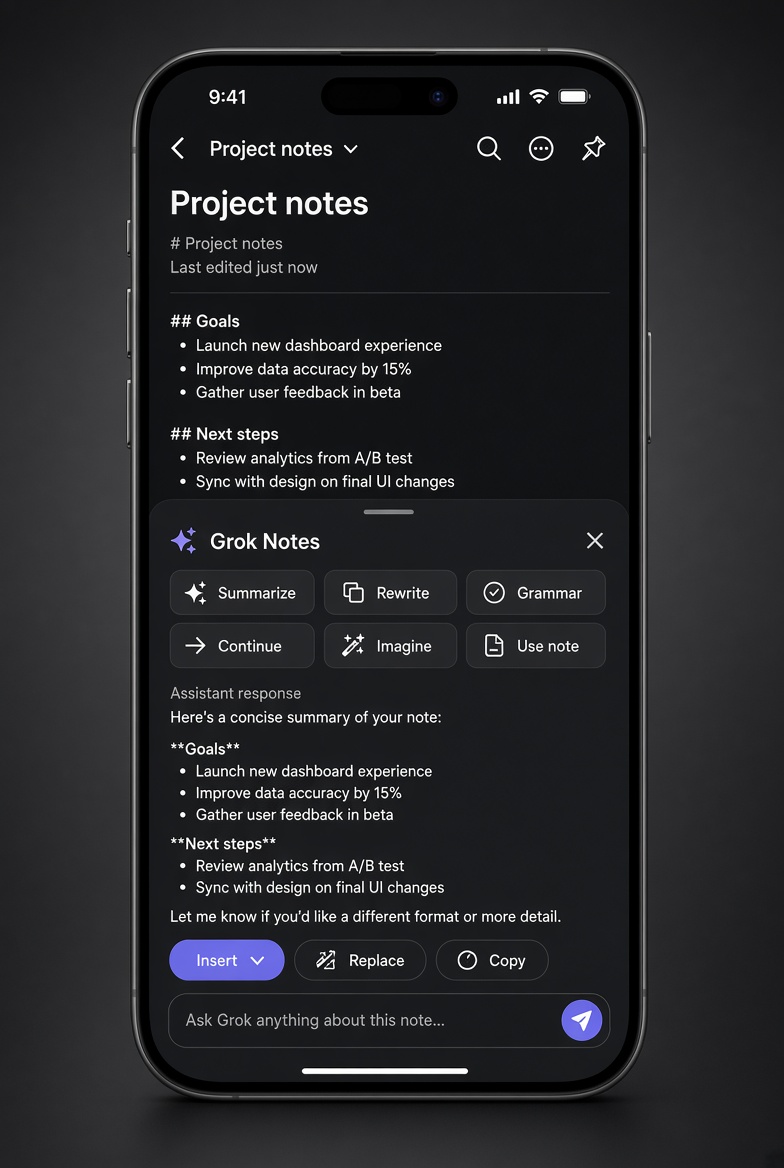
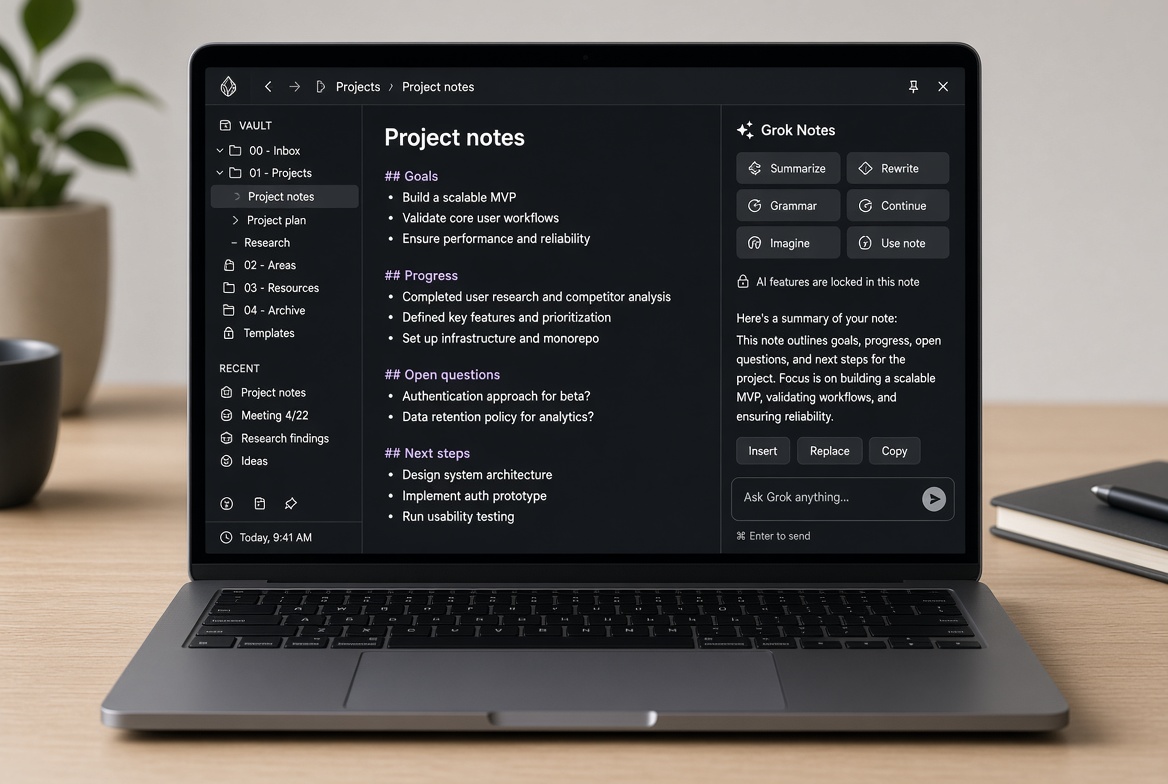
These are interface mockups of the 1.4.5 layout, not screenshots from a vault.
Docs
- Install and update
- Phone and laptop
- Commands
- Quick actions
- Imagine
- Models
- Privacy
- Troubleshooting
- FAQ
- For the Obsidian community
- Changelog
- Support
Support
If this plugin is useful, you can buy me a coffee.
Privacy and network use
This plugin sends the text you choose (selection, note, prompt, or notes in the open note's folder) to xAI at https://api.x.ai when you run a command, tap Send, or generate an image. It does not work without an xAI API key from https://console.x.ai . xAI bills API usage separately. The key is stored only in this vault's plugin settings (data.json). Do not commit that file.
Install or update
This plugin is not in the community store yet. Install from the release. Full steps: docs/install.md.
Open the latest release: https://github.com/ChrostnWo/Grok-Notes/releases/latest
Download
main.js,manifest.json, andstyles.css(or the release zip, then unzip).Put them in:
YourVault/.obsidian/plugins/grok-mobile/The folder name must be
grok-mobile. Replace the three files if you already installed an older version. Leavedata.jsonalone — that file holds your API key.Fully quit Obsidian and open it again (on iOS, swipe the app away). If the plugin was already enabled, turn it off and on under Settings → Community plugins.
Settings → Grok Notes → confirm the model is Grok 4.7. Paste an xAI key from https://console.x.ai if you have not already.
Use it
Ribbon sparkles icon, or command palette:
- Open Grok chat
- Open Grok sidebar
- Ask Grok about selection
- Ask Grok about this note
- Summarize this note
- Continue writing from cursor
- Rewrite selection
- Fix grammar of selection
- Test xAI API key
On a laptop, select text → right click → Ask Grok about selection.
Summarize opens the sheet (phone) or sidebar (laptop) with the note already loaded and sends. Tap Insert to put the summary in the note.
Quick actions
On the phone sheet and the desktop sidebar, quick actions sit in a locked 3 by 2 box:
- Summarize — the open note (not a stray selection)
- Rewrite — selection, or the context already loaded
- Grammar — selection, or the context already loaded
- Continue — text before the cursor
- Imagine — open image generation
- Use note — load the open note as context
A chip fills the prompt and sends. Insert, Replace, and Copy still use the raw Markdown, not the rendered HTML.
Rendered replies
Finished replies render as Markdown (headings, lists, code). While tokens are arriving, the reply stays plain text. Insert and Replace write the Markdown source into the note. Phone waits for the full reply; streaming is laptop-only.
Imagine
Command palette, or the Imagine chip on the sheet:
- Imagine something new
- Imagine from this note
- Imagine from this folder
- Imagine from this folder and subfolders
Vault sample uses the 12 newest notes, not every file. Folder uses up to 8 notes in the current folder. Draft from source asks the chat model for one image prompt, which you can edit. Generate calls grok-imagine-image-2.0 and bills one image. Save writes a jpg into the Grok folder. Save and embed drops the image link into the open note.
Settings → Grok Notes → Imagine model, aspect, and folder. Details: docs/imagine.md.
Layout
Settings → Chat layout: Auto, always sidebar, or always popup sheet. See phone and laptop.
Models
Default is grok-4.7 (public xAI API, chat completions). Settings → Grok Notes → Model:
| Picker | API id | Notes |
|---|---|---|
| Grok 4.7 (recommended) | grok-4.7 |
Current flagship. 500k context. About $2 / $6 per 1M input / output tokens. |
| Grok 4.6 | grok-4.6 |
Previous flagship, still on the public API. |
| Grok 4.5 | grok-4.5 |
Earlier 4.5 release. |
| Grok 4.20 | grok-4.20 |
Longer-context 4.20 line. |
| Grok 4 | grok-4 |
Original Grok 4. Kept so older setups still work. |
| Grok 3 | grok-3 |
Older model. |
| Custom model id | whatever you paste | Use this if xAI ships a new id before this list is updated. |
Removed from the picker: grok-4-latest, grok-3-mini, and grok-2. If your vault was on one of those, 1.2.0 switches it to grok-4.7 once. A saved id that is not in the list is kept as a custom id.
Grok 4.7 Fast is not on the public API (Cursor and Grok Build only). Do not put that name in Custom.
Ids and prices: https://docs.x.ai/developers/models
Releases
Full notes: CHANGELOG.md.
- 1.4.0 — Imagine from a prompt, note, folder, or 12-note vault sample. Saves a jpg into the vault and can embed it.
- 1.3.1 — Summarize works on phone. The sheet keeps the note even when the editor is not active. Quick actions ask Grok 4.7 for a short think (
reasoning_effort: low) so the token budget is not spent before the summary. Phone uses a non-streaming request. - 1.3.0 — Quick-action chips on the sheet and sidebar. Finished replies render as Markdown. Insert still writes Markdown.
- 1.2.0 — Model list refresh. Default
grok-4.7. Picker matches public API ids. Retired ids migrate. README and manifest description updated. - 1.1.0 — Sidebar on desktop, sheet on phone. Note and selection commands. Insert, replace, copy, new note.