Graph Exclusions
 matteo57 downloads
Add an Exclusions section to graph view filters to hide notes by path, tag, or file name, with a toggle for each rule.
- Overview
- Scorecard
- Updates1
Hide notes from the graph view with reusable exclusion rules you can switch on and off.
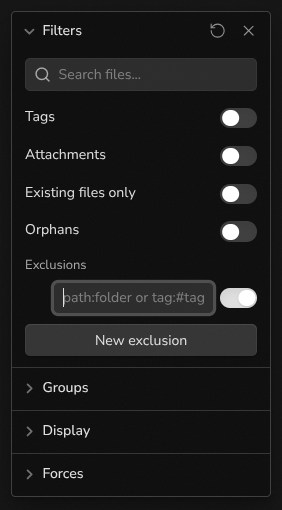
Graph Exclusions adds an Exclusions section inside the Filters panel of both the global graph and the local graph. Each rule is a query with its own toggle, so you can hide a folder, a tag, or a group of files without rewriting your search filter every time.
Usage
- Open the graph view (global or local).
- Open Filters. The Exclusions section appears below the existing filters.
- Select New exclusion and type a query.
- Use the toggle to turn the rule on or off. Hover a rule and select the × icon to remove it.
Rules are shared between the global graph and all local graphs. Links to and from excluded notes are hidden as well.
Query syntax
| Query | Hides |
|---|---|
path:Archive |
Notes whose path contains Archive |
file:draft |
Notes whose file name contains draft |
tag:#journal |
Notes tagged #journal or any nested tag such as #journal/2026, and the #journal tag node |
meeting |
Notes whose path contains meeting |
Matching is case-insensitive. Values can be wrapped in quotes, for example path:"My folder". A leading - is ignored, so -path:Archive works the same as path:Archive.
Compatibility
The graph view has no public API for filtering nodes, so this plugin hooks into Obsidian's internal graph renderer. A future Obsidian update may break it. If the exclusions stop working, a warning is logged in the developer console. Please open an issue.
The plugin doesn't use the network and doesn't access files outside your vault.
Installation
- Community plugins: search for "Graph Exclusions" in Settings → Community plugins → Browse.
- Manual: download
main.js,manifest.json, andstyles.cssfrom the latest release into<vault>/.obsidian/plugins/graph-exclusions/, then enable the plugin in Settings → Community plugins.