Search...Search plugins and themes...
⌘K
Sign in
  • Get started
  • Download
  • Pricing
  • Enterprise
  • Account
  • Obsidian
  • Overview
  • Sync
  • Publish
  • Canvas
  • Mobile
  • Web Clipper
  • CLI
  • Learn
  • Help
  • Developers
  • Changelog
  • About
  • Roadmap
  • Blog
  • Resources
  • System status
  • License overview
  • Terms of service
  • Privacy policy
  • Security
  • Community
  • Plugins
  • Themes
  • Discord
  • Forum / 中文论坛
  • Merch store
  • Brand guidelines
Follow us
DiscordTwitterBlueskyThreadsMastodonYouTubeGitHub
© 2026 Obsidian

Graph Edge Notes

li-zaneli-zane274 downloads

Display and edit short relationship labels on graph edges.

Add to Obsidian
  • Overview
  • Scorecard
  • Updates3

Graph Edge Notes is an Obsidian plugin that overlays short relationship labels on graph-view edges.

Demo

Graph view
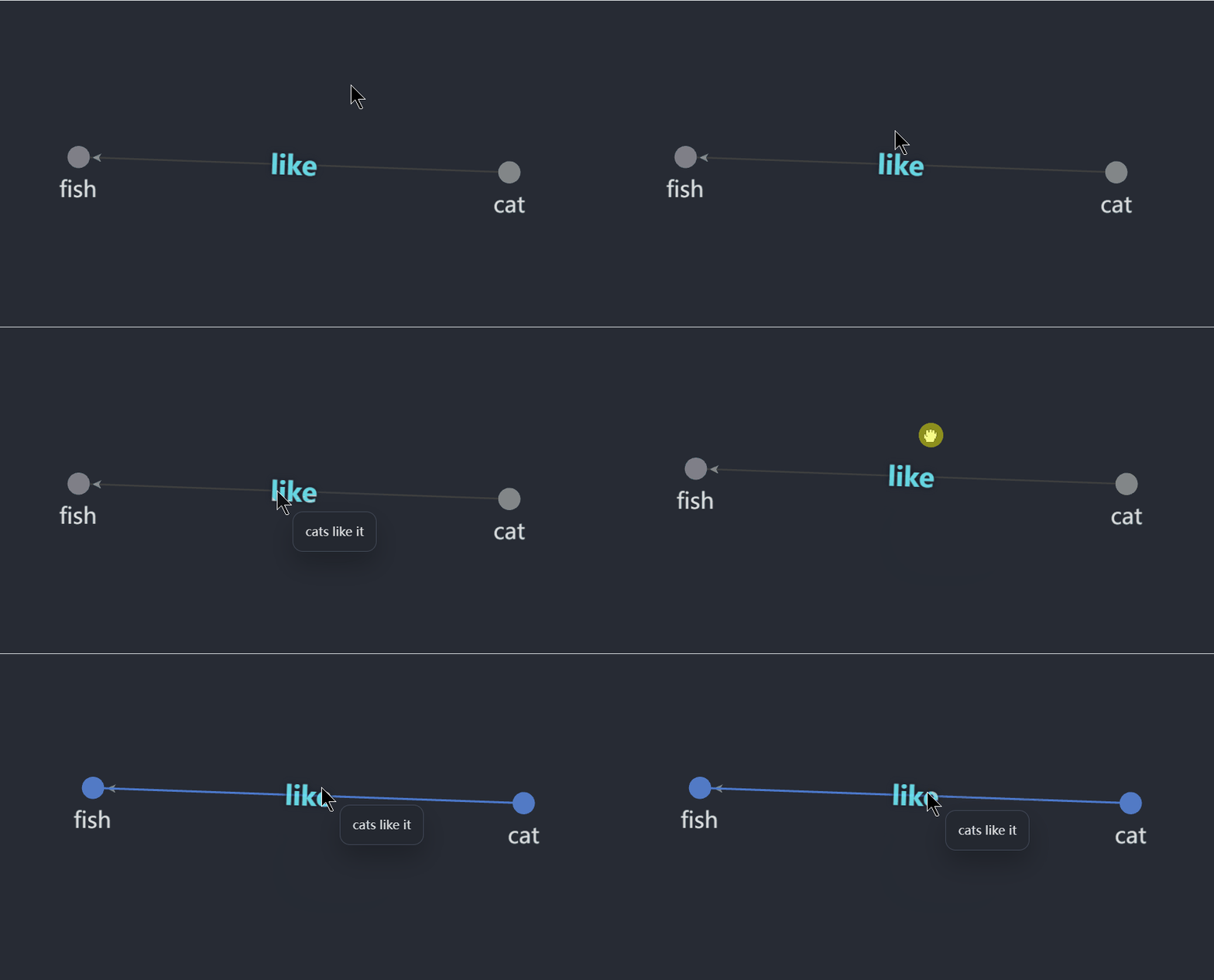
Graph edge notes color demo

Frontmatter setup

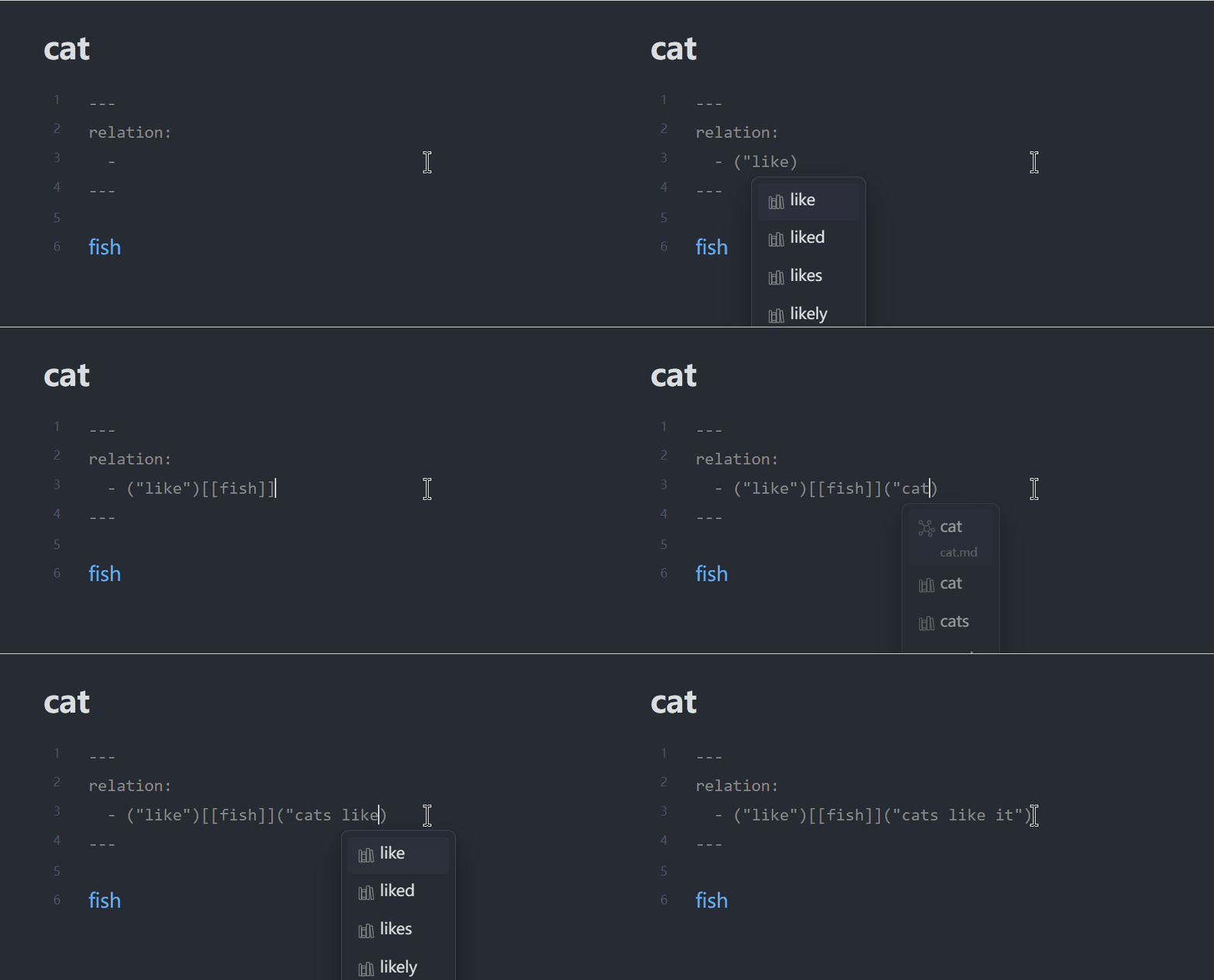
Graph edge notes config demo

What it does

  • Reads note-to-note relations from frontmatter.
  • Renders each relation label on the matching graph edge.
  • Shows optional detail text when you hover a label.
  • Adds a command to create a new relation for the current note.
  • Supports a plugin-level default label color.
  • Includes an optional debug panel that shows recent plugin actions and the current graph binding state.
  • When debug mode is enabled, the plugin also writes recent debug events to .obsidian/plugins/graph-edge-notes/debug.log and removes that file again when debug mode is turned off.

Frontmatter format

relations:
  - '("limited-open")[[Open]]("finite-population open model")'
  - '("gossip")[[Communication]]'

The command palette editor currently saves relations in the string form above.

Object-style YAML is also accepted when reading existing notes:

relation:
  - target: "[[Open]]"
    label: "limited-open"
    detail: "finite-population open model"

label is what appears on the edge. detail is optional and appears in the hover tooltip.

The frontmatter property name is configurable in plugin settings. In the examples above, relations and relation are both valid if your plugin setting is configured to match that property name.

Important limitation

The plugin annotates edges that already exist in Obsidian's graph. It does not create new graph edges by itself. In practice, this means the two notes still need to be linked somewhere in the vault for an edge to appear.

Rendered labels show relation detail on hover. Edit relations through the command palette command Add graph relation to current note or by editing frontmatter directly.

Development

npm install
npm run build

To test in a vault, copy main.js, manifest.json, and styles.css into:

<Vault>/.obsidian/plugins/graph-edge-notes/

Then reload Obsidian and enable Graph Edge Notes under Settings -> Community plugins.

82%
HealthExcellent
ReviewSatisfactory
About
Render short relationship labels on graph-view edges by reading relations from note frontmatter and show optional detail on hover with a configurable label color. Add relations for the current note via a command, view an optional debug panel and log, and require that linked notes already create the graph edges being annotated.
VisualizationPropertiesLinks
Details
Current version
0.3.2
Last updated
2 months ago
Created
2 months ago
Updates
3 releases
Downloads
274
Compatible with
Obsidian 1.5.0+
Platforms
Desktop, Mobile
License
MIT
Report bugRequest featureReport plugin
Author
li-zaneli-zane
GitHubli-zane
  1. Community
  2. Plugins
  3. Visualization
  4. Graph Edge Notes

Related plugins

Advanced Canvas

Supercharge your canvas experience. Create presentations, flowcharts and more.

Excalidraw

Visual PKM powerhouse. Create and edit Excalidraw drawings.

Strange New Worlds

Reveal networked thought and the strange new worlds created by your vault.

April's Automatic Timelines

Simple timeline generator for story tellers.

Leaflet

Interactive maps inside your notes.

Wikilink Types

Type @ inside wikilink aliases to add relationship types, auto-synced to YAML frontmatter.

Smart Connections Visualizer

View your Smart Connections in a visualized format.

Graph Link Types

Link types for graph view.

Smart Connections

AI link discovery copilot. See related notes as you write. Lookup using semantic (vector) search across your vault. Zero-setup local model for embeddings, no API keys, private.

Meta Bind

Make your notes interactive with inline input fields, metadata displays, and buttons.