Search...Search plugins and themes...
⌘K
Sign in
  • Get started
  • Download
  • Pricing
  • Enterprise
  • Account
  • Obsidian
  • Overview
  • Sync
  • Publish
  • Canvas
  • Mobile
  • Web Clipper
  • CLI
  • Learn
  • Help
  • Developers
  • Changelog
  • About
  • Roadmap
  • Blog
  • Resources
  • System status
  • License overview
  • Terms of service
  • Privacy policy
  • Security
  • Community
  • Plugins
  • Themes
  • Discord
  • Forum / 中文论坛
  • Merch store
  • Brand guidelines
Follow us
DiscordTwitterBlueskyThreadsMastodonYouTubeGitHub
© 2026 Obsidian

GoBoard

dsokolovdsokolov211 downloads

Render Go game diagrams from Markdown code blocks.

Add to Obsidian
  • Overview
  • Scorecard
  • Updates16

GoBoard

GoBoard

GoBoard is a plugin for Obsidian that renders Go game diagrams (also known as Weiqi or Baduk).

Language: English • Русский • 中文

Installation

If you don't have Obsidian installed yet - download it.

To install click here, or follow these steps:

  1. In the Obsidian application, open the community plugins settings: Settings -> Community plugins.
  2. If you haven't done this yet, you'll need to enable support for third-party plugins Turn on community plugins.
  3. Go to plugin selection by clicking Browse.
  4. In the search bar, enter GoBoard.
  5. Select the plugin, click Install, and after installation is complete - Enable.
  6. Done, now you can draw diagrams!

Other installation methods are described in installation.md

Usage

Diagrams are drawn based on markdown code blocks with the goboard syntax specified.

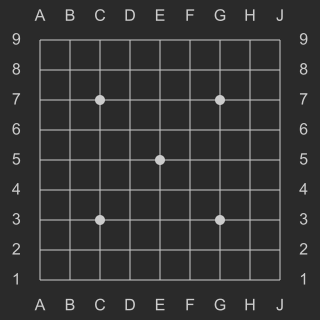
For example, the following code will draw an empty 9x9 goban:

```goboard
size 9x9
```
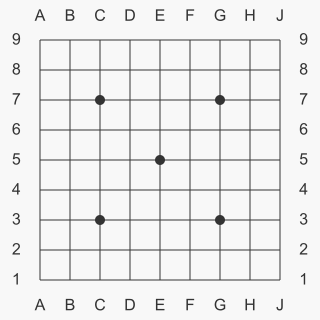
Empty 9x9 goban (light theme) Empty 9x9 goban (dark theme)

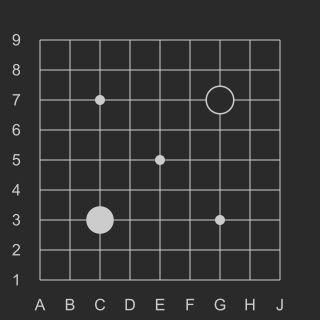
To place stones on the diagram, use B <position> and W <position> for black and white stones respectively. For example:

```goboard
size 9x9
B G7
W C3
```
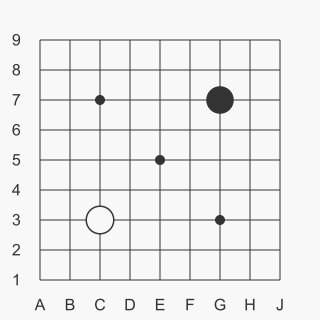
First two moves on 9x9 goban (light theme) First two moves on 9x9 goban (dark theme)

For more usage examples, see examples.md.

Building the project

See build.md

Issues and suggestions

If you found a bug or have suggestions for improvement - don't hesitate to create issues!

License

MIT License - see the LICENSE file for details.

90%
HealthExcellent
ReviewSatisfactory
About
Render Go (Weiqi/Baduk) diagrams directly from markdown code blocks using goboard syntax. Draw configurable board sizes and place black or white stones with simple B/W position commands (e.g., B G7 W C3) to visualize game positions.
DrawingMarkdown
Details
Current version
1.0.2
Last updated
6 days ago
Created
8 months ago
Updates
16 releases
Downloads
211
Compatible with
Obsidian 1.8.7+
Platforms
Desktop, Mobile
License
MIT
Report bugRequest featureReport plugin
Author
dsokolovdsokolov
github.com/dsokolov
GitHubdsokolov
  1. Community
  2. Plugins
  3. Drawing
  4. GoBoard

Related plugins

Importer

Import data from Notion, Evernote, Apple Notes, Microsoft OneNote, Google Keep, Bear, Roam, and HTML files.

Excalidraw

Visual PKM powerhouse. Create and edit Excalidraw drawings.

Outliner

Work with your lists like in Workflowy or Roam Research.

Mermaid Tools

Improved Mermaid.js experience: visual toolbar with common elements and more.

Various Complements

Complete words similar to auto-completion in an IDE.

Linter

Format and style your notes. Linter can be used to format YAML tags, aliases, arrays, and metadata; footnotes; headings; spacing; math blocks; regular Markdown contents like list, italics, and bold styles; and more with the use of custom rule options.

Fantasy Statblocks

Create, manage and view a Fantasy Bestiary with Dungeons and Dragons style statblocks.

Ink

Hand write or draw directly between paragraphs using a digital pen, stylus, or Apple pencil.

Custom Frames

Turn web apps into panes using iframes with custom styling. Also comes with presets for Google Keep, Todoist and more.

Auto Link Title

Automatically fetches the titles of links from the web.