Ghostty Terminal
 lavs93k downloads
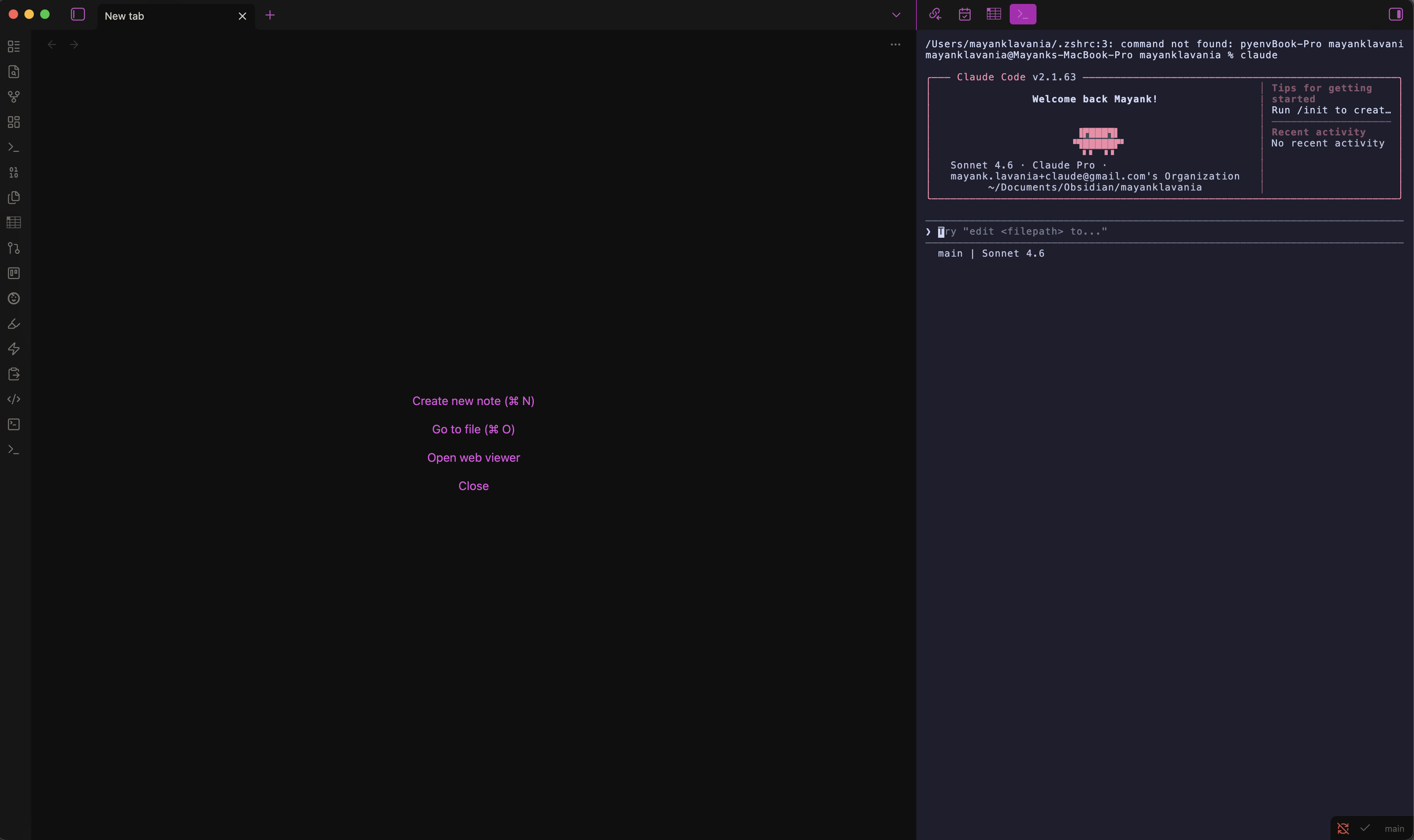
True Ghostty embedded terminal (libghostty-vt WASM) – with your real Ghostty config, multi-split support, and file-explorer context menu.
- Overview
- Scorecard
- Updates13
A true Ghostty-powered terminal pane embedded inside Obsidian — same VT parser as the native Ghostty app, no Electron quirks, no xterm.js compromises.
What is this?
Ghostty Terminal embeds a fully functional, real terminal inside your Obsidian vault pane. Under the hood it uses:
- ghostty-web — the official Ghostty VT parser compiled to WebAssembly (WASM). This is the same
libghostty-vtengine that powers the native Ghostty terminal app on macOS and Linux. - A Python PTY proxy (
pty_helper.py) — spawns your actual shell in a real pseudo-terminal (PTY) and proxies I/O between it and the WASM terminal renderer. Uses Python's stdlibptymodule — no native Node addons required. - Canvas renderer —
ghostty-web'sCanvasRendererdraws the terminal to a<canvas>element pixel-perfectly using exact font metrics.
This is not a wrapper around xterm.js. You get real Ghostty VT semantics: proper Unicode (grapheme clusters, wide chars), 256-color + truecolor, OSC 8 hyperlinks, Kitty graphics protocol, and more.
Screenshots
Features
| Feature | Details |
|---|---|
| 🖥️ Real Ghostty VT parser | ghostty-web WASM — identical behavior to native Ghostty |
| 🎨 Your Ghostty config | Auto-reads ~/.config/ghostty/config — font, font size, full 16-color palette |
| 📐 Pixel-perfect resize | Canvas measures exact character cell dimensions; columns never misalign |
| 🪟 Multiple terminals / splits | Each pane is fully independent; open as many as you need |
| 📁 File Explorer context menu | Right-click any file or folder → Open Ghostty Terminal here |
| 🔁 Shell restart button | If the shell exits, a ⟳ button appears inline — no plugin reload needed |
| ⚙️ Settings override | Override shell, font, font size, and scrollback from Obsidian Settings |
| 🚫 No native addons | Uses Python pty stdlib instead of node-pty — no electron-rebuild needed |
Requirements
| Requirement | Minimum version |
|---|---|
| Obsidian | 1.6.0 (desktop only) |
| macOS / Linux | Any modern version |
| Python | 3.8+ (ships with macOS and most Linux distros) |
| Node.js | 18+ (only needed to build from source) |
Windows: The PTY proxy does not currently support Windows. macOS and Linux are fully supported.
Installation
Option A — BRAT (recommended for early access)
BRAT lets you install plugins directly from GitHub without waiting for community approval.
- Install the BRAT plugin from Obsidian Community Plugins
- Open BRAT settings → Add Beta Plugin
- Enter the repository URL:
https://github.com/lavs9/obsidian-ghostty-terminal - Click Add Plugin — BRAT will download and install it automatically
- Go to Settings → Community plugins and enable Ghostty Terminal
Option B — Manual install from GitHub release
Go to the Releases page and download the latest release assets:
main.jsmanifest.jsonstyles.csspty_helper.py
Create the plugin folder in your vault:
mkdir -p /path/to/your-vault/.obsidian/plugins/ghostty-terminalCopy the downloaded files into that folder
In Obsidian: Settings → Community plugins → Toggle "Restricted mode" OFF → Enable "Ghostty Terminal"
Option C — Build from source
# 1. Clone the repo
git clone https://github.com/lavs9/obsidian-ghostty-terminal
cd obsidian-ghostty-terminal

# 2. Install dependencies
npm install

# 3. Build
npm run build

# 4. Copy plugin files to your vault
VAULT=~/path/to/your-vault
mkdir -p "$VAULT/.obsidian/plugins/ghostty-terminal"
cp main.js manifest.json styles.css pty_helper.py "$VAULT/.obsidian/plugins/ghostty-terminal/"

# 5. Enable in Obsidian
# Settings → Community plugins → Enable "Ghostty Terminal"
Development (hot-reload)
# Symlink the repo directly into your vault's plugins folder for development
ln -s "$(pwd)" ~/path/to/your-vault/.obsidian/plugins/ghostty-terminal

# Start the watcher — rebuilds on every save
npm run dev
Install the Hot-Reload plugin in Obsidian to auto-reload the plugin on file change.
Usage
Opening a terminal
| Action | How |
|---|---|
| Open terminal | Click the terminal icon in the left ribbon, or run command "Open Ghostty Terminal" |
| Open in new split | Command palette: "Open Ghostty Terminal in new split" |
| Open at a specific path | Right-click any file or folder in the File Explorer → "Open Ghostty Terminal here" |
| Restart shell | Click the ⟳ Restart shell button that appears when the shell exits |
Keyboard shortcuts
You can assign custom hotkeys to "Open Ghostty Terminal" via Settings → Hotkeys.
Configuration
Ghostty config auto-detection
The plugin automatically reads your Ghostty config from:
- macOS:
~/Library/Application Support/com.mitchellh.ghostty/config - Linux:
~/.config/ghostty/config
The following config keys are recognized:
| Ghostty key | Effect |
|---|---|
font-family |
Terminal font family |
font-size |
Terminal font size (pt) |
background |
Background color |
foreground |
Foreground/text color |
cursor-color |
Cursor color |
palette = N=RRGGBB |
All 16 ANSI color entries |
cursor-style |
block / underline / bar |
cursor-style-blink |
true / false |
scrollback-limit |
Lines of scrollback buffer |
command |
Default shell command |
Plugin settings
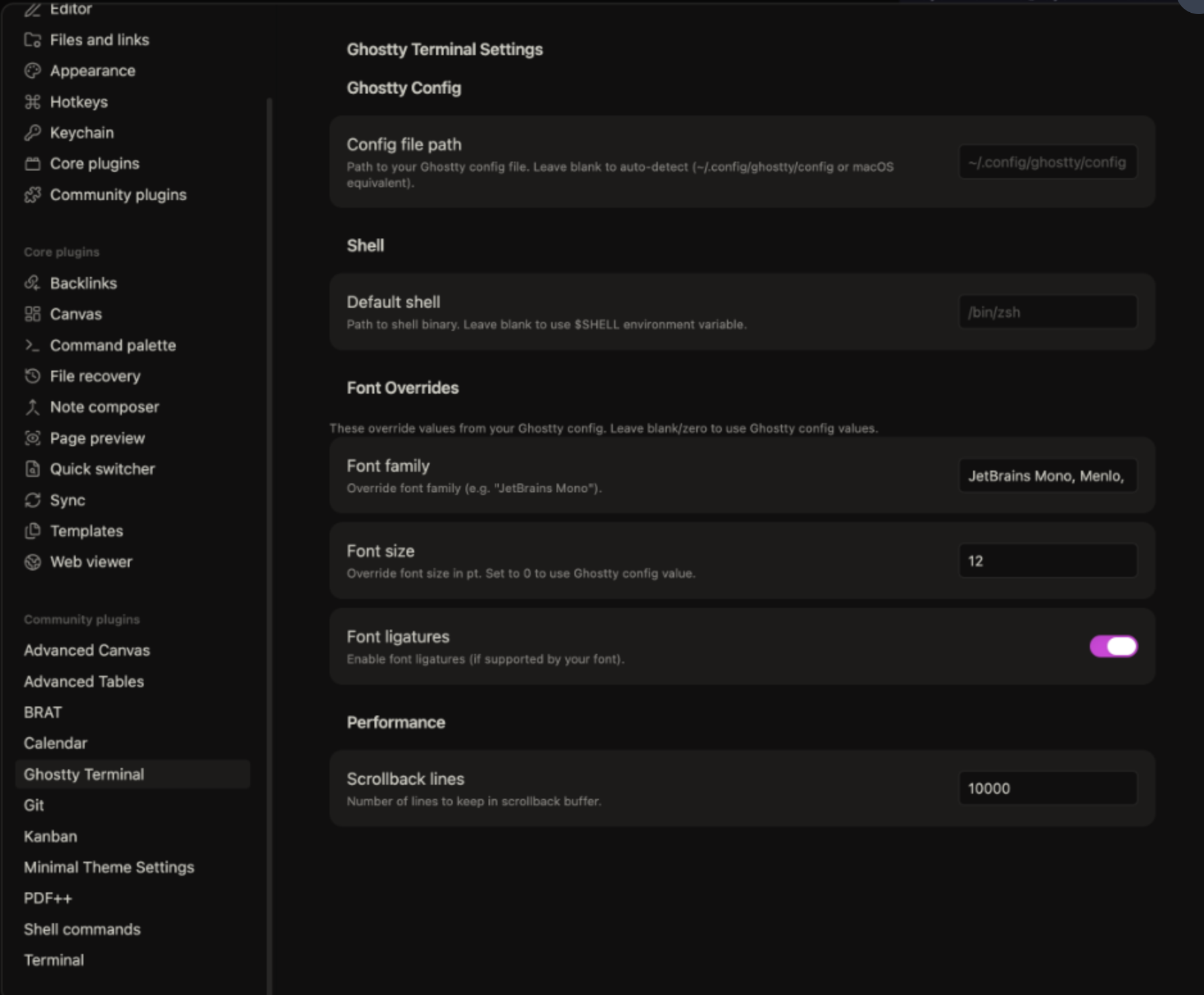
Override any Ghostty config value from Obsidian → Settings → Ghostty Terminal:
| Setting | Default | Description |
|---|---|---|
| Config file path | (auto-detect) | Explicit path to your Ghostty config file |
| Default shell | $SHELL env var |
Shell binary to spawn (e.g. /bin/fish) |
| Font family override | (from Ghostty config) | Override font, e.g. "Fira Code" |
| Font size override | (from Ghostty config) | Point size, e.g. 14 |
| Scrollback lines | 10000 |
Number of lines in the scrollback buffer |
Architecture
obsidian-ghostty-terminal/
├── main.ts                   Plugin entry + GhosttyTerminalView
│                               - Registers view, ribbon, commands, context menu
│                               - Boots ghostty-web WASM on startup
│                               - Manages Terminal lifecycle (init, resize, dispose)
│                               - Spawns pty_helper.py and proxies I/O
├── src/
│   ├── ghostty-config.ts     Ghostty config file parser
│   │                           - Auto-detects config location on macOS + Linux
│   │                           - Parses font, colors, cursor, scrollback, shell
│   └── settings.ts           Plugin settings schema + Obsidian SettingTab UI
├── pty_helper.py             Python PTY proxy (Unix only)
│                               - Forks a real PTY via Python stdlib `pty.fork()`
│                               - Proxies stdin/stdout between JS and shell
│                               - Reads 4-byte resize frames on fd 3 (rows, cols)
│                               - Calls TIOCSWINSZ to resize the PTY kernel window
├── styles.css                Plugin CSS — scoped .ghostty-* classes
├── manifest.json             Obsidian plugin manifest
└── esbuild.config.mjs        Build config — bundles main.ts + ghostty-web WASM
How the PTY bridge works
Obsidian (Electron/Node.js)
        │
        ▼
  child_process.spawn("python3 pty_helper.py /bin/zsh")
        │ stdin  ──────────────────────────────► PTY master fd
        │ stdout ◄────────────────────────────── PTY master fd
        │ stdio[3] (resize pipe, write-only) ──► ioctl TIOCSWINSZ
        │
        ▼
  ghostty-web Terminal (WASM + Canvas)
    - terminal.write(data)    ← stdout bytes from PTY
    - terminal.onData(cb)     → stdin bytes to PTY
    - terminal.resize(c, r)   → 4-byte frame to resize pipe
Why Python instead of node-pty?
node-pty is a native Node.js addon that requires recompilation against Electron's version of V8 (electron-rebuild). This is fragile and breaks on Obsidian updates. Python's pty module is part of the standard library and works out of the box on any macOS or Linux machine — no compilation needed.
Troubleshooting
Terminal shows "pty_helper.py not found"
Make sure pty_helper.py is in the same folder as main.js inside .obsidian/plugins/ghostty-terminal/. If you installed from source, re-run the copy step.
Shell doesn't start / shows Python error
- Verify Python 3 is available:
which python3 - Check Obsidian's developer console (View → Toggle Developer Tools → Console) for the full error
Font looks wrong or spacing is off
Set an explicit font in Settings → Ghostty Terminal → Font family override. Use a monospace font installed on your system, e.g. "Menlo", "Monaco", "Fira Code", or "JetBrains Mono".
Colors don't match my Ghostty theme
The plugin reads your Ghostty config automatically. If colors look wrong:
- Check Settings → Ghostty Terminal → Config file path — leave blank for auto-detection
- Open the developer console and look for a
[GhosttyTerminal] config:log line to see what was parsed
Contributing
Pull requests are welcome! Please:
- Fork the repo and create a feature branch
- Run
npm run buildto verify there are no TypeScript errors - Test in Obsidian with a real vault before submitting
Roadmap
- Obsidian theme sync (auto-switch light/dark palette)
- OSC 633 shell integration (prompt anchoring, command detection)
- Tab bar for multiple terminals in a single pane
- Windows support via ConPTY
- Submit to Obsidian Community Plugins registry
License
MIT © Mayank Lavania